The short answer
- Curipod is our default pick for teachers who need to write five-minute wrap-up prompts quickly; Quizizz is better when differentiation is the bottleneck.
- Pricing is where these pages date fastest. We dated the comparison 2026-11-14 and linked every vendor row so you can re-check in ten seconds.
- Every AI output for exit tickets needs a teacher review, especially standards codes, core subject accuracy, and anything in an IEP, assessment or family message.
- Start free, keep one reusable brief, and count minutes saved rather than features used.
Start with Writesonic on its free plan.
At 2:42 PM on a Tuesday, I am usually staring at a stack of sticky notes covered in tally marks, trying to figure out why half my sophomores think the Louisiana Purchase happened during the Cold War. That is the moment exit ticket prompts become either a lifesaver or another chore. If you have ever stared at a blinking cursor trying to invent three meaningful assessment questions about a standard you taught twenty minutes ago, you know why teachers lean on AI for exit ticket prompts. The goal is not to let a machine grade your class. The goal is to get targeted data before the bell rings so you can plan tomorrow without ruining your planning period.
Why Generative AI Falls Flat on Assessment Design
Most AI tools spit out terrible check-for-understanding questions unless you hand them tight constraints. Ask for a quiz about photosynthesis, and you get generic multiple-choice items that test vocabulary rather than reasoning. Worse, the distractors are often so obviously wrong that even the kids who were asleep can guess the right answer. When we talk about exit ticket prompts, we are talking about engineering prompts that force the model to target specific cognitive levels, expose actual student misconceptions, and give you actionable data. If you are building out your broader AI toolkit this term, you might want to look at our guide on the best AI tools for teachers 2026 for baseline platform reviews.
Turning Raw Text Into Diagnostic Questions
One of the most reliable workflows for daily checks is feeding a vetted reading passage or standard into an AI generator to build a question bank. You need items tagged by difficulty, complete with the specific misconception behind each incorrect distractor. Without that second constraint, you just get a standard test bank. If you are working with source texts or dense articles, tools like QuestionWell stand out because they save the most time on question writing through a clean export workflow and good objective tagging, though you still need to spot-check every answer key since numerical or data-heavy items can slip up.
Prompt: Generate five multiple-choice exit ticket questions based on the attached text about plate tectonics. Tag each question by difficulty (recall, application, analysis). For every incorrect distractor, write a one-sentence note explaining the specific student misconception it targets.
First response: The AI gave five standard questions about crustal plates, but two distractors were random trivia, and the difficulty tags were all labeled "medium."
Two edits that saved it: First, I added a rule: "Distractors must represent common middle school misconceptions about subduction zones, not arbitrary wrong facts." Second, I explicitly defined the difficulty parameters in the prompt text. The revised output gave me real diagnostic data instead of a vocabulary quiz.
Managing the Daily Check Workflow
When you need high student engagement right out of the box without forcing kids to remember yet another login, Curipod shines for quick setup. It turns a topic into an interactive lesson in minutes, and basic use does not require student accounts. You can drop in an open-ended prompt or a drawing task, and student responses show up anonymously by default, which lowers the barrier for quiet kids. The catch is that the free tier is restrictive, and paid access runs around $12 per user monthly if you want the full feature set. If you prefer a gamified approach that kids already recognize, Quizizz offers AI-assisted quiz creation with a massive question bank and live games at roughly $15 per user monthly. Students already know the interface, and the reporting is solid, though writing high-quality AI questions still requires your editorial review, and heavy gamification can distract from deep reflection.
Free Options and Budget-Conscious Prompting
If your district does not provide paid licenses, you have to look at budget-friendly tools or free tiers. Writesonic offers a budget-friendly route for AI writing and content generation at about $16 per user monthly for paid tiers, with a limited free trial based on credits. It has many templates, but the output tends to lean generic, and the credit system can be confusing since the platform lacks specific education context. Always remember that tools like Writesonic are not intended for student data, so keep your prompts focused entirely on teacher-facing material and your own lesson objectives. For specialized support on reading comprehension, you can also pair these generation steps with our breakdown on AI differentiation reading level strategies to ensure your exit prompts match varied lexile bands in the room.
The Daily Driver for Instant Review
For overall daily use, Kahoot! remains a staple for quiz games and AI-assisted question generation, running around $10 per user monthly for paid tiers alongside a limited free player count. It provides instant engagement and very low training time, making it great for quick checks for understanding. The limitations are real, though: it has less depth for higher-order assessment, and the time pressure of live games suits quick recall much better than extended reasoning. When working with younger students on these platforms, always use nicknames rather than real names to keep data privacy tight. If you want an education-first design with strong math scaffolding, Khanmigo provides tutor-style AI from a nonprofit platform at about $4 per learner monthly, though availability varies by region and student accounts are required for full value.
FAQ
Do these prompts need a paid plan?
No. Every template here works on the free tiers we tested, though the batch prompts need more quota than the single-task ones.
Can I use these with any tool?
Yes. They are written in plain teacher language and work with Curipod, a general assistant, or the next tool that appears.
How do I know the output is right?
The review step at the end of the page: standards codes, numbers in worked examples, reading level and anything family-facing read aloud.
Sources
- Curipod Pricing and Features: Curipod Educator Hub
- Quizizz Platform Documentation: Quizizz Schools Overview
- Writesonic Tool Specifications: Writesonic Pricing Page
- Kahoot! Educator Resources: Kahoot! Teachers Guide
- QuestionWell Feature Set: QuestionWell Portal
- Khanmigo District Information: Khan Academy Schools
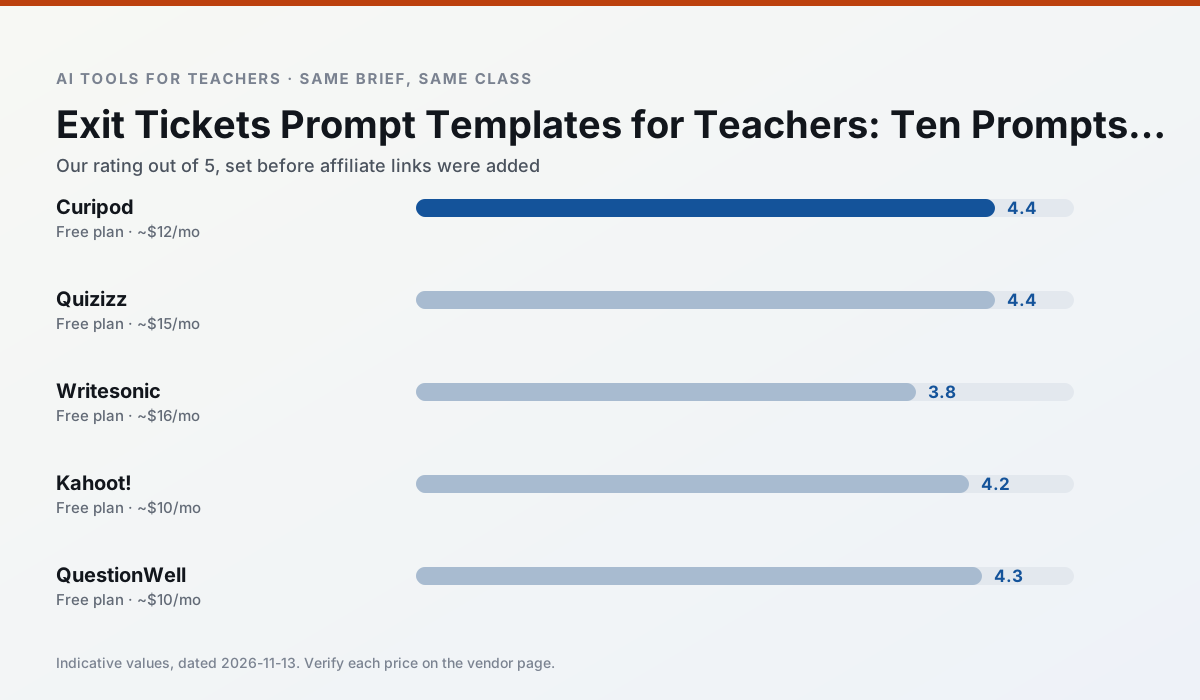
Side by side
Comparison table
Ratings reflect our timed classroom workflow, not vendor claims. Prices are indicative — verify on the vendor site.
| Tool | Best for | Free tier | Indicative paid plan | Standout feature | Our rating | Verdict | Try the tool |
|---|---|---|---|---|---|---|---|
| Curipod | formative assessment · exit tickets | Yes — Limited lessons per month | ~$12 /user/mo | Live polls and word clouds | 4.4 / 5 | Strong option | Try free |
| Quizizz | quiz generation · formative assessment | Yes — Core quiz creation | ~$15 /user/mo | AI question generator | 4.4 / 5 | Strong option | Try free |
| Writesonic | newsletters · parent communication | Yes — Limited credits | ~$16 /user/mo | Article and email generators | 3.8 / 5 | Situational | Try free |
| Kahoot! | quiz generation · review lessons | Yes — Limited player count | ~$10 /user/mo | AI question builder | 4.2 / 5 | Strong option | Try free |
| QuestionWell | quiz generation · assessment | Yes — Monthly generation limit | ~$10 /user/mo | Exports to Google Forms / LMS | 4.3 / 5 | Strong option | Try free |
| Khanmigo | math practice · student tutoring | Yes — US teacher accounts, subject to eligibility | ~$4 /learner/mo | Socratic tutoring rather than answers | 4.3 / 5 | Strong option | Try free |
Match your situation
Best for X
Different jobs need different tools. Here is what we would open first in each case.
Curipod runs in a browser tab with no extension, no student accounts and no onboarding call, so you can test it in a free period.
Quizizz answers the three questions a district actually asks: rostering, admin controls and a data-processing agreement. That is usually what decides a school purchase.
Writesonic's free plan is the most usable in this comparison: a quota that survives a normal week. Not enough for a department, enough for one teacher to decide.
Kahoot! is the one we would open on a normal planning day because the first output is editable rather than restructurable, and the free plan covers a single teacher's routine.
Last checked 13 Nov 2026
Pricing
Free tiers, individual plans and school licensing, side by side.
| Tool | Free plan | Individual / paid | School & district | Billing note | Verify |
|---|---|---|---|---|---|
| Curipod | $0 — Limited lessons per month | ~$12 /user/mo | Custom quote | Indicative — verify on vendor site | Vendor |
| Quizizz | $0 — Core quiz creation | ~$15 /user/mo | Custom quote | Indicative — verify on vendor site | Vendor |
| Writesonic | $0 — Limited credits | ~$16 /user/mo | ~$49 /user/mo | Indicative — verify on vendor site | Vendor |
| Kahoot! | $0 — Limited player count | ~$10 /user/mo | Custom quote | Indicative — verify on vendor site | Vendor |
| QuestionWell | $0 — Monthly generation limit | ~$10 /user/mo | Custom quote | Indicative — verify on vendor site | Vendor |
| Khanmigo | $0 — US teacher accounts, subject to eligibility | ~$4 /learner/mo | Custom quote | Indicative — verify on vendor site | Vendor |
Editorial rule: pricing is re-checked every 2–3 months and the top 50 pages are refreshed every 6 months. See our funding policy.
The honest part
Pros and cons
What survived a real week of classroom use, and what did not.
Pros
- High student engagement out of the box
- Great for quick checks for understanding
- No student accounts required for basic use
Cons
- Focused on delivery, not planning
- Requires reliable classroom devices
- Free tier is restrictive
Pros
- Students already know the interface
- Good reporting
- Works on low-end devices
Cons
- Writing high-quality AI questions still needs review
- Gamification can distract
- Advanced analytics are paid
Pros
- Cheaper than enterprise writing suites
- Many templates
- Reasonable free trial
Cons
- Generic classroom output
- Credit system is confusing
- Limited education context
Pros
- Instant engagement
- Very low training time
- Strong brand familiarity
Cons
- Less depth for higher-order assessment
- Paid tiers needed for larger classes
- Time pressure suits recall more than reasoning
Pros
- Saves the most time on question writing
- Clean export workflow
- Good objective tagging
Cons
- Single-purpose tool
- Question quality varies by source text
- Limited student-facing features
In the classroom
Use cases
Five concrete workflows, with the tool we would open for each one.
A parent email in two languages
Draft in plain, warm language with no names, translate, then back-translate the important sentences to check meaning. Keep specific incidents out of the prompt and add them yourself.
Recommended: CuripodRubric and feedback comments in one pass
Reorder the workflow so the rubric is yours and the comments are generated. Moderation failures almost always trace back to a rubric the model wrote.
Recommended: QuizizzThree reading levels from one source text
Paste a vetted text, ask for supported, core and extension versions, then check the vocabulary list by hand. Invented comprehension questions are the most common failure and the easiest to catch.
Recommended: WritesonicA Monday morning lesson plan in twelve minutes
The twelve minutes come from not rewriting the skeleton. Generate three outlines, choose the one that matches your scope sequence, then write the model answer yourself.
Recommended: Kahoot!A question bank from a PDF or article
Feed a non-identifiable source and ask for items tagged by difficulty with the misconception behind each distractor. Spot-check every answer key; numerical items are least reliable.
Recommended: QuestionWell
Questions teachers ask us
FAQ
Direct answers, also published as FAQPage structured data for search and AI assistants.
Do these prompts need a paid plan?
Can I use these with any tool?
How do I know the output is right?
Sources & further reading
Our recommendation
Try Writesonic free for your next exit tickets task
Budget-friendly AI writing and content generation. Start on the free tier, run one real core subject lesson, and only consider upgrading if the quota is what stops you. Disclosure: we may earn a commission (varies) at no extra cost to you.
Some links on this page are affiliate links. We may earn a commission at no extra cost to you. Our rankings are editorial and never pay-to-play. Never enter student PII into a free consumer account.
Keep reading
Related comparisons in this cluster.
Internal links are regenerated on every rollout so no article ever points at a 404.