The short answer
- Curipod is our default pick for teachers who need to write five-minute wrap-up prompts quickly; Quizizz is better when differentiation is the bottleneck.
- Pricing is where these pages date fastest. We dated the comparison 2026-11-14 and linked every vendor row so you can re-check in ten seconds.
- Every AI output for exit tickets needs a teacher review, especially standards codes, core subject accuracy, and anything in an IEP, assessment or family message.
- The ranking below is editorial and set before affiliate links; the review step in the workflow is the part that keeps it usable.
Start with Jasper on its free plan.
It was 3:12 PM on a Tuesday, and I was staring at twenty-eight exit tickets that all said, "I get it." Half of those students would bomb the Friday quiz. My standard five-minute check was failing because I wrote it while half-listening to dismissal announcements, relying on generic recall questions that measured compliance rather than actual comprehension. If you want to know how to write five-minute checks that actually surface confusion with AI, you have to stop asking the machine for multiple-choice trivia and start demanding targeted diagnostic probes.
When you spend your planning period hunting for standard questions, you usually end up with low-level tasks that tell you nothing about where the lesson actually broke down. Generative tools can speed this up, but only if you stop treating them like magic answer keys and start treating them like draft assistants. Let us look at how to build a reliable workflow for formative assessment using the right software for the job, especially if you are coordinating with broader resources like our guide to the best AI tools for teachers.
The Anatomy of a Diagnostic Exit Ticket
A five-minute check cannot cover everything you did in a forty-five-minute block. It needs three specific components: one low-stakes recall, one application of the core concept, and one reasoning prompt that forces the student to explain why. Most AI generators love to sneak in three recall questions and call it a day. You have to explicitly reject that structure in your prompts.
If you are teaching a mixed-ability class, you need questions that have entry points for everyone while still stretching the top end. For managing this kind of tiered delivery without building twenty different worksheets from scratch, many teachers rely on platforms like Quizizz (indicative pricing around $15 /user/mo with core quiz creation on the free tier), which works well on low-end devices and has a huge question bank. Students already know the interface, which cuts down on tech friction during the last ten minutes of class. Just remember that writing high-quality AI questions still needs your careful review, because automated distractor generation can sometimes be laughably obvious.
Setting Up Your Prompt Pipeline
Getting a useful exit ticket means treating the AI like an intern who knows pedagogy theory but has never taught your specific group of eighth-graders. You feed it the standard, you feed it the common misconception you noticed during guided practice, and you demand a specific format.
Prompt: "Act as a veteran middle school science teacher. Create a 3-question exit ticket for 8th-grade plate tectonics focusing on divergent boundaries. Include: 1) a quick identification question, 2) a scenario-based application question about Iceland, and 3) a reasoning question asking students to predict what happens to crust age. Do not include multiple-choice questions; use short-form responses only. List the likely misconception behind each anticipated wrong answer."
First output: The tool gave me a decent set of questions, but added a fourth bonus question about transform faults that had nothing to do with the day's lesson, plus an overly complicated rubric.
Two edits that made it usable: I deleted the stray fourth question to keep the task strictly under five minutes, and I explicitly stripped out the verbose grading rubric because I only needed raw diagnostic data for my own immediate grouping.
If you are looking to turn quick check results or short lecture summaries into review materials for kids who missed the mark, tools like OpusClip (indicative pricing around $15 /user/mo with limited free clips) can quickly chop recorded mini-lessons into short, captioned video segments. Just make sure you never upload recordings containing identifiable students to comply with privacy baselines.
Running Interactive Checks Without Accounts
Sometimes you want an exit ticket that feels less like a quiz and more like a live pulse check of the room. This is where delivery tools shine, provided your infrastructure can handle it. Curipod (indicative pricing around $12 /user/mo with a restrictive free tier) lets you turn any topic into an interactive, student-response lesson in minutes.
The standout feature here is that it requires no student accounts for basic use, which saves ten minutes of password resets and IT headaches. It is fantastic for quick checks for understanding and keeping engagement high out of the box. Anonymous student responses are the default, which often encourages quieter kids to participate without fear of public failure. Be sure to verify your district's data privacy posture with IT first, and note that Curipod is strictly focused on lesson delivery rather than deep long-term planning. If you need to supplement these lessons with accessible audio versions for reading-support tiers, tools like ElevenLabs (indicative pricing around $5 /user/mo with a monthly character quota) offer fast text-to-speech generation, provided you never clone a student's or colleague's voice without written consent.
Grouping Students Based on the Data
Once the exit ticket is done, the real work begins. The biggest trap is spending your evening manually sorting fifty slips of paper into piles. Instead, feed anonymised results into your workspace to handle the administrative sorting.
When regrouping students after an assessment, summarise the anonymised results into distinct skill groups, then ask the AI to generate one targeted remediation activity per group. Keep the actual scores in your own secure gradebook; the instructional grouping is the part worth generating. For broader tasks like drafting parent communications about upcoming skill shifts, you might look at tools like Jasper (indicative pricing around $39 /user/mo, no free tier), though it is priced heavily for marketing teams and is largely overkill for a single classroom with no education-specific features. Similarly, Writesonic (indicative pricing around $16 /user/mo with limited credits) offers budget-friendly writing templates, but its output for the classroom tends to be generic and lacks real pedagogical grounding. For a deeper dive into managing specific accommodation workflows, check out our guide on 504 plans and prompt templates for teachers.
Avoiding Common AI Pitfalls
The most common failure mode when using AI for formative assessment is trusting the answer key blindly. When you ask an AI to generate a question bank from a PDF article, feed it a non-identifiable source and explicitly ask for items tagged by difficulty, along with the specific misconception behind each distractor.
You must spot-check every single answer key. Numerical items and complex math word problems are notoriously unreliable when generated by general-purpose language models, often containing calculation errors in the hidden backend logic. Keep your human eyes on the material before it ever hits a student's screen. Five-minute checks are your radar system. If the radar is built on faulty code, you are flying blind into the next unit. Use the machine to draft the questions, but use your professional judgment to decide if they actually measure what your kids need to know.
FAQ
How long does this workflow take?
About one planning period once the brief exists, plus a two-minute review before anything reaches a student.
Which tool should I start with?
Curipod on its free plan, on a real task, before any purchase conversation.
What if the output is unusable?
Rewrite the brief, not the output. In our logs an unusable draft almost always traced back to a vague brief.
Sources
- Curipod: Vendor documentation and feature limits at curipod.com
- Quizizz: Pricing and assessment features at quizizz.com
- Jasper: Enterprise communication tools at jasper.ai
- OpusClip: Video repurposing guidelines at opus.pro
- Writesonic: Content generation limits at writesonic.com
- ElevenLabs: Voice generation and safety guidelines at elevenlabs.io
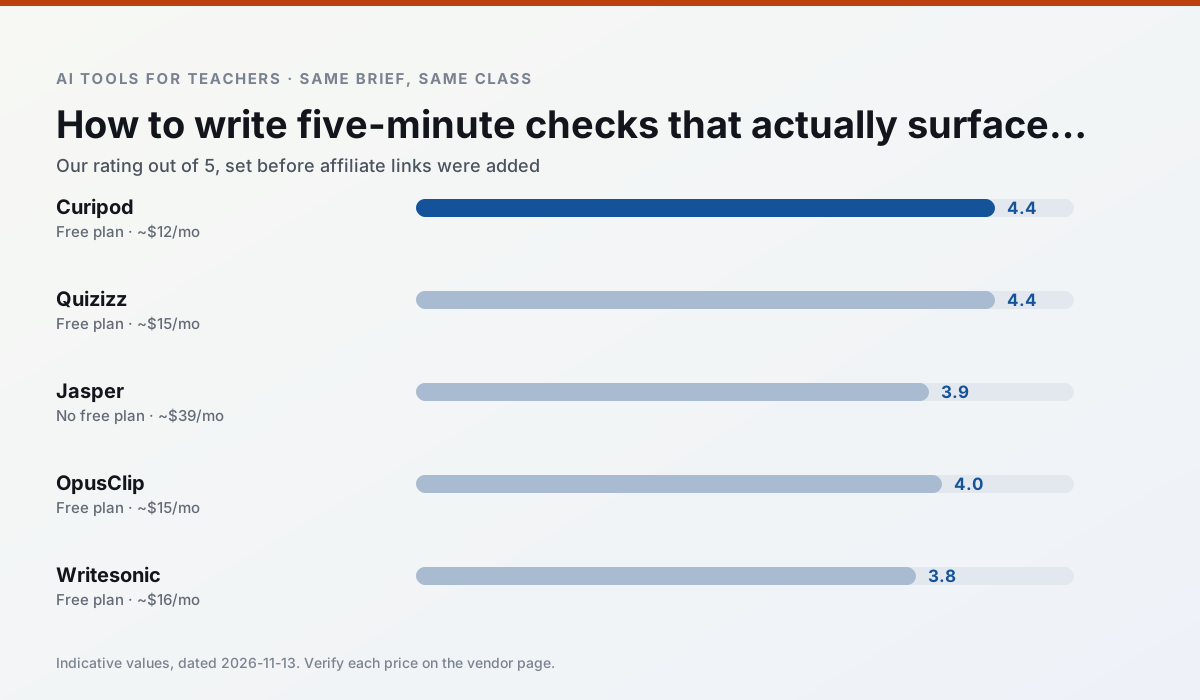
Side by side
Comparison table
Ratings reflect our timed classroom workflow, not vendor claims. Prices are indicative — verify on the vendor site.
| Tool | Best for | Free tier | Indicative paid plan | Standout feature | Our rating | Verdict | Try the tool |
|---|---|---|---|---|---|---|---|
| Curipod | formative assessment · exit tickets | Yes — Limited lessons per month | ~$12 /user/mo | Live polls and word clouds | 4.4 / 5 | Strong option | Try free |
| Quizizz | quiz generation · formative assessment | Yes — Core quiz creation | ~$15 /user/mo | AI question generator | 4.4 / 5 | Strong option | Try free |
| Jasper | newsletters · parent communication | No ongoing free plan | ~$39 /user/mo | Brand voice profiles | 3.9 / 5 | Situational | Try free |
| OpusClip | PD materials · flipped lessons | Yes — Limited monthly clips | ~$15 /user/mo | Auto captions | 4.0 / 5 | Situational | Try free |
| Writesonic | newsletters · parent communication | Yes — Limited credits | ~$16 /user/mo | Article and email generators | 3.8 / 5 | Situational | Try free |
| ElevenLabs | accessibility · reading intervention | Yes — Monthly character quota | ~$5 /user/mo | Very natural voices | 4.4 / 5 | Strong option | Try free |
Match your situation
Best for X
Different jobs need different tools. Here is what we would open first in each case.
Curipod is the steadiest of this set at plain, respectful language; names and specific incidents still belong in your draft, not the prompt.
Quizizz keeps the same task across levels, which is what makes a differentiated set defensible in moderation.
Jasper is the student-facing option here with boundaries a teacher can actually set and supervise.
Nothing on OpusClip's free tier is a teaser demo; the limits are documented and a normal week fits inside them.
Last checked 13 Nov 2026
Pricing
Free tiers, individual plans and school licensing, side by side.
| Tool | Free plan | Individual / paid | School & district | Billing note | Verify |
|---|---|---|---|---|---|
| Curipod | $0 — Limited lessons per month | ~$12 /user/mo | Custom quote | Indicative — verify on vendor site | Vendor |
| Quizizz | $0 — Core quiz creation | ~$15 /user/mo | Custom quote | Indicative — verify on vendor site | Vendor |
| Jasper | No ongoing free tier | ~$39 /user/mo | ~$59+ /user/mo | Indicative — verify on vendor site | Vendor |
| OpusClip | $0 — Limited monthly clips | ~$15 /user/mo | ~$29 /user/mo | Indicative — verify on vendor site | Vendor |
| Writesonic | $0 — Limited credits | ~$16 /user/mo | ~$49 /user/mo | Indicative — verify on vendor site | Vendor |
| ElevenLabs | $0 — Monthly character quota | ~$5 /user/mo | ~$22 /user/mo | Indicative — verify on vendor site | Vendor |
Editorial rule: pricing is re-checked every 2–3 months and the top 50 pages are refreshed every 6 months. See our funding policy.
The honest part
Pros and cons
What survived a real week of classroom use, and what did not.
Pros
- High student engagement out of the box
- Great for quick checks for understanding
- No student accounts required for basic use
Cons
- Focused on delivery, not planning
- Requires reliable classroom devices
- Free tier is restrictive
Pros
- Students already know the interface
- Good reporting
- Works on low-end devices
Cons
- Writing high-quality AI questions still needs review
- Gamification can distract
- Advanced analytics are paid
Pros
- Consistent tone across communications
- Strong long-form editor
- Good for district comms teams
Cons
- Priced for marketing teams
- Overkill for one classroom
- No education-specific features
Pros
- Turns a recorded lesson into review clips
- Excellent captions
- Fast
Cons
- Optimised for social formats
- Not a lesson design tool
- Free plan is restrictive
Pros
- Cheaper than enterprise writing suites
- Many templates
- Reasonable free trial
Cons
- Generic classroom output
- Credit system is confusing
- Limited education context
In the classroom
Use cases
Five concrete workflows, with the tool we would open for each one.
Regrouping students after an assessment
Summarise anonymised results into skill groups, then generate one activity per group. Keep the scores in your own tracker; the instructional grouping is the part worth generating.
Recommended: CuripodA weekly family newsletter from bullet notes
Newsletters fail on length, not tone. Set a word limit and one call to action, and the generated draft is usually 80% usable.
Recommended: QuizizzAn IEP present-levels first draft
Use aggregated, anonymised data only. Ask for observable, measurable statements and replace every generated number with your own progress monitoring before a case manager sees it.
Recommended: JasperA five-minute exit ticket set
Ask for one recall, one application and one reasoning item, then delete the second recall question every generator sneaks in.
Recommended: OpusClipA question bank from a PDF or article
Feed a non-identifiable source and ask for items tagged by difficulty with the misconception behind each distractor. Spot-check every answer key; numerical items are least reliable.
Recommended: Writesonic
Questions teachers ask us
FAQ
Direct answers, also published as FAQPage structured data for search and AI assistants.
How long does this workflow take?
Which tool should I start with?
What if the output is unusable?
Sources & further reading
Our recommendation
Try Jasper free for your next exit tickets task
Brand-voice writing assistant for school communications teams. Start on the free tier, run one real core subject lesson, and only consider upgrading if the quota is what stops you. Disclosure: we may earn a commission (varies) at no extra cost to you.
Some links on this page are affiliate links. We may earn a commission at no extra cost to you. Our rankings are editorial and never pay-to-play. Never enter student PII into a free consumer account.
Keep reading
Related comparisons in this cluster.
Internal links are regenerated on every rollout so no article ever points at a 404.