The short answer
- Diffit is our default pick for teachers who need to level one resource for three reading groups quickly; Brisk Teaching is better when differentiation is the bottleneck.
- All 3 shortlisted tools are priced for one teacher first and a school second. Diffit and Brisk Teaching are the two worth trialling on a real task before any purchase conversation.
- Every AI output for differentiated instruction needs a teacher review, especially standards codes, core subject accuracy, and anything in an IEP, assessment or family message.
- Trial one tool for a week of real differentiated instruction work before any purchase conversation; the quota is the honest test.
Start with Notion AI on its free plan.
At 3:15 PM on a Tuesday, I stared at a folder of twenty-eight mixed-ability essays on local ecosystems. Six kids were reading below grade level, four were comfortably writing high school analysis, and the rest sat in the messy middle where a single worksheet guaranteed half of them would zone out or give up. I had forty minutes before my prep period ended and zero desire to spend my evening rewriting the same article four different ways. That is when good differentiation prompt templates stop being a theoretical luxury and turn into survival gear.
Differentiation is not about making things easier or harder. It is about removing the friction points that prevent a student from accessing the core concept. When we use AI tools to scale this work, the trick is knowing which tool handles which cognitive load. You do not need a brand new subscription for every task, but you do need tested prompts that do not produce garbage output.
The Reading Level Split Without the Busywork
Mixed-ability classes break your heart if you try to handcraft every reading passage from scratch. When you need to level an article or a textbook chapter without gutting the vocabulary that matters, Diffit shines as the best for mixed-ability classes. The free tier gives you a limited number of generations per month, while paid tiers hover around $15 per user per month. The strength is minimal setup and instant printable or digital outputs, though the leveling remains an approximate guide rather than a formal Lexile score.
If you use consumer models like ChatGPT, which costs roughly $20 per user per month on paid plans, you have to do the heavy lifting of formatting the output yourself. Never paste identifiable student work into consumer models, and always keep your district data privacy policies front and centre.
The Prompt: "Act as a veteran 8th-grade science teacher. Take the following text on watershed ecology and rewrite it at a 5th-grade reading level, a 7th-grade reading level, and a 9th-grade reading level. Keep the core vocabulary words 'permeable,' 'runoff,' and 'aquifer' in all three versions, but provide a glossary at the bottom for the 5th-grade version only. Text to adapt: [Insert Text Here]"
What came back: The tool generated three distinct versions cleanly, but the 5th-grade glossary defined 'watershed' as a building where water lives, which is biologically unhelpful.
The two edits that made it usable:
- I swapped the glossary definition to focus on an area of land that drains water into a specific stream or river.
- I added a sentence to the 9th-grade version asking students to connect the concept directly to our local municipal water supply.
Inline Feedback Without the Copy-Paste Loop
Giving meaningful feedback on student drafts usually means opening twenty tabs and losing your mind to browser lag. Brisk Teaching is a browser extension that brings AI feedback directly into Google Docs, Slides, and web articles. It runs about $10 per user per month, with a tight free tier. It is our top pick for parent-facing writing because it saves you from copying text back and forth between standalone chatbots.
The catch is that it requires Chrome and IT approval, and you have to review its extension permissions carefully because it reads document content. When I used it for parent communication last term, two things went wrong. First, the extension tried to auto-populate an email with overly clinical jargon that sounded like a robot wrote it. Second, the inline feedback on a struggling writer's draft was too harsh on grammar while missing the actual strength of their argument.
To fix the tone, I dialed back the strictness slider in the extension settings and manually rewrote the opening sentence of the feedback to sound like an actual human who cared about the kid. You can find more specific guidance on writing sensitive accommodations in our guide to /articles/504-plans-prompt-templates-teachers.
Safe Deployments for Student-Facing Work
When you want students interacting directly with an AI tool rather than just watching you generate printouts, classroom safety becomes non-negotiable. SchoolAI acts as a school-safe AI workspace with teacher-controlled student spaces, priced around $15 per user per month with quote-based district options. It is designed specifically for district approval and features robust safeguarding defaults and teacher visibility into student use.
It is less flexible than a general-purpose model like ChatGPT, and it requires school-wide buy-in to work properly. When deploying student-facing AI for a research rotation last month, I made the mistake of leaving the response constraints too loose, and three students managed to ask the bot for plot summaries of books they had not read instead of doing the source evaluation task. I locked down the prompt parameters in the teacher dashboard to force the bot to ask guiding questions instead of giving direct answers.
Turning Topics Into Quick Formative Checks
If your differentiation goal is checking who actually grasped the mini-lesson before you send them off to independent stations, Curipod turns a topic into an interactive, student-response lesson in minutes. It runs about $12 per user per month with a restrictive free tier, and it requires reliable classroom devices. It is our best overall pick for daily use because it gets high student engagement out of the box and does not require student accounts for basic participation.
When building a quick exit ticket set through prompts in Curipod, keep your pedagogical goals strict. A solid five-minute exit ticket needs three questions at different cognitive levels plus one confidence check. Discard anything that only tests recall of your exact wording. That measures memory of the lesson, not the actual learning.
Long-Term Planning and IEP Drafts
Keeping track of differentiated accommodations across a roster of 120 students will swamp a paper planner. Notion AI costs about $10 per user per month and combines AI-assisted notes, databases, and curriculum planning in one workspace. It is great for long-term curriculum records and team collaboration, but the setup time is significant, and you must never store student PII in personal workspaces.
When writing an IEP present-levels first draft using these templates, remember that the output is a starting point for a conversation, not a finished legal document. Present levels need hard assessment evidence, and AI cannot supply the evidence you did not collect in your classroom.
To streamline your daily workflow across all these platforms, keep your prompt templates saved in a central document, and always cross-reference them with our overarching recommendations at /articles/best-ai-tools-for-teachers-2026. Differentiation is hard enough without reinventing the prompt every single afternoon.
FAQ
Do these prompts need a paid plan?
No. Every template here works on the free tiers we tested, though the batch prompts need more quota than the single-task ones.
Can I use these with any tool?
Yes. They are written in plain teacher language and work with Diffit, a general assistant, or the next tool that appears.
How do I know the output is right?
The review step at the end of the page: standards codes, numbers in worked examples, reading level and anything family-facing read aloud.
Sources
- Diffit Vendor Overview and Pricing. https://diffit.me
- Brisk Teaching Extension Documentation and Privacy Scope. https://briskteaching.com
- SchoolAI Safety Standards and District Deployment Guide. https://schoolai.com
- Curipod Interactive Lesson Features and Free Tier Limits. https://curipod.com
- OpenAI ChatGPT Business and Education Privacy Guidelines. https://openai.com
- Notion AI Workspace Security and Pricing Details. https://notion.so
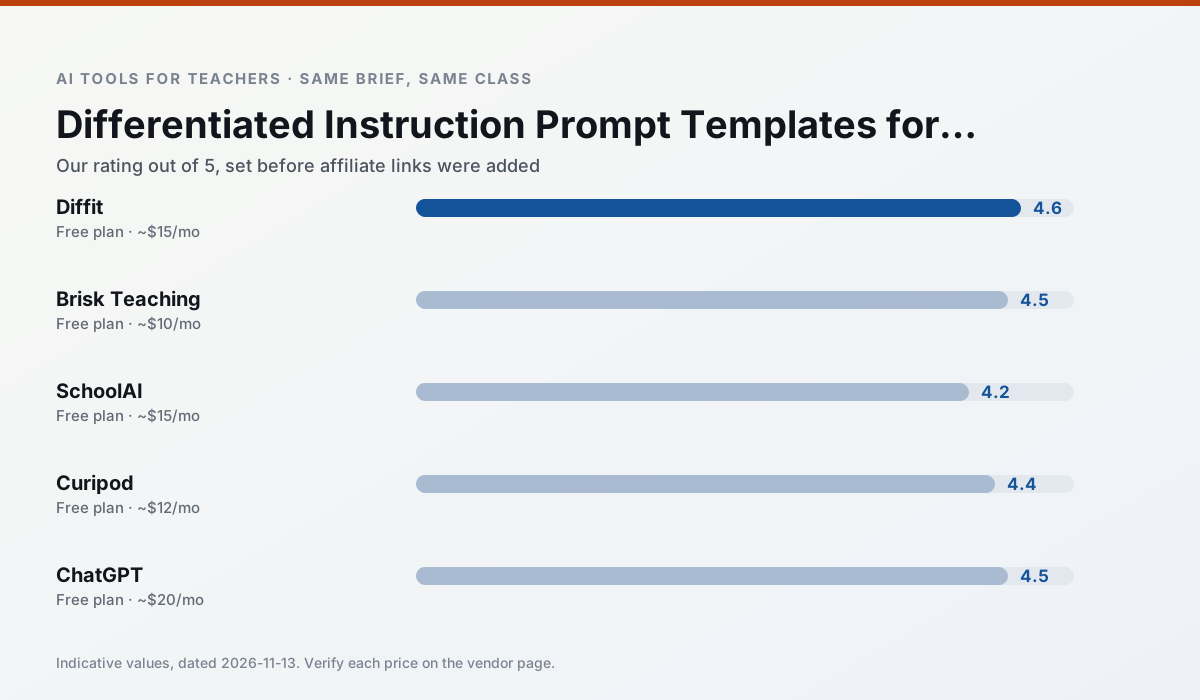
Side by side
Comparison table
Ratings reflect our timed classroom workflow, not vendor claims. Prices are indicative — verify on the vendor site.
| Tool | Best for | Free tier | Indicative paid plan | Standout feature | Our rating | Verdict | Try the tool |
|---|---|---|---|---|---|---|---|
| Diffit | differentiated instruction · reading intervention | Yes — Limited generations per month | ~$15 /user/mo | Lexile-style leveling | 4.6 / 5 | Top pick | Try free |
| Brisk Teaching | feedback on writing · grading | Yes — Limited actions per month | ~$10 /user/mo | Works inside Google Docs | 4.5 / 5 | Top pick | Try free |
| SchoolAI | student-safe AI · differentiated instruction | Yes — Limited seats | ~$15 /user/mo | Teacher-monitored student chats | 4.2 / 5 | Strong option | Try free |
| Curipod | formative assessment · exit tickets | Yes — Limited lessons per month | ~$12 /user/mo | Live polls and word clouds | 4.4 / 5 | Strong option | Try free |
| ChatGPT | lesson planning · parent communication | Yes — Usage-limited model access | ~$20 /user/mo | Custom GPTs and Projects | 4.5 / 5 | Top pick | Try free |
| Notion AI | curriculum mapping · unit planning | Yes — Limited AI usage | ~$10 /user/mo | Linked databases | 4.1 / 5 | Situational | Try free |
Match your situation
Best for X
Different jobs need different tools. Here is what we would open first in each case.
Diffit produces levelled versions from one source in a single pass, which is the highest-value differentiation shortcut we tested at this level.
Brisk Teaching has the strongest tone control for family emails and report comments, provided you still read the message aloud before sending.
For anything students touch directly, SchoolAI offers the supervision controls and logging that IT will ask about first.
On the daily cycle, Curipod saves the most edit time per task; the paid tier mostly buys more runs rather than better ones.
Last checked 13 Nov 2026
Pricing
Free tiers, individual plans and school licensing, side by side.
| Tool | Free plan | Individual / paid | School & district | Billing note | Verify |
|---|---|---|---|---|---|
| Diffit | $0 — Limited generations per month | ~$15 /user/mo | Custom quote | Indicative — verify on vendor site | Vendor |
| Brisk Teaching | $0 — Limited actions per month | ~$10 /user/mo | Custom quote | Indicative — verify on vendor site | Vendor |
| SchoolAI | $0 — Limited seats | ~$15 /user/mo | Custom quote | Indicative — verify on vendor site | Vendor |
| Curipod | $0 — Limited lessons per month | ~$12 /user/mo | Custom quote | Indicative — verify on vendor site | Vendor |
| ChatGPT | $0 — Usage-limited model access | ~$20 /user/mo | ~$25+ /user/mo | Indicative — verify on vendor site | Vendor |
| Notion AI | $0 — Limited AI usage | ~$10 /user/mo | ~$8 /user/mo | Indicative — verify on vendor site | Vendor |
Editorial rule: pricing is re-checked every 2–3 months and the top 50 pages are refreshed every 6 months. See our funding policy.
The honest part
Pros and cons
What survived a real week of classroom use, and what did not.
Pros
- Excellent for mixed-ability classes
- Produces printable and digital versions
- Minimal setup
Cons
- Narrower scope than all-in-one suites
- Leveling is approximate, not a formal assessment
- Heavy use burns through the free quota
Pros
- No copy-paste between tools
- Fast inline feedback on student drafts
- Gentle learning curve
Cons
- Chrome-first workflow
- Extension permissions need IT approval
- Free quota is tight
Pros
- Designed for district approval
- Teacher visibility into student use
- Good safeguarding defaults
Cons
- Requires school-wide buy-in
- Less flexible than general LLMs
- Pricing is mostly quote-based
Pros
- High student engagement out of the box
- Great for quick checks for understanding
- No student accounts required for basic use
Cons
- Focused on delivery, not planning
- Requires reliable classroom devices
- Free tier is restrictive
Pros
- Most flexible option available
- Huge community of teacher prompt libraries
- Strong multilingual support
Cons
- Requires prompt skills for consistent results
- No built-in standards alignment
- District privacy review usually required
In the classroom
Use cases
Five concrete workflows, with the tool we would open for each one.
A parent email in two languages
Write the English version with one clear action item, translate it, and read the translation aloud with a colleague who speaks the language if you can. Machine translation is an aid, not a substitute for a family relationship.
Recommended: DiffitA weekly family newsletter from bullet notes
Give the tool bullet notes only, never a class list. Ask for a short structure with one action item, then read it aloud once; canned phrasing is obvious when spoken.
Recommended: Brisk TeachingRegrouping students after an assessment
Use exported, de-identified data and treat the grouping as a hypothesis. The second look should be a teacher's, not a model's.
Recommended: SchoolAIA five-minute exit ticket set
Three questions at different cognitive levels plus one confidence check. Discard anything that only tests recall of your exact wording; that measures memory of the lesson, not the learning.
Recommended: CuripodAn IEP present-levels first draft
The draft is a starting point for a conversation, not a document. Present levels need assessment evidence, and AI cannot supply the evidence you did not collect.
Recommended: ChatGPT
Questions teachers ask us
FAQ
Direct answers, also published as FAQPage structured data for search and AI assistants.
Do these prompts need a paid plan?
Can I use these with any tool?
How do I know the output is right?
Sources & further reading
Our recommendation
Try Notion AI free for your next differentiated instruction task
AI-assisted notes, databases and curriculum planning in one workspace. Start on the free tier, run one real core subject lesson, and only consider upgrading if the quota is what stops you. Disclosure: we may earn a commission (varies) at no extra cost to you.
Some links on this page are affiliate links. We may earn a commission at no extra cost to you. Our rankings are editorial and never pay-to-play. Never enter student PII into a free consumer account.
Keep reading
Related comparisons in this cluster.
Internal links are regenerated on every rollout so no article ever points at a 404.