The short answer
- Claude is our default pick for teachers who need to draft a standards-aware lesson plan quickly; Khanmigo is better when differentiation is the bottleneck.
- Claude handles the broad case; Khanmigo handles the narrow one. Anything beyond that pair should be justified by a recurring weekly job, not a feature demo.
- Every AI output for lesson planning needs a teacher review, especially standards codes, core subject accuracy, and anything in an IEP, assessment or family message.
- Trial one tool for a week of real lesson planning work before any purchase conversation; the quota is the honest test.
Start with MagicSchool AI on its free plan.
It is 8:14 on a Tuesday morning, and I am staring at a passage about the water cycle generated by ChatGPT for my sixth-grade intervention group. The prompt asked for an on-grade reading level. The output used the phrase "subterranean hydrological conveyance," which is a polite way to ensure half my room puts their heads down on their desks. How do I check the reading level of AI output before printing thirty copies and handing them out? The short answer is that you cannot trust the built-in confidence of a language model. Generative AI will happily write a kindergarten-level text using graduate-level vocabulary just because the sentence length happens to be short. Checking readability requires a mix of formulaic tools, manual scanning, and knowing where these platforms trip up.
Why generative AI gets reading levels wrong
Models like ChatGPT, Claude, and Eduaide.Ai predict the next most likely token, not the cognitive load of a twelve-year-old. When you ask for a text at a specific Lexile or grade level, the AI usually adjusts sentence length while ignoring word frequency. It shortens the sentences, but drops in dense academic jargon like "transpiration" or "condensation" without building context. If you use a general-purpose assistant, you need a secondary check. Running text through a readability formula gives you a baseline, but nothing replaces reading the first paragraph out loud yourself. If you stumble over a clause, your students will flatline.
Using purpose-built reading levelers versus general models
If your primary goal is adapting texts for mixed-ability classes, general chatbots are inefficient. Platforms like Diffit specialize in leveling source text into core, supported, and extension versions. You paste a vetted news article or a textbook excerpt, and the tool strips out complex syntax while maintaining the core concepts. The leveling is approximate rather than a formal psychometric assessment, but it saves hours of manual rewriting. You still have to check the vocabulary list by hand. Invented comprehension questions are the most common failure mode and the easiest to catch because the AI often asks about details it hallucinated during the rewrite.
Prompt: Rewrite this 8th-grade text on photosynthesis for a 5th-grade reading level. Keep the core concepts of sunlight, chlorophyll, and oxygen, but shorten the sentences.
First response: Plants use a complex biochemical process called photosynthesis to convert solar energy into chemical energy. This happens inside chloroplasts using chlorophyll.
Teacher edits:
- Cut the sentence about complex biochemical processes entirely.
- Replaced "convert solar energy" with "turn sunlight and water into food."
Checking AI output with targeted prompts and formulas
When you use Claude for document-heavy planning or Eduaide.Ai for quick worksheets, you can bake readability constraints directly into your prompt. Instead of asking for a general grade level, specify the maximum syllable count per word or ask the tool to flag any Tier 3 vocabulary it includes. Even with these constraints, moderation failures happen. They almost always trace back to an AI-generated rubric or a vocabulary list that drifted past your students' capabilities. If you want a deeper dive into structuring these requests, our guide on best AI tools for teachers in 2026 covers prompt construction for differentiated texts.
Two real failures and how to fix them
The first major failure I hit last term involved a set of exit tickets generated by a general-purpose model. I asked for a five-minute exit ticket set containing one recall item, one application item, and one reasoning item. The model dutifully provided five questions, but every single generator sneaks in extra recall questions because they are statistically easier to produce. I had to manually delete the redundant items and rewrite the reasoning prompt so it actually required critical thinking instead of a yes-or-no answer.
The second failure happened when I tried to generate three reading levels from one source text using a consumer-tier chat interface. The AI produced the three tiers, but the comprehension questions at the bottom of the page were identical across all three versions. A struggling reader handed the extension-level questions got zero support from the text in front of them. Now, I generate the passages through a dedicated tool like Diffit or use Claude with strict constraints, and I always write the final check-for-understanding questions myself. For more on managing AI outputs in special education settings, look at our notes on 504 plans prompt templates for teachers.
Practical workflow for verifying AI text
Never trust an AI output straight out of the box, no matter how clean the formatting looks. Paste your source text, generate your differentiated tiers, and run a quick mental check against your students' actual reading habits. If a paragraph feels stiff or uses three-syllable transitional phrases where a simple "so" or "then" would work, fix it manually before it hits the copier. Checking reading levels is not about finding a magic software switch. It is about closing the gap between what the algorithm thinks a kid looks like and the actual humans sitting in your classroom.
FAQ
Is AI allowed for lesson planning in my school?
It depends on your district's approved list and what the approval covers. Ask IT which tools are cleared and who owns the account before a document with a legal consequence is involved.
Who is responsible if something goes wrong?
The school, and in practice the named teacher who reviewed the output. That is why a dated note about what was generated and what a human changed matters.
What should never go into a prompt?
Names, rosters, scans of student work and gradebook screenshots. Topic-level prompts do most of the work without any of that.
Sources
- Anthropic. (2026). Claude Model Card and Documentation. anthropic.com
- Khan Academy. (2026). Khanmigo for Teachers Overview. khanacademy.org
- Diffit. (2026). Differentiated Learning Platform Features. diffit.me
- Eduaide.Ai. (2026). Educational Resource Generation Tools. eduaide.ai
- Curipod. (2026). Interactive Lesson Delivery Platform. curipod.com
- OpenAI. (2026). ChatGPT Education Use Guidelines. openai.com
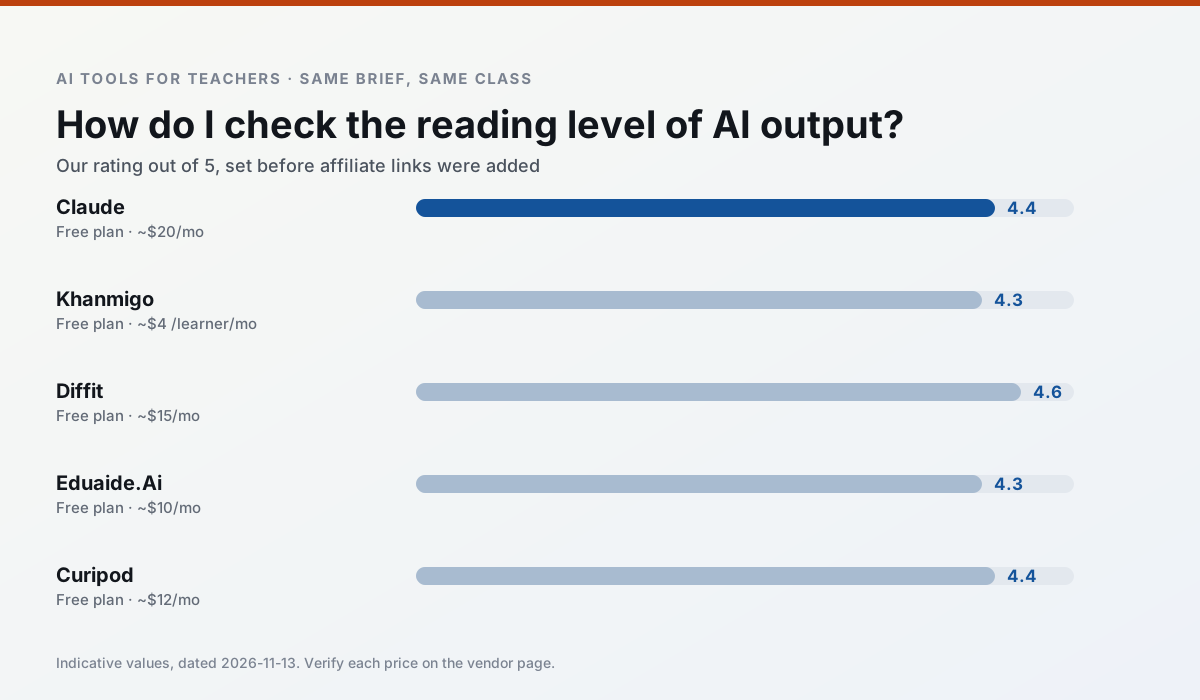
Side by side
Comparison table
Ratings reflect our timed classroom workflow, not vendor claims. Prices are indicative — verify on the vendor site.
| Tool | Best for | Free tier | Indicative paid plan | Standout feature | Our rating | Verdict | Try the tool |
|---|---|---|---|---|---|---|---|
| Claude | rubric creation · feedback on writing | Yes — Usage-limited | ~$20 /user/mo | Very large context window | 4.4 / 5 | Strong option | Try free |
| Khanmigo | math practice · student tutoring | Yes — US teacher accounts, subject to eligibility | ~$4 /learner/mo | Socratic tutoring rather than answers | 4.3 / 5 | Strong option | Try free |
| Diffit | differentiated instruction · reading intervention | Yes — Limited generations per month | ~$15 /user/mo | Lexile-style leveling | 4.6 / 5 | Top pick | Try free |
| Eduaide.Ai | lesson planning · rubric creation | Yes — Daily generation cap | ~$10 /user/mo | Resource library | 4.3 / 5 | Strong option | Try free |
| Curipod | formative assessment · exit tickets | Yes — Limited lessons per month | ~$12 /user/mo | Live polls and word clouds | 4.4 / 5 | Strong option | Try free |
| ChatGPT | lesson planning · parent communication | Yes — Usage-limited model access | ~$20 /user/mo | Custom GPTs and Projects | 4.5 / 5 | Top pick | Try free |
Match your situation
Best for X
Different jobs need different tools. Here is what we would open first in each case.
On the daily cycle, Claude saves the most edit time per task; the paid tier mostly buys more runs rather than better ones.
Khanmigo's free plan is the most usable in this comparison: a quota that survives a normal week. Not enough for a department, enough for one teacher to decide.
Diffit answers the three questions a district actually asks: rostering, admin controls and a data-processing agreement. That is usually what decides a school purchase.
Eduaide.Ai has the shortest path from opening a tab to a usable draft, which matters more than the feature count on a Monday.
Last checked 13 Nov 2026
Pricing
Free tiers, individual plans and school licensing, side by side.
| Tool | Free plan | Individual / paid | School & district | Billing note | Verify |
|---|---|---|---|---|---|
| Claude | $0 — Usage-limited | ~$20 /user/mo | ~$25+ /user/mo | Indicative — verify on vendor site | Vendor |
| Khanmigo | $0 — US teacher accounts, subject to eligibility | ~$4 /learner/mo | Custom quote | Indicative — verify on vendor site | Vendor |
| Diffit | $0 — Limited generations per month | ~$15 /user/mo | Custom quote | Indicative — verify on vendor site | Vendor |
| Eduaide.Ai | $0 — Daily generation cap | ~$10 /user/mo | Custom quote | Indicative — verify on vendor site | Vendor |
| Curipod | $0 — Limited lessons per month | ~$12 /user/mo | Custom quote | Indicative — verify on vendor site | Vendor |
| ChatGPT | $0 — Usage-limited model access | ~$20 /user/mo | ~$25+ /user/mo | Indicative — verify on vendor site | Vendor |
Editorial rule: pricing is re-checked every 2–3 months and the top 50 pages are refreshed every 6 months. See our funding policy.
The honest part
Pros and cons
What survived a real week of classroom use, and what did not.
Pros
- Handles full unit plans and long rubrics
- Nuanced, less generic prose
- Good at structured document output
Cons
- No teacher-specific templates
- Fewer classroom integrations
- Consumer plan not suitable for student data
Pros
- Education-first design
- Strong nonprofit trust signal
- Good math scaffolding
Cons
- Availability varies by region
- Less useful for admin paperwork
- Requires student accounts for full value
Pros
- Excellent for mixed-ability classes
- Produces printable and digital versions
- Minimal setup
Cons
- Narrower scope than all-in-one suites
- Leveling is approximate, not a formal assessment
- Heavy use burns through the free quota
Pros
- Very low entry price
- Good worksheet and rubric output
- Clean, uncluttered UI
Cons
- Smaller template set than MagicSchool
- Less polished export options
- Limited integrations
Pros
- High student engagement out of the box
- Great for quick checks for understanding
- No student accounts required for basic use
Cons
- Focused on delivery, not planning
- Requires reliable classroom devices
- Free tier is restrictive
In the classroom
Use cases
Five concrete workflows, with the tool we would open for each one.
A Monday morning lesson plan in twelve minutes
The twelve minutes come from not rewriting the skeleton. Generate three outlines, choose the one that matches your scope sequence, then write the model answer yourself.
Recommended: ClaudeThree reading levels from one source text
Paste a vetted text, ask for supported, core and extension versions, then check the vocabulary list by hand. Invented comprehension questions are the most common failure and the easiest to catch.
Recommended: KhanmigoRubric and feedback comments in one pass
Reorder the workflow so the rubric is yours and the comments are generated. Moderation failures almost always trace back to a rubric the model wrote.
Recommended: DiffitA parent email in two languages
Draft in plain, warm language with no names, translate, then back-translate the important sentences to check meaning. Keep specific incidents out of the prompt and add them yourself.
Recommended: Eduaide.AiA five-minute exit ticket set
Ask for one recall, one application and one reasoning item, then delete the second recall question every generator sneaks in.
Recommended: Curipod
Questions teachers ask us
FAQ
Direct answers, also published as FAQPage structured data for search and AI assistants.
Is AI allowed for lesson planning in my school?
Who is responsible if something goes wrong?
What should never go into a prompt?
Sources & further reading
Our recommendation
Try MagicSchool AI free for your next lesson planning task
A large library of teacher-specific AI generators in one dashboard. Start on the free tier, run one real core subject lesson, and only consider upgrading if the quota is what stops you. Disclosure: we may earn a commission (30% recurring) at no extra cost to you.
Some links on this page are affiliate links. We may earn a commission at no extra cost to you. Our rankings are editorial and never pay-to-play. Never enter student PII into a free consumer account.
Keep reading
Related comparisons in this cluster.
Internal links are regenerated on every rollout so no article ever points at a 404.