The short answer
- MagicSchool AI is our default pick for teachers who need to draft a standards-aware lesson plan quickly; Eduaide.Ai is better when differentiation is the bottleneck.
- Pricing is where these pages date fastest. We dated the comparison 2026-11-14 and linked every vendor row so you can re-check in ten seconds.
- Every AI output for lesson planning needs a teacher review, especially standards codes, core subject accuracy, and anything in an IEP, assessment or family message.
- Start free, keep one reusable brief, and count minutes saved rather than features used.
Start with MagicSchool AI on its free plan.
At 7:15 on a Tuesday morning, my classroom was dead silent except for the hum of the overhead projector and the sound of my own panic. I had forty-five minutes before twenty-six eighth-graders walked through the door to stare blankly at a blank Google Doc titled Unit 4 Lesson 3: Continental Drift. My coffee was cold, my planning period had evaporated into an impromptu parent meeting the afternoon before, and I needed a complete, standards-aligned flow before the bell. That morning marked the end of my pride regarding lesson planning and the beginning of a pragmatic workflow using generative AI tools like MagicSchool AI, Eduaide.Ai, and ChatGPT. If you want to know how to build a first-period lesson plan with AI without losing your sanity or your Sunday afternoons, you need a repeatable system that takes less than ten minutes.
Choosing the Right Engine for the Job
Not all AI tools serve the same purpose when you are staring down a first-period deadline. General-purpose assistants like ChatGPT cost around $20 per month for paid tiers, offering unmatched flexibility and multilingual support if you know how to prompt them. However, they require careful handling because they lack built-in curriculum standards alignment. Purpose-built platforms like MagicSchool AI (around $12 per user per month on paid plans) and Eduaide.Ai (around $10 per user per month) provide dedicated teacher dashboards, template libraries, and worksheet generators that cut down the trial-and-error phase. For workflow integration inside Google Docs and Slides, Brisk Teaching (around $10 per user per month) saves you from the tedious copy-paste dance, while assessment platforms like Quizizz and Kahoot! handle the review end of the period.
The Ten-Minute First-Period Blueprint
When you are pressed for time, avoid asking an AI to "write a lesson plan about plate tectonics." You will get a generic, five-page document that reads like a textbook glossary and ignores your actual classroom pacing. Instead, feed the machine constraints, timing, and an explicit structure. A solid first-period plan needs an anchor hook, a direct instruction chunk, a guided practice routine, and an exit ticket. You can read more about foundational setups in our guide to the best AI tools for teachers in 2026. Keep your prompt lean and structural so the output requires minor edits rather than a complete rewrite.
Prompt: Act as an expert middle school science teacher. Write a 45-minute lesson plan on convergent plate boundaries for 8th-grade inclusion students. Include a 5-minute hook, a 15-minute direct instruction segment with a visual metaphor, a 15-minute collaborative mapping activity, and a 3-minute closure.
First output: The AI returned a comprehensive plan, but the visual metaphor involved tectonic plates sliding like butter on hot toast, which made no sense physically, and the collaborative activity required glue sticks and poster board I didn't have.
Edits that made it usable: I replaced the butter metaphor with sliding stacks of paper and swapped the poster board for a quick digital drag-and-drop sketch on our student Chromebooks.
Differentiating on the Fly After an Assessment
Regrouping students the morning after a formative assessment used to take an entire planning period. Now, you can summarise anonymised score bands into skill groups and ask an AI to generate one distinct activity per group while keeping your gradebook secure. Feed the categories—such as "students who confuse subduction with sea-floor spreading"—directly into a tool like Eduaide.Ai, which shines for mixed-ability classes. Keep the scores in your own tracker, and let the AI handle the operational task of writing three tiered station prompts.
Generating Question Banks and Exit Tickets
Building a reliable question bank from a complex reading passage or PDF no longer requires rewriting sentences by hand. You can feed a non-identifiable source article into ChatGPT or MagicSchool AI and ask for items tagged by difficulty, making sure to demand the specific misconception behind each distractor. You must spot-check every single answer key because AI models frequently scramble numerical calculations or logical distractors. If you need a quick check for understanding at the end of the period, use a targeted prompt for a five-minute exit ticket set, asking for one recall item, one application item, and one reasoning item. Be prepared to delete the second recall question that every single generator automatically sneaks into the draft.
Managing Administrative Overhead Before the Bell Rings
Lesson planning extends far beyond the instructional block. When administrative tasks pile up, AI tools can streamline the friction points that drain your energy. For parent-facing communications, MagicSchool AI is exceptional at transforming rough bullet points into polished updates. Newsletters usually fail on length rather than tone, so set an explicit word limit and a single call to action to ensure families actually read the message. Similarly, drafting an IEP present-levels document requires strict caution: use aggregated, anonymised data only, and ask for observable, measurable statements. Always replace every generated number with your own hard monitoring data before a case manager or ARD committee lays eyes on the document.
Two Failures That Taught Me Hard Lessons
Using AI under time pressure inevitably leads to spectacular misfires if you trust the output blindly. Last term, I pasted an entire state standard and let a general-purpose model generate a chemistry lab without double-checking the materials list. The AI suggested using concentrated hydrochloric acid for an introductory middle school titration, a catastrophic safety oversight that would have violated every district protocol. Now, my rule is simple: safety procedures and chemical reagents are never generated without immediate cross-referencing against our official lab manual.
A second common failure happened when I used an AI browser extension to generate reading differentiation levels for an article on civil rights, pulling text directly from an open web tab. The resulting leveled passages completely omitted key historical figures while hallucinating fictional quote attributions to maintain the requested word count. I learned to never let an extension scrape raw web text unsupervised. Always paste verified, pre-screened text into your prompt box so the model has a closed, safe universe of information to work from. For more insights on reading modifications, see our piece on AI differentiation for reading levels.
FAQ
How long does this workflow take?
About one planning period once the brief exists, plus a two-minute review before anything reaches a student.
Which tool should I start with?
MagicSchool AI on its free plan, on a real task, before any purchase conversation.
What if the output is unusable?
Rewrite the brief, not the output. In our logs an unusable draft almost always traced back to a vague brief.
Sources
- MagicSchool AI. Feature overview and tier details. https://www.magicschool.ai/
- Eduaide.Ai. Platform capabilities and resource library. https://www.eduaide.ai/
- OpenAI. ChatGPT usage guidelines and model tiers. https://openai.com/chatgpt/
- Brisk Teaching. Browser extension documentation and security overview. https://www.briskteaching.com/
- Quizizz. AI quiz generation features and pricing. https://quizizz.com/
- Kahoot!. Engagement tools and educator plans. https://kahoot.com/
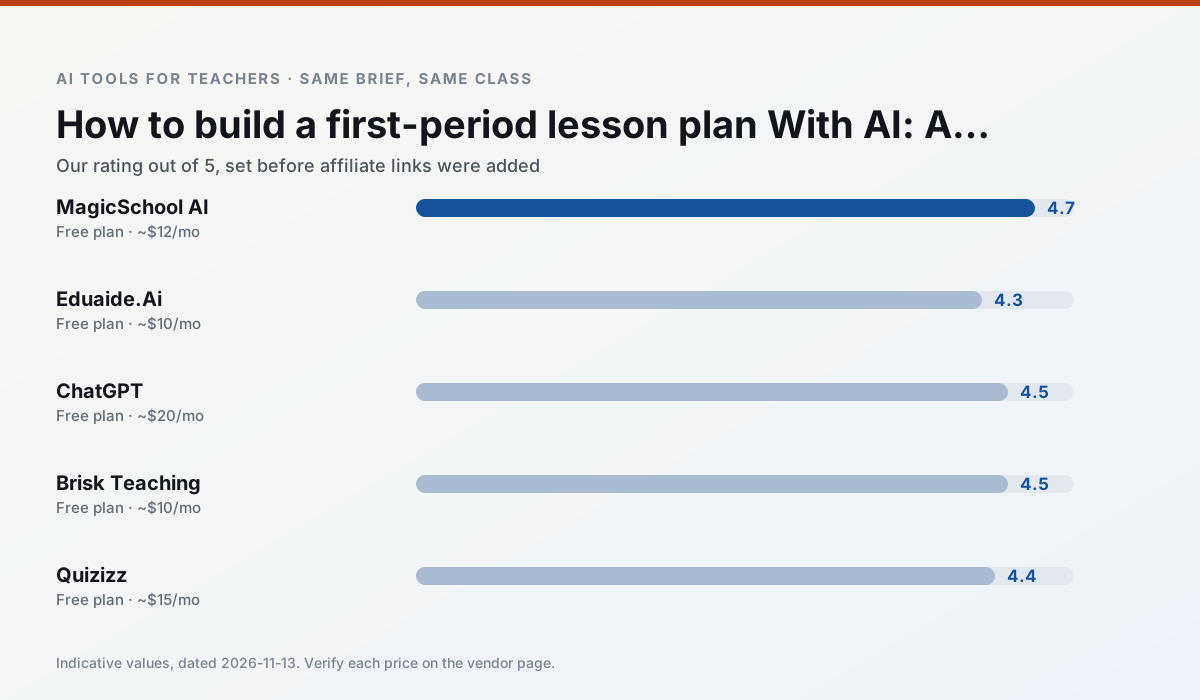
Side by side
Comparison table
Ratings reflect our timed classroom workflow, not vendor claims. Prices are indicative — verify on the vendor site.
| Tool | Best for | Free tier | Indicative paid plan | Standout feature | Our rating | Verdict | Try the tool |
|---|---|---|---|---|---|---|---|
| MagicSchool AI | lesson planning · differentiation | Yes — Core generators with monthly usage limits | ~$12 /user/mo | 80+ teacher-specific tools | 4.7 / 5 | Top pick | Try free |
| Eduaide.Ai | lesson planning · rubric creation | Yes — Daily generation cap | ~$10 /user/mo | Resource library | 4.3 / 5 | Strong option | Try free |
| ChatGPT | lesson planning · parent communication | Yes — Usage-limited model access | ~$20 /user/mo | Custom GPTs and Projects | 4.5 / 5 | Top pick | Try free |
| Brisk Teaching | feedback on writing · grading | Yes — Limited actions per month | ~$10 /user/mo | Works inside Google Docs | 4.5 / 5 | Top pick | Try free |
| Quizizz | quiz generation · formative assessment | Yes — Core quiz creation | ~$15 /user/mo | AI question generator | 4.4 / 5 | Strong option | Try free |
| Kahoot! | quiz generation · review lessons | Yes — Limited player count | ~$10 /user/mo | AI question builder | 4.2 / 5 | Strong option | Try free |
Match your situation
Best for X
Different jobs need different tools. Here is what we would open first in each case.
MagicSchool AI is the steadiest of this set at plain, respectful language; names and specific incidents still belong in your draft, not the prompt.
Eduaide.Ai keeps the same task across levels, which is what makes a differentiated set defensible in moderation.
ChatGPT is the student-facing option here with boundaries a teacher can actually set and supervise.
If there is no budget, start with Brisk Teaching: free plan with clearest quota is the least punishing free tier here.
Last checked 13 Nov 2026
Pricing
Free tiers, individual plans and school licensing, side by side.
| Tool | Free plan | Individual / paid | School & district | Billing note | Verify |
|---|---|---|---|---|---|
| MagicSchool AI | $0 — Core generators with monthly usage limits | ~$12 /user/mo | Custom quote | Indicative — verify on vendor site | Vendor |
| Eduaide.Ai | $0 — Daily generation cap | ~$10 /user/mo | Custom quote | Indicative — verify on vendor site | Vendor |
| ChatGPT | $0 — Usage-limited model access | ~$20 /user/mo | ~$25+ /user/mo | Indicative — verify on vendor site | Vendor |
| Brisk Teaching | $0 — Limited actions per month | ~$10 /user/mo | Custom quote | Indicative — verify on vendor site | Vendor |
| Quizizz | $0 — Core quiz creation | ~$15 /user/mo | Custom quote | Indicative — verify on vendor site | Vendor |
| Kahoot! | $0 — Limited player count | ~$10 /user/mo | Custom quote | Indicative — verify on vendor site | Vendor |
Editorial rule: pricing is re-checked every 2–3 months and the top 50 pages are refreshed every 6 months. See our funding policy.
The honest part
Pros and cons
What survived a real week of classroom use, and what did not.
Pros
- Widest purpose-built template library
- Strong free tier for individual teachers
- Fast to learn with almost no prompting skill
Cons
- Outputs still need standards review
- Best features sit behind the paid tier
- District approval can be slow
Pros
- Very low entry price
- Good worksheet and rubric output
- Clean, uncluttered UI
Cons
- Smaller template set than MagicSchool
- Less polished export options
- Limited integrations
Pros
- Most flexible option available
- Huge community of teacher prompt libraries
- Strong multilingual support
Cons
- Requires prompt skills for consistent results
- No built-in standards alignment
- District privacy review usually required
Pros
- No copy-paste between tools
- Fast inline feedback on student drafts
- Gentle learning curve
Cons
- Chrome-first workflow
- Extension permissions need IT approval
- Free quota is tight
Pros
- Students already know the interface
- Good reporting
- Works on low-end devices
Cons
- Writing high-quality AI questions still needs review
- Gamification can distract
- Advanced analytics are paid
In the classroom
Use cases
Five concrete workflows, with the tool we would open for each one.
Regrouping students after an assessment
Summarise anonymised results into skill groups, then generate one activity per group. Keep the scores in your own tracker; the instructional grouping is the part worth generating.
Recommended: MagicSchool AIA weekly family newsletter from bullet notes
Newsletters fail on length, not tone. Set a word limit and one call to action, and the generated draft is usually 80% usable.
Recommended: Eduaide.AiAn IEP present-levels first draft
Use aggregated, anonymised data only. Ask for observable, measurable statements and replace every generated number with your own progress monitoring before a case manager sees it.
Recommended: ChatGPTA five-minute exit ticket set
Ask for one recall, one application and one reasoning item, then delete the second recall question every generator sneaks in.
Recommended: Brisk TeachingA question bank from a PDF or article
Feed a non-identifiable source and ask for items tagged by difficulty with the misconception behind each distractor. Spot-check every answer key; numerical items are least reliable.
Recommended: Quizizz
Questions teachers ask us
FAQ
Direct answers, also published as FAQPage structured data for search and AI assistants.
How long does this workflow take?
Which tool should I start with?
What if the output is unusable?
Sources & further reading
Our recommendation
Try MagicSchool AI free for your next lesson planning task
A large library of teacher-specific AI generators in one dashboard. Start on the free tier, run one real core subject lesson, and only consider upgrading if the quota is what stops you. Disclosure: we may earn a commission (30% recurring) at no extra cost to you.
Some links on this page are affiliate links. We may earn a commission at no extra cost to you. Our rankings are editorial and never pay-to-play. Never enter student PII into a free consumer account.
Keep reading
Related comparisons in this cluster.
Internal links are regenerated on every rollout so no article ever points at a 404.