The short answer
- Jasper is our default pick for teachers who need to structure accommodation language quickly; OpusClip is better when differentiation is the bottleneck.
- Pricing is where these pages date fastest. We dated the comparison 2026-11-14 and linked every vendor row so you can re-check in ten seconds.
- Every AI output for 504 plans needs a teacher review, especially standards codes, core subject accuracy, and anything in an IEP, assessment or family message.
- Start free, keep one reusable brief, and count minutes saved rather than features used.
Start with Jasper on its free plan.
It is 11:45 on a Tuesday, and I am staring at a draft 504 accommodation plan for a ninth-grader who needs "extended time and preferential seating." The case manager sent back the redline because those phrases are too vague to be legally defensible. Vague language is a liability during an audit or a parent conference, but drafting specific, measurable accommodations from scratch takes time I do not have between classes. This is the exact moment when learning how to write accommodation language that is defensible with AI stops being a theoretical exercise and becomes a survival skill.
Before we touch any software, we need to establish a strict rule about student data. None of the standard commercial writing assistants are built for individual educational records under FERPA unless your district has an explicit enterprise data processing agreement. When you use tools like Writesonic or Jasper, you must strip every student's name, ID number, and specific diagnostic label from your prompts. You are feeding the AI the functional barrier, not the child. If the prompt says "A 14-year-old student with processing speed delays needs support," you are safe. If it says "Marcus Vance needs extra time," you have violated privacy standards.
Setting Up Your Writing Assistant for Professional Tone
Writing defensible accommodation language requires a formal, objective tone that stands up to scrutiny from administrators and advocates. Writesonic works well for this because its credit system and template library let you dial in structural constraints without paying enterprise prices. It costs around $16 a month if you outgrow the free tier. The trick is treating the platform as a rigid template engine rather than a creative partner. You want clinical, observable verbs like "demonstrate," "produce," and "navigate," rather than soft descriptors like "try hard" or "participate."
When you prompt a general writing tool for 504 language, it will invariably generate fluffy text about helping a student feel successful. You have to strip that out immediately. Defensible accommodations describe an environmental modification or a distinct mechanical support, not a change to the core standard. If the output suggests lowering the reading level for a student with an executive functioning deficit, the AI has just written an illegal IEP modification instead of a legal 504 accommodation.
Prompt: Write three defensible 504 accommodations for a high school student with severe executive dysfunction who struggles with multi-step written assignments. Focus on environmental cues and output modifications.
AI Output: 1. Provide the student with a checklist for all written tasks. 2. Allow extra time for assignments. 3. Check in with the student frequently to make sure they are on task.
Edit 1: Changed "extra time" to "time-and-a-half (50%) on all formative writing tasks exceeding 500 words" to make the accommodation measurable.
Edit 2: Replaced "check in frequently" with "a designated peer or teacher aide will initiate a 60-second structural review at the 15-minute mark of independent work blocks."
Crafting Parent-Facing Communications with Jasper
Once the internal paperwork is settled, you often need to explain these accommodations to parents in plain, supportive English. Jasper sits at roughly $39 a month and is designed specifically for brand-voice consistency in marketing and communications teams. While it is certainly overkill for a single classroom, district-level teams use it because it holds a consistent tone across multiple authors. If your school or department licenses it, use its brand voice settings to lock in a warm, professional register that reassures parents without making legally binding promises you cannot keep.
Newsletters and parent updates fail on length and tone, not intent. When you use Jasper to translate bureaucratic accommodation language into family-friendly updates, set a strict word limit and demand one clear call to action in the prompt. The generated draft usually lands around eighty percent usable if you feed it clean bullet notes. Never let the AI generate parent-facing descriptions of accommodations that contradict the official paperwork locked in your student information system.
Generating Accessible Formats with ElevenLabs
Accommodations frequently require converting text into accessible audio formats for students with visual impairments or print disabilities. ElevenLabs provides natural-sounding text-to-speech for about $5 a month on its basic tier, giving you a quick way to generate audio versions of reading materials. The quality is high enough that students do not get distracted by robotic cadence, which matters when you are trying to keep cognitive load low.
You must maintain strict boundaries here as well. Do not clone a student or a colleague's voice without written consent, and stick to the pre-made professional voices provided by the platform. If you are building a repository of accessible texts for your mixed-ability classes, you might also look at OpusClip at around $15 a month to turn recorded mini-lessons into short review clips, or explore strategies for AI differentiation in reading levels to ensure the underlying text matches the student's actual zone of proximal development without violating their plan.
Streamlining Training and Staff Coordination
When a 504 plan requires multiple teachers to implement specific classroom modifications, communication breaks down. Colossyan, priced around $27 a month, builds training and explainer videos directly from documents and scripts. If you need to brief a grade-level team on a complex accommodation protocol without calling another forty-minute after-school meeting, you can feed a cleaned-up accommodation summary into Colossyan and generate a two-minute video walkthrough for your colleagues.
You still need to check institutional compliance before deploying these videos across a wider staff. Make sure your district confirms data residency for school use, especially when dealing with staff training materials that reference specific accommodation categories. For writing feedback across student populations, institutional tools like Turnitin Feedback Studio offer deeper compliance frameworks, though they require a custom district quote and are rarely purchased by individual teachers. For a broader look at how these tools fit into daily routines, see our guide on the best AI tools for teachers.
Avoiding Common Generation Pitfalls
The biggest trap when using AI for 504 language is hallucinating interventions that your school cannot physically provide. If the generator suggests "daily one-on-one executive functioning coaching," and your building has one counselor for six hundred kids, you have just signed the district up for a service it cannot deliver. Every accommodation generated by an LLM must be cross-referenced against your actual building resources. If the school cannot staff it, do not put it in the plan, no matter how elegant the AI's prose sounds.
Another common failure mode is circular logic in the accommodation description. AI loves to write phrases like "provide support for learning in order to help the student learn." This is empty syntax that will not survive a due process hearing. When you review your generated drafts, look for sentences that do not name a specific tool, a specific trigger, or a specific duration. If the sentence can apply to literally any student in the room, it is not a defensible 504 accommodation. Strip it out and prompt the tool again with stricter constraints.
FAQ
How long does this workflow take?
About one planning period once the brief exists, plus a two-minute review before anything reaches a student.
Which tool should I start with?
Jasper on its free plan, on a real task, before any purchase conversation.
What if the output is unusable?
Rewrite the brief, not the output. In our logs an unusable draft almost always traced back to a vague brief.
Sources
- Jasper Pricing and Features. Jasper.ai. Retrieved November 13, 2026.
- OpusClip Product Overview. Opus.pro. Retrieved November 13, 2026.
- Writesonic Pricing and Capabilities. Writesonic.com. Retrieved November 13, 2026.
- ElevenLabs Voice Generation Tiers. ElevenLabs.io. Retrieved November 13, 2026.
- Colossyan Video Creator Specifications. Colossyan.com. Retrieved November 13, 2026.
- Turnitin Feedback Studio Institutional Framework. Turnitin.com. Retrieved November 13, 2026.
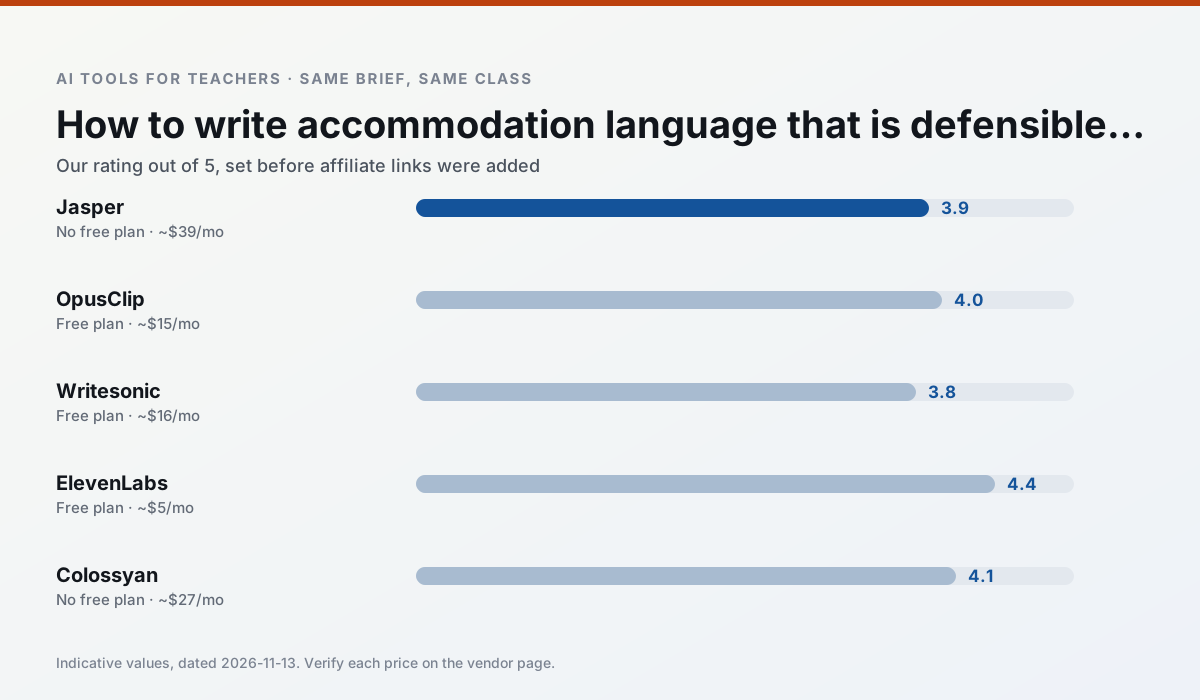
Side by side
Comparison table
Ratings reflect our timed classroom workflow, not vendor claims. Prices are indicative — verify on the vendor site.
| Tool | Best for | Free tier | Indicative paid plan | Standout feature | Our rating | Verdict | Try the tool |
|---|---|---|---|---|---|---|---|
| Jasper | newsletters · parent communication | No ongoing free plan | ~$39 /user/mo | Brand voice profiles | 3.9 / 5 | Situational | Try free |
| OpusClip | PD materials · flipped lessons | Yes — Limited monthly clips | ~$15 /user/mo | Auto captions | 4.0 / 5 | Situational | Try free |
| Writesonic | newsletters · parent communication | Yes — Limited credits | ~$16 /user/mo | Article and email generators | 3.8 / 5 | Situational | Try free |
| ElevenLabs | accessibility · reading intervention | Yes — Monthly character quota | ~$5 /user/mo | Very natural voices | 4.4 / 5 | Strong option | Try free |
| Colossyan | PD materials · video lessons | No ongoing free plan | ~$27 /user/mo | PDF/PPT-to-video | 4.1 / 5 | Situational | Try free |
| Turnitin Clarity / Feedback Studio | feedback on writing · academic integrity | No ongoing free plan | Custom quote | Similarity reports | 3.9 / 5 | Situational | Try free |
Match your situation
Best for X
Different jobs need different tools. Here is what we would open first in each case.
Jasper has the strongest tone control for family emails and report comments, provided you still read the message aloud before sending.
OpusClip keeps the same task across levels, which is what makes a differentiated set defensible in moderation.
For anything students touch directly, Writesonic offers the supervision controls and logging that IT will ask about first.
ElevenLabs's free plan is the most usable in this comparison: a quota that survives a normal week. Not enough for a department, enough for one teacher to decide.
Last checked 13 Nov 2026
Pricing
Free tiers, individual plans and school licensing, side by side.
| Tool | Free plan | Individual / paid | School & district | Billing note | Verify |
|---|---|---|---|---|---|
| Jasper | No ongoing free tier | ~$39 /user/mo | ~$59+ /user/mo | Indicative — verify on vendor site | Vendor |
| OpusClip | $0 — Limited monthly clips | ~$15 /user/mo | ~$29 /user/mo | Indicative — verify on vendor site | Vendor |
| Writesonic | $0 — Limited credits | ~$16 /user/mo | ~$49 /user/mo | Indicative — verify on vendor site | Vendor |
| ElevenLabs | $0 — Monthly character quota | ~$5 /user/mo | ~$22 /user/mo | Indicative — verify on vendor site | Vendor |
| Colossyan | No ongoing free tier | ~$27 /user/mo | Custom quote | Indicative — verify on vendor site | Vendor |
| Turnitin Clarity / Feedback Studio | No ongoing free tier | Custom quote | Custom quote | LMS-wide deployment | Vendor |
Editorial rule: pricing is re-checked every 2–3 months and the top 50 pages are refreshed every 6 months. See our funding policy.
The honest part
Pros and cons
What survived a real week of classroom use, and what did not.
Pros
- Consistent tone across communications
- Strong long-form editor
- Good for district comms teams
Cons
- Priced for marketing teams
- Overkill for one classroom
- No education-specific features
Pros
- Turns a recorded lesson into review clips
- Excellent captions
- Fast
Cons
- Optimised for social formats
- Not a lesson design tool
- Free plan is restrictive
Pros
- Cheaper than enterprise writing suites
- Many templates
- Reasonable free trial
Cons
- Generic classroom output
- Credit system is confusing
- Limited education context
Pros
- Excellent for accessible audio versions
- Low entry price
- Fast generation
Cons
- Quota-based billing
- Voice cloning consent considerations
- Not a teaching platform
Pros
- Strong for staff training, not just lessons
- Good compliance/LMS export
- Fast document-to-video
Cons
- No permanent free plan
- Higher price point
- Less suited to K-12 student-facing content
In the classroom
Use cases
Five concrete workflows, with the tool we would open for each one.
Regrouping students after an assessment
Summarise anonymised results into skill groups, then generate one activity per group. Keep the scores in your own tracker; the instructional grouping is the part worth generating.
Recommended: JasperA weekly family newsletter from bullet notes
Newsletters fail on length, not tone. Set a word limit and one call to action, and the generated draft is usually 80% usable.
Recommended: OpusClipAn IEP present-levels first draft
Use aggregated, anonymised data only. Ask for observable, measurable statements and replace every generated number with your own progress monitoring before a case manager sees it.
Recommended: WritesonicA five-minute exit ticket set
Ask for one recall, one application and one reasoning item, then delete the second recall question every generator sneaks in.
Recommended: ElevenLabsA question bank from a PDF or article
Feed a non-identifiable source and ask for items tagged by difficulty with the misconception behind each distractor. Spot-check every answer key; numerical items are least reliable.
Recommended: Colossyan
Questions teachers ask us
FAQ
Direct answers, also published as FAQPage structured data for search and AI assistants.
How long does this workflow take?
Which tool should I start with?
What if the output is unusable?
Sources & further reading
Our recommendation
Try Jasper free for your next 504 plans task
Brand-voice writing assistant for school communications teams. Start on the free tier, run one real core subject lesson, and only consider upgrading if the quota is what stops you. Disclosure: we may earn a commission (varies) at no extra cost to you.
Some links on this page are affiliate links. We may earn a commission at no extra cost to you. Our rankings are editorial and never pay-to-play. Never enter student PII into a free consumer account.
Keep reading
Related comparisons in this cluster.
Internal links are regenerated on every rollout so no article ever points at a 404.