The short answer
- Brisk Teaching is our default pick for teachers who need to draft a standards-aware lesson plan quickly; Quizizz is better when differentiation is the bottleneck.
- Start with Brisk Teaching on its free plan, keep Quizizz as the second opinion, and do not open a card until the quota, not the feature list, is what stops you.
- Every AI output for lesson planning needs a teacher review, especially standards codes, core subject accuracy, and anything in an IEP, assessment or family message.
- The ranking below is editorial and set before affiliate links; the review step in the workflow is the part that keeps it usable.
Start with MagicSchool AI on its free plan.
By November 2026, most schools have moved past the panic phase of generative intelligence. The question on department heads' desks is no longer whether we should use these systems, but rather what a school’s first AI budget should buy when funds are tight and every software rep claims to save ten hours a week. If you hand a building principal five thousand dollars for classroom software licenses, the worst thing they can do is buy six different tools that all generate multiple-choice quizzes.
When building a coherent software stack for a middle or high school, you need to balance teacher time-savers against student-facing engagement platforms. To help you navigate these choices, we have also looked at broader options in our guide on the best ai tools for teachers 2026. Let us look at what makes the cut for a sensible, school-funded deployment, and where you should spend your limited dollars first.
Writing home and drafting reports
If your department or school wants to solve teacher burnout around family communication, put your money into Brisk Teaching at roughly ten dollars per user per month. Brisk operates as a browser extension that lives inside Google Docs and Slides. It is our top pick for parent-facing writing because it does not require you to copy and paste text back and forth into a separate chat window.
Prompt: Write a weekly family newsletter based on these bullet points: science fair projects due Friday, half-day on Tuesday for staff development, and permission slips for the aquarium trip. Keep it under 200 words and include one clear call to action for parents.
First response: A glowing, three-paragraph letter praising the wonderful students and reminding families about the wonderful science fair, complete with excessive exclamation marks. First edit: Cut the opening two sentences of fluff and replaced the generic greeting with our school's actual attendance policy note. Second edit: Pinned the deadline for the aquarium slips to the top of the email in bold text so working parents would not miss it.
Brisk also provides inline feedback on student drafts, which helps when you have thirty essays to annotate before Friday. The main catch is that it is a Chrome-first workflow. Your district IT department has to approve the extension permissions, and the free tier hits a strict monthly quota very quickly.
Formative assessment and live game practice
For checking understanding during a live lesson, districts usually split their loyalty between Quizizz and Kahoot! at roughly ten to fifteen dollars per user per month. Quizizz is our top pick for mixed-ability classes because students can work at their own pace on low-end devices without feeling rushed by a shared classroom leaderboard. The reporting backend gives you clean data on who missed which standard, which makes it straightforward to build small intervention groups for the next class period.
Kahoot! remains the gold standard for student-safe deployments and instant engagement, especially for Friday review sessions. It is the tool substitute teachers can run without a fifteen-minute tutorial. However, it relies heavily on speed, which tests recall rather than deeper reasoning. If you teach younger grades, remember to have students use nicknames rather than real names to keep data privacy clean.
Generating question banks and differentiation
When you need to turn a dense PDF into standards-aligned practice, QuestionWell is the standout utility. The free tier gives you a monthly generation limit, while the paid version sits around ten dollars per user per month. It is our top free option because it cuts out the tedious work of writing distractor questions from scratch.
Prompt: Generate five multiple-choice questions based on this provided article about watershed ecosystems. Tag each item by difficulty and include the specific student misconception behind each wrong answer.
First response: Four good questions and one numerical calculation about runoff rates that relied on a formula not found in the source text. First edit: Deleted the broken calculation item entirely. Second edit: Rewrote the distractor on question three because the AI made the wrong answer choice obviously absurd compared to the others.
QuestionWell is a single-purpose tool, which is actually its strength. It does not try to be a grading assistant or a chat companion. You paste non-identifiable source text, export the bank to your preferred LMS, and close the tab. If you need help tailoring those texts for diverse learners, take a look at our companion piece on using AI differentiation for reading levels.
Comprehensive tracking and paper grading
At the school-wide level, Formative and Gradescope handle the heavy lifting of assessment data. Formative costs around fifteen dollars per user per month and turns existing PDFs into live interactive worksheets where you can watch student cursors move in real time. It works well if your department relies heavily on blended learning rotations.
Gradescope uses custom institutional pricing and AI-assisted rubrics to grade scanned paper assessments. If your high school science or math department still gives paper exams because of equation formatting, Gradescope saves hours of weekend sorting. It groups similar student answers together so you can apply rubric points in bulk. It is definitely overkill for elementary classrooms, and the setup effort for scanning and mapping zones on paper tests is steep.
Where to spend the first dollar
If you are a department chair or tech coach deciding where to allocate a modest budget, start with workflow tools rather than flashy student games. Buy a handful of Brisk or QuestionWell licenses to give teachers their Sunday afternoons back. Once the adults are saving time on lesson prep and parent communication, look at district-wide licenses for Formative or Quizizz to track student growth across common assessments. Keep your deployments targeted, review privacy agreements with your IT department, and always check the math questions before you hand them out.
FAQ
Is AI allowed for lesson planning in my school?
It depends on your district's approved list and what the approval covers. Ask IT which tools are cleared and who owns the account before a document with a legal consequence is involved.
Who is responsible if something goes wrong?
The school, and in practice the named teacher who reviewed the output. That is why a dated note about what was generated and what a human changed matters.
What should never go into a prompt?
Names, rosters, scans of student work and gradebook screenshots. Topic-level prompts do most of the work without any of that.
Sources
- Brisk Teaching. Pricing and Features Overview. https://www.briskteaching.com/
- Quizizz. Educator Plans and District Pricing. https://quizizz.com/
- Kahoot!. Schools and Districts Feature Matrix. https://kahoot.com/
- QuestionWell. Standards-Aligned Question Generation Tool. https://www.questionwell.ai/
- Formative. Real-Time Student Assessment Platform. https://www.GoFormative.com/
- Gradescope. AI-Assisted Rubric Grading and Assessment. https://www.gradescope.com/
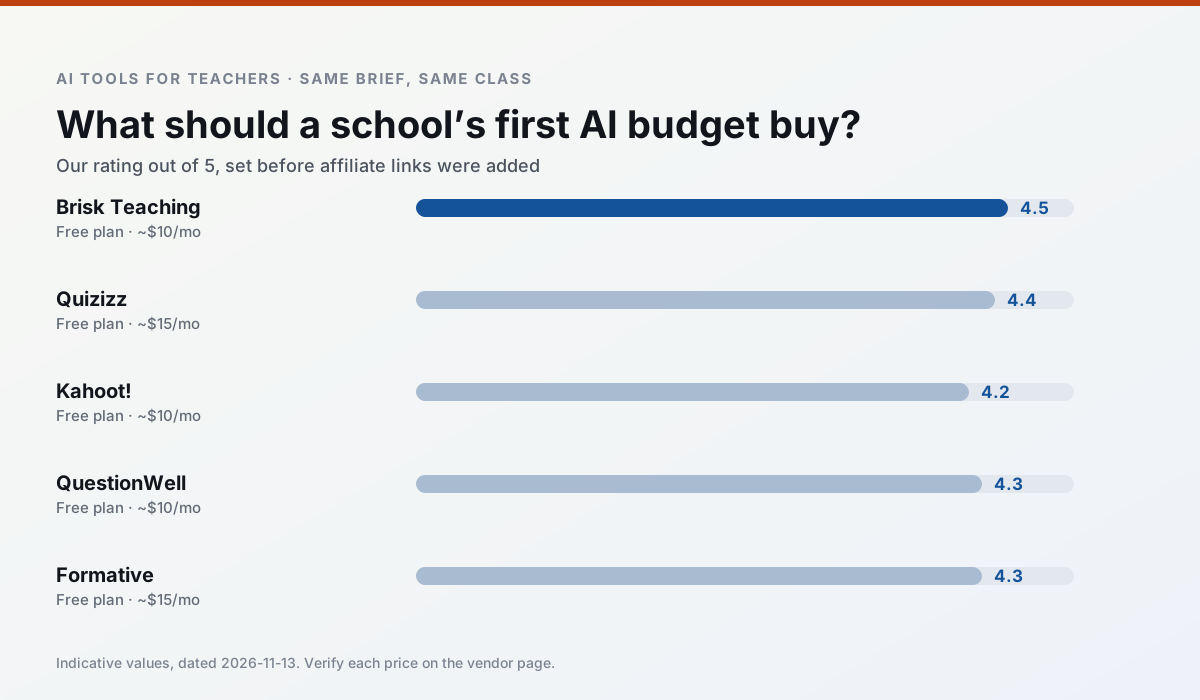
Side by side
Comparison table
Ratings reflect our timed classroom workflow, not vendor claims. Prices are indicative — verify on the vendor site.
| Tool | Best for | Free tier | Indicative paid plan | Standout feature | Our rating | Verdict | Try the tool |
|---|---|---|---|---|---|---|---|
| Brisk Teaching | feedback on writing · grading | Yes — Limited actions per month | ~$10 /user/mo | Works inside Google Docs | 4.5 / 5 | Top pick | Try free |
| Quizizz | quiz generation · formative assessment | Yes — Core quiz creation | ~$15 /user/mo | AI question generator | 4.4 / 5 | Strong option | Try free |
| Kahoot! | quiz generation · review lessons | Yes — Limited player count | ~$10 /user/mo | AI question builder | 4.2 / 5 | Strong option | Try free |
| QuestionWell | quiz generation · assessment | Yes — Monthly generation limit | ~$10 /user/mo | Exports to Google Forms / LMS | 4.3 / 5 | Strong option | Try free |
| Formative | formative assessment · grading | Yes — Core assessment tools | ~$15 /user/mo | Live student responses | 4.3 / 5 | Strong option | Try free |
| Gradescope | grading · rubric creation | Yes — Limited courses | Custom quote | Bubble sheet and handwriting capture | 4.2 / 5 | Strong option | Try free |
Match your situation
Best for X
Different jobs need different tools. Here is what we would open first in each case.
Brisk Teaching is the steadiest of this set at plain, respectful language; names and specific incidents still belong in your draft, not the prompt.
Quizizz keeps the same task across levels, which is what makes a differentiated set defensible in moderation.
Kahoot! is the student-facing option here with boundaries a teacher can actually set and supervise.
QuestionWell's free plan is the most usable in this comparison: a quota that survives a normal week. Not enough for a department, enough for one teacher to decide.
Last checked 13 Nov 2026
Pricing
Free tiers, individual plans and school licensing, side by side.
| Tool | Free plan | Individual / paid | School & district | Billing note | Verify |
|---|---|---|---|---|---|
| Brisk Teaching | $0 — Limited actions per month | ~$10 /user/mo | Custom quote | Indicative — verify on vendor site | Vendor |
| Quizizz | $0 — Core quiz creation | ~$15 /user/mo | Custom quote | Indicative — verify on vendor site | Vendor |
| Kahoot! | $0 — Limited player count | ~$10 /user/mo | Custom quote | Indicative — verify on vendor site | Vendor |
| QuestionWell | $0 — Monthly generation limit | ~$10 /user/mo | Custom quote | Indicative — verify on vendor site | Vendor |
| Formative | $0 — Core assessment tools | ~$15 /user/mo | Custom quote | Indicative — verify on vendor site | Vendor |
| Gradescope | $0 — Limited courses | Custom quote | Custom quote | LMS integration and support | Vendor |
Editorial rule: pricing is re-checked every 2–3 months and the top 50 pages are refreshed every 6 months. See our funding policy.
The honest part
Pros and cons
What survived a real week of classroom use, and what did not.
Pros
- No copy-paste between tools
- Fast inline feedback on student drafts
- Gentle learning curve
Cons
- Chrome-first workflow
- Extension permissions need IT approval
- Free quota is tight
Pros
- Students already know the interface
- Good reporting
- Works on low-end devices
Cons
- Writing high-quality AI questions still needs review
- Gamification can distract
- Advanced analytics are paid
Pros
- Instant engagement
- Very low training time
- Strong brand familiarity
Cons
- Less depth for higher-order assessment
- Paid tiers needed for larger classes
- Time pressure suits recall more than reasoning
Pros
- Saves the most time on question writing
- Clean export workflow
- Good objective tagging
Cons
- Single-purpose tool
- Question quality varies by source text
- Limited student-facing features
Pros
- Strong data for intervention groups
- Works with existing PDFs and Docs
- Good LMS integrations
Cons
- Steeper setup than quiz games
- Best value requires school-wide rollout
- Price adds up per teacher
In the classroom
Use cases
Five concrete workflows, with the tool we would open for each one.
Regrouping students after an assessment
Summarise anonymised results into skill groups, then generate one activity per group. Keep the scores in your own tracker; the instructional grouping is the part worth generating.
Recommended: Brisk TeachingA weekly family newsletter from bullet notes
Newsletters fail on length, not tone. Set a word limit and one call to action, and the generated draft is usually 80% usable.
Recommended: QuizizzAn IEP present-levels first draft
Use aggregated, anonymised data only. Ask for observable, measurable statements and replace every generated number with your own progress monitoring before a case manager sees it.
Recommended: Kahoot!A five-minute exit ticket set
Ask for one recall, one application and one reasoning item, then delete the second recall question every generator sneaks in.
Recommended: QuestionWellA question bank from a PDF or article
Feed a non-identifiable source and ask for items tagged by difficulty with the misconception behind each distractor. Spot-check every answer key; numerical items are least reliable.
Recommended: Formative
Questions teachers ask us
FAQ
Direct answers, also published as FAQPage structured data for search and AI assistants.
Is AI allowed for lesson planning in my school?
Who is responsible if something goes wrong?
What should never go into a prompt?
Sources & further reading
Our recommendation
Try MagicSchool AI free for your next lesson planning task
A large library of teacher-specific AI generators in one dashboard. Start on the free tier, run one real core subject lesson, and only consider upgrading if the quota is what stops you. Disclosure: we may earn a commission (30% recurring) at no extra cost to you.
Some links on this page are affiliate links. We may earn a commission at no extra cost to you. Our rankings are editorial and never pay-to-play. Never enter student PII into a free consumer account.
Keep reading
Related comparisons in this cluster.
Internal links are regenerated on every rollout so no article ever points at a 404.