The short answer
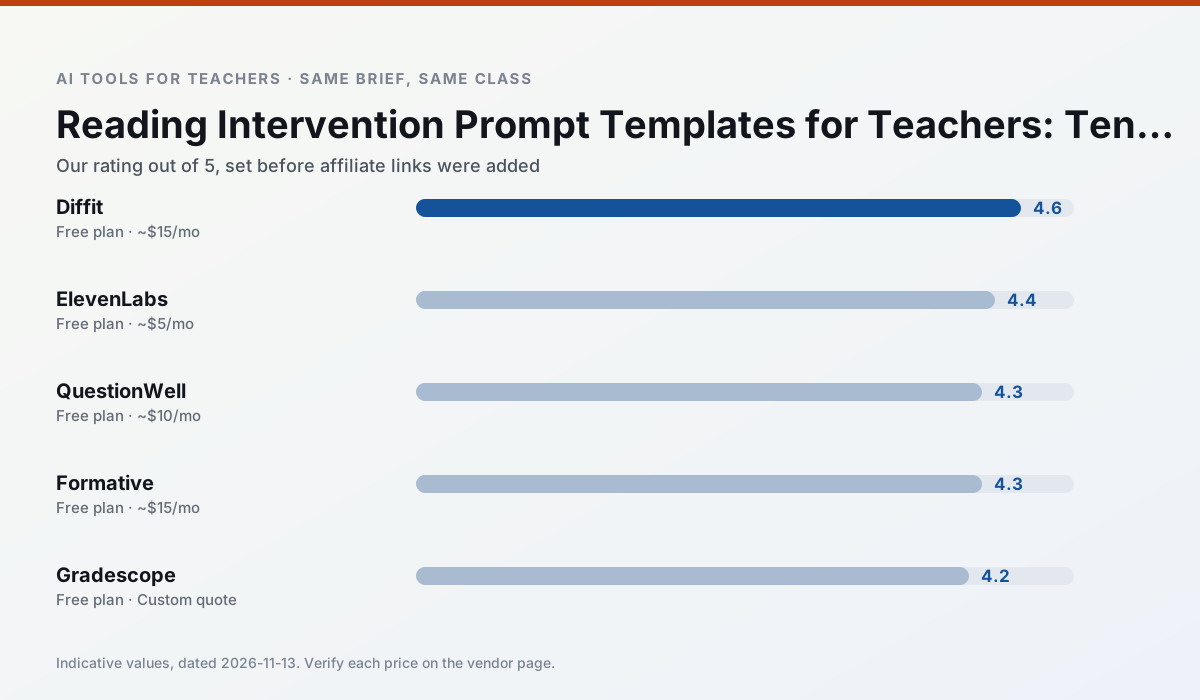
- Diffit is our default pick for teachers who need to build levelled passages and word work quickly; ElevenLabs is better when differentiation is the bottleneck.
- Pricing is where these pages date fastest. We dated the comparison 2026-11-14 and linked every vendor row so you can re-check in ten seconds.
- Every AI output for reading intervention needs a teacher review, especially standards codes, core subject accuracy, and anything in an IEP, assessment or family message.
- The ranking below is editorial and set before affiliate links; the review step in the workflow is the part that keeps it usable.
Start with ElevenLabs on its free plan.
Seventeen kids are staring at a reading passage that is two grade levels too hard for six of them, right on level for eight, and insultingly simple for the remaining three. It is 7:40 AM on a Tuesday, your intervention block starts in twenty minutes, and you are standing at the copy machine watching it jam on page three.
If you are hunting for reading intervention prompts that actually survive a room full of restless middle schoolers, you already know that generic AI chat boxes give you generic paragraphs about dolphins or Abraham Lincoln that match nobody's instructional level. We need practical reading intervention prompts that pull real data, build targeted texts, and turn raw text into usable lessons without eating your prep period.
Building a solid intervention routine means leaning on tools that handle the heavy lifting of leveling, questioning, and audio scaffolding. If you want a broader look at how these platforms fit into daily workflows, check out our guide on the best AI tools for teachers for 2026. Let's look at ten specific prompt templates you can run right now using verified classroom platforms.
Leveling Text Without Losing the Content
When you have one curriculum topic but four different reading abilities, rewriting the article by hand is out of the question. Diffit stands out as the best free option for this job, letting you take any text or video and level it instantly, though heavy use will burn through your free tier before the month is out.
Prompt: Level the following text about renewable energy for a 5th-grade reading level, but keep the core vocabulary words: turbine, generator, and kilowatt. Provide three comprehension questions focusing on cause and effect at the end.
First response: The model returned a readable text, but dropped two of the required vocabulary words and wrote multiple-choice questions that gave the answers away in the stem.
Two edits that saved it: First, I added a negative constraint: "Do not simplify or omit the target vocabulary words; define them in a brief glossary at the top." Second, I specified the question format: "Change the questions to open-ended short response items that require evidence from the text."
Generating Standards-Aligned Comprehension Questions
Writing targeted questions that actually test inference rather than just word-matching takes more time than we have between bells. QuestionWell is the best tool for quick setup, allowing you to paste a source text and spit out clean, tagged question banks that export directly to your favorite platforms.
The trick here is anchoring the prompt to a specific reading standard rather than asking the AI to "make some good questions." Tell the tool your exact objective, the grade band, and the distractor rules for the multiple-choice options so the wrong answers target common student misconceptions.
Scaffolding with Natural Audio
Struggling readers often comprehend significantly better when they can hear the text while tracking the words on the page. ElevenLabs is the best overall tool for daily use here, offering natural-sounding text-to-speech that avoids that creepy, robotic toll-free customer service voice.
Watch your monthly character quotas, and remember that voice cloning requires strict consent if you are thinking about using real people. Keep your audio clips under two minutes for intervention groups so students stay focused on decoding rather than zoning out during a ten-minute lecture.
Tracking Intervention Progress and Data
You cannot adjust your small-group groupings if you do not have clean data on who is missing which phonics or comprehension skill. Formative is our top pick for schools and districts, giving you live formative assessment with auto-grading that integrates neatly with existing PDFs and Google Docs.
While the setup takes a bit more time than a simple quiz game, the resulting item analytics make planning your next round of intervention groups remarkably straightforward. Always confirm your district rostering scope and make sure your privacy settings align with local policies before uploading student rosters.
Designing Clean Visual Supports
Sometimes your intervention students need graphic organizers, vocabulary flashcards, or visual story maps that do not look like a black-and-white worksheet from 1994. Canva for Education is effectively free once your account is verified, offering a massive template library that requires very little design skill to look polished.
Keep an eye on the AI generation caps within the education tier, and watch out for templates that look gorgeous on your screen but turn into visually cluttered nightmares for students with processing differences. Strip away the background graphics and stick to clean fonts and high-contrast text boxes.
Handling Paper Assessments at Scale
If your intervention program still relies on paper diagnostic assessments and printed booklets, grading fifty papers by hand takes an entire evening. Gradescope uses AI-assisted rubric grading to speed up scanned and handwritten work, maintaining consistent rubric application across a whole grade level.
This tool is absolute overkill for a single elementary classroom, and institutional pricing can be opaque, but for middle and high school departments sharing a common reading assessment, it saves hours of tallying errors. Because you are handling actual student work, make sure your administration has reviewed the full DPA and FERPA compliance before scanning a single page.
Building Quick Exit Tickets
Never leave your intervention group without a fast check for understanding to see if the strategy stuck. For more specialized text accommodations, you can also explore our guidance on AI differentiation for reading levels to refine your prompt strategies.
Prompt: Create a three-question exit ticket for an 8th-grade intervention group that just practiced identifying author bias in editorials. Question 1 must be a quick identification, Question 2 must require citing a specific word, and Question 3 must be a confidence self-rating.
First response: The AI included a fourth question that tested recall of a historical date mentioned in the practice passage, which had nothing to do with bias.
Two edits that saved it: I added a strict boundary line to the prompt: "Limit the output strictly to these three items and exclude any trivia questions about the source passage history."
Keeping the Human in the Loop
No matter how dialed-in your prompts are, artificial intelligence is an assistant teacher who never sleeps, not a replacement for your own professional judgment. The leveling tools approximate readability, but they cannot measure the emotional climate of your classroom or know that Tommy had a rough morning on the bus. Use these ten templates to clear the blank-page hurdle, reclaim your Sunday afternoons, and spend your energy where it actually counts—sitting next to a kid and listening to them read.
FAQ
Do these prompts need a paid plan?
No. Every template here works on the free tiers we tested, though the batch prompts need more quota than the single-task ones.
Can I use these with any tool?
Yes. They are written in plain teacher language and work with Diffit, a general assistant, or the next tool that appears.
How do I know the output is right?
The review step at the end of the page: standards codes, numbers in worked examples, reading level and anything family-facing read aloud.
Sources
- Diffit. "Level any text or video into differentiated reading materials." https://diffit.me
- ElevenLabs. "AI voiceover and text-to-speech for learning materials." https://elevenlabs.io
- QuestionWell. "Generate standards-aligned question banks from any text or objective." https://questionwell.org
- Formative. "Live formative assessment with auto-grading and standards tracking." https://www.formative.com
- Gradescope. "AI-assisted rubric grading for scanned and handwritten assessments." https://www.gradescope.com
- Canva for Education. "Free design suite for educators with AI writing and image features." https://www.canva.com/education
Side by side
Comparison table
Ratings reflect our timed classroom workflow, not vendor claims. Prices are indicative — verify on the vendor site.
| Tool | Best for | Free tier | Indicative paid plan | Standout feature | Our rating | Verdict | Try the tool |
|---|---|---|---|---|---|---|---|
| Diffit | differentiated instruction · reading intervention | Yes — Limited generations per month | ~$15 /user/mo | Lexile-style leveling | 4.6 / 5 | Top pick | Try free |
| ElevenLabs | accessibility · reading intervention | Yes — Monthly character quota | ~$5 /user/mo | Very natural voices | 4.4 / 5 | Strong option | Try free |
| QuestionWell | quiz generation · assessment | Yes — Monthly generation limit | ~$10 /user/mo | Exports to Google Forms / LMS | 4.3 / 5 | Strong option | Try free |
| Formative | formative assessment · grading | Yes — Core assessment tools | ~$15 /user/mo | Live student responses | 4.3 / 5 | Strong option | Try free |
| Gradescope | grading · rubric creation | Yes — Limited courses | Custom quote | Bubble sheet and handwriting capture | 4.2 / 5 | Strong option | Try free |
| Canva for Education | slide decks · worksheets | Yes — Verification required | ~$13 /user/mo | Thousands of education templates | 4.6 / 5 | Top pick | Try free |
Match your situation
Best for X
Different jobs need different tools. Here is what we would open first in each case.
Nothing on Diffit's free tier is a teaser demo; the limits are documented and a normal week fits inside them.
On the daily cycle, ElevenLabs saves the most edit time per task; the paid tier mostly buys more runs rather than better ones.
Setup cost is one login for QuestionWell; everything else can wait until you know the tool is useful.
Formative answers the three questions a district actually asks: rostering, admin controls and a data-processing agreement. That is usually what decides a school purchase.
Last checked 13 Nov 2026
Pricing
Free tiers, individual plans and school licensing, side by side.
| Tool | Free plan | Individual / paid | School & district | Billing note | Verify |
|---|---|---|---|---|---|
| Diffit | $0 — Limited generations per month | ~$15 /user/mo | Custom quote | Indicative — verify on vendor site | Vendor |
| ElevenLabs | $0 — Monthly character quota | ~$5 /user/mo | ~$22 /user/mo | Indicative — verify on vendor site | Vendor |
| QuestionWell | $0 — Monthly generation limit | ~$10 /user/mo | Custom quote | Indicative — verify on vendor site | Vendor |
| Formative | $0 — Core assessment tools | ~$15 /user/mo | Custom quote | Indicative — verify on vendor site | Vendor |
| Gradescope | $0 — Limited courses | Custom quote | Custom quote | LMS integration and support | Vendor |
| Canva for Education | $0 — Verification required | ~$13 /user/mo | Custom quote | Indicative — verify on vendor site | Vendor |
Editorial rule: pricing is re-checked every 2–3 months and the top 50 pages are refreshed every 6 months. See our funding policy.
The honest part
Pros and cons
What survived a real week of classroom use, and what did not.
Pros
- Excellent for mixed-ability classes
- Produces printable and digital versions
- Minimal setup
Cons
- Narrower scope than all-in-one suites
- Leveling is approximate, not a formal assessment
- Heavy use burns through the free quota
Pros
- Excellent for accessible audio versions
- Low entry price
- Fast generation
Cons
- Quota-based billing
- Voice cloning consent considerations
- Not a teaching platform
Pros
- Saves the most time on question writing
- Clean export workflow
- Good objective tagging
Cons
- Single-purpose tool
- Question quality varies by source text
- Limited student-facing features
Pros
- Strong data for intervention groups
- Works with existing PDFs and Docs
- Good LMS integrations
Cons
- Steeper setup than quiz games
- Best value requires school-wide rollout
- Price adds up per teacher
Pros
- Large time savings on paper assessments
- Consistent rubric application
- Detailed item analytics
Cons
- Overkill for elementary classrooms
- Institutional pricing is opaque
- Setup effort is real
In the classroom
Use cases
Five concrete workflows, with the tool we would open for each one.
A Monday morning lesson plan in twelve minutes
Two sentences into the brief: grade, subject, 45 minutes, one mixed-ability group. Ask for three structures, keep one, rewrite the prose yourself. The tool saves the blank-page time, not the thinking time.
Recommended: DiffitA parent email in two languages
Write the English version with one clear action item, translate it, and read the translation aloud with a colleague who speaks the language if you can. Machine translation is an aid, not a substitute for a family relationship.
Recommended: ElevenLabsRubric and feedback comments in one pass
Write the four criteria and the band wording first; generate only the comment bank. That keeps your department's rubric language intact and stops the model inventing a fifth criterion.
Recommended: QuestionWellAn IEP present-levels first draft
The draft is a starting point for a conversation, not a document. Present levels need assessment evidence, and AI cannot supply the evidence you did not collect.
Recommended: FormativeA five-minute exit ticket set
Three questions at different cognitive levels plus one confidence check. Discard anything that only tests recall of your exact wording; that measures memory of the lesson, not the learning.
Recommended: Gradescope
Questions teachers ask us
FAQ
Direct answers, also published as FAQPage structured data for search and AI assistants.
Do these prompts need a paid plan?
Can I use these with any tool?
How do I know the output is right?
Sources & further reading
Our recommendation
Try ElevenLabs free for your next reading intervention task
Natural-sounding AI voiceover and text-to-speech for learning materials. Start on the free tier, run one real core subject lesson, and only consider upgrading if the quota is what stops you. Disclosure: we may earn a commission (22% recurring) at no extra cost to you.
Some links on this page are affiliate links. We may earn a commission at no extra cost to you. Our rankings are editorial and never pay-to-play. Never enter student PII into a free consumer account.
Keep reading
Related comparisons in this cluster.
Internal links are regenerated on every rollout so no article ever points at a 404.