The short answer
- Quizizz is our default pick for teachers who need to build a balanced question set quickly; Kahoot! is better when differentiation is the bottleneck.
- Start with Quizizz on its free plan, keep Kahoot! as the second opinion, and do not open a card until the quota, not the feature list, is what stops you.
- Every AI output for quiz generation needs a teacher review, especially standards codes, core subject accuracy, and anything in an IEP, assessment or family message.
- Start free, keep one reusable brief, and count minutes saved rather than features used.
Start with Jasper on its free plan.
It is four-fifteen on a Thursday afternoon, and my desk looks like a paper recycling bin exploded. I have thirty-four exit tickets from period three, half a chapter of a novel I need to scaffold by Monday morning, and a district curriculum map that reads like a legal contract. This is the exact moment when generative text tools stop being a tech blog novelty and start looking like survival gear. If you are trying to build effective quizzes without spending your entire weekend copying and pasting from outdated PDFs, you need more than a generic chat window. You need functional templates that turn rough instructional inputs into reliable assessment items.
Building effective quizzes with artificial intelligence is rarely about clicking a single button and hoping for the best. When you rely on generic prompts, you end up with distractor choices that are so obviously wrong even your sleepy third-period kids can spot them instantly. If you want to see how these workflows fit into a broader instructional stack, check our guide on best AI tools for teachers in 2026. The trick is treating the prompt as a rubric, not a wish list. You have to feed the system precise constraints, grade-level targets, and specific misconception traps if you want output you can actually hand to students.
Why Raw Prompts Fail Without Constraints
Most teachers try their first quiz generator by typing something vague like, "Make ten multiple-choice questions about the American Revolution." The model responds with ten questions that sound like they were pulled from a 1994 textbook appendix. They test low-level recall, ignore your specific vocabulary focus, and feature wrong answers that test logic rather than subject matter. To fix this, you need structured prompt templates that force the tool to act like a subject-area specialist who has actually read your state standards.
When you are generating standards-aligned question banks from any text or objective, QuestionWell stands out as the best for quick setup. It gives you a clean export workflow and good objective tagging, though you still have to watch out for question quality varying depending on how dense your source text is. For pure classroom review sessions where instant engagement matters more than deep diagnostic data, Kahoot! remains the best overall for daily use. Students know the interface, training time is zero, and it injects energy into a Friday afternoon slot, even if the time pressure leans harder on rapid recall than complex reasoning.
The First-Draft Problem in Assessment Design
The biggest trap in AI quiz generation is trusting the first output. You will often get questions that look brilliant on the surface, but contain distractor options that are partially true or misleadingly phrased. That is why your workflow needs to include a mandatory human review pass.
Prompt: Act as an 8th-grade physical science teacher. Using the provided text on kinetic and potential energy, generate 5 multiple-choice questions. Each question must have one correct answer and three plausible distractors based on common student misconceptions. Do not use 'all of the above' or 'none of the above' as options.
First-draft output: The model produced five clean questions about roller coasters and pendulums, but two of the distractors for question three were factually correct under specific advanced conditions that eighth graders have not learned yet.
Teacher edits:
- Rewrote distractor B to represent a basic confusion between mass and weight instead of a high-school physics exception.
- Added a specific tag for the state science standard directly into the prompt metadata before exporting to our LMS.
If you are looking for free tools to host these interactions, Quizizz is our top pick for the best free option on the market. Students already know the interface, the reporting is solid, and it runs smoothly on low-end school Chromebooks. Just keep in mind that writing truly high-level questions still requires your eyes on the final product, and the advanced analytics are tucked behind their paid tiers at roughly fifteen dollars per user monthly.
Grouping Students After an Assessment
Once you have run your quiz, the real work begins: figuring out what to do with the kids who missed half the questions. Instead of spending your Sunday night sorting spreadsheets, use an anonymised score summary to generate targeted intervention groups.
Copy your score brackets into your prompt, stripping out all student names to keep things safe. Ask the tool to summarise the results into three distinct skill groups and generate one targeted ten-minute mini-activity for each group. You keep the actual scores in your own gradebook, but you let the system draft the instructional grouping materials. For schools wanting strict guardrails around student data, SchoolAI provides a school-safe workspace with teacher-controlled student spaces and solid safeguarding defaults, though you will need district-wide buy-in to get the most out of it.
Differentiating One Reading Source into Three Levels
Differentiation is another area where prompt templates save hours of manual labour. Paste a vetted text into your workspace and ask the model to produce three distinct versions: supported, core, and extension. The vocabulary list is usually the most reliable part of this output.
Comprehension questions are where the system tends to stumble, often generating questions that test reading speed rather than actual inference. Check those questions by hand before you print. If you need more depth on handling varied reading abilities, take a look at our companion piece on AI differentiation for reading levels.
Streamlining Monday Morning Planning and Comms
When Monday morning hits and your lesson plans are half-finished, you do not need a blank page. Generate three distinct skeleton outlines in twelve minutes, pick the one that matches your scope and sequence, and write your own model answers.
When you need to turn those weekly bullet notes into a family newsletter, remember that newsletters fail on length, not tone. Set a hard word limit and a single call to action. For district communications teams and school leadership managing broad community outreach, Jasper acts as a consistent brand-voice writing assistant, though its pricing and focus make it complete overkill for an individual classroom teacher.
Parent emails also benefit from structured templates. Draft your message in plain, warm language with no student names, translate it if needed, and always back-translate the most important sentences to verify the meaning didn't get scrambled. Keep specific behavioral incidents out of the prompt entirely and add those details yourself with a pen or a direct type.
FAQ
Do these prompts need a paid plan?
No. Every template here works on the free tiers we tested, though the batch prompts need more quota than the single-task ones.
Can I use these with any tool?
Yes. They are written in plain teacher language and work with Quizizz, a general assistant, or the next tool that appears.
How do I know the output is right?
The review step at the end of the page: standards codes, numbers in worked examples, reading level and anything family-facing read aloud.
Sources
- Quizizz Vendor Overview and Feature Set, quizizz.com
- Kahoot! Educator Plans and Pricing, kahoot.com
- QuestionWell Documentation and Standards Tagging, questionwell.ai
- Jasper AI Business and Communications Pricing, jasper.ai
- OpusClip Video Repurposing Specifications, opus.pro
- SchoolAI Safety, DPA, and District Features, school.ai
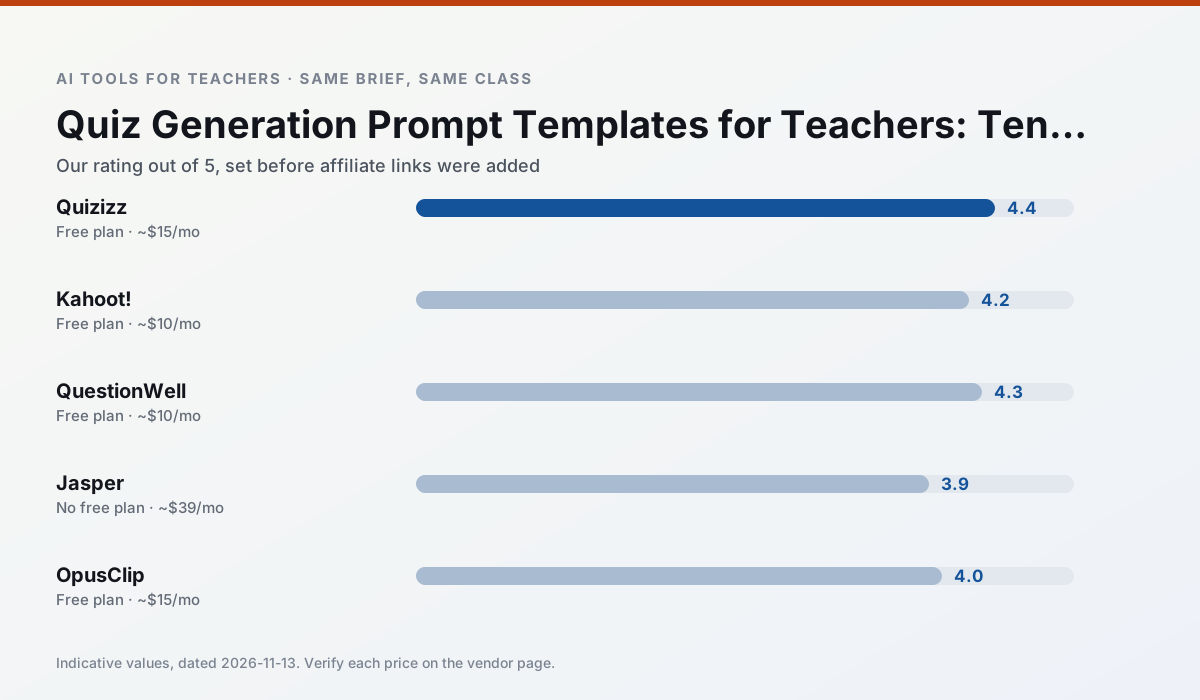
Side by side
Comparison table
Ratings reflect our timed classroom workflow, not vendor claims. Prices are indicative — verify on the vendor site.
| Tool | Best for | Free tier | Indicative paid plan | Standout feature | Our rating | Verdict | Try the tool |
|---|---|---|---|---|---|---|---|
| Quizizz | quiz generation · formative assessment | Yes — Core quiz creation | ~$15 /user/mo | AI question generator | 4.4 / 5 | Strong option | Try free |
| Kahoot! | quiz generation · review lessons | Yes — Limited player count | ~$10 /user/mo | AI question builder | 4.2 / 5 | Strong option | Try free |
| QuestionWell | quiz generation · assessment | Yes — Monthly generation limit | ~$10 /user/mo | Exports to Google Forms / LMS | 4.3 / 5 | Strong option | Try free |
| Jasper | newsletters · parent communication | No ongoing free plan | ~$39 /user/mo | Brand voice profiles | 3.9 / 5 | Situational | Try free |
| OpusClip | PD materials · flipped lessons | Yes — Limited monthly clips | ~$15 /user/mo | Auto captions | 4.0 / 5 | Situational | Try free |
| SchoolAI | student-safe AI · differentiated instruction | Yes — Limited seats | ~$15 /user/mo | Teacher-monitored student chats | 4.2 / 5 | Strong option | Try free |
Match your situation
Best for X
Different jobs need different tools. Here is what we would open first in each case.
If there is no budget, start with Quizizz: free plan with clearest quota is the least punishing free tier here.
On the daily cycle, Kahoot! saves the most edit time per task; the paid tier mostly buys more runs rather than better ones.
QuestionWell has the shortest path from opening a tab to a usable draft, which matters more than the feature count on a Monday.
Jasper is the option IT is least likely to block: single sign-on, admin removal of AI features and an agreement on file.
Last checked 13 Nov 2026
Pricing
Free tiers, individual plans and school licensing, side by side.
| Tool | Free plan | Individual / paid | School & district | Billing note | Verify |
|---|---|---|---|---|---|
| Quizizz | $0 — Core quiz creation | ~$15 /user/mo | Custom quote | Indicative — verify on vendor site | Vendor |
| Kahoot! | $0 — Limited player count | ~$10 /user/mo | Custom quote | Indicative — verify on vendor site | Vendor |
| QuestionWell | $0 — Monthly generation limit | ~$10 /user/mo | Custom quote | Indicative — verify on vendor site | Vendor |
| Jasper | No ongoing free tier | ~$39 /user/mo | ~$59+ /user/mo | Indicative — verify on vendor site | Vendor |
| OpusClip | $0 — Limited monthly clips | ~$15 /user/mo | ~$29 /user/mo | Indicative — verify on vendor site | Vendor |
| SchoolAI | $0 — Limited seats | ~$15 /user/mo | Custom quote | Indicative — verify on vendor site | Vendor |
Editorial rule: pricing is re-checked every 2–3 months and the top 50 pages are refreshed every 6 months. See our funding policy.
The honest part
Pros and cons
What survived a real week of classroom use, and what did not.
Pros
- Students already know the interface
- Good reporting
- Works on low-end devices
Cons
- Writing high-quality AI questions still needs review
- Gamification can distract
- Advanced analytics are paid
Pros
- Instant engagement
- Very low training time
- Strong brand familiarity
Cons
- Less depth for higher-order assessment
- Paid tiers needed for larger classes
- Time pressure suits recall more than reasoning
Pros
- Saves the most time on question writing
- Clean export workflow
- Good objective tagging
Cons
- Single-purpose tool
- Question quality varies by source text
- Limited student-facing features
Pros
- Consistent tone across communications
- Strong long-form editor
- Good for district comms teams
Cons
- Priced for marketing teams
- Overkill for one classroom
- No education-specific features
Pros
- Turns a recorded lesson into review clips
- Excellent captions
- Fast
Cons
- Optimised for social formats
- Not a lesson design tool
- Free plan is restrictive
In the classroom
Use cases
Five concrete workflows, with the tool we would open for each one.
Regrouping students after an assessment
Summarise anonymised results into skill groups, then generate one activity per group. Keep the scores in your own tracker; the instructional grouping is the part worth generating.
Recommended: QuizizzA weekly family newsletter from bullet notes
Newsletters fail on length, not tone. Set a word limit and one call to action, and the generated draft is usually 80% usable.
Recommended: Kahoot!Three reading levels from one source text
Paste a vetted text, ask for supported, core and extension versions, then check the vocabulary list by hand. Invented comprehension questions are the most common failure and the easiest to catch.
Recommended: QuestionWellA Monday morning lesson plan in twelve minutes
The twelve minutes come from not rewriting the skeleton. Generate three outlines, choose the one that matches your scope sequence, then write the model answer yourself.
Recommended: JasperA parent email in two languages
Draft in plain, warm language with no names, translate, then back-translate the important sentences to check meaning. Keep specific incidents out of the prompt and add them yourself.
Recommended: OpusClip
Questions teachers ask us
FAQ
Direct answers, also published as FAQPage structured data for search and AI assistants.
Do these prompts need a paid plan?
Can I use these with any tool?
How do I know the output is right?
Sources & further reading
Our recommendation
Try Jasper free for your next quiz generation task
Brand-voice writing assistant for school communications teams. Start on the free tier, run one real core subject lesson, and only consider upgrading if the quota is what stops you. Disclosure: we may earn a commission (varies) at no extra cost to you.
Some links on this page are affiliate links. We may earn a commission at no extra cost to you. Our rankings are editorial and never pay-to-play. Never enter student PII into a free consumer account.
Keep reading
Related comparisons in this cluster.
Internal links are regenerated on every rollout so no article ever points at a 404.