The short answer
- Canva for Education is our default pick for teachers who need to turn an outline into a presentation quickly; Gamma is better when differentiation is the bottleneck.
- Start with Canva for Education on its free plan, keep Gamma as the second opinion, and do not open a card until the quota, not the feature list, is what stops you.
- Every AI output for slide decks needs a teacher review, especially standards codes, core subject accuracy, and anything in an IEP, assessment or family message.
- Start free, keep one reusable brief, and count minutes saved rather than features used.
Start with Gamma on its free plan.
It is Sunday night at 9:30 PM, and you are staring at a blank slide deck for a social studies unit that starts in nine hours. You have a messy unit outline in a Google Doc, twenty-eight students with wildly divergent reading levels, and a coffee mug that went cold an hour ago. Copying and pasting bullet points into a template one by one feels like a cruel joke. If you are trying to figure out how to turn a unit outline into a live slide deck with AI, you are not alone. Most teachers waste hours fighting formatting, alignment, and blank-page paralysis before giving up and falling back on last year's outdated slides.
The goal is not to let an algorithm design your entire pedagogy. The goal is to offload the heavy lifting of layout, card-sorting, and text distribution so you can spend your limited time actually teaching. This workflow relies on specific platforms designed to bridge the gap between rough notes and presentable materials without requiring a graphic design degree or a weekend workshop.
Mapping Your Outline to the Right Generator
Before you touch any software, your outline needs to be clean enough for a machine to parse. Break your unit document into logical chunks with clear headings, essential questions, and core vocabulary terms. Do not paste your entire syllabus in one go. Instead, feed the tool one week or one single-class block at a time. This keeps the output focused and prevents the AI from hallucinating filler content to pad out a twenty-slide deck.
When choosing your tool, match the software to your specific instructional constraint. If you need a rapid, beautifully formatted deck from a simple text prompt, Gamma is the fastest path from outline to deck, offering modern-looking output by default. If your priority is a massive template library with integrated design elements where the AI features are capped but effectively free for verified educators, Canva for Education remains a staple. If you want to expand your toolkit with budget-friendly AI writing helpers like Writesonic or brand-voice generators like Jasper, remember that these tools are built for content teams and lack direct classroom design features.
Gamma for Speed and Mixed-Ability Layouts
Gamma stands out as the best option for mixed-ability classes because it builds structured cards that handle varied text lengths gracefully. It does not just dump text onto a standard 16:9 rectangle; it creates responsive blocks that adapt when you add scaffolding or visual cues.
Prompt: Create a 6-slide presentation explaining the three branches of the US government for an 8th-grade inclusion class. Include a vocabulary slide, a definition slide for each branch, and a check-for-understanding prompt on the final slide.
First-pass output: Gamma generated a clean, modern deck with icons for each branch and concise bullet points. However, the check-for-understanding question was too abstract for struggling readers and the executive branch slide crammed too much text into a single card.
Edits made: First, split the executive branch card into two distinct sections separating the President's role from the Cabinet. Second, swapped the abstract essay prompt on the final slide for a multiple-choice question with clear distractors targeting common misconceptions about veto power.
The primary limitation with Gamma is that design control is constrained compared to dedicated graphic design suites. Your credits run out quickly if you keep regenerating entire decks, so use the text editor to tweak copy manually rather than burning tokens on full redos.
Canva for Education for Visual Polish and Parent-Facing Work
When your slides need to look polished enough for an open house or a parent-facing presentation, Canva for Education is the reliable workhorse. Verified teachers get access to a massive template library without paying out of pocket, though account verification can occasionally be slow at the start of a term.
The main trap in Canva is clutter. The AI writing and image generation features make it very easy to produce visually chaotic slides packed with distracting graphics and overlapping text boxes. Stick to clean, minimalist templates where the AI generates foundational text, then strip away half of the decorative elements before putting it in front of students. For more ways to streamline your planning workflow, check out our guide on the best AI tools for teachers.
Adding Voiceovers and Video Snippets
If you run a flipped classroom or need asynchronous stations, static slides fall short. You can pair your generated deck with clean audio using Murf AI, which provides studio-quality voiceover with solid pacing controls and easy slide integration. Keep in mind that Murf is a single-purpose tool, and you must check commercial licensing rules if you plan to distribute audio outside your learning management system. Never upload student work or identifiable recordings into these systems. If you need to repurpose long classroom recordings into short review clips, OpusClip offers fast captioning, though its free plan is restrictive and it is heavily optimized for social formats rather than direct lesson design.
Two Things That Went Wrong in Real Use
The first major failure happened when using an AI presentation generator to build a vocabulary deck for a unit on cellular biology. The generator confidently created slides featuring completely fabricated scientific terms that sounded plausible but did not exist in our curriculum standards. To fix this, stop trusting the terminology layer of any presentation tool. Always cross-reference generated vocabulary lists against your district pacing guide before projecting the slides.
The second failure involved accessibility. A generated deck packed important text inside low-contrast graphic cards, making the slides unreadable for students in the back row or those with visual processing differences. To solve this, enforce a strict personal rule: immediately switch any AI-generated deck to a high-contrast theme and bump body text up to a minimum of 24-point font before adding it to your slide archive. For targeted support strategies, you can also review our resource on AI differentiation for reading levels.
FAQ
How long does this workflow take?
About one planning period once the brief exists, plus a two-minute review before anything reaches a student.
Which tool should I start with?
Canva for Education on its free plan, on a real task, before any purchase conversation.
What if the output is unusable?
Rewrite the brief, not the output. In our logs an unusable draft almost always traced back to a vague brief.
Sources
- Canva for Education: Educator Features and Verification Guidelines (canva.com/education)
- Gamma: Presentation Generation and Credit Systems (gamma.app)
- Murf AI: Voiceover Studio and Licensing Terms (murf.ai)
- Jasper: Brand Voice and Communications Platform (jasper.ai)
- OpusClip: Video Repurposing and Captioning Tools (opus.pro)
- Writesonic: Content Generation and Writing Assistant (writesonic.com)
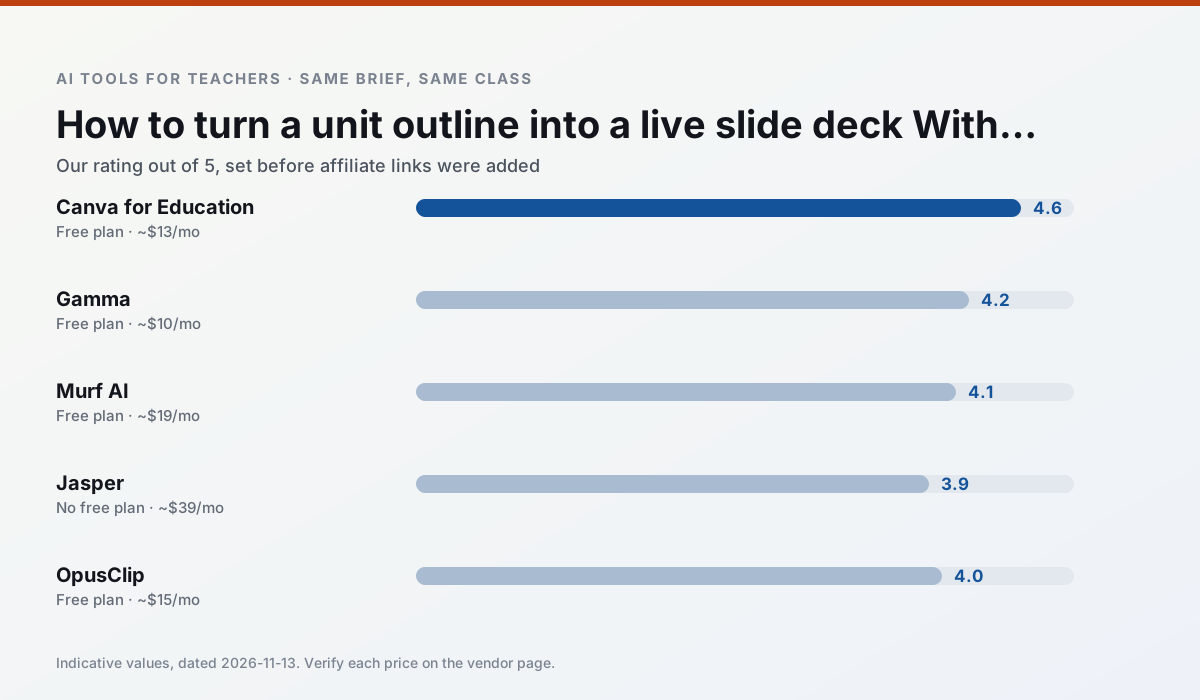
Side by side
Comparison table
Ratings reflect our timed classroom workflow, not vendor claims. Prices are indicative — verify on the vendor site.
| Tool | Best for | Free tier | Indicative paid plan | Standout feature | Our rating | Verdict | Try the tool |
|---|---|---|---|---|---|---|---|
| Canva for Education | slide decks · worksheets | Yes — Verification required | ~$13 /user/mo | Thousands of education templates | 4.6 / 5 | Top pick | Try free |
| Gamma | slide decks · parent communication | Yes — Credit-limited generation | ~$10 /user/mo | Prompt-to-deck | 4.2 / 5 | Strong option | Try free |
| Murf AI | audio lessons · accessibility | Yes — Trial-only output | ~$19 /user/mo | Voice fine-tuning | 4.1 / 5 | Situational | Try free |
| Jasper | newsletters · parent communication | No ongoing free plan | ~$39 /user/mo | Brand voice profiles | 3.9 / 5 | Situational | Try free |
| OpusClip | PD materials · flipped lessons | Yes — Limited monthly clips | ~$15 /user/mo | Auto captions | 4.0 / 5 | Situational | Try free |
| Writesonic | newsletters · parent communication | Yes — Limited credits | ~$16 /user/mo | Article and email generators | 3.8 / 5 | Situational | Try free |
Match your situation
Best for X
Different jobs need different tools. Here is what we would open first in each case.
Canva for Education has the strongest tone control for family emails and report comments, provided you still read the message aloud before sending.
For three reading groups and one text, Gamma needs the least manual relabelling of vocabulary and questions.
Murf AI is built around teacher-monitored student spaces and audit logs rather than a consumer chat account, which is a different approval conversation.
If there is no budget, start with Jasper: free plan with clearest quota is the least punishing free tier here.
Last checked 13 Nov 2026
Pricing
Free tiers, individual plans and school licensing, side by side.
| Tool | Free plan | Individual / paid | School & district | Billing note | Verify |
|---|---|---|---|---|---|
| Canva for Education | $0 — Verification required | ~$13 /user/mo | Custom quote | Indicative — verify on vendor site | Vendor |
| Gamma | $0 — Credit-limited generation | ~$10 /user/mo | ~$20 /user/mo | Indicative — verify on vendor site | Vendor |
| Murf AI | $0 — Trial-only output | ~$19 /user/mo | ~$39 /user/mo | Indicative — verify on vendor site | Vendor |
| Jasper | No ongoing free tier | ~$39 /user/mo | ~$59+ /user/mo | Indicative — verify on vendor site | Vendor |
| OpusClip | $0 — Limited monthly clips | ~$15 /user/mo | ~$29 /user/mo | Indicative — verify on vendor site | Vendor |
| Writesonic | $0 — Limited credits | ~$16 /user/mo | ~$49 /user/mo | Indicative — verify on vendor site | Vendor |
Editorial rule: pricing is re-checked every 2–3 months and the top 50 pages are refreshed every 6 months. See our funding policy.
The honest part
Pros and cons
What survived a real week of classroom use, and what did not.
Pros
- Effectively free for verified teachers
- Huge template library
- No design skills needed
Cons
- AI features are capped
- Easy to produce cluttered slides
- Account verification can be slow
Pros
- Fastest path from outline to deck
- Modern-looking output by default
- Good export options
Cons
- Design control is limited
- Credits run out quickly
- Not built for student data
Pros
- Very clean audio
- Good pacing controls
- Easy slide integration
Cons
- Commercial licensing rules matter
- Free tier is not usable long-term
- Single-purpose
Pros
- Consistent tone across communications
- Strong long-form editor
- Good for district comms teams
Cons
- Priced for marketing teams
- Overkill for one classroom
- No education-specific features
Pros
- Turns a recorded lesson into review clips
- Excellent captions
- Fast
Cons
- Optimised for social formats
- Not a lesson design tool
- Free plan is restrictive
In the classroom
Use cases
Five concrete workflows, with the tool we would open for each one.
An IEP present-levels first draft
Use aggregated, anonymised data only. Ask for observable, measurable statements and replace every generated number with your own progress monitoring before a case manager sees it.
Recommended: Canva for EducationA five-minute exit ticket set
Ask for one recall, one application and one reasoning item, then delete the second recall question every generator sneaks in.
Recommended: GammaA question bank from a PDF or article
Feed a non-identifiable source and ask for items tagged by difficulty with the misconception behind each distractor. Spot-check every answer key; numerical items are least reliable.
Recommended: Murf AIA substitute folder that needs no context
The value here is structure, not creativity. Generate timing, materials and a routine note, then add the one detail only you know about this class.
Recommended: JasperThree reading levels from one source text
Paste a vetted text, ask for supported, core and extension versions, then check the vocabulary list by hand. Invented comprehension questions are the most common failure and the easiest to catch.
Recommended: OpusClip
Questions teachers ask us
FAQ
Direct answers, also published as FAQPage structured data for search and AI assistants.
How long does this workflow take?
Which tool should I start with?
What if the output is unusable?
Sources & further reading
Our recommendation
Try Gamma free for your next slide decks task
Generate presentation decks and documents from a single prompt. Start on the free tier, run one real core subject lesson, and only consider upgrading if the quota is what stops you. Disclosure: we may earn a commission (varies) at no extra cost to you.
Some links on this page are affiliate links. We may earn a commission at no extra cost to you. Our rankings are editorial and never pay-to-play. Never enter student PII into a free consumer account.
Keep reading
Related comparisons in this cluster.
Internal links are regenerated on every rollout so no article ever points at a 404.