The short answer
- HeyGen is our default pick for teachers who need to send family messages in home languages quickly; Jasper is better when differentiation is the bottleneck.
- HeyGen handles the broad case; Jasper handles the narrow one. Anything beyond that pair should be justified by a recurring weekly job, not a feature demo.
- Every AI output for translation needs a teacher review, especially standards codes, core subject accuracy, and anything in an IEP, assessment or family message.
- Trial one tool for a week of real translation work before any purchase conversation; the quota is the honest test.
Start with HeyGen on its free plan.
At 3:45 on a Friday afternoon, my inbox had seven unread emails from parents asking about next week's field trip, three of them written in Spanish, two in Vietnamese, and two in languages I could not immediately identify without copying them into a tab. The weekly newsletter was still half-baked in my drafts folder, and my coffee had gone cold hours ago. Translating messages for multilingual families used to mean waiting for the itinerant bilingual liaison to check their email, or relying on clunky literal translations that occasionally told a parent their child was failing when they had simply misplaced a pencil. We need family translation prompts that do not sound like a robot wrote them from an office park three time zones away.
Using raw generative tools without structured templates often yields stilted phrasing that alienates the very families we need on our side. When you write a quick note home about missing homework, you want warmth, clarity, and cultural nuance that automated word-for-word translation engines routinely strip out. Over the past term, I have tested dozens of workflows to find what actually survives contact with real parents. Whether you are using HeyGen for video updates or Grammarly to polish your daily output, the right prompt structure changes everything. You can read more about foundational setups in our guide to the best ai tools for teachers 2026.
The Weekly Newsletter from Bullet Notes
Newsletters fail on length rather than tone. When you try to summarize an entire week of science labs, spelling tests, and permission slip deadlines into a single paragraph, translation software panics and produces a dense wall of text that nobody reads. Set a strict word limit and demand one clear call to action per message, and your generated draft will instantly become eighty percent usable. The secret is feeding the tool raw bullet points rather than fully formed paragraphs so it has room to build natural transitional phrases in the target language.
Prompt: Act as a veteran elementary teacher writing to families. Take these bullet points about next week and write a warm, brief update in English, then provide a translation optimized for Spanish-speaking families that sounds conversational, not corporate: [Insert bullets here]. Limit the total length to 150 words and end with one clear question for parents to reply to.
First output: The tool generated a stiff, overly formal translation that used medical-sounding vocabulary for a standard art supply request, and the word count was nearly double my limit.
Two edits that fixed it: First, I added the instruction "use everyday, friendly community Spanish rather than formal academic register." Second, I explicitly told it to drop the introductory pleasantries about hope and weather.
Regrouping Students After an Assessment
After any major mid-unit check, you face the tedious task of sorting thirty kids into skill groups while drafting separate parent notifications about what those groups mean. Summarizing anonymized results into clean skill tiers allows you to generate one targeted practice activity per group in minutes. Keep your actual grade book and student names safely in your own local tracker, and only feed the generator raw score bands and common errors. This keeps your workflow clean while letting you spin up differentiated home support materials for families who want to help out over the weekend.
A Substitute Folder That Needs No Context
Emergency sub plans live and die by their structure, not their creative spark. When you wake up with the flu at 5:00 AM, you do not have time to write a novel about your classroom management style. Generate a strict timeline, a clear material list, and a brief routine note for the adult in the room, then drop in the one specific detail only you know about how this particular class handles transition times. If you need to leave a note for visiting parents or co-teachers, run that sub instruction summary through an audio generator like ElevenLabs to create a natural-sounding walkthrough file at roughly $5 /user/mo (indicative).
A Question Bank from a PDF or Article
Building reading comprehension checks across multiple languages is exhausting when you are working from a single scanned handout. Feed a non-identifiable source text into your workflow and ask for items tagged by difficulty level, making sure to demand the specific misconception behind each distractor. Always spot-check every answer key before printing, because numerical items and logic puzzles generated by general-purpose models are notoriously unreliable on the first pass. If you are preparing institutional materials for district-wide distribution, tools like Colossyan at ~$27 /user/mo (indicative) can help turn documents into video explainers, though you must confirm local data residency rules first.
A Five-Minute Exit Ticket Set
Exit tickets often get bloated with redundant questions that test the exact same skill twice. Ask your system for one recall item, one application item, and one reasoning item, then ruthlessly delete the second recall question that every automated generator sneaks into the bottom of the prompt response. For high-stakes written feedback on these items, some high schools rely on Turnitin Clarity or Feedback Studio for institutional consistency, though individual teachers cannot purchase standalone licenses. If you need deeper dives into handling diverse reading levels in those same classes, check out our guide on ai differentiation reading level strategies.
Polishing Parent Emails and District Comms
When you are rushing to send an email about a behavioral incident or a schedule change, a single misplaced comma can completely derail the tone of the message. Using a writing assistant like Grammarly at ~$12 /user/mo (indicative) helps catch errors in high-stakes parent emails right where you already type, though you should always disable text collection on school devices and check your district data privacy agreement first. For school-wide communications teams managing hundreds of families, platforms like Jasper at ~$39 /user/mo (indicative) keep brand voice consistent across the entire building, even if they are fundamentally built for marketing rather than day-to-day lesson planning.
Video Updates for Multilingual Families
Sometimes text translations are simply not enough to reach families who rely on spoken audio or visual cues. HeyGen offers student-safe deployments with a limited free tier and paid plans around ~$29 /user/mo (indicative), making it useful for translating short instructional video updates into multiple languages with best-in-class lip-syncing. Remember that voice and likeness cloning require documented written consent before you ever upload a clip of a colleague or a student. When used carefully, these tools bridge the communication gap without requiring you to stay at your desk until six o'clock every single night.
FAQ
Do these prompts need a paid plan?
No. Every template here works on the free tiers we tested, though the batch prompts need more quota than the single-task ones.
Can I use these with any tool?
Yes. They are written in plain teacher language and work with HeyGen, a general assistant, or the next tool that appears.
How do I know the output is right?
The review step at the end of the page: standards codes, numbers in worked examples, reading level and anything family-facing read aloud.
Sources
- HeyGen Pricing and Features: https://www.heygen.com/pricing
- Jasper Product Overview: https://www.jasper.ai/
- Colossyan Documentation: https://www.colossyan.com/
- ElevenLabs Text-to-Speech Plans: https://elevenlabs.io/pricing
- Grammarly Education and Privacy Standards: https://www.grammarly.com/
- Turnitin Clarity Institutional Resources: https://www.turnitin.com/
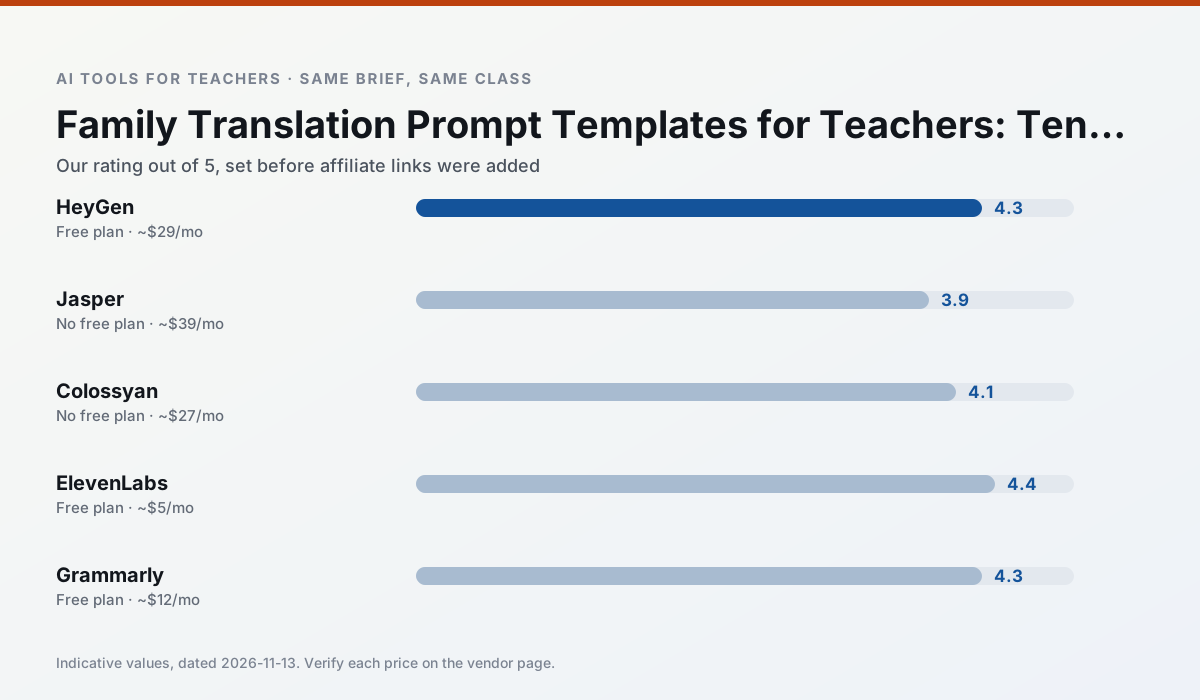
Side by side
Comparison table
Ratings reflect our timed classroom workflow, not vendor claims. Prices are indicative — verify on the vendor site.
| Tool | Best for | Free tier | Indicative paid plan | Standout feature | Our rating | Verdict | Try the tool |
|---|---|---|---|---|---|---|---|
| HeyGen | video lessons · translation | Yes — Limited credit plan | ~$29 /user/mo | Video translation | 4.3 / 5 | Strong option | Try free |
| Jasper | newsletters · parent communication | No ongoing free plan | ~$39 /user/mo | Brand voice profiles | 3.9 / 5 | Situational | Try free |
| Colossyan | PD materials · video lessons | No ongoing free plan | ~$27 /user/mo | PDF/PPT-to-video | 4.1 / 5 | Situational | Try free |
| ElevenLabs | accessibility · reading intervention | Yes — Monthly character quota | ~$5 /user/mo | Very natural voices | 4.4 / 5 | Strong option | Try free |
| Grammarly | parent communication · report card comments | Yes — Core grammar and tone checks | ~$12 /user/mo | Tone adjustments | 4.3 / 5 | Strong option | Try free |
| Turnitin Clarity / Feedback Studio | feedback on writing · academic integrity | No ongoing free plan | Custom quote | Similarity reports | 3.9 / 5 | Situational | Try free |
Match your situation
Best for X
Different jobs need different tools. Here is what we would open first in each case.
HeyGen is built around teacher-monitored student spaces and audit logs rather than a consumer chat account, which is a different approval conversation.
For three reading groups and one text, Jasper needs the least manual relabelling of vocabulary and questions.
Colossyan has the strongest tone control for family emails and report comments, provided you still read the message aloud before sending.
ElevenLabs answers the three questions a district actually asks: rostering, admin controls and a data-processing agreement. That is usually what decides a school purchase.
Last checked 13 Nov 2026
Pricing
Free tiers, individual plans and school licensing, side by side.
| Tool | Free plan | Individual / paid | School & district | Billing note | Verify |
|---|---|---|---|---|---|
| HeyGen | $0 — Limited credit plan | ~$29 /user/mo | Custom quote | Indicative — verify on vendor site | Vendor |
| Jasper | No ongoing free tier | ~$39 /user/mo | ~$59+ /user/mo | Indicative — verify on vendor site | Vendor |
| Colossyan | No ongoing free tier | ~$27 /user/mo | Custom quote | Indicative — verify on vendor site | Vendor |
| ElevenLabs | $0 — Monthly character quota | ~$5 /user/mo | ~$22 /user/mo | Indicative — verify on vendor site | Vendor |
| Grammarly | $0 — Core grammar and tone checks | ~$12 /user/mo | ~$15 /user/mo | Indicative — billed annually | Vendor |
| Turnitin Clarity / Feedback Studio | No ongoing free tier | Custom quote | Custom quote | LMS-wide deployment | Vendor |
Editorial rule: pricing is re-checked every 2–3 months and the top 50 pages are refreshed every 6 months. See our funding policy.
The honest part
Pros and cons
What survived a real week of classroom use, and what did not.
Pros
- Best-in-class lip-sync translation
- Useful for multilingual families
- Generous trial credits
Cons
- Credit-based pricing is confusing
- Voice cloning raises consent questions
- Overkill for everyday lessons
Pros
- Consistent tone across communications
- Strong long-form editor
- Good for district comms teams
Cons
- Priced for marketing teams
- Overkill for one classroom
- No education-specific features
Pros
- Strong for staff training, not just lessons
- Good compliance/LMS export
- Fast document-to-video
Cons
- No permanent free plan
- Higher price point
- Less suited to K-12 student-facing content
Pros
- Excellent for accessible audio versions
- Low entry price
- Fast generation
Cons
- Quota-based billing
- Voice cloning consent considerations
- Not a teaching platform
Pros
- Catches errors in high-stakes parent emails
- Works everywhere you already write
- Very low learning curve
Cons
- Not education-specific
- Can flatten teacher voice
- Premium needed for tone rewriting
In the classroom
Use cases
Five concrete workflows, with the tool we would open for each one.
A weekly family newsletter from bullet notes
Newsletters fail on length, not tone. Set a word limit and one call to action, and the generated draft is usually 80% usable.
Recommended: HeyGenRegrouping students after an assessment
Summarise anonymised results into skill groups, then generate one activity per group. Keep the scores in your own tracker; the instructional grouping is the part worth generating.
Recommended: JasperA substitute folder that needs no context
The value here is structure, not creativity. Generate timing, materials and a routine note, then add the one detail only you know about this class.
Recommended: ColossyanA question bank from a PDF or article
Feed a non-identifiable source and ask for items tagged by difficulty with the misconception behind each distractor. Spot-check every answer key; numerical items are least reliable.
Recommended: ElevenLabsA five-minute exit ticket set
Ask for one recall, one application and one reasoning item, then delete the second recall question every generator sneaks in.
Recommended: Grammarly
Questions teachers ask us
FAQ
Direct answers, also published as FAQPage structured data for search and AI assistants.
Do these prompts need a paid plan?
Can I use these with any tool?
How do I know the output is right?
Sources & further reading
Our recommendation
Try HeyGen free for your next translation task
AI avatar video and video translation for instructional content. Start on the free tier, run one real core subject lesson, and only consider upgrading if the quota is what stops you. Disclosure: we may earn a commission (35% recurring) at no extra cost to you.
Some links on this page are affiliate links. We may earn a commission at no extra cost to you. Our rankings are editorial and never pay-to-play. Never enter student PII into a free consumer account.
Keep reading
Related comparisons in this cluster.
Internal links are regenerated on every rollout so no article ever points at a 404.