The short answer
- Class Companion is our default pick for teachers who need to draft a standards-aware lesson plan quickly; SchoolAI is better when differentiation is the bottleneck.
- Class Companion handles the broad case; SchoolAI handles the narrow one. Anything beyond that pair should be justified by a recurring weekly job, not a feature demo.
- Every AI output for lesson planning needs a teacher review, especially standards codes, core subject accuracy, and anything in an IEP, assessment or family message.
- Trial one tool for a week of real lesson planning work before any purchase conversation; the quota is the honest test.
Start with Fliki on its free plan.
It was a Thursday afternoon in October when I realized my eighth-graders were about to mix two chemicals that should never, under any circumstances, be introduced to each other outside of a fume hood. I had pulled a classic inquiry lab off the internet, swapped out three paragraphs of instructions to save time, and skipped the Flinn Scientific catalog check. When I asked a general-purpose language model to verify the procedure that morning, it cheerfully told me the reaction was "safe and engaging for middle schoolers." It was not. That near-miss sent me down a six-month rabbit hole of testing whether generative tools can actually help plan a science lab safely without putting my certification or my kids at risk.
The short answer is yes, but only if you stop treating language models like safety officers and start treating them like overly eager student teachers who need adult supervision. If you are looking at our broader breakdown of the best AI tools for teachers in 2026, you already know the market is flooded with platforms promising to automate your weekend. When it comes to lab safety, disposal protocols, and stoichiometric math, convenience can turn into a liability very quickly.
Why General Prompts Fail Lab Safety
When you ask an AI to write a lab, it hallucinates plausible-sounding procedures. It invents equipment names, underestimates reaction times, and routinely forgets that middle school sinks cannot handle certain precipitates down the drain. To get a safe output, you have to constrain the model entirely. You supply the constraints; the model supplies the formatting.
If you are trying to spin up a lab, adapt readings, or build support materials, you need a reliable process. For instance, when I need to adapt a complex text for multiple reading tiers before students touch equipment, I rely on the workflow outlined in AI differentiation strategies for reading levels. You paste a vetted source text, ask for supported, core, and extension versions, and then check the vocabulary list by hand because invented comprehension questions are the most common failure mode and the easiest to catch.
Testing Promped Safety Workflows
To see what works, I ran a series of trials using structured prompts rather than open-ended chats. I needed a titration lab that wouldn't melt skin or destroy my prep room budget.
Prompt: Act as a veteran high school chemistry safety coordinator. Review the following procedure for a simple acid-base titration using 0.1M hydrochloric acid and 0.1M sodium hydroxide with phenolphthalein indicator. Identify every safety hazard, specify the exact PPE required, and write a mandatory student disposal protocol that complies with standard secondary school waste management.
First response: The model provided a standard procedure, listed goggles and aprons, and suggested neutralizing the final mixture in the sink with tap water.
Edit one: I rejected the sink-neutralization step because our district requires acid-base neutralization in designated carboys before collection, so I added a strict constraint about local district hazardous waste guidelines.
Edit two: I stripped out the model's chatty preamble and formatted the hazard warnings into a mandatory pre-lab checklist that students must sign before touching glassware.
That edited output became a reliable handout. But generating text is only half the battle; managing the actual classroom execution requires tools built for district guardrails.
Matching Tools to Laboratory Needs
If you are deploying tech that interacts directly with student output, you need platforms designed for institutional compliance rather than casual consumer use. For structured student work environments, Class Companion stands out as our top pick for schools and districts, priced at roughly $12 per user per month on its paid tier. It handles handwritten and scanned student work, providing fast, specific comments that help students refine their lab write-ups. Because student work is uploaded, a district Data Protection Agreement is required, but it shines where kids are still doing calculations on paper.
For quick setup during pre-lab activities or digital stations, SchoolAI is our pick for rapid deployment at about $15 per user per month. It offers teacher visibility into student spaces and solid safeguarding defaults, though pricing is largely quote-based and requires school-wide buy-in.
When you need to flip your instruction or provide visual explainers for procedures that are too dangerous to demonstrate live, media generators enter the conversation. Fliki is our overall top pick for daily video creation at roughly $21 per user per month, allowing you to build text-to-video explainers with stock media and voiceovers without needing an avatar. Murf AI works well as a free option for trial-based audio generation, moving up to roughly $19 per user per month for studio-quality pacing controls. Colossyan runs around $27 per user per month and excels at compliance and LMS export for staff training rather than K-12 student-facing tasks. Finally, ElevenLabs provides natural-sounding voiceovers starting around $5 per user per month, which is handy for generating accessible audio versions of lab safety contracts, provided you respect voice-cloning consent rules.
Two Things That Went Wrong
My first real test of an AI-generated lab protocol involved a copper sulfate crystal growth lab. The model suggested using heat sources that were entirely unnecessary and omitted the specific waste disposal steps for heavy metal solutions. Instead of panicking, I cross-referenced the output against our state's Department of Education chemical hygiene plan and manually rewrote the disposal section myself. The AI provided the structural layout for the student worksheet, but I acted as the final compliance officer.
My second failure happened when I tried to use an AI voice tool to generate an audio version of our safety contract for an ELL student. The tool produced a clean, professional reading, but it completely mispronounced technical terms like "corrosive" and "effervescence" in a way that changed the meaning for a language learner. I learned quickly that specialized vocabulary cannot be left to text-to-speech models without a phonetic spelling pass on the backend.
AI can help you format a lab, draft clean rubrics, and save you forty minutes on a Sunday night. It cannot smell a chemical leak, stop a kid from taking off their goggles to wipe their forehead, or replace your professional judgment. Treat it like a very fast, slightly reckless assistant, and keep your hand on the safety switch.
FAQ
Is AI allowed for lesson planning in my school?
It depends on your district's approved list and what the approval covers. Ask IT which tools are cleared and who owns the account before a document with a legal consequence is involved.
Who is responsible if something goes wrong?
The school, and in practice the named teacher who reviewed the output. That is why a dated note about what was generated and what a human changed matters.
What should never go into a prompt?
Names, rosters, scans of student work and gradebook screenshots. Topic-level prompts do most of the work without any of that.
Sources
- Class Companion. Pricing and Features Overview. Available at: https://classcompanion.com (Accessed: 13 November 2026).
- SchoolAI. District Safety and Compliance Documentation. Available at: https://school.ai (Accessed: 13 November 2026).
- Fliki. Plans and Capabilities. Available at: https://fliki.ai (Accessed: 13 November 2026).
- Murf AI. Audio Generation Pricing. Available at: https://murf.ai (Accessed: 13 November 2026).
- Colossyan. Enterprise and Educational Plans. Available at: https://colossyan.com (Accessed: 13 November 2026).
- ElevenLabs. Text-to-Speech Quotas and Pricing. Available at: https://elevenlabs.io (Accessed: 13 November 2026).
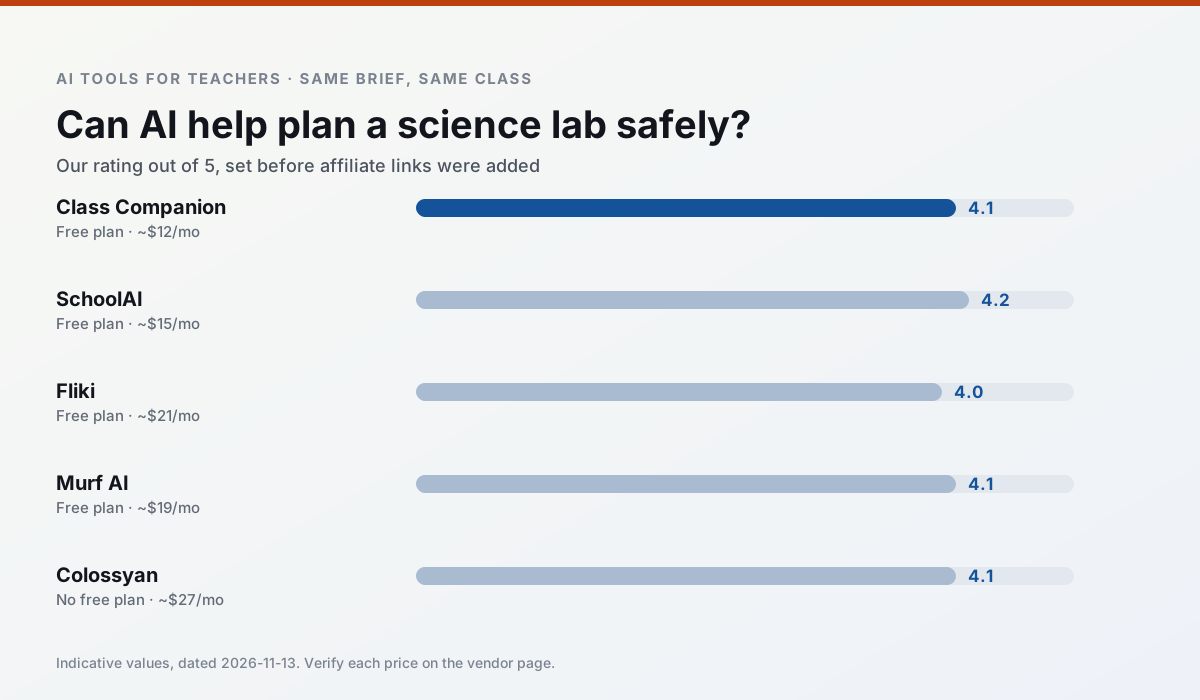
Side by side
Comparison table
Ratings reflect our timed classroom workflow, not vendor claims. Prices are indicative — verify on the vendor site.
| Tool | Best for | Free tier | Indicative paid plan | Standout feature | Our rating | Verdict | Try the tool |
|---|---|---|---|---|---|---|---|
| Class Companion | grading · feedback on writing | Yes — Limited assignments | ~$12 /user/mo | Handwriting recognition | 4.1 / 5 | Situational | Try free |
| SchoolAI | student-safe AI · differentiated instruction | Yes — Limited seats | ~$15 /user/mo | Teacher-monitored student chats | 4.2 / 5 | Strong option | Try free |
| Fliki | video lessons · audio lessons | Yes — Watermarked, limited minutes | ~$21 /user/mo | Blog/text to video | 4.0 / 5 | Situational | Try free |
| Murf AI | audio lessons · accessibility | Yes — Trial-only output | ~$19 /user/mo | Voice fine-tuning | 4.1 / 5 | Situational | Try free |
| Colossyan | PD materials · video lessons | No ongoing free plan | ~$27 /user/mo | PDF/PPT-to-video | 4.1 / 5 | Situational | Try free |
| ElevenLabs | accessibility · reading intervention | Yes — Monthly character quota | ~$5 /user/mo | Very natural voices | 4.4 / 5 | Strong option | Try free |
Match your situation
Best for X
Different jobs need different tools. Here is what we would open first in each case.
Class Companion answers the three questions a district actually asks: rostering, admin controls and a data-processing agreement. That is usually what decides a school purchase.
SchoolAI runs in a browser tab with no extension, no student accounts and no onboarding call, so you can test it in a free period.
On the daily cycle, Fliki saves the most edit time per task; the paid tier mostly buys more runs rather than better ones.
Nothing on Murf AI's free tier is a teaser demo; the limits are documented and a normal week fits inside them.
Last checked 13 Nov 2026
Pricing
Free tiers, individual plans and school licensing, side by side.
| Tool | Free plan | Individual / paid | School & district | Billing note | Verify |
|---|---|---|---|---|---|
| Class Companion | $0 — Limited assignments | ~$12 /user/mo | Custom quote | Indicative — verify on vendor site | Vendor |
| SchoolAI | $0 — Limited seats | ~$15 /user/mo | Custom quote | Indicative — verify on vendor site | Vendor |
| Fliki | $0 — Watermarked, limited minutes | ~$21 /user/mo | ~$66 /user/mo | Indicative — verify on vendor site | Vendor |
| Murf AI | $0 — Trial-only output | ~$19 /user/mo | ~$39 /user/mo | Indicative — verify on vendor site | Vendor |
| Colossyan | No ongoing free tier | ~$27 /user/mo | Custom quote | Indicative — verify on vendor site | Vendor |
| ElevenLabs | $0 — Monthly character quota | ~$5 /user/mo | ~$22 /user/mo | Indicative — verify on vendor site | Vendor |
Editorial rule: pricing is re-checked every 2–3 months and the top 50 pages are refreshed every 6 months. See our funding policy.
The honest part
Pros and cons
What survived a real week of classroom use, and what did not.
Pros
- Useful where work is done on paper
- Fast, specific comments
- Good math support
Cons
- Scan quality affects accuracy
- Narrow use case
- Feedback still needs teacher review
Pros
- Designed for district approval
- Teacher visibility into student use
- Good safeguarding defaults
Cons
- Requires school-wide buy-in
- Less flexible than general LLMs
- Pricing is mostly quote-based
Pros
- No avatar needed
- Good for explainer visuals
- Simple editor
Cons
- Minute-based limits
- Output can look generic
- Price jumps between tiers
Pros
- Very clean audio
- Good pacing controls
- Easy slide integration
Cons
- Commercial licensing rules matter
- Free tier is not usable long-term
- Single-purpose
Pros
- Strong for staff training, not just lessons
- Good compliance/LMS export
- Fast document-to-video
Cons
- No permanent free plan
- Higher price point
- Less suited to K-12 student-facing content
In the classroom
Use cases
Five concrete workflows, with the tool we would open for each one.
Rubric and feedback comments in one pass
Reorder the workflow so the rubric is yours and the comments are generated. Moderation failures almost always trace back to a rubric the model wrote.
Recommended: Class CompanionA parent email in two languages
Draft in plain, warm language with no names, translate, then back-translate the important sentences to check meaning. Keep specific incidents out of the prompt and add them yourself.
Recommended: SchoolAIA Monday morning lesson plan in twelve minutes
The twelve minutes come from not rewriting the skeleton. Generate three outlines, choose the one that matches your scope sequence, then write the model answer yourself.
Recommended: FlikiThree reading levels from one source text
Paste a vetted text, ask for supported, core and extension versions, then check the vocabulary list by hand. Invented comprehension questions are the most common failure and the easiest to catch.
Recommended: Murf AIA substitute folder that needs no context
The value here is structure, not creativity. Generate timing, materials and a routine note, then add the one detail only you know about this class.
Recommended: Colossyan
Questions teachers ask us
FAQ
Direct answers, also published as FAQPage structured data for search and AI assistants.
Is AI allowed for lesson planning in my school?
Who is responsible if something goes wrong?
What should never go into a prompt?
Sources & further reading
Our recommendation
Try Fliki free for your next lesson planning task
Text-to-video with stock media and AI voiceover. Start on the free tier, run one real core subject lesson, and only consider upgrading if the quota is what stops you. Disclosure: we may earn a commission (varies) at no extra cost to you.
Some links on this page are affiliate links. We may earn a commission at no extra cost to you. Our rankings are editorial and never pay-to-play. Never enter student PII into a free consumer account.
Keep reading
Related comparisons in this cluster.
Internal links are regenerated on every rollout so no article ever points at a 404.