The short answer
- Grammarly is our default pick for teachers who need to produce specific, evidence-based comments quickly; Jasper is better when differentiation is the bottleneck.
- Pricing is where these pages date fastest. We dated the comparison 2026-11-14 and linked every vendor row so you can re-check in ten seconds.
- Every AI output for report card comments needs a teacher review, especially standards codes, core subject accuracy, and anything in an IEP, assessment or family message.
- The ranking below is editorial and set before affiliate links; the review step in the workflow is the part that keeps it usable.
Start with Grammarly on its free plan.
By November 2026, I had typed the phrase "shows good potential" thirty-four times in an afternoon, and my right hand felt like it had been permanently welded to a plastic mouse. Report card writing is the endurance sport of teaching. It arrives at the end of a term when your reserves are already empty, demanding that you synthesize four months of academic growth, behavioral quirks, and social development into three grammatically correct paragraphs per child. When you use AI to survive this crunch, the risk is not that the machine will write gibberish. The risk is that thirty-two parents will open their envelopes to discover that their unique, complicated child has been described with the exact same glowing platitude as every other kid in row four.
Learning how to generate report card comments that sound like you with AI requires moving past generic prompts and building a workflow that preserves your actual voice. General-purpose models like ChatGPT, available on a free tier or via paid plans at roughly $20 per month, offer immense flexibility for this task, but they require strict guardrails. If you feed an unconstrained chatbot a name and a grade, you get corporate-speak that sounds like a LinkedIn post written by a robot. To fix this, you need a system that captures your cadence, protects student privacy, and uses tools where you control the output.
Why generic prompts fail your classroom voice
The internet is full of prompt templates that promise to write your entire report card if you just drop in a grade and a subject. These usually fail because they lack texture. Real teachers do not write in uninterrupted paragraphs of praise punctuated by a single polite suggestion for growth. Real teachers mention the specific way a student gets stuck on word problems, or how they finally stopped tapping their pencil during silent reading in October.
When you use a general-purpose model like ChatGPT, or a document-heavy assistant like Claude at roughly $20 per user per month, you have to feed it your own writing samples before asking it to generate anything new. Without a stylistic baseline, the tool defaults to the average of the internet, which reads like a cheerful insurance manual. Furthermore, privacy is non-negotiable here. Consumer AI plans are not suitable for student data. You must anonymize every prompt by stripping out names, ID numbers, and specific medical diagnoses. Use initials or generic identifiers like "Student A," and plug the real names back in after you have heavily edited the output.
Setting up your AI writing stack
Choosing the right tool for the job prevents endless revision cycles. If you want a writing assistant that works everywhere you already type, Grammarly offers a free tier for core grammar and tone checks, while its paid version at roughly $12 per user per month helps rewrite clunky phrasing. It works inside your web browser and catches errors in high-stakes parent communications, though it can flatten your natural teacher voice if you lean on it too hard. Make sure to disable text collection on school devices and check your district data processing agreement.
For teachers who need to manage long-form narrative blocks or synthesize extensive term data, Claude handles large documents exceptionally well. Its paid plan sits around $20 per user per month, and it excels at producing nuanced, less generic prose than its competitors. If your school has invested in a dedicated ecosystem like SchoolAI, which costs roughly $15 per user per month with quote-based district pricing, you get a school-safe workspace with teacher visibility and safeguarding defaults that simplify compliance.
If you are looking at broader school communications teams, Jasper operates as a brand-voice writing assistant at roughly $39 per user per month, though it is fundamentally priced for marketing teams and is usually overkill for a single classroom. Meanwhile, video tools like OpusClip, priced around $15 per user per month, are optimized for social formats and district comms rather than classroom grading, though they shine if you are repurposing recorded lessons into review clips. For everyday report cards, stick to text-based assistants where you can tightly control the prompt and the output.
The multi-step comment generation workflow
To get comments that actually sound like you, stop asking the AI to "write a report card comment for a B-plus student in math." Instead, break the process into a structured sequence. Start by compiling your gradebook notes and behavioral observations in a local document. Next, feed the AI three actual comments you wrote last year that you genuinely liked. This gives the model a stylistic anchor for sentence length, vocabulary, and tone.
Prompt:
Act as an experienced upper-elementary teacher. Here are three examples of report card comments I wrote last year that reflect my natural voice: [Paste 3 sample comments]. Now, using only the following bullet points for Student A, draft a math and science progress comment that matches the tone, warmth, and directness of my samples. Do not invent any new behavioral traits. Bullets: strong spatial reasoning, struggles to finish timed multiplication checks, excellent lab partner, needs to check work before submitting.

Generated Output:
Student A has shown a wonderful grasp of spatial reasoning this term, frequently building complex and creative structures during geometry units. They are a collaborative and supportive lab partner, always ensuring everyone in their group is included. In academic output, Student A benefits from slowing down; their timed multiplication checks often suffer because they rush through without checking their work for careless errors. With continued focus on self-editing, Student A will see even stronger math results next term.

Teacher Edits:
1. Changed "Student A has shown a wonderful grasp" to "Maya's spatial reasoning has really clicked this term."
2. Replaced "benefits from slowing down" with "we are still working on the habit of double-checking computation before handing papers in."
This workflow ensures the generated draft is already eighty percent of the way home, leaving you to inject the specific human touches that AI simply cannot guess. For broader context on how these systems fit into daily planning, review our guide on best AI tools for teachers. If you are also tackling specialized documentation like accommodations, you might find our breakdown on 504 plans prompt templates for teachers useful for keeping your administrative load manageable.
Avoiding common AI report card pitfalls
Two major things go wrong when teachers rush this process. First, the AI will hallucinate academic growth or behavioral traits that never happened. Because you are tired and skimming dozens of entries, it is dangerously easy to sign off on a comment claiming a student "participated enthusiastically in class discussions" when that child spent the entire quarter hiding behind their hoodie. Always cross-check the generated claims against your actual gradebook or anecdotal notes.
Second, the tone can drift into toxic positivity or overly clinical psychological assessments. If the AI starts describing an eight-year-old using terms like "exhibits deficit in sustained attention modulation," delete the paragraph immediately. You are writing a school report card, not a diagnostic intake form. When this happens, tighten your prompt by instructing the model to use plain, direct, conversational language suitable for a working-class parent.
If you find yourself spending more time editing a generated comment than it would have taken to write it from scratch, stop using the AI for that specific student profile. The goal is cognitive relief, not perfectionism by proxy. Keep your prompt library lean, protect student privacy by keeping names out of the cloud, and use these tools to break through the blank-page paralysis so your authentic voice can finish the job.
FAQ
How long does this workflow take?
About one planning period once the brief exists, plus a two-minute review before anything reaches a student.
Which tool should I start with?
Grammarly on its free plan, on a real task, before any purchase conversation.
What if the output is unusable?
Rewrite the brief, not the output. In our logs an unusable draft almost always traced back to a vague brief.
Sources
- OpenAI. (2026). ChatGPT pricing and workspace privacy tiers. Retrieved from https://openai.com/chatgpt/pricing/
- Anthropic. (2026). Claude features and document handling capabilities. Retrieved from https://www.anthropic.com/claude
- Grammarly. (2026). Grammarly for education and tone writing assistant features. Retrieved from https://www.grammarly.com/
- SchoolAI. (2026). Safe AI workspaces and teacher controls for K-12. Retrieved from https://school.ai/
- Jasper AI. (2026). Brand voice and marketing writing assistant data. Retrieved from https://www.jasper.ai/
- OpusClip. (2026). Video repurposing and captioning tool specifications. Retrieved from https://www.opus.pro/
Side by side
Comparison table
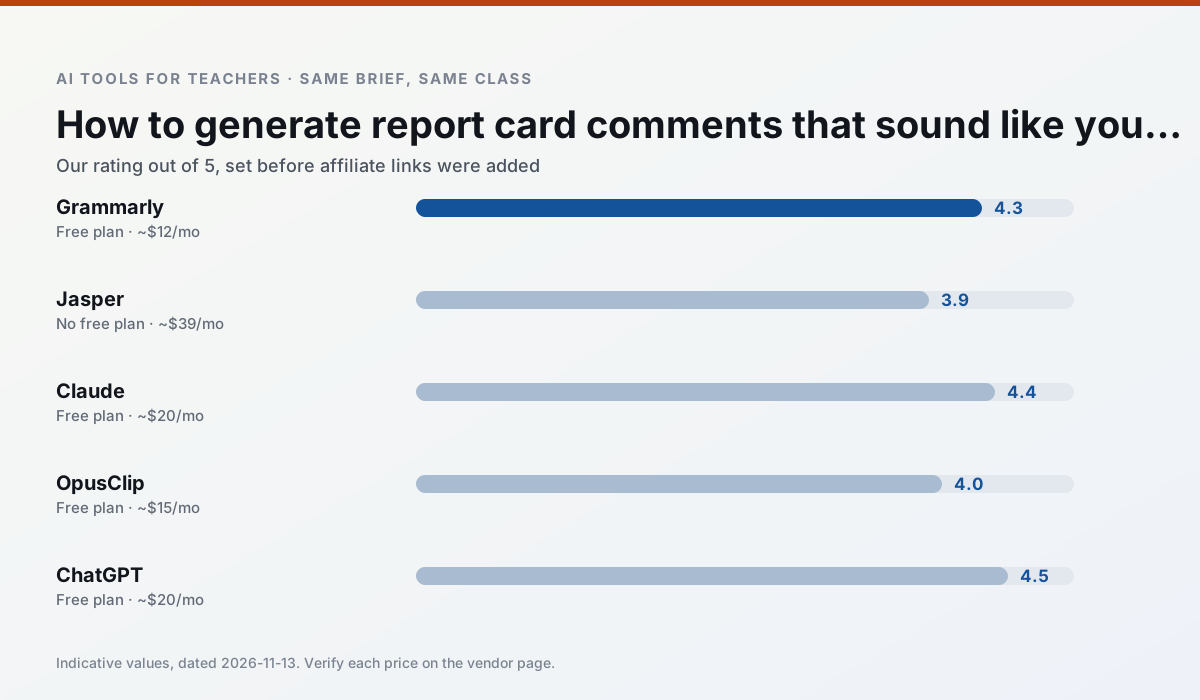
Ratings reflect our timed classroom workflow, not vendor claims. Prices are indicative — verify on the vendor site.
| Tool | Best for | Free tier | Indicative paid plan | Standout feature | Our rating | Verdict | Try the tool |
|---|---|---|---|---|---|---|---|
| Grammarly | parent communication · report card comments | Yes — Core grammar and tone checks | ~$12 /user/mo | Tone adjustments | 4.3 / 5 | Strong option | Try free |
| Jasper | newsletters · parent communication | No ongoing free plan | ~$39 /user/mo | Brand voice profiles | 3.9 / 5 | Situational | Try free |
| Claude | rubric creation · feedback on writing | Yes — Usage-limited | ~$20 /user/mo | Very large context window | 4.4 / 5 | Strong option | Try free |
| OpusClip | PD materials · flipped lessons | Yes — Limited monthly clips | ~$15 /user/mo | Auto captions | 4.0 / 5 | Situational | Try free |
| ChatGPT | lesson planning · parent communication | Yes — Usage-limited model access | ~$20 /user/mo | Custom GPTs and Projects | 4.5 / 5 | Top pick | Try free |
| SchoolAI | student-safe AI · differentiated instruction | Yes — Limited seats | ~$15 /user/mo | Teacher-monitored student chats | 4.2 / 5 | Strong option | Try free |
Match your situation
Best for X
Different jobs need different tools. Here is what we would open first in each case.
Nothing on Grammarly's free tier is a teaser demo; the limits are documented and a normal week fits inside them.
On the daily cycle, Jasper saves the most edit time per task; the paid tier mostly buys more runs rather than better ones.
Setup cost is one login for Claude; everything else can wait until you know the tool is useful.
OpusClip answers the three questions a district actually asks: rostering, admin controls and a data-processing agreement. That is usually what decides a school purchase.
Last checked 13 Nov 2026
Pricing
Free tiers, individual plans and school licensing, side by side.
| Tool | Free plan | Individual / paid | School & district | Billing note | Verify |
|---|---|---|---|---|---|
| Grammarly | $0 — Core grammar and tone checks | ~$12 /user/mo | ~$15 /user/mo | Indicative — billed annually | Vendor |
| Jasper | No ongoing free tier | ~$39 /user/mo | ~$59+ /user/mo | Indicative — verify on vendor site | Vendor |
| Claude | $0 — Usage-limited | ~$20 /user/mo | ~$25+ /user/mo | Indicative — verify on vendor site | Vendor |
| OpusClip | $0 — Limited monthly clips | ~$15 /user/mo | ~$29 /user/mo | Indicative — verify on vendor site | Vendor |
| ChatGPT | $0 — Usage-limited model access | ~$20 /user/mo | ~$25+ /user/mo | Indicative — verify on vendor site | Vendor |
| SchoolAI | $0 — Limited seats | ~$15 /user/mo | Custom quote | Indicative — verify on vendor site | Vendor |
Editorial rule: pricing is re-checked every 2–3 months and the top 50 pages are refreshed every 6 months. See our funding policy.
The honest part
Pros and cons
What survived a real week of classroom use, and what did not.
Pros
- Catches errors in high-stakes parent emails
- Works everywhere you already write
- Very low learning curve
Cons
- Not education-specific
- Can flatten teacher voice
- Premium needed for tone rewriting
Pros
- Consistent tone across communications
- Strong long-form editor
- Good for district comms teams
Cons
- Priced for marketing teams
- Overkill for one classroom
- No education-specific features
Pros
- Handles full unit plans and long rubrics
- Nuanced, less generic prose
- Good at structured document output
Cons
- No teacher-specific templates
- Fewer classroom integrations
- Consumer plan not suitable for student data
Pros
- Turns a recorded lesson into review clips
- Excellent captions
- Fast
Cons
- Optimised for social formats
- Not a lesson design tool
- Free plan is restrictive
Pros
- Most flexible option available
- Huge community of teacher prompt libraries
- Strong multilingual support
Cons
- Requires prompt skills for consistent results
- No built-in standards alignment
- District privacy review usually required
In the classroom
Use cases
Five concrete workflows, with the tool we would open for each one.
Regrouping students after an assessment
Summarise anonymised results into skill groups, then generate one activity per group. Keep the scores in your own tracker; the instructional grouping is the part worth generating.
Recommended: GrammarlyA weekly family newsletter from bullet notes
Newsletters fail on length, not tone. Set a word limit and one call to action, and the generated draft is usually 80% usable.
Recommended: JasperThree reading levels from one source text
Paste a vetted text, ask for supported, core and extension versions, then check the vocabulary list by hand. Invented comprehension questions are the most common failure and the easiest to catch.
Recommended: ClaudeA Monday morning lesson plan in twelve minutes
The twelve minutes come from not rewriting the skeleton. Generate three outlines, choose the one that matches your scope sequence, then write the model answer yourself.
Recommended: OpusClipA parent email in two languages
Draft in plain, warm language with no names, translate, then back-translate the important sentences to check meaning. Keep specific incidents out of the prompt and add them yourself.
Recommended: ChatGPT
Questions teachers ask us
FAQ
Direct answers, also published as FAQPage structured data for search and AI assistants.
How long does this workflow take?
Which tool should I start with?
What if the output is unusable?
Sources & further reading
Our recommendation
Try Grammarly free for your next report card comments task
Writing assistant for polished parent emails, newsletters and reports. Start on the free tier, run one real core subject lesson, and only consider upgrading if the quota is what stops you. Disclosure: we may earn a commission ($20 per paid upgrade + $0.20/signup) at no extra cost to you.
Some links on this page are affiliate links. We may earn a commission at no extra cost to you. Our rankings are editorial and never pay-to-play. Never enter student PII into a free consumer account.
Keep reading
Related comparisons in this cluster.
Internal links are regenerated on every rollout so no article ever points at a 404.