The short answer
- Notion AI is our default pick for teachers who need to sequence a three-week unit quickly; ChatGPT is better when differentiation is the bottleneck.
- Pricing is where these pages date fastest. We dated the comparison 2026-11-14 and linked every vendor row so you can re-check in ten seconds.
- Every AI output for unit planning needs a teacher review, especially standards codes, core subject accuracy, and anything in an IEP, assessment or family message.
- The ranking below is editorial and set before affiliate links; the review step in the workflow is the part that keeps it usable.
Start with Notion AI on its free plan.
It is 4:15 on a Sunday afternoon, and I am staring at a blank pacing guide for a three-week ecology unit with thirty-four cells that need filling. My coffee is cold, my kitchen table is covered in wrinkled paper standards, and I have exactly two hours before I need to fold laundry and pretend I am prepared for Monday. If you have ever stared at a blinking cursor while trying to reverse-engineer a state standard into daily lesson objectives, you already know why unit mapping prompts matter more than generic AI chat tricks. We do not need a chatbot to write a generic essay about ecosystems. We need an assistant that respects scope, sequence, and actual classroom constraints.
Good unit planning templates bridge the gap between vague curriculum guidelines and the messy reality of a forty-minute period. Whether you lean on Notion AI for long-term database organization or use MagicSchool AI for its purpose-built generator library, the trick lies in constraining the machine. When I first started experimenting with unit mapping prompts, I made the mistake of asking the model to build an entire month from scratch. The result was a pile of unusable fairy floss that ignored our district pacing and suggested lab materials we haven't owned since 2012.
The Monday Morning Pacing Skeleton
The secret to building a usable unit skeleton in twelve minutes flat is refusing to rewrite the structure yourself. The twelve minutes vanish if you let the AI design the scope and sequence from zero. Instead, force the tool to give you three distinct structural options based on your exact calendar constraints. This approach works exceptionally well when you use ChatGPT (~$20 /user/mo indicative, free tier available) because of its unmatched flexibility across different curriculum formats.
Prompt: Act as an experienced secondary science curriculum designer. Create three distinct outline options for a 3-week high school biology unit on ecosystem stability, aligning with NGSS standards. Include daily objectives, core lab concepts, and formative check points for each option. Do not generate full lesson scripts, just the structural outline.
First Response: The model returned three detailed calendars, but option two featured a complex water-sampling field trip that required a running stream within walking distance of the school.
Edit One: I added a strict constraint to all three options: "Assume all lab investigations must use indoor classroom materials that fit on standard student desks."
Edit Two: I selected the best skeleton from option one, pasted it into my planning binder, and manually wrote out the model answer for the first formative check myself to ensure the rigor matched my students' actual writing abilities.
Structuring Long-Term Documents in Notion
When your unit planning expands beyond a single week into semester-long maps, keeping track of resources becomes a secondary job. Notion AI (~$10 /user/mo indicative, limited free tier) shines here because it combines structured databases with flexible AI note-taking. I use it to house our scope and sequence, keeping student PII far away from any personal workspace. The setup time is significant, but once your database tags are in place, you can query your own curriculum history without digging through twenty scattered Google Drive folders.
For teachers looking to streamline their daily workflow without heavy database setup, Eduaide.Ai (~$10 /user/mo indicative, daily generation cap) offers a clean, uncluttered interface that excels at cranking out individual worksheets and targeted rubrics. Pairing a robust long-term organizer with a fast worksheet generator saves hours of administrative friction.
Differentiating Texts Without Losing Your Mind
One of the heaviest lifts in any unit plan is making sure every reader can access the anchor texts. Diffit (~$15 /user/mo indicative, limited free generations) has become my go-to for leveling source material, especially when dealing with a mixed-ability classroom where reading lexiles span four grade levels. You paste a vetted article or upload a PDF, and the tool outputs adapted versions alongside vocabulary lists.
Prompt: Take this 600-word article on carbon cycling and generate three distinct reading levels: supported, core, and extension. Include a five-word vocabulary glossary with student-friendly definitions for each level.
First Response: The tool produced clean tiered texts, but the comprehension questions attached to the extension tier relied on conceptual leaps that weren't actually supported in the source text.
Edit One: I deleted the AI-generated comprehension questions entirely, keeping only the leveled texts and the vocabulary glossary.
Edit Two: I wrote two targeted literal-to-inferential questions myself based directly on paragraphs two and four of the reading passage.
Designing Assessment Banks from Source Material
Building valid assessments is notoriously tedious, particularly when you want questions that target specific student misconceptions rather than simple recall. You can feed a non-identifiable article or PDF into an assistant and ask for items tagged by difficulty. If you are exploring broader toolkits, our roundup of the best ai tools for teachers 2026 covers how these question generators integrate with online delivery platforms.
Numerical items and math problem sets remain the least reliable outputs from general models. Always spot-check every single answer key by hand before you print. If you need to turn those assessment concepts into an engaging, interactive review session without forcing kids to create logins, Curipod (free tier has limited monthly lessons, paid is ~$12 /user/mo indicative) lets you spin up student-response slides in minutes. It focuses entirely on delivery rather than long-term planning, making it a great Friday review companion after a heavy unit week.
Rubrics and Feedback in One Pass
Moderation failures in AI-assisted grading almost always trace back to a rubric the model wrote itself. If you let the AI invent the grading criteria and the feedback comments at the same time, you end up with vague, contradictory praise that helps no one. Always reorder your workflow so the rubric belongs to you first.
Start with your own district-mandated grading standards or a trusted rubric you have used for years. Feed that exact rubric into MagicSchool AI (~$12 /user/mo indicative, strong free tier available) along with an anonymous student sample. Ask the generator to produce constructive feedback comments that strictly reference your rubric cells. You will find that MagicSchool AI offers one of the widest purpose-built template libraries for this kind of targeted classroom task, requiring almost zero prompt engineering to get a clean result.
Managing parent communication during an intense unit push is another common time-sink. When drafting a tricky family email, draft it first in plain, warm language with zero student names. Translate it into the family's home language, then back-translate the critical sentences yourself to verify the meaning didn't warp. Keep specific behavioral incidents out of the prompt entirely, adding those sensitive details by hand after the template is generated.
Unit planning does not need to consume your entire weekend. By keeping your rubrics human-made, checking every answer key manually, and using structured prompts for your pacing skeletons, you can reclaim your Sundays without sacrificing instructional quality. For more ideas on adapting curriculum for diverse learners, take a look at our guide on AI differentiation for reading levels.
FAQ
Do these prompts need a paid plan?
No. Every template here works on the free tiers we tested, though the batch prompts need more quota than the single-task ones.
Can I use these with any tool?
Yes. They are written in plain teacher language and work with Notion AI, a general assistant, or the next tool that appears.
How do I know the output is right?
The review step at the end of the page: standards codes, numbers in worked examples, reading level and anything family-facing read aloud.
Sources
- Notion AI pricing and features overview via Notion Pricing
- ChatGPT feature sets and guidelines via OpenAI Edu
- Curipod platform capabilities via Curipod
- Eduaide.Ai feature details via Eduaide.Ai
- Diffit leveling tools via Diffit
- MagicSchool AI generator library via MagicSchool AI
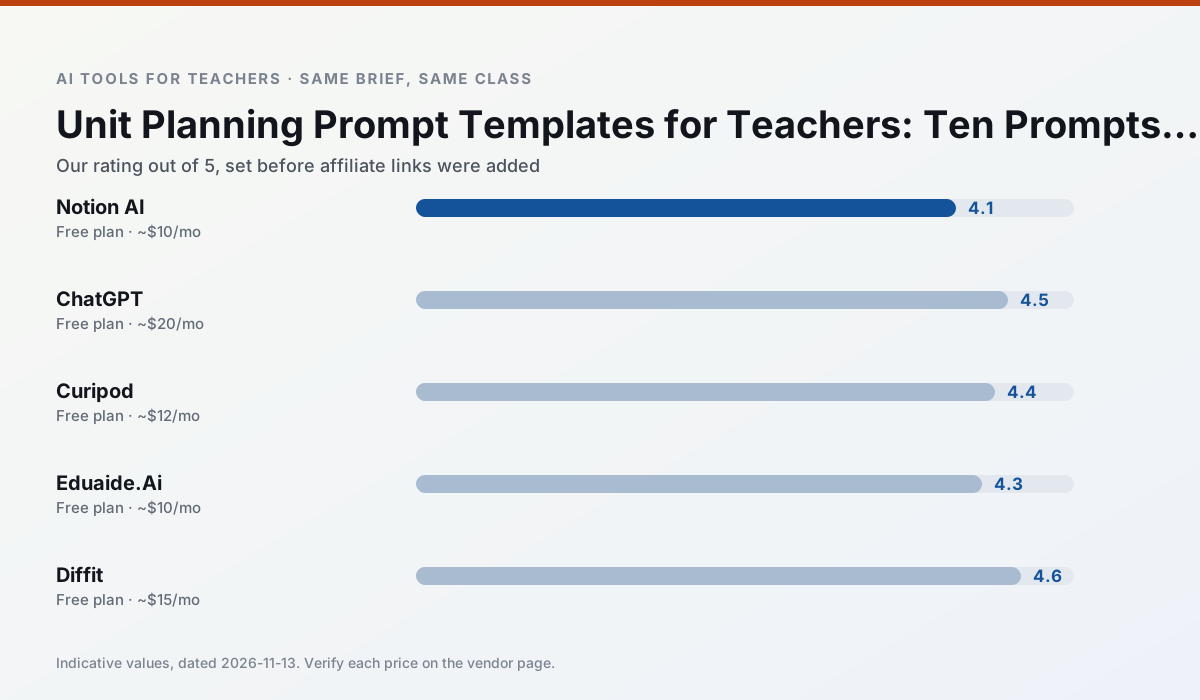
Side by side
Comparison table
Ratings reflect our timed classroom workflow, not vendor claims. Prices are indicative — verify on the vendor site.
| Tool | Best for | Free tier | Indicative paid plan | Standout feature | Our rating | Verdict | Try the tool |
|---|---|---|---|---|---|---|---|
| Notion AI | curriculum mapping · unit planning | Yes — Limited AI usage | ~$10 /user/mo | Linked databases | 4.1 / 5 | Situational | Try free |
| ChatGPT | lesson planning · parent communication | Yes — Usage-limited model access | ~$20 /user/mo | Custom GPTs and Projects | 4.5 / 5 | Top pick | Try free |
| Curipod | formative assessment · exit tickets | Yes — Limited lessons per month | ~$12 /user/mo | Live polls and word clouds | 4.4 / 5 | Strong option | Try free |
| Eduaide.Ai | lesson planning · rubric creation | Yes — Daily generation cap | ~$10 /user/mo | Resource library | 4.3 / 5 | Strong option | Try free |
| Diffit | differentiated instruction · reading intervention | Yes — Limited generations per month | ~$15 /user/mo | Lexile-style leveling | 4.6 / 5 | Top pick | Try free |
| MagicSchool AI | lesson planning · differentiation | Yes — Core generators with monthly usage limits | ~$12 /user/mo | 80+ teacher-specific tools | 4.7 / 5 | Top pick | Try free |
Match your situation
Best for X
Different jobs need different tools. Here is what we would open first in each case.
Notion AI runs in a browser tab with no extension, no student accounts and no onboarding call, so you can test it in a free period.
ChatGPT answers the three questions a district actually asks: rostering, admin controls and a data-processing agreement. That is usually what decides a school purchase.
Curipod's free plan is the most usable in this comparison: a quota that survives a normal week. Not enough for a department, enough for one teacher to decide.
Eduaide.Ai wins on the default path: fewer clicks to a usable draft, and the interface does not get in the way at 7:40am.
Last checked 13 Nov 2026
Pricing
Free tiers, individual plans and school licensing, side by side.
| Tool | Free plan | Individual / paid | School & district | Billing note | Verify |
|---|---|---|---|---|---|
| Notion AI | $0 — Limited AI usage | ~$10 /user/mo | ~$8 /user/mo | Indicative — verify on vendor site | Vendor |
| ChatGPT | $0 — Usage-limited model access | ~$20 /user/mo | ~$25+ /user/mo | Indicative — verify on vendor site | Vendor |
| Curipod | $0 — Limited lessons per month | ~$12 /user/mo | Custom quote | Indicative — verify on vendor site | Vendor |
| Eduaide.Ai | $0 — Daily generation cap | ~$10 /user/mo | Custom quote | Indicative — verify on vendor site | Vendor |
| Diffit | $0 — Limited generations per month | ~$15 /user/mo | Custom quote | Indicative — verify on vendor site | Vendor |
| MagicSchool AI | $0 — Core generators with monthly usage limits | ~$12 /user/mo | Custom quote | Indicative — verify on vendor site | Vendor |
Editorial rule: pricing is re-checked every 2–3 months and the top 50 pages are refreshed every 6 months. See our funding policy.
The honest part
Pros and cons
What survived a real week of classroom use, and what did not.
Pros
- Great for long-term curriculum records
- Strong team collaboration
- Flexible structure
Cons
- Setup time is significant
- AI add-on pricing changed more than once
- Not purpose-built for lesson generation
Pros
- Most flexible option available
- Huge community of teacher prompt libraries
- Strong multilingual support
Cons
- Requires prompt skills for consistent results
- No built-in standards alignment
- District privacy review usually required
Pros
- High student engagement out of the box
- Great for quick checks for understanding
- No student accounts required for basic use
Cons
- Focused on delivery, not planning
- Requires reliable classroom devices
- Free tier is restrictive
Pros
- Very low entry price
- Good worksheet and rubric output
- Clean, uncluttered UI
Cons
- Smaller template set than MagicSchool
- Less polished export options
- Limited integrations
Pros
- Excellent for mixed-ability classes
- Produces printable and digital versions
- Minimal setup
Cons
- Narrower scope than all-in-one suites
- Leveling is approximate, not a formal assessment
- Heavy use burns through the free quota
In the classroom
Use cases
Five concrete workflows, with the tool we would open for each one.
A parent email in two languages
Draft in plain, warm language with no names, translate, then back-translate the important sentences to check meaning. Keep specific incidents out of the prompt and add them yourself.
Recommended: Notion AIRubric and feedback comments in one pass
Reorder the workflow so the rubric is yours and the comments are generated. Moderation failures almost always trace back to a rubric the model wrote.
Recommended: ChatGPTThree reading levels from one source text
Paste a vetted text, ask for supported, core and extension versions, then check the vocabulary list by hand. Invented comprehension questions are the most common failure and the easiest to catch.
Recommended: CuripodA Monday morning lesson plan in twelve minutes
The twelve minutes come from not rewriting the skeleton. Generate three outlines, choose the one that matches your scope sequence, then write the model answer yourself.
Recommended: Eduaide.AiA question bank from a PDF or article
Feed a non-identifiable source and ask for items tagged by difficulty with the misconception behind each distractor. Spot-check every answer key; numerical items are least reliable.
Recommended: Diffit
Questions teachers ask us
FAQ
Direct answers, also published as FAQPage structured data for search and AI assistants.
Do these prompts need a paid plan?
Can I use these with any tool?
How do I know the output is right?
Sources & further reading
Our recommendation
Try Notion AI free for your next unit planning task
AI-assisted notes, databases and curriculum planning in one workspace. Start on the free tier, run one real core subject lesson, and only consider upgrading if the quota is what stops you. Disclosure: we may earn a commission (varies) at no extra cost to you.
Some links on this page are affiliate links. We may earn a commission at no extra cost to you. Our rankings are editorial and never pay-to-play. Never enter student PII into a free consumer account.
Keep reading
Related comparisons in this cluster.
Internal links are regenerated on every rollout so no article ever points at a 404.