The short answer
- Writesonic is our default pick for teachers who need to draft a standards-aware lesson plan quickly; Turnitin Clarity / Feedback Studio is better when differentiation is the bottleneck.
- Pricing is where these pages date fastest. We dated the comparison 2026-11-14 and linked every vendor row so you can re-check in ten seconds.
- Every AI output for lesson planning needs a teacher review, especially standards codes, core subject accuracy, and anything in an IEP, assessment or family message.
- Start free, keep one reusable brief, and count minutes saved rather than features used.
Start with Writesonic on its free plan.
By third period on a Tuesday, my desk looked like a stationery warehouse exploded. I had thirty-four copies of a reading passage on water conservation, a handful of half-finished exit tickets from Monday, and an email draft to an administrator that sounded like a robot wrote it. When teachers ask me whether tools like Writesonic, Canva for Education, Grammarly, and ElevenLabs are worth our limited planning time, they are usually drowning in paper just like I was. We are all trying to figure out which platforms actually save us minutes and which ones just add another tab to our browsers.
Sorting out writing assistants and basic free tiers
If you need budget-friendly AI content generation, Writesonic offers a limited free tier with a paid plan running around $16 per user per month. It is great for churning out a high volume of text, but the output can feel a bit generic if you do not feed it strong constraints. On the student-safety front, it works well enough for general drafting, but you must remember it is not strictly built for education context and you should never feed it student data. If you are comparing options in our broader roundup of the best AI tools for teachers 2026, you will see why matching the tool to the exact task matters.
Grammarly sits at about $12 per user per month for paid features, though the free tier handles core grammar and tone checks nicely. It is my go-to for parent emails and newsletters because it lives right inside my browser and catches tone slips before I hit send. The main trap is that it can flatten your natural teacher voice if you click accept on every single suggestion. You still need to turn off text collection in your school device settings to keep things locked down.
Prompt: Write a warm email to parents explaining our upcoming science unit on local watersheds, keeping sentences short and avoiding jargon.
First response: Dear Families, We are thrilled to announce our upcoming pedagogical dive into aquatic ecosystems and anthropogenic impacts on local drainage basins. Students will explore fluvial geomorphology through hands-on inquiry-based modalities.
Two edits that made it usable:
- Cut the jargon completely: change "pedagogical dive" and "fluvial geomorphology" to "hands-on study of local streams and where our tap water comes from."
- Insert a specific calendar note about our Friday field trip permission slips so the email actually answers the questions parents will call about.
Design platforms and student-safe deployments
Canva for Education remains one of the best bargains in EdTech because it is effectively free once your educator status is verified. It gives you a massive template library and built-in AI writing and image features, though the AI uses up monthly caps rather quickly. It is my favorite choice for student-safe deployments when kids are building slides or infographics, but watch out for cluttered layouts. Students love adding every animated sticker in the library until the page is unreadable.
When you need institutional writing feedback and similarity checking, Turnitin Clarity and Feedback Studio provide consistent revision histories, though individual teachers cannot buy licenses directly. They require heavy administrative setup and custom quotes, but many high schools and districts already pay for them. AI detection on these platforms remains contested territory among staff, so always rely on your own read of a student's writing voice rather than a single score. For more on navigating those gray areas, take a look at our guide on AI detector evidence.
Voice generation and video tools for staff training
ElevenLabs costs around $5 per user per month with a monthly character quota on its free tier, making it remarkably affordable for quick text-to-speech tasks. I use it to generate clean, natural-sounding audio versions of reading passages for students who benefit from listening along. It is fast and low-friction, but remember it is a voice generator, not a full teaching platform. Never clone a student or colleague's voice without explicit written consent, and keep an eye on your character quota so you do not run dry mid-week.
Colossyan steps away from student-facing lessons and focuses on training and explainer videos built from documents and scripts, running around $27 per user per month with no permanent free plan. It is brilliant for staff training modules or quick compliance videos, translating documents into presenter-led videos in minutes. Because of the price point and lack of K-12 specific features, keep it in the administrative or department-head toolbox rather than your daily lesson planning routine. If you are trying to scaffold reading materials across mixed groups before you even touch video generation, review our tips on AI differentiation reading level.
Two classroom traps and how to dodge them
The first thing that went wrong in my classroom happened when I asked an AI generator to make a five-minute exit ticket set for my eighth graders. The tool sneaked in a second recall question disguised as an application task, which totally defeated the purpose of checking for deep understanding. I fixed this by establishing a strict rule: I now ask specifically for one recall, one application, and one reasoning item, and I immediately delete the duplicate recall question before printing.
The second failure involved drafting an IEP present-levels first draft using aggregated data. The tool generated neat, confident-sounding numbers that were completely disconnected from my actual progress-monitoring spreadsheets. I caught it before the case manager saw it, and now my workflow requires stripping out every single generated statistic and manually dropping in verified data from my own binder. AI is great for giving you the skeleton of a document, but the meat and bones have to come from your classroom reality.
FAQ
Is AI allowed for lesson planning in my school?
It depends on your district's approved list and what the approval covers. Ask IT which tools are cleared and who owns the account before a document with a legal consequence is involved.
Who is responsible if something goes wrong?
The school, and in practice the named teacher who reviewed the output. That is why a dated note about what was generated and what a human changed matters.
What should never go into a prompt?
Names, rosters, scans of student work and gradebook screenshots. Topic-level prompts do most of the work without any of that.
Sources
- Writesonic Pricing and Features, Writesonic
- Turnitin Feedback Studio Overview, Turnitin
- Grammarly for Education, Grammarly
- ElevenLabs Text to Speech, ElevenLabs
- Colossyan Creator Plans, Colossyan
- Canva for Education Verification, Canva
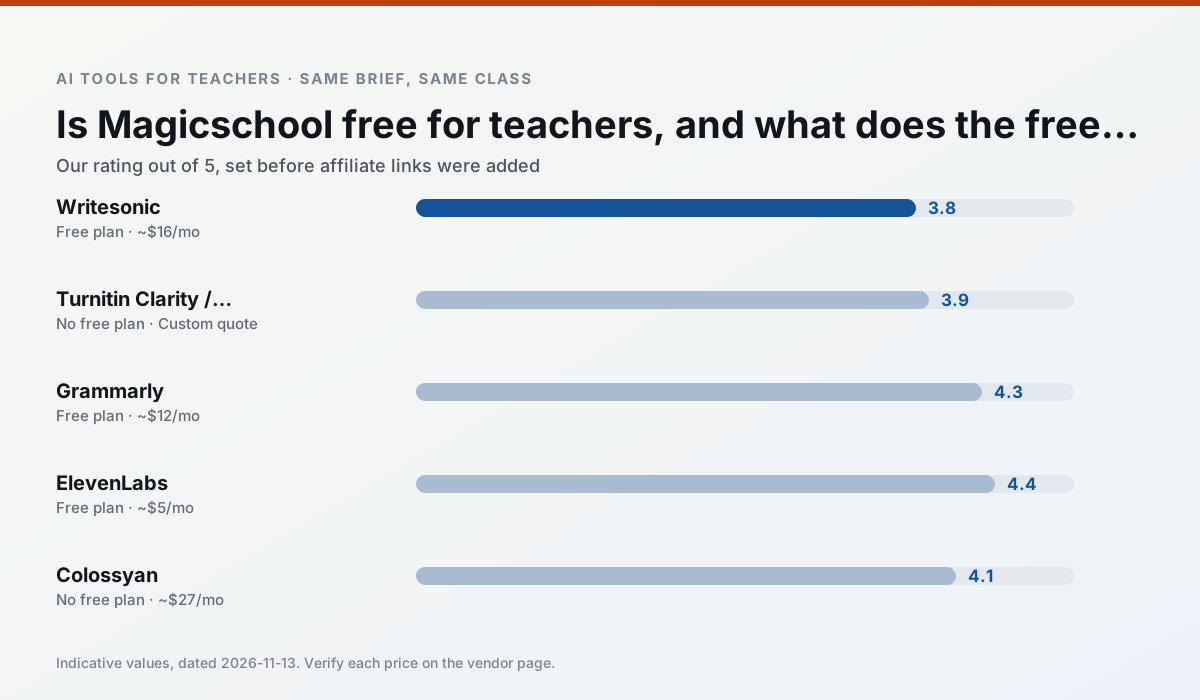
Side by side
Comparison table
Ratings reflect our timed classroom workflow, not vendor claims. Prices are indicative — verify on the vendor site.
| Tool | Best for | Free tier | Indicative paid plan | Standout feature | Our rating | Verdict | Try the tool |
|---|---|---|---|---|---|---|---|
| Writesonic | newsletters · parent communication | Yes — Limited credits | ~$16 /user/mo | Article and email generators | 3.8 / 5 | Situational | Try free |
| Turnitin Clarity / Feedback Studio | feedback on writing · academic integrity | No ongoing free plan | Custom quote | Similarity reports | 3.9 / 5 | Situational | Try free |
| Grammarly | parent communication · report card comments | Yes — Core grammar and tone checks | ~$12 /user/mo | Tone adjustments | 4.3 / 5 | Strong option | Try free |
| ElevenLabs | accessibility · reading intervention | Yes — Monthly character quota | ~$5 /user/mo | Very natural voices | 4.4 / 5 | Strong option | Try free |
| Colossyan | PD materials · video lessons | No ongoing free plan | ~$27 /user/mo | PDF/PPT-to-video | 4.1 / 5 | Situational | Try free |
| Canva for Education | slide decks · worksheets | Yes — Verification required | ~$13 /user/mo | Thousands of education templates | 4.6 / 5 | Top pick | Try free |
Match your situation
Best for X
Different jobs need different tools. Here is what we would open first in each case.
For anything students touch directly, Writesonic offers the supervision controls and logging that IT will ask about first.
Turnitin Clarity / Feedback Studio has the strongest tone control for family emails and report comments, provided you still read the message aloud before sending.
Grammarly produces levelled versions from one source in a single pass, which is the highest-value differentiation shortcut we tested at this level.
ElevenLabs has the shortest path from opening a tab to a usable draft, which matters more than the feature count on a Monday.
Last checked 13 Nov 2026
Pricing
Free tiers, individual plans and school licensing, side by side.
| Tool | Free plan | Individual / paid | School & district | Billing note | Verify |
|---|---|---|---|---|---|
| Writesonic | $0 — Limited credits | ~$16 /user/mo | ~$49 /user/mo | Indicative — verify on vendor site | Vendor |
| Turnitin Clarity / Feedback Studio | No ongoing free tier | Custom quote | Custom quote | LMS-wide deployment | Vendor |
| Grammarly | $0 — Core grammar and tone checks | ~$12 /user/mo | ~$15 /user/mo | Indicative — billed annually | Vendor |
| ElevenLabs | $0 — Monthly character quota | ~$5 /user/mo | ~$22 /user/mo | Indicative — verify on vendor site | Vendor |
| Colossyan | No ongoing free tier | ~$27 /user/mo | Custom quote | Indicative — verify on vendor site | Vendor |
| Canva for Education | $0 — Verification required | ~$13 /user/mo | Custom quote | Indicative — verify on vendor site | Vendor |
Editorial rule: pricing is re-checked every 2–3 months and the top 50 pages are refreshed every 6 months. See our funding policy.
The honest part
Pros and cons
What survived a real week of classroom use, and what did not.
Pros
- Cheaper than enterprise writing suites
- Many templates
- Reasonable free trial
Cons
- Generic classroom output
- Credit system is confusing
- Limited education context
Pros
- Already licensed at many schools
- Consistent institutional workflow
- Detailed revision history
Cons
- Individual teachers cannot buy it
- AI detection remains contested
- Heavy administrative setup
Pros
- Catches errors in high-stakes parent emails
- Works everywhere you already write
- Very low learning curve
Cons
- Not education-specific
- Can flatten teacher voice
- Premium needed for tone rewriting
Pros
- Excellent for accessible audio versions
- Low entry price
- Fast generation
Cons
- Quota-based billing
- Voice cloning consent considerations
- Not a teaching platform
Pros
- Strong for staff training, not just lessons
- Good compliance/LMS export
- Fast document-to-video
Cons
- No permanent free plan
- Higher price point
- Less suited to K-12 student-facing content
In the classroom
Use cases
Five concrete workflows, with the tool we would open for each one.
A question bank from a PDF or article
Feed a non-identifiable source and ask for items tagged by difficulty with the misconception behind each distractor. Spot-check every answer key; numerical items are least reliable.
Recommended: WritesonicA substitute folder that needs no context
The value here is structure, not creativity. Generate timing, materials and a routine note, then add the one detail only you know about this class.
Recommended: Turnitin Clarity / Feedback StudioAn IEP present-levels first draft
Use aggregated, anonymised data only. Ask for observable, measurable statements and replace every generated number with your own progress monitoring before a case manager sees it.
Recommended: GrammarlyA five-minute exit ticket set
Ask for one recall, one application and one reasoning item, then delete the second recall question every generator sneaks in.
Recommended: ElevenLabsA parent email in two languages
Draft in plain, warm language with no names, translate, then back-translate the important sentences to check meaning. Keep specific incidents out of the prompt and add them yourself.
Recommended: Colossyan
Questions teachers ask us
FAQ
Direct answers, also published as FAQPage structured data for search and AI assistants.
Is AI allowed for lesson planning in my school?
Who is responsible if something goes wrong?
What should never go into a prompt?
Sources & further reading
Our recommendation
Try Writesonic free for your next lesson planning task
Budget-friendly AI writing and content generation. Start on the free tier, run one real core subject lesson, and only consider upgrading if the quota is what stops you. Disclosure: we may earn a commission (varies) at no extra cost to you.
Some links on this page are affiliate links. We may earn a commission at no extra cost to you. Our rankings are editorial and never pay-to-play. Never enter student PII into a free consumer account.
Keep reading
Related comparisons in this cluster.
Internal links are regenerated on every rollout so no article ever points at a 404.