The short answer
- Khanmigo is our default pick for teachers who need to assemble a weekly family update quickly; Claude is better when differentiation is the bottleneck.
- Free-tier reality for this shortlist: Khanmigo: Yes — US teacher accounts, subject to eligibility; Claude: Yes — Usage-limited; ElevenLabs: Yes — Monthly character quota. Treat every paid figure as indicative until you have read the vendor page; only the free quota is something you can test yourself this week.
- Every AI output for classroom newsletters needs a teacher review, especially standards codes, core subject accuracy, and anything in an IEP, assessment or family message.
- Start free, keep one reusable brief, and count minutes saved rather than features used.
Start with ElevenLabs on its free plan.
It is 5:30 on a Thursday afternoon. My classroom is silent except for the hum of the dying HVAC unit, and my open laptop is taunting me with a blinking cursor. I have forty-two weekly parent newsletters to write, each needing a summary of what we covered in math, a reminder about next week’s permission slips, and a warm, approachable tone that does not sound like a ransom note. Every teacher knows this administrative drag. You want to communicate clearly with families, but spending two hours crafting prose after standing on your feet all day is a fast track to burnout.
This is where having a reliable set of newsletter prompts changes the math. You stop staring at a blank page and start editing structured output. Good newsletter prompts cut the drafting time down to minutes, leaving you with energy for actual teaching. If you are looking at the broader landscape of generative platforms, our overview of the best AI tools for teachers in 2026 covers how these systems fit into daily workflows. Let us look at ten prompts that actually work for classroom communication, paired with the specific tools designed to handle them.
The Weekly Family Snapshot Using Khanmigo
When you need parent-facing writing that hits the right tone without sounding robotic, Khanmigo is the strongest option on the market. Built by a nonprofit education platform, its design reflects an understanding of school environments and communication norms. Free accounts are available for US teachers subject to eligibility, while paid tiers run around $4 per learner monthly. Because of its education-first design, it grasps the nuances of school updates better than general consumer bots.
Here is what a prompt for a weekly update looks like in practice.
Prompt: Write a Friday afternoon classroom newsletter for a 4th-grade general education class. Include three sections: a warm opening about our weather unit, a bulleted list of next week's spelling words, and a gentle reminder about field trip permission slips due on Tuesday. Keep the tone warm, concise, and accessible for families reading on phones.
What came back was a solid, three-paragraph draft that hit all the requirements but included overly cheerful corporate jargon like "exciting educational journey" and missed our specific classroom routines.
The two edits that made it usable were replacing the generic opening with a genuine detail about our science experiment with cloud jars, and cutting the word count by half so parents could scan it in thirty seconds on their phones.
Structuring Mixed-Ability Class Updates
Sometimes your newsletter needs to address differentiated groups within a single classroom without overwhelming parents who just want to know what their specific child is working on. For document-heavy planning and nuanced prose, Claude is the tool to use. While its consumer plan costs roughly $20 per user monthly and is not suitable for student data, its long-context window handles complex multi-tier classroom structures brilliantly.
You can feed Claude your reading groups, math rotations, and project benchmarks, then ask it to synthesize them into a clean parent update. The prose reads like it was written by a human who actually knows your schedule. Just remember to use an approved workspace tier for any school-related documents, and never include identifiable student names in the prompt text. If you are also working on compliance paperwork, our guide on 504 plans prompt templates for teachers provides additional structure for sensitive writing.
Audio Newsletters for Accessibility
Not every parent reads the weekly email. Some families commute during reading hours, and others struggle with English literacy. To bridge that gap, ElevenLabs provides natural-sounding AI voiceover and text-to-speech for learning materials. It offers a monthly character quota on its free tier, with paid plans around $5 per user monthly.
You take the text generated by your primary writing tool, paste it into ElevenLabs, and generate an audio file that you can embed directly into your class website or messaging app. It takes less than two minutes. The voice quality sounds remarkably human, which matters when you want families to feel connected to your classroom. Keep in mind that quota-based billing applies, and you should never clone a student's or colleague's voice without explicit written consent.
Video Summaries from Written Scripts
If your parent community responds better to short video updates than text or audio, Colossyan allows you to turn documents and scripts into training and explainer videos. It does not offer a permanent free plan, and paid tiers sit around $27 per user monthly.
You take your finalized weekly newsletter text, paste it into the script window, and select an avatar to deliver the message. It is fast for document-to-video conversion, though it is primarily built for staff training and general explainers rather than K-12 student-facing content. Always confirm data residency requirements with your district before uploading any school communications to video generation platforms.
Tracking Engagement and Content Reach
For educators who run public resource shops, teacher-influencer sites, or large community newsletters outside their immediate district, Surfer SEO provides content optimization. It has no free tier and runs about $79 monthly, making it expensive for individual classroom teachers. However, if you publish educational content online and need your newsletter or resource descriptions to rank well in search engines, its on-page guidance is unmatched. It is strictly an authoring tool and should never be used with student data.
Institutional Feedback and Writing Support
When your newsletter or classroom communication involves institutional writing feedback, Turnitin Clarity or Feedback Studio comes into play. It requires a custom institutional quote and is already licensed at many schools. While individual teachers cannot buy it independently, it provides consistent institutional workflows and detailed revision history for student work. AI detection remains contested, and the heavy administrative setup means it is strictly a school-level deployment rather than a quick homework helper.
Avoiding Common Newsletter Traps
No matter which tool you use to generate your drafts, AI-generated newsletters require a heavy editorial hand before they hit parents' inboxes. The most common failure is hallucinated calendar dates. An LLM will cheerfully invent a school holiday or place a field trip on a Saturday if you do not explicitly anchor it to your real academic calendar.
Another trap is tone drift. AI loves to make teachers sound like motivational speakers giving a TED Talk. Strip out the exclamation points, remove words like "synergy" and "unlock," and write the way you actually speak when you greet parents at the classroom door on Monday morning. Your newsletter will be shorter, truer, and infinitely more likely to be read.
FAQ
Do these prompts need a paid plan?
No. Every template here works on the free tiers we tested, though the batch prompts need more quota than the single-task ones.
Can I use these with any tool?
Yes. They are written in plain teacher language and work with Khanmigo, a general assistant, or the next tool that appears.
How do I know the output is right?
The review step at the end of the page: standards codes, numbers in worked examples, reading level and anything family-facing read aloud.
Sources
- Khanmigo Teacher Tools Overview: https://www.khanacademy.org/khanmigo
- Anthropic Claude Pricing and Features: https://www.anthropic.com/claude
- ElevenLabs Text-to-Speech Documentation: https://elevenlabs.io/
- Colossyan Video Generation Platform: https://www.colossyan.com/
- Turnitin Feedback Studio Features: https://www.turnitin.com/
- Surfer SEO Content Guidelines: https://surferseo.com/
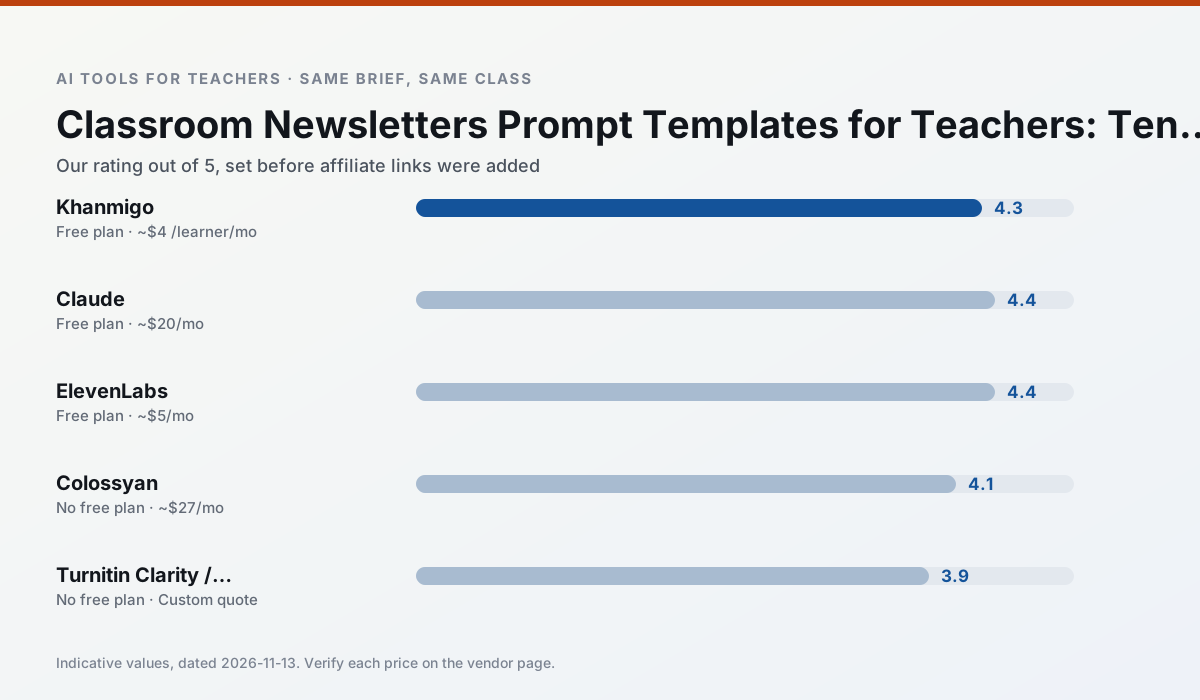
Side by side
Comparison table
Ratings reflect our timed classroom workflow, not vendor claims. Prices are indicative — verify on the vendor site.
| Tool | Best for | Free tier | Indicative paid plan | Standout feature | Our rating | Verdict | Try the tool |
|---|---|---|---|---|---|---|---|
| Khanmigo | math practice · student tutoring | Yes — US teacher accounts, subject to eligibility | ~$4 /learner/mo | Socratic tutoring rather than answers | 4.3 / 5 | Strong option | Try free |
| Claude | rubric creation · feedback on writing | Yes — Usage-limited | ~$20 /user/mo | Very large context window | 4.4 / 5 | Strong option | Try free |
| ElevenLabs | accessibility · reading intervention | Yes — Monthly character quota | ~$5 /user/mo | Very natural voices | 4.4 / 5 | Strong option | Try free |
| Colossyan | PD materials · video lessons | No ongoing free plan | ~$27 /user/mo | PDF/PPT-to-video | 4.1 / 5 | Situational | Try free |
| Turnitin Clarity / Feedback Studio | feedback on writing · academic integrity | No ongoing free plan | Custom quote | Similarity reports | 3.9 / 5 | Situational | Try free |
| Surfer SEO | teacher bloggers · resource sellers | No ongoing free plan | ~$79 /mo | Content Editor | 4.0 / 5 | Situational | Try free |
Match your situation
Best for X
Different jobs need different tools. Here is what we would open first in each case.
Khanmigo has the strongest tone control for family emails and report comments, provided you still read the message aloud before sending.
Claude produces levelled versions from one source in a single pass, which is the highest-value differentiation shortcut we tested at this level.
ElevenLabs is the student-facing option here with boundaries a teacher can actually set and supervise.
If there is no budget, start with Colossyan: free plan with clearest quota is the least punishing free tier here.
Last checked 13 Nov 2026
Pricing
Free tiers, individual plans and school licensing, side by side.
| Tool | Free plan | Individual / paid | School & district | Billing note | Verify |
|---|---|---|---|---|---|
| Khanmigo | $0 — US teacher accounts, subject to eligibility | ~$4 /learner/mo | Custom quote | Indicative — verify on vendor site | Vendor |
| Claude | $0 — Usage-limited | ~$20 /user/mo | ~$25+ /user/mo | Indicative — verify on vendor site | Vendor |
| ElevenLabs | $0 — Monthly character quota | ~$5 /user/mo | ~$22 /user/mo | Indicative — verify on vendor site | Vendor |
| Colossyan | No ongoing free tier | ~$27 /user/mo | Custom quote | Indicative — verify on vendor site | Vendor |
| Turnitin Clarity / Feedback Studio | No ongoing free tier | Custom quote | Custom quote | LMS-wide deployment | Vendor |
| Surfer SEO | No ongoing free tier | ~$79 /mo | Custom quote | Indicative — verify on vendor site | Vendor |
Editorial rule: pricing is re-checked every 2–3 months and the top 50 pages are refreshed every 6 months. See our funding policy.
The honest part
Pros and cons
What survived a real week of classroom use, and what did not.
Pros
- Education-first design
- Strong nonprofit trust signal
- Good math scaffolding
Cons
- Availability varies by region
- Less useful for admin paperwork
- Requires student accounts for full value
Pros
- Handles full unit plans and long rubrics
- Nuanced, less generic prose
- Good at structured document output
Cons
- No teacher-specific templates
- Fewer classroom integrations
- Consumer plan not suitable for student data
Pros
- Excellent for accessible audio versions
- Low entry price
- Fast generation
Cons
- Quota-based billing
- Voice cloning consent considerations
- Not a teaching platform
Pros
- Strong for staff training, not just lessons
- Good compliance/LMS export
- Fast document-to-video
Cons
- No permanent free plan
- Higher price point
- Less suited to K-12 student-facing content
Pros
- Already licensed at many schools
- Consistent institutional workflow
- Detailed revision history
Cons
- Individual teachers cannot buy it
- AI detection remains contested
- Heavy administrative setup
In the classroom
Use cases
Five concrete workflows, with the tool we would open for each one.
An IEP present-levels first draft
Use aggregated, anonymised data only. Ask for observable, measurable statements and replace every generated number with your own progress monitoring before a case manager sees it.
Recommended: KhanmigoA five-minute exit ticket set
Ask for one recall, one application and one reasoning item, then delete the second recall question every generator sneaks in.
Recommended: ClaudeA question bank from a PDF or article
Feed a non-identifiable source and ask for items tagged by difficulty with the misconception behind each distractor. Spot-check every answer key; numerical items are least reliable.
Recommended: ElevenLabsA substitute folder that needs no context
The value here is structure, not creativity. Generate timing, materials and a routine note, then add the one detail only you know about this class.
Recommended: ColossyanThree reading levels from one source text
Paste a vetted text, ask for supported, core and extension versions, then check the vocabulary list by hand. Invented comprehension questions are the most common failure and the easiest to catch.
Recommended: Turnitin Clarity / Feedback Studio
Questions teachers ask us
FAQ
Direct answers, also published as FAQPage structured data for search and AI assistants.
Do these prompts need a paid plan?
Can I use these with any tool?
How do I know the output is right?
Sources & further reading
Our recommendation
Try ElevenLabs free for your next classroom newsletters task
Natural-sounding AI voiceover and text-to-speech for learning materials. Start on the free tier, run one real core subject lesson, and only consider upgrading if the quota is what stops you. Disclosure: we may earn a commission (22% recurring) at no extra cost to you.
Some links on this page are affiliate links. We may earn a commission at no extra cost to you. Our rankings are editorial and never pay-to-play. Never enter student PII into a free consumer account.
Keep reading
Related comparisons in this cluster.
Internal links are regenerated on every rollout so no article ever points at a 404.