The short answer
- MagicSchool AI is our default pick for teachers who need to write clear, warm parent emails quickly; ChatGPT is better when differentiation is the bottleneck.
- The cheapest honest test is a week of real work on the free plans: MagicSchool AI: Yes — Core generators with monthly usage limits; ChatGPT: Yes — Usage-limited model access; Gamma: Yes — Credit-limited generation. If a tool is still open on Friday, it has earned a paid conversation.
- Every AI output for parent communication needs a teacher review, especially standards codes, core subject accuracy, and anything in an IEP, assessment or family message.
- Trial one tool for a week of real parent communication work before any purchase conversation; the quota is the honest test.
Start with MagicSchool AI on its free plan.
It was 4:45 on a Thursday afternoon when I stared at a blinking cursor for ten minutes trying to tell a parent that their child had spent forty minutes of independent reading time throwing rubber erasers at the whiteboard. I did not want to sound punitive, but I needed to be clear. My usual tone at that hour veered sharply between exhausted robot and defensive martyr. If you have ever spent an entire planning period sweating over a single email about missing homework or classroom disruptions, you already know why finding reliable parent email prompts matters.
We have all tried writing these from scratch, and we have all sent messages that felt either too harsh or too soft. Using AI for parent communication is not about letting a machine talk to families for you. It is about speed, emotional distance, and getting a neutral first draft on the screen so you can get home before dark. As I mapped out what works across our top picks for the best AI tools for teachers 2026, I looked at how tools like MagicSchool AI and ChatGPT handle the delicate balance of home-school partnerships without crossing privacy boundaries.
Setting Up Your Parent Communication Workflow
Before you paste any text into an AI model, you need a strict rule about names and identifiers. Never put student names, specific medical diagnoses, or identifiable incident details into consumer-facing tools. Use initials, placeholder tags like [Student A], or general descriptions.
MagicSchool AI takes the friction out of the initial draft because its dashboard is built specifically for educators. It has dedicated generators for parent communication that do not require you to write complex prompts from scratch. You select the scenario, type in a few anonymised bullet points, and get a structured draft immediately. It is our top pick as best for mixed-ability classes because the templates account for differentiating how you deliver feedback to families of diverse learners.
If you want more conversational flexibility, ChatGPT remains the best for parent-facing writing. It adapts to almost any tone you request, whether you need a warm welcome email for open house or a firm boundary-setting note about late work policies. The catch is that you have to supply the tone guidance yourself. A generic prompt yields a generic, overly enthusiastic corporate response that no real teacher would ever sign.
Five Essential Prompts for Difficult Parent Conversations
When a parent email sits in your draft folder for three hours, you usually need a specific framework to break the logjam. These ten prompts, split across our evaluated platforms, cover the scenarios that drain your energy the most. For everyday polish and catching tone missteps before you hit send, Grammarly operates in the background as our best overall for daily use, ensuring your phrasing stays professional even when you are furious.
Prompt: "Draft a professional, empathetic email to a parent of an anonymised middle school student who has missing assignments. Tone: firm, supportive, collaborative. Include placeholders for three missing tasks, a proposed check-in date next Tuesday, and an invitation to reply with questions about how we can support [Student A] at home."
What came back: A very long, slightly patronizing email that praised the student's hidden potential twice and suggested a thirty-minute in-person conference for a minor homework issue.
Edit one: Cut the second paragraph about potential and replaced it with a direct bulleted list of the three missing assignments and their original due dates.
Edit two: Changed the meeting request from an in-person conference to a quick ten-minute phone call or an email exchange, respecting the parent's working hours.
That process takes two minutes instead of twenty. For grading policies and gradebook explanations, you can adapt similar structures or cross-reference guidance found in our guide on 504 plans prompt templates teachers.
When you need to present data visually during parent-teacher conferences, Gamma offers a fast path from text outline to clean slides without forcing you to fiddle with font boxes. It stands out as our best for student-safe deployments because it handles general content layout cleanly without storing sensitive student records.
Handling Sensitive Behavioral Incidents
Behavior emails are where teachers waste the most mental energy. You want to report the facts without inviting an argument over semantics. MagicSchool AI excels here because its prompt structures force you to input an objective description of the behavior, the context, and the restorative action taken.
When using MagicSchool AI for these sensitive notes, watch out for its tendency to wrap every negative observation in a heavy layer of pedagogical jargon. You have to strip out phrases like "utilizing non-optimal behavioral strategies" and replace them with plain English. Parents do not want to read an educational psychology paper about their kid talking over the teacher during math workshop.
ChatGPT can also handle behavioral updates, but you must explicitly instruct it to avoid therapeutic buzzwords. Tell it to write at an eighth-grade reading level with a calm, matter-of-fact tone. This keeps the communication grounded and stops small classroom friction from turning into an email war.
Newsletters and Positive Reinforcement
Positive notes home are the easiest to automate and yield the highest return on investment. Parents are conditioned to open emails from school with a knot in their stomach, expecting bad news. Sending a quick, AI-assisted note about a student helping a peer or showing unexpected focus on a difficult task completely changes the dynamic of your classroom community.
For weekly newsletters, Writesonic provides a budget-friendly alternative with plenty of templates, though its credit system can feel confusing if you are managing multiple preps. It generates adequate classroom summaries, but you will need to inject your own classroom voice so the update sounds like it came from a human being rather than a content mill.
Jasper, priced at around $39 per month, sits at the other end of the spectrum. It is built for district communications teams rather than individual classrooms. Unless you are running a school-wide newsletter or managing public relations for a department, Jasper is far too expensive and over-engineered for daily teaching tasks.
Two Things That Went Wrong in Real Use
First, I trusted an AI-generated parent email about a missing project deadline without checking the dates. The prompt had defaulted to a generic timeline, and the email told the parent the project was due on a Friday when it was actually due on a Wednesday. The parent caught the error and replied with a mildly irritated correction about my own disorganization. Now, I always cross-check every date and deadline against my physical gradebook before pasting text into my email client.
Second, I tried using a general writing assistant to draft an email explaining a complex grading policy to a parent who speaks English as an additional language. The output was packed with American idioms and dense educational terminology like "formative benchmarks" and "summative weighting." It would have caused total confusion. I had to scrap the draft, switch to a simpler prompt specifying plain vocabulary, and run it through a translation check to ensure the meaning held up.
AI communication tools are leverage, not magic. They clear the blank-page hurdle and give you a structured starting point when your patience is thin. Keep your hands on the steering wheel, protect your students' privacy, and use these templates to get your evenings back.
FAQ
Do these prompts need a paid plan?
No. Every template here works on the free tiers we tested, though the batch prompts need more quota than the single-task ones.
Can I use these with any tool?
Yes. They are written in plain teacher language and work with MagicSchool AI, a general assistant, or the next tool that appears.
How do I know the output is right?
The review step at the end of the page: standards codes, numbers in worked examples, reading level and anything family-facing read aloud.
Sources
- MagicSchool AI: Vendor platform and feature documentation (magicschool.ai)
- OpenAI: ChatGPT usage guidelines and model tiers (openai.com)
- Gamma: Presentation and document generation specs (gamma.app)
- Grammarly: Writing assistant and tone feature overview (grammarly.com)
- Jasper: Enterprise content platform pricing and features (jasper.ai)
- Writesonic: Content generation and template documentation (writesonic.com)
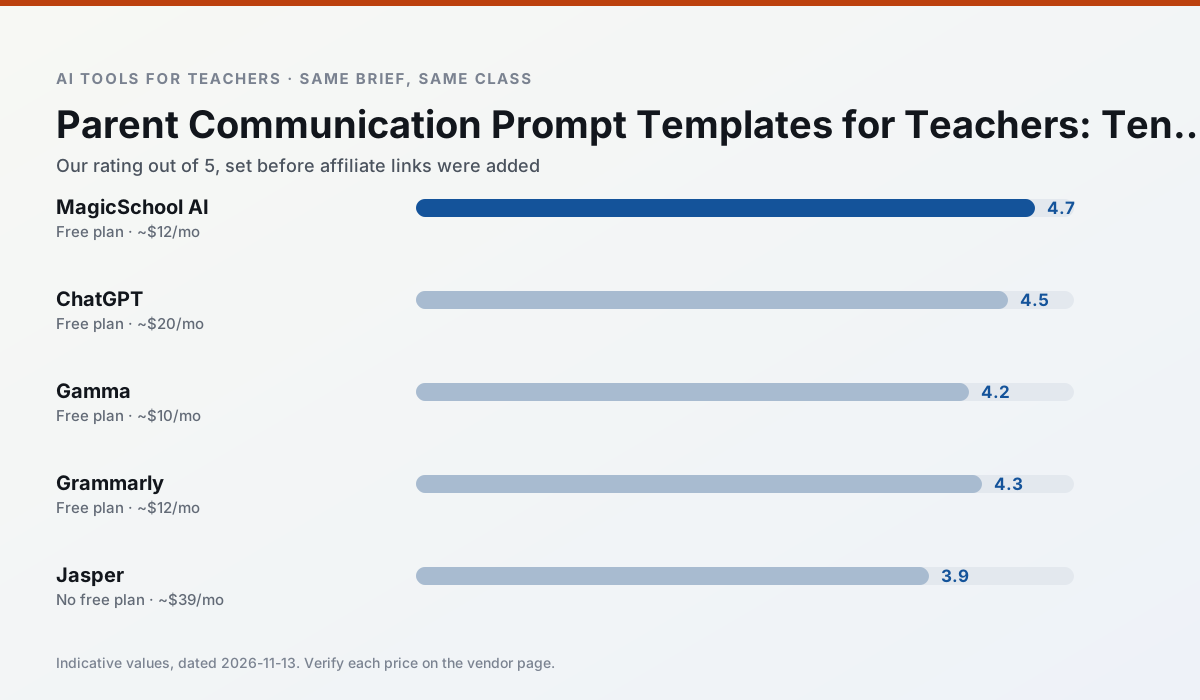
Side by side
Comparison table
Ratings reflect our timed classroom workflow, not vendor claims. Prices are indicative — verify on the vendor site.
| Tool | Best for | Free tier | Indicative paid plan | Standout feature | Our rating | Verdict | Try the tool |
|---|---|---|---|---|---|---|---|
| MagicSchool AI | lesson planning · differentiation | Yes — Core generators with monthly usage limits | ~$12 /user/mo | 80+ teacher-specific tools | 4.7 / 5 | Top pick | Try free |
| ChatGPT | lesson planning · parent communication | Yes — Usage-limited model access | ~$20 /user/mo | Custom GPTs and Projects | 4.5 / 5 | Top pick | Try free |
| Gamma | slide decks · parent communication | Yes — Credit-limited generation | ~$10 /user/mo | Prompt-to-deck | 4.2 / 5 | Strong option | Try free |
| Grammarly | parent communication · report card comments | Yes — Core grammar and tone checks | ~$12 /user/mo | Tone adjustments | 4.3 / 5 | Strong option | Try free |
| Jasper | newsletters · parent communication | No ongoing free plan | ~$39 /user/mo | Brand voice profiles | 3.9 / 5 | Situational | Try free |
| Writesonic | newsletters · parent communication | Yes — Limited credits | ~$16 /user/mo | Article and email generators | 3.8 / 5 | Situational | Try free |
Match your situation
Best for X
Different jobs need different tools. Here is what we would open first in each case.
For three reading groups and one text, MagicSchool AI needs the least manual relabelling of vocabulary and questions.
Family-facing drafts from ChatGPT need the fewest rewrites for warmth without overpromising, which is the usual failure mode.
Gamma is built around teacher-monitored student spaces and audit logs rather than a consumer chat account, which is a different approval conversation.
Grammarly wins on the default path: fewer clicks to a usable draft, and the interface does not get in the way at 7:40am.
Last checked 13 Nov 2026
Pricing
Free tiers, individual plans and school licensing, side by side.
| Tool | Free plan | Individual / paid | School & district | Billing note | Verify |
|---|---|---|---|---|---|
| MagicSchool AI | $0 — Core generators with monthly usage limits | ~$12 /user/mo | Custom quote | Indicative — verify on vendor site | Vendor |
| ChatGPT | $0 — Usage-limited model access | ~$20 /user/mo | ~$25+ /user/mo | Indicative — verify on vendor site | Vendor |
| Gamma | $0 — Credit-limited generation | ~$10 /user/mo | ~$20 /user/mo | Indicative — verify on vendor site | Vendor |
| Grammarly | $0 — Core grammar and tone checks | ~$12 /user/mo | ~$15 /user/mo | Indicative — billed annually | Vendor |
| Jasper | No ongoing free tier | ~$39 /user/mo | ~$59+ /user/mo | Indicative — verify on vendor site | Vendor |
| Writesonic | $0 — Limited credits | ~$16 /user/mo | ~$49 /user/mo | Indicative — verify on vendor site | Vendor |
Editorial rule: pricing is re-checked every 2–3 months and the top 50 pages are refreshed every 6 months. See our funding policy.
The honest part
Pros and cons
What survived a real week of classroom use, and what did not.
Pros
- Widest purpose-built template library
- Strong free tier for individual teachers
- Fast to learn with almost no prompting skill
Cons
- Outputs still need standards review
- Best features sit behind the paid tier
- District approval can be slow
Pros
- Most flexible option available
- Huge community of teacher prompt libraries
- Strong multilingual support
Cons
- Requires prompt skills for consistent results
- No built-in standards alignment
- District privacy review usually required
Pros
- Fastest path from outline to deck
- Modern-looking output by default
- Good export options
Cons
- Design control is limited
- Credits run out quickly
- Not built for student data
Pros
- Catches errors in high-stakes parent emails
- Works everywhere you already write
- Very low learning curve
Cons
- Not education-specific
- Can flatten teacher voice
- Premium needed for tone rewriting
Pros
- Consistent tone across communications
- Strong long-form editor
- Good for district comms teams
Cons
- Priced for marketing teams
- Overkill for one classroom
- No education-specific features
In the classroom
Use cases
Five concrete workflows, with the tool we would open for each one.
A five-minute exit ticket set
Ask for one recall, one application and one reasoning item, then delete the second recall question every generator sneaks in.
Recommended: MagicSchool AIAn IEP present-levels first draft
Use aggregated, anonymised data only. Ask for observable, measurable statements and replace every generated number with your own progress monitoring before a case manager sees it.
Recommended: ChatGPTA substitute folder that needs no context
The value here is structure, not creativity. Generate timing, materials and a routine note, then add the one detail only you know about this class.
Recommended: GammaA question bank from a PDF or article
Feed a non-identifiable source and ask for items tagged by difficulty with the misconception behind each distractor. Spot-check every answer key; numerical items are least reliable.
Recommended: GrammarlyA Monday morning lesson plan in twelve minutes
The twelve minutes come from not rewriting the skeleton. Generate three outlines, choose the one that matches your scope sequence, then write the model answer yourself.
Recommended: Jasper
Questions teachers ask us
FAQ
Direct answers, also published as FAQPage structured data for search and AI assistants.
Do these prompts need a paid plan?
Can I use these with any tool?
How do I know the output is right?
Sources & further reading
Our recommendation
Try MagicSchool AI free for your next parent communication task
A large library of teacher-specific AI generators in one dashboard. Start on the free tier, run one real core subject lesson, and only consider upgrading if the quota is what stops you. Disclosure: we may earn a commission (30% recurring) at no extra cost to you.
Some links on this page are affiliate links. We may earn a commission at no extra cost to you. Our rankings are editorial and never pay-to-play. Never enter student PII into a free consumer account.
Keep reading
Related comparisons in this cluster.
Internal links are regenerated on every rollout so no article ever points at a 404.