The short answer
- Eduaide.Ai is our default pick for teachers who need to write criterion-referenced rubrics quickly; Claude is better when differentiation is the bottleneck.
- Eduaide.Ai handles the broad case; Claude handles the narrow one. Anything beyond that pair should be justified by a recurring weekly job, not a feature demo.
- Every AI output for rubric creation needs a teacher review, especially standards codes, core subject accuracy, and anything in an IEP, assessment or family message.
- Trial one tool for a week of real rubric creation work before any purchase conversation; the quota is the honest test.
Start with MagicSchool AI on its free plan.
It was a Tuesday afternoon during final moderation, and the department head was staring at a 15-page stack of sophomore argument essays with a red pen poised like a dagger. We had three different teachers grading the same prompt, and our rubrics were a mess of subjective descriptors like "good understanding" and "effective use of evidence." When I tried to defend why one student got a three instead of a four, my colleague pointed out that the rubric allowed for both interpretations. That was the moment I realized my assessment criteria were functionally useless. Since then, I have learned how to write a rubric that stands up to moderation with AI, shifting the burden of consistency from my exhausted brain onto a system that can hold a complex set of constraints without getting tired.
The secret to passing moderation isn't letting the algorithm design your grading philosophy. It is using a general-purpose model like Claude or ChatGPT to stress-test your grading scale before a single student submits an assignment. Moderation failures almost always trace back to a rubric the model wrote entirely from scratch, because generic AI loves vague phrasing just as much as tired teachers do. When you build a rubric, you need to invert the typical workflow. You supply the anchor standards and the non-negotiable hard skills, and you let the AI generate the behavioral descriptors and the differentiated feedback comment banks in one clean pass.
Why Standard Rubrics Fail the Moderation Test
Most classroom rubrics fail because they conflate quantity with quality. We write criteria that reward length over logic, or we use sliding scales that make it nearly impossible to distinguish between a two and a three. When an administrator or a grade-level team pulls your papers for moderation, they look for objective boundaries between achievement levels. If your rubric relies on words like "some," "adequate," or "proficient" without defining what those terms look like in student work, you are inviting friction.
Using AI to draft these scales works well if you provide strict parameters upfront. You cannot simply type "write a rubric for an essay" into a tool like MagicSchool AI or Eduaide.Ai and expect a moderation-ready document. You have to feed the tool your specific state standard, your grade level, and the exact anchor papers you have already graded in your head. The AI's job is not to invent the standard, but to expand your grading criteria into parallel, equidistant rungs that leave no room for guesswork.
The Prompt Engineering Workflow for Rubrics
Getting a reliable rubric requires a multi-step prompt structure that locks down the performance levels. If you are using Eduaide.Ai for its clean UI and worksheet library, or leaning on Claude for long-context planning, the prompt needs to establish the penalty zones and the top-tier ceiling immediately. You must define the scale explicitly—typically a four-point rubric works best for moderation because it eliminates the middle-of-the-road cop-out grade.
Prompt: Act as an expert secondary curriculum designer. I need a 4-point analytic rubric for a 10th-grade argumentative essay aligned to CCSS W.9-10.1. The four levels must be: Advanced, Proficient, Developing, and Beginning. For the 'Proficient' column, use these exact indicators: includes a clear claim, integrates at least two credible textual citations, and addresses one counterargument. Do not use vague terms like 'good' or 'adequate.' Each descriptor must name specific structural elements found in the student text.
Initial AI Output: A standard four-column table with slightly repetitive bullet points about tone and evidence.
First Edit: Added a strict negative constraint forbidding the repetition of the word "effectively" across multiple levels.
Second Edit: Injected explicit word-count and citation-count boundaries for the 'Developing' and 'Beginning' columns to ensure objective scoring during department moderation.
This iterative approach ensures the final document can survive a cross-check from a skeptical colleague. Once the rubric is locked, you can use the same tool to generate feedback comment banks tailored to each row, which cuts grading time in half while keeping your commentary anchored strictly to the rubric criteria.
Managing Tool Choices and Data Privacy
Different platforms serve different stages of the assessment lifecycle. For day-to-day planning and quick template generation, Eduaide.Ai offers a very low entry price at roughly $10 per user per month, alongside MagicSchool AI, which provides a massive library of teacher-specific generators for around $12 per user per month. If you are handling heavy document analysis or building extensive multi-week units, Claude handles long-context planning exceptionally well at about $20 per user per month. For general flexibility and prompt experimentation, ChatGPT sits in a similar price bracket.
Data privacy remains the non-negotiable boundary line in this workflow. Consumer-tier AI plans are not suitable for student data. Never paste real student names, identifiable writing samples, or personal information into a consumer AI prompt. If your school uses institutional tiers with proper Data Processing Agreements, tools like Gradescope can automate assessment grading for scanned and handwritten work, saving massive amounts of time on paper-based tests. However, Gradescope is an institutional purchase with opaque pricing and requires setup effort that would be severe overkill for an elementary classroom.
For quick formative checks during class, Curipod lets you turn a topic into an interactive lesson for roughly $12 per user per month, utilizing anonymous student responses by default. Always confirm your district's specific stance on AI tools before running classroom data through them, and lean on our breakdown of the best AI tools for teachers 2026 when evaluating district-wide adoption.
Two Things That Went Wrong and How I Fixed Them
The first major failure happened when I trusted an AI-generated rubric for a science lab report without reading the fine print. The model included a category for "neatness and aesthetic presentation," which inadvertently penalized a student with dysgraphia who typed their work instead of drawing manual diagrams. Moderation flagged the disparity immediately. I fixed this by adding an explicit equity check to my prompt template, instructing the model to strip out any criteria that measured physical neatness or artistic skill, ensuring the rubric measured scientific reasoning alone.
The second failure occurred when I tried to use a consumer AI model to grade a stack of essays directly by feeding the rubric and the student texts in together. The model suffered from severe cognitive drift by the twelfth paper, giving wildly inconsistent scores to essays with identical thesis structures due to context window fatigue. I learned that AI is brilliant at building the measuring stick, but humans must do the measuring. I now use AI exclusively for rubric design and comment-bank generation, keeping actual evaluation in human hands. For related accommodations strategies, review our guide on 504 plans prompt templates for teachers. By keeping the machine in the drafting seat and the teacher in the grading seat, moderation meetings stop being defensive standoffs and start being productive calibration sessions.
FAQ
How long does this workflow take?
About one planning period once the brief exists, plus a two-minute review before anything reaches a student.
Which tool should I start with?
Eduaide.Ai on its free plan, on a real task, before any purchase conversation.
What if the output is unusable?
Rewrite the brief, not the output. In our logs an unusable draft almost always traced back to a vague brief.
Sources
- Eduaide.Ai Feature Overview and Pricing: eduaide.ai
- Claude Product Specifications and Context Limits: anthropic.com/claude
- Gradescope Workflow and Assessment Documentation: gradescope.com
- Curipod Interactive Lesson Features: curipod.com
- ChatGPT Educator Resources and Model Limits: openai.com/chatgpt
- MagicSchool AI Tool Directory and Pricing: magicschool.ai
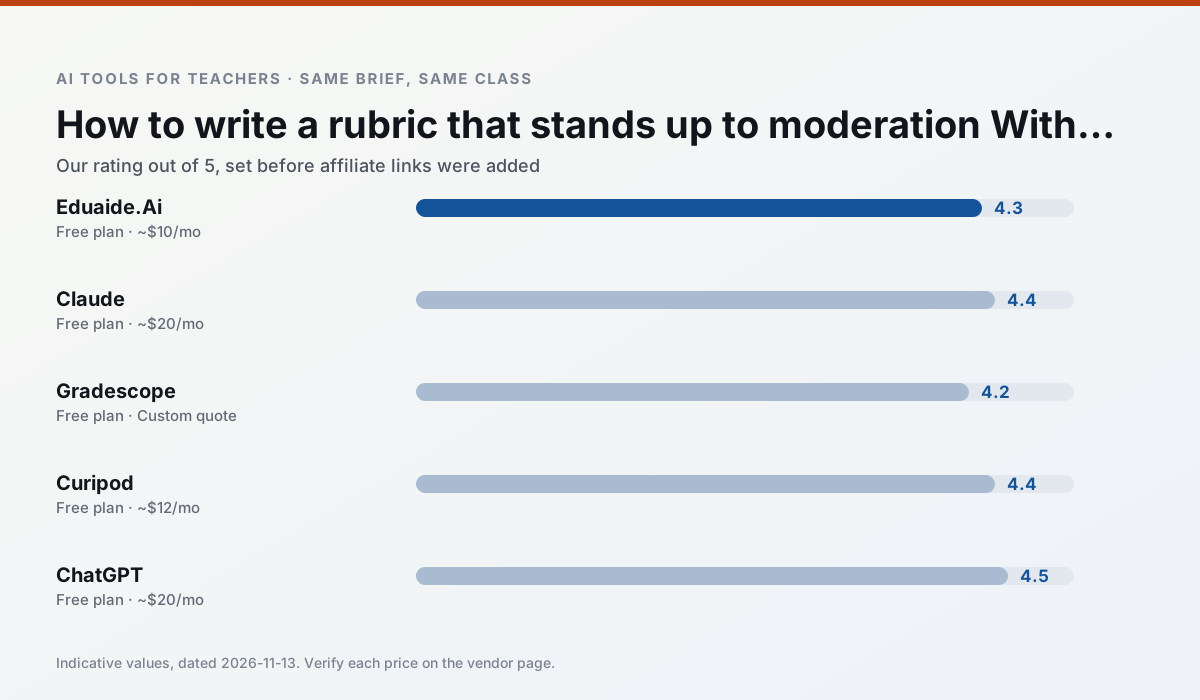
Side by side
Comparison table
Ratings reflect our timed classroom workflow, not vendor claims. Prices are indicative — verify on the vendor site.
| Tool | Best for | Free tier | Indicative paid plan | Standout feature | Our rating | Verdict | Try the tool |
|---|---|---|---|---|---|---|---|
| Eduaide.Ai | lesson planning · rubric creation | Yes — Daily generation cap | ~$10 /user/mo | Resource library | 4.3 / 5 | Strong option | Try free |
| Claude | rubric creation · feedback on writing | Yes — Usage-limited | ~$20 /user/mo | Very large context window | 4.4 / 5 | Strong option | Try free |
| Gradescope | grading · rubric creation | Yes — Limited courses | Custom quote | Bubble sheet and handwriting capture | 4.2 / 5 | Strong option | Try free |
| Curipod | formative assessment · exit tickets | Yes — Limited lessons per month | ~$12 /user/mo | Live polls and word clouds | 4.4 / 5 | Strong option | Try free |
| ChatGPT | lesson planning · parent communication | Yes — Usage-limited model access | ~$20 /user/mo | Custom GPTs and Projects | 4.5 / 5 | Top pick | Try free |
| MagicSchool AI | lesson planning · differentiation | Yes — Core generators with monthly usage limits | ~$12 /user/mo | 80+ teacher-specific tools | 4.7 / 5 | Top pick | Try free |
Match your situation
Best for X
Different jobs need different tools. Here is what we would open first in each case.
Eduaide.Ai answers the three questions a district actually asks: rostering, admin controls and a data-processing agreement. That is usually what decides a school purchase.
Setup cost is one login for Claude; everything else can wait until you know the tool is useful.
Gradescope is the one we would open on a normal planning day because the first output is editable rather than restructurable, and the free plan covers a single teacher's routine.
If there is no budget, start with Curipod: free plan with clearest quota is the least punishing free tier here.
Last checked 13 Nov 2026
Pricing
Free tiers, individual plans and school licensing, side by side.
| Tool | Free plan | Individual / paid | School & district | Billing note | Verify |
|---|---|---|---|---|---|
| Eduaide.Ai | $0 — Daily generation cap | ~$10 /user/mo | Custom quote | Indicative — verify on vendor site | Vendor |
| Claude | $0 — Usage-limited | ~$20 /user/mo | ~$25+ /user/mo | Indicative — verify on vendor site | Vendor |
| Gradescope | $0 — Limited courses | Custom quote | Custom quote | LMS integration and support | Vendor |
| Curipod | $0 — Limited lessons per month | ~$12 /user/mo | Custom quote | Indicative — verify on vendor site | Vendor |
| ChatGPT | $0 — Usage-limited model access | ~$20 /user/mo | ~$25+ /user/mo | Indicative — verify on vendor site | Vendor |
| MagicSchool AI | $0 — Core generators with monthly usage limits | ~$12 /user/mo | Custom quote | Indicative — verify on vendor site | Vendor |
Editorial rule: pricing is re-checked every 2–3 months and the top 50 pages are refreshed every 6 months. See our funding policy.
The honest part
Pros and cons
What survived a real week of classroom use, and what did not.
Pros
- Very low entry price
- Good worksheet and rubric output
- Clean, uncluttered UI
Cons
- Smaller template set than MagicSchool
- Less polished export options
- Limited integrations
Pros
- Handles full unit plans and long rubrics
- Nuanced, less generic prose
- Good at structured document output
Cons
- No teacher-specific templates
- Fewer classroom integrations
- Consumer plan not suitable for student data
Pros
- Large time savings on paper assessments
- Consistent rubric application
- Detailed item analytics
Cons
- Overkill for elementary classrooms
- Institutional pricing is opaque
- Setup effort is real
Pros
- High student engagement out of the box
- Great for quick checks for understanding
- No student accounts required for basic use
Cons
- Focused on delivery, not planning
- Requires reliable classroom devices
- Free tier is restrictive
Pros
- Most flexible option available
- Huge community of teacher prompt libraries
- Strong multilingual support
Cons
- Requires prompt skills for consistent results
- No built-in standards alignment
- District privacy review usually required
In the classroom
Use cases
Five concrete workflows, with the tool we would open for each one.
Rubric and feedback comments in one pass
Reorder the workflow so the rubric is yours and the comments are generated. Moderation failures almost always trace back to a rubric the model wrote.
Recommended: Eduaide.AiA parent email in two languages
Draft in plain, warm language with no names, translate, then back-translate the important sentences to check meaning. Keep specific incidents out of the prompt and add them yourself.
Recommended: ClaudeA Monday morning lesson plan in twelve minutes
The twelve minutes come from not rewriting the skeleton. Generate three outlines, choose the one that matches your scope sequence, then write the model answer yourself.
Recommended: GradescopeThree reading levels from one source text
Paste a vetted text, ask for supported, core and extension versions, then check the vocabulary list by hand. Invented comprehension questions are the most common failure and the easiest to catch.
Recommended: CuripodA substitute folder that needs no context
The value here is structure, not creativity. Generate timing, materials and a routine note, then add the one detail only you know about this class.
Recommended: ChatGPT
Questions teachers ask us
FAQ
Direct answers, also published as FAQPage structured data for search and AI assistants.
How long does this workflow take?
Which tool should I start with?
What if the output is unusable?
Sources & further reading
Our recommendation
Try MagicSchool AI free for your next rubric creation task
A large library of teacher-specific AI generators in one dashboard. Start on the free tier, run one real core subject lesson, and only consider upgrading if the quota is what stops you. Disclosure: we may earn a commission (30% recurring) at no extra cost to you.
Some links on this page are affiliate links. We may earn a commission at no extra cost to you. Our rankings are editorial and never pay-to-play. Never enter student PII into a free consumer account.
Keep reading
Related comparisons in this cluster.
Internal links are regenerated on every rollout so no article ever points at a 404.