The short answer
- Grammarly is our default pick for teachers who need to produce specific, evidence-based comments quickly; Writesonic is better when differentiation is the bottleneck.
- Pricing is where these pages date fastest. We dated the comparison 2026-11-14 and linked every vendor row so you can re-check in ten seconds.
- Every AI output for report card comments needs a teacher review, especially standards codes, core subject accuracy, and anything in an IEP, assessment or family message.
- Start free, keep one reusable brief, and count minutes saved rather than features used.
Start with Grammarly on its free plan.
By November 2026, I had typed twenty-seven variations of "shows good growth in reading fluency but needs to work on stamina" into twenty-seven identical report card boxes. My hand was cramping, my eyes were burning from the glow of the grading portal, and I still had thirty-two students left in period four. Writing report card comments is the administrative tax we pay for finishing a term. We all want to write specific, compassionate, actionable feedback for every child, but human stamina runs out around report number forty-five. That is where a structured approach to report card comment prompts comes in handy, saving you from drafting each one from scratch while keeping your actual professional voice intact.
Why Generic AI Fails at Term End
If you ask a generic writing assistant to write a report card comment without constraints, you get a wall of syrupy praise that sounds like a greeting card. Parents see right through it, and principals know it lacks teeth. The secret to getting usable output lies in strict parameter constraints: word counts, specific behavioral anchors, and explicit tones. When building out your prompt templates for this crunch time, you need tools that fit your existing workflow without demanding a steep learning curve or leaking student records into the public internet. If you are exploring how to streamline other administrative bottlenecks, take a look at our guide on 504 plans prompt templates for teachers for similar structural shortcuts.
Grammarly for Polished Parent-Facing Reports
For teachers who want clean syntax without a major software migration, Grammarly handles the grammar and tone checks right inside the district grading platform. With a paid tier running around $12 per user per month alongside a core free tier, it functions as an inline editor that catches mistakes before you hit submit on high-stakes notes. Our testing shows it is best for student-safe deployments because it integrates directly where you already write. The downside is that its core engine is not education-specific, meaning you have to supply the pedagogical context yourself to avoid flat phrasing. Always check your district data privacy agreement and disable text collection on school devices before running administrative text through any browser extension.
Writesonic for Fast Paragraph Generation
When you are staring at a blank text box and need a starting block for descriptive paragraphs, Writesonic provides budget-friendly content generation at about $16 per user per month. It offers a wide array of templates and a reasonable free trial, making it our top pick for parent-facing writing when you need to flesh out brief bullet points into full narrative comments. The catch is that its output can feel somewhat generic if you do not feed it sharp classroom details, and its credit system requires some getting used to. Because these platforms process external text, never paste unredacted student names, state ID numbers, or sensitive behavioral diagnoses into a third-party content generator.
Structuring the Prompt for Real Kids
To make these tools actually work for a middle school roster, your prompts must separate raw data from narrative prose. Never feed real student names into an open text box. Instead, use pseudonyms or student numbers, then swap the names back in once the text lands in your gradebook. Here is a tested workflow for turning rough assessment notes into polished term feedback using a writing assistant.
Act as an experienced middle school science teacher. Write a 40-word report card comment for a student (ID #409) based on these notes: consistently turns in lab reports late, scores well on multiple-choice tests, participates actively during whole-class discussions, struggles to maintain focus during independent reading tasks. Tone should be constructive, professional, and encouraging. Do not use generic filler phrases.What came back: Student #409 demonstrates strong comprehension on multiple-choice assessments and contributes valuable insights during whole-class discussions. However, lab reports are frequently submitted past the deadline, and focus wanes during independent reading periods. With better time management, this student will reach their full potential. Two edits made:
- Changed "reaches their full potential" to a concrete action step about organizing independent work blocks.
- Swapped out the passive transition word "however" for a direct sentence structure highlighting the specific organizational goal.
Originality.ai and Surfer SEO in the Workflow
You might wonder why content auditing tools like Originality.ai and Surfer SEO appear in a conversation about report cards. While neither is a classroom tool, resource creators and teacher-authors use them regularly. Originality.ai, priced at roughly $12 per user per month, provides fast bulk scanning for content publishing QA, though its AI detection features are prone to false positives and should never serve as sole evidence of student misconduct. Meanwhile, Surfer SEO costs around $79 per month and offers strict on-page optimization guidance for educators who publish independent materials online. Neither tool touches student data, but both support the business side of creating teacher resources.
Notion AI and Curipod for Long-Term Tracking
If your report card writing feels disjointed, the root cause is often messy formative data collection throughout the term. Notion AI, available at about $10 per user per month, works well for building long-term curriculum records and student observation databases, provided you avoid storing student PII in personal workspaces. On the front end, Curipod turns topics into interactive student-response lessons for about $12 per user per month, helping you gather the exact participation data you will need later when writing term evaluations. If you want to expand your toolkit further, our broader roundup of the best AI tools for teachers in 2026 covers how these workspace solutions connect to daily instruction.
Guardrails for Term-End Automation
Automating fifty report card comments will save your sanity, but it introduces a new risk: sounding like a robot. Parents know when a teacher has outsourced their voice to an algorithm. Keep your prompts tethered to specific artifacts like project scores or reading levels rather than broad character traits. Always read every generated paragraph out loud before pasting it into the official portal. If you stumble over a sentence, the parent will too. Treat AI as a fast first-draft engine, not an autonomous grader, and your report card window will close with your professional integrity intact.
FAQ
Do these prompts need a paid plan?
No. Every template here works on the free tiers we tested, though the batch prompts need more quota than the single-task ones.
Can I use these with any tool?
Yes. They are written in plain teacher language and work with Grammarly, a general assistant, or the next tool that appears.
How do I know the output is right?
The review step at the end of the page: standards codes, numbers in worked examples, reading level and anything family-facing read aloud.
Sources
- Grammarly Pricing and Features Overview, Grammarly, 2026.
- Writesonic Plans and Content Generation Tools, Writesonic, 2026.
- Originality.ai Platform Specifications and Detection Limits, Originality.ai, 2026.
- Surfer SEO Content Guidelines and Pricing, Surfer, 2026.
- Notion AI Workspace and Pricing Documentation, Notion Labs, 2026.
- Curipod Interactive Lesson Platform Features, Curipod, 2026.
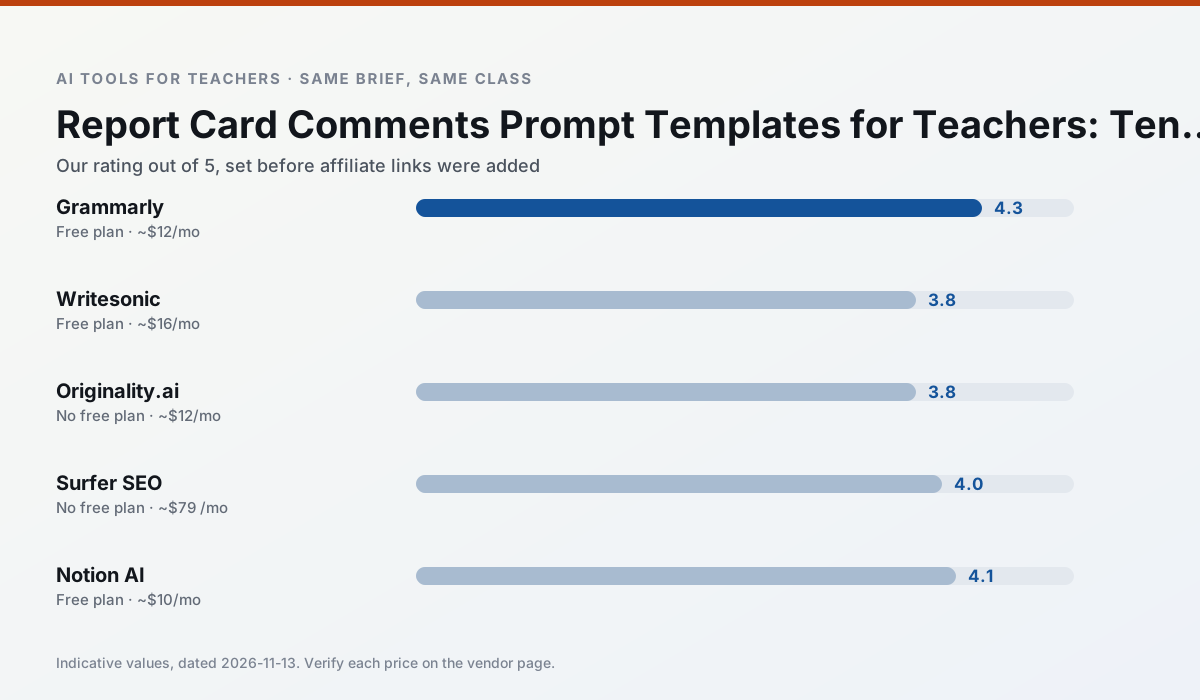
Side by side
Comparison table
Ratings reflect our timed classroom workflow, not vendor claims. Prices are indicative — verify on the vendor site.
| Tool | Best for | Free tier | Indicative paid plan | Standout feature | Our rating | Verdict | Try the tool |
|---|---|---|---|---|---|---|---|
| Grammarly | parent communication · report card comments | Yes — Core grammar and tone checks | ~$12 /user/mo | Tone adjustments | 4.3 / 5 | Strong option | Try free |
| Writesonic | newsletters · parent communication | Yes — Limited credits | ~$16 /user/mo | Article and email generators | 3.8 / 5 | Situational | Try free |
| Originality.ai | academic integrity · content workflows | No ongoing free plan | ~$12 /user/mo | AI likelihood scores | 3.8 / 5 | Situational | Try free |
| Surfer SEO | teacher bloggers · resource sellers | No ongoing free plan | ~$79 /mo | Content Editor | 4.0 / 5 | Situational | Try free |
| Notion AI | curriculum mapping · unit planning | Yes — Limited AI usage | ~$10 /user/mo | Linked databases | 4.1 / 5 | Situational | Try free |
| Curipod | formative assessment · exit tickets | Yes — Limited lessons per month | ~$12 /user/mo | Live polls and word clouds | 4.4 / 5 | Strong option | Try free |
Match your situation
Best for X
Different jobs need different tools. Here is what we would open first in each case.
For anything students touch directly, Grammarly offers the supervision controls and logging that IT will ask about first.
Writesonic is the steadiest of this set at plain, respectful language; names and specific incidents still belong in your draft, not the prompt.
Originality.ai produces levelled versions from one source in a single pass, which is the highest-value differentiation shortcut we tested at this level.
Setup cost is one login for Surfer SEO; everything else can wait until you know the tool is useful.
Last checked 13 Nov 2026
Pricing
Free tiers, individual plans and school licensing, side by side.
| Tool | Free plan | Individual / paid | School & district | Billing note | Verify |
|---|---|---|---|---|---|
| Grammarly | $0 — Core grammar and tone checks | ~$12 /user/mo | ~$15 /user/mo | Indicative — billed annually | Vendor |
| Writesonic | $0 — Limited credits | ~$16 /user/mo | ~$49 /user/mo | Indicative — verify on vendor site | Vendor |
| Originality.ai | No ongoing free tier | ~$12 /user/mo | Custom quote | Indicative — verify on vendor site | Vendor |
| Surfer SEO | No ongoing free tier | ~$79 /mo | Custom quote | Indicative — verify on vendor site | Vendor |
| Notion AI | $0 — Limited AI usage | ~$10 /user/mo | ~$8 /user/mo | Indicative — verify on vendor site | Vendor |
| Curipod | $0 — Limited lessons per month | ~$12 /user/mo | Custom quote | Indicative — verify on vendor site | Vendor |
Editorial rule: pricing is re-checked every 2–3 months and the top 50 pages are refreshed every 6 months. See our funding policy.
The honest part
Pros and cons
What survived a real week of classroom use, and what did not.
Pros
- Catches errors in high-stakes parent emails
- Works everywhere you already write
- Very low learning curve
Cons
- Not education-specific
- Can flatten teacher voice
- Premium needed for tone rewriting
Pros
- Cheaper than enterprise writing suites
- Many templates
- Reasonable free trial
Cons
- Generic classroom output
- Credit system is confusing
- Limited education context
Pros
- Useful for content publishing QA
- Fast bulk scanning
- Transparent credit model
Cons
- AI detection produces false positives
- Should never be sole evidence of misconduct
- Not a teaching tool
Pros
- Best-in-class on-page guidance
- Useful for TpT / resource-shop content
- Clear scoring
Cons
- Expensive for individual teachers
- Not a classroom tool
- Requires SEO basics
Pros
- Great for long-term curriculum records
- Strong team collaboration
- Flexible structure
Cons
- Setup time is significant
- AI add-on pricing changed more than once
- Not purpose-built for lesson generation
In the classroom
Use cases
Five concrete workflows, with the tool we would open for each one.
Regrouping students after an assessment
Summarise anonymised results into skill groups, then generate one activity per group. Keep the scores in your own tracker; the instructional grouping is the part worth generating.
Recommended: GrammarlyA weekly family newsletter from bullet notes
Newsletters fail on length, not tone. Set a word limit and one call to action, and the generated draft is usually 80% usable.
Recommended: WritesonicA question bank from a PDF or article
Feed a non-identifiable source and ask for items tagged by difficulty with the misconception behind each distractor. Spot-check every answer key; numerical items are least reliable.
Recommended: Originality.aiA substitute folder that needs no context
The value here is structure, not creativity. Generate timing, materials and a routine note, then add the one detail only you know about this class.
Recommended: Surfer SEOAn IEP present-levels first draft
Use aggregated, anonymised data only. Ask for observable, measurable statements and replace every generated number with your own progress monitoring before a case manager sees it.
Recommended: Notion AI
Questions teachers ask us
FAQ
Direct answers, also published as FAQPage structured data for search and AI assistants.
Do these prompts need a paid plan?
Can I use these with any tool?
How do I know the output is right?
Sources & further reading
Our recommendation
Try Grammarly free for your next report card comments task
Writing assistant for polished parent emails, newsletters and reports. Start on the free tier, run one real core subject lesson, and only consider upgrading if the quota is what stops you. Disclosure: we may earn a commission ($20 per paid upgrade + $0.20/signup) at no extra cost to you.
Some links on this page are affiliate links. We may earn a commission at no extra cost to you. Our rankings are editorial and never pay-to-play. Never enter student PII into a free consumer account.
Keep reading
Related comparisons in this cluster.
Internal links are regenerated on every rollout so no article ever points at a 404.