The short answer
- Notion AI is our default pick for teachers who need to draft a standards-aware lesson plan quickly; QuestionWell is better when differentiation is the bottleneck.
- The cheapest honest test is a week of real work on the free plans: Notion AI: Yes — Limited AI usage; QuestionWell: Yes — Monthly generation limit; Kahoot!: Yes — Limited player count. If a tool is still open on Friday, it has earned a paid conversation.
- Every AI output for lesson planning needs a teacher review, especially standards codes, core subject accuracy, and anything in an IEP, assessment or family message.
- Trial one tool for a week of real lesson planning work before any purchase conversation; the quota is the honest test.
Start with Notion AI on its free plan.
It was a Tuesday evening in October, and my desktop had forty-two browser tabs open. I was staring at a Notion database that I had spent three weekends building, trying to link a tenth-grade American literature unit to our district's writing standards. The database looked gorgeous. It was color-coded, tagged, and entirely devoid of actual lesson plans. That was the moment I realized my digital workspace had become a second job. If you are looking for a magic wand that generates curriculum out of thin air, Notion AI will frustrate you. If you want a digital binder that actually remembers what you taught last November, it is worth every bit of its ~$10 /user/mo (indicative) price tag.
Why Notion AI belongs in your workspace, not your lesson generator
Most AI tools try to write the whole lesson for you. Notion AI operates differently because it lives inside a structured note-taking app. You are not chatting with a generic chatbot in a separate window; you are querying your own accumulated resources. The free tier gives you limited AI usage, which is enough to test whether you like having an assistant built into your databases. Its main strength lies in long-term curriculum records and team collaboration. If your department shares a master scope and sequence, keeping it in Notion means everyone can query the same archive.
The catch is setup time. You have to build the database structure yourself before the AI has anything useful to organize. Furthermore, Notion AI is not purpose-built for instant lesson generation the way dedicated tools are. When you need a quick quiz or a slide deck, jumping between platforms is common. Teachers often pair it with tools like Brisk Teaching for inline feedback or Quizizz for gamified reviews, treating Notion solely as the filing cabinet that holds the resulting artifacts. Never store student PII in your personal workspace, especially if your district has not cleared the DPA.
A Monday morning lesson plan in twelve minutes
The secret to saving time with Notion AI on a frantic Monday morning is refusing to rewrite the structural skeleton. The twelve minutes come entirely from letting the system generate structural outlines while you supply the pedagogical judgment. Do not ask it to write a full day of instruction. Instead, feed it your standard template and ask for options.
Prompt typed into Notion AI: "Using our 90ф_unit_template database, generate three distinct lesson outlines for introducing rhetorical appeals to 10th graders. Include a 10-minute hook, a 20-minute guided practice, and a 15-minute application task for each option."
What came back: Option one used a political speech analysis. Option two used a commercial transcript. Option three used a historical letter. All three included standard lecture blocks and generic group work.
The two edits that made it usable:
- I deleted the generic lecture block from option two and replaced it with a targeted five-minute modeling script using our local textbook excerpt.
- I adjusted the application task to require individual written responses rather than group chatter, matching our current classroom management goals.
Managing mixed-ability classes without losing your mind
When you teach a class with five IEPs, three English language learners, and four kids who finished the reading before the bell even rang, standard lesson plans fall apart. Notion AI shines brightest here because you can ask it to cross-reference your core text with different reading levels or accommodation notes stored in separate pages. If you want a deeper dive into adjusting texts, check our guide on AI differentiation reading levels.
For mixed-ability planning, you write the core lesson once, then use Notion AI's inline generation to draft tiered discussion prompts. You might ask it to generate three versions of a driving question: one scaffolded with sentence frames, one at grade level, and one requiring abstract synthesis. Because your original text and standards database live right next to the prompt, the output actually aligns with what you taught yesterday. If you need broader ideas on structuring your workflows, our comprehensive overview of the best AI tools for teachers in 2026 covers how these pieces fit together.
Where other AI tools step in
Notion AI cannot do everything, and pretending it can leads to late nights at the kitchen table. When you need specific item types or rapid question generation, other platforms handle the heavy lifting. QuestionWell is fantastic for parent-facing writing and generating standards-aligned question banks from any text or objective for about ~$10 /user/mo (indicative), though its free tier has a monthly generation limit. Remember to only paste non-identifiable source text.
For review days, teachers often rely on interactive platforms. Kahoot! offers instant engagement and very low training time, making it our pick for student-safe deployments when you use nicknames rather than real names for younger students. It costs around ~$10 /user/mo (indicative) for full features, though its free tier limits player counts. Similarly, Quizizz remains our best overall for daily use at ~$15 /user/mo (indicative), offering robust reporting and a massive question bank that works reliably on low-end devices. If you want to turn articles into video explainers, Fliki provides text-to-video capabilities with stock media and AI voiceover for about ~$21 /user/mo (indicative), though you must keep an eye on minute-based limits and avoid student PII entirely.
Two things that went wrong in my classroom
Real tools fail in real classrooms, and pretending otherwise helps no one. First, I tried using Notion AI to auto-generate a complete formative assessment matrix for a complex novel unit. The AI hallucinated page numbers for quotes that did not exist in our specific edition, which led to a very confused room of sophomores on Wednesday morning. To fix this, I instituted a strict rule: any quote or numerical data generated by AI must be verified against a physical copy before it goes onto a worksheet.
Second, I once attempted to build a substitute teacher folder entirely inside a shared Notion workspace without testing it on a non-district device first. The substitute could not log in past our district single-sign-on wall, leaving my second-period class staring at a blank screen. Now, the value of a sub folder in Notion is purely for my own drafting; I export the final timing, materials, and routine notes to a PDF and print three paper copies to leave on the desk alongside the digital link.
FAQ
Is Notion AI worth paying for at mixed-grade level?
Only if lesson planning is a weekly job for you. At one use a month the free plan is enough; at weekly use the paid tier buys back more time than it costs, provided you keep the review step.
What does Notion AI get wrong most often?
Invented standards codes and assumed resources, in that order. Both survive a quick read, which is why the review checklist in this article starts with those two.
Can Notion AI replace a planning period?
It replaces the blank page, not the planning. Our edit time ranged from eleven minutes for an outline to most of an evening for a full differentiated set.
Is Notion AI safe to use with student data?
Not on a personal account. Use topic-level prompts, keep work samples out, and check what your district has approved before a student's work reaches any tool.
Sources
- Notion AI Pricing and Workspace Documentation, notion.so
- QuestionWell Feature Overview, questionwell.com
- Kahoot! Educator Tiers and Safety Guidelines, kahoot.com
- Quizizz Plan Comparisons and COPPA Documentation, quizizz.com
- Brisk Teaching Extension Permissions and Privacy Policy, briskteaching.com
- Fliki Text-to-Video Limits and Tiers, fliki.ai
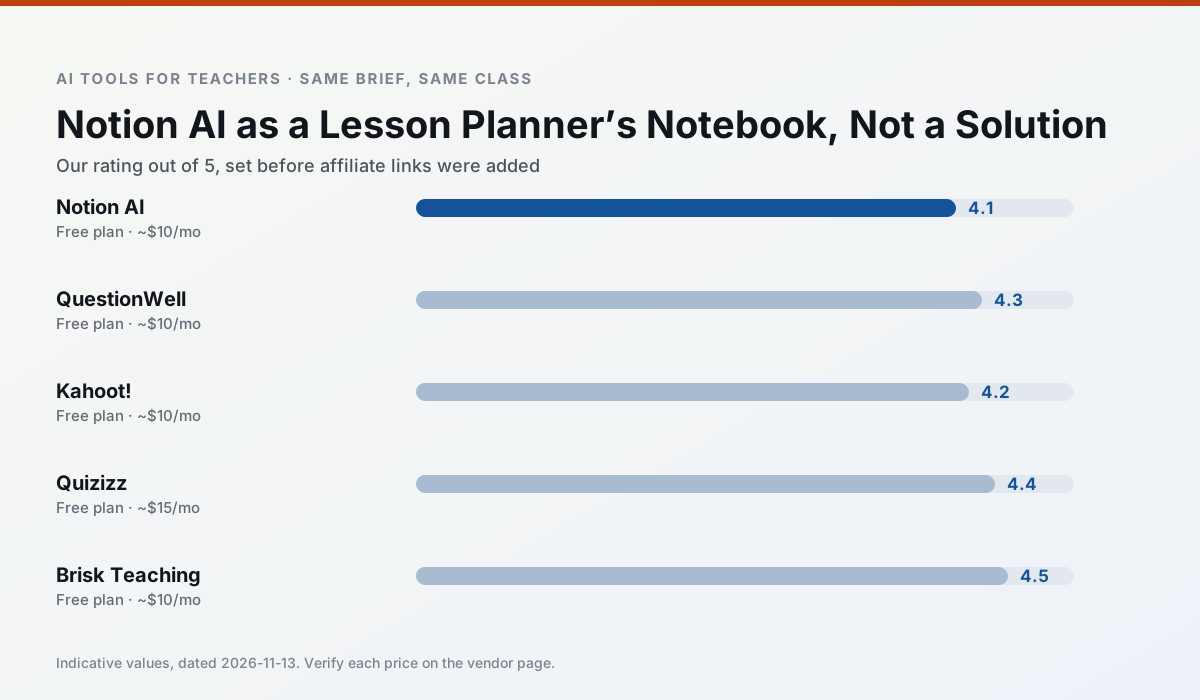
Side by side
Comparison table
Ratings reflect our timed classroom workflow, not vendor claims. Prices are indicative — verify on the vendor site.
| Tool | Best for | Free tier | Indicative paid plan | Standout feature | Our rating | Verdict | Try the tool |
|---|---|---|---|---|---|---|---|
| Notion AI | curriculum mapping · unit planning | Yes — Limited AI usage | ~$10 /user/mo | Linked databases | 4.1 / 5 | Situational | Try free |
| QuestionWell | quiz generation · assessment | Yes — Monthly generation limit | ~$10 /user/mo | Exports to Google Forms / LMS | 4.3 / 5 | Strong option | Try free |
| Kahoot! | quiz generation · review lessons | Yes — Limited player count | ~$10 /user/mo | AI question builder | 4.2 / 5 | Strong option | Try free |
| Quizizz | quiz generation · formative assessment | Yes — Core quiz creation | ~$15 /user/mo | AI question generator | 4.4 / 5 | Strong option | Try free |
| Brisk Teaching | feedback on writing · grading | Yes — Limited actions per month | ~$10 /user/mo | Works inside Google Docs | 4.5 / 5 | Top pick | Try free |
| Fliki | video lessons · audio lessons | Yes — Watermarked, limited minutes | ~$21 /user/mo | Blog/text to video | 4.0 / 5 | Situational | Try free |
Match your situation
Best for X
Different jobs need different tools. Here is what we would open first in each case.
Notion AI keeps the same task across levels, which is what makes a differentiated set defensible in moderation.
QuestionWell is the steadiest of this set at plain, respectful language; names and specific incidents still belong in your draft, not the prompt.
Kahoot! is built around teacher-monitored student spaces and audit logs rather than a consumer chat account, which is a different approval conversation.
On the daily cycle, Quizizz saves the most edit time per task; the paid tier mostly buys more runs rather than better ones.
Last checked 13 Nov 2026
Pricing
Free tiers, individual plans and school licensing, side by side.
| Tool | Free plan | Individual / paid | School & district | Billing note | Verify |
|---|---|---|---|---|---|
| Notion AI | $0 — Limited AI usage | ~$10 /user/mo | ~$8 /user/mo | Indicative — verify on vendor site | Vendor |
| QuestionWell | $0 — Monthly generation limit | ~$10 /user/mo | Custom quote | Indicative — verify on vendor site | Vendor |
| Kahoot! | $0 — Limited player count | ~$10 /user/mo | Custom quote | Indicative — verify on vendor site | Vendor |
| Quizizz | $0 — Core quiz creation | ~$15 /user/mo | Custom quote | Indicative — verify on vendor site | Vendor |
| Brisk Teaching | $0 — Limited actions per month | ~$10 /user/mo | Custom quote | Indicative — verify on vendor site | Vendor |
| Fliki | $0 — Watermarked, limited minutes | ~$21 /user/mo | ~$66 /user/mo | Indicative — verify on vendor site | Vendor |
Editorial rule: pricing is re-checked every 2–3 months and the top 50 pages are refreshed every 6 months. See our funding policy.
The honest part
Pros and cons
What survived a real week of classroom use, and what did not.
Pros
- Great for long-term curriculum records
- Strong team collaboration
- Flexible structure
Cons
- Setup time is significant
- AI add-on pricing changed more than once
- Not purpose-built for lesson generation
Pros
- Saves the most time on question writing
- Clean export workflow
- Good objective tagging
Cons
- Single-purpose tool
- Question quality varies by source text
- Limited student-facing features
Pros
- Instant engagement
- Very low training time
- Strong brand familiarity
Cons
- Less depth for higher-order assessment
- Paid tiers needed for larger classes
- Time pressure suits recall more than reasoning
Pros
- Students already know the interface
- Good reporting
- Works on low-end devices
Cons
- Writing high-quality AI questions still needs review
- Gamification can distract
- Advanced analytics are paid
Pros
- No copy-paste between tools
- Fast inline feedback on student drafts
- Gentle learning curve
Cons
- Chrome-first workflow
- Extension permissions need IT approval
- Free quota is tight
In the classroom
Use cases
Five concrete workflows, with the tool we would open for each one.
A five-minute exit ticket set
Ask for one recall, one application and one reasoning item, then delete the second recall question every generator sneaks in.
Recommended: Notion AIAn IEP present-levels first draft
Use aggregated, anonymised data only. Ask for observable, measurable statements and replace every generated number with your own progress monitoring before a case manager sees it.
Recommended: QuestionWellA substitute folder that needs no context
The value here is structure, not creativity. Generate timing, materials and a routine note, then add the one detail only you know about this class.
Recommended: Kahoot!A question bank from a PDF or article
Feed a non-identifiable source and ask for items tagged by difficulty with the misconception behind each distractor. Spot-check every answer key; numerical items are least reliable.
Recommended: QuizizzA Monday morning lesson plan in twelve minutes
The twelve minutes come from not rewriting the skeleton. Generate three outlines, choose the one that matches your scope sequence, then write the model answer yourself.
Recommended: Brisk Teaching
Questions teachers ask us
FAQ
Direct answers, also published as FAQPage structured data for search and AI assistants.
Is Notion AI worth paying for at mixed-grade level?
What does Notion AI get wrong most often?
Can Notion AI replace a planning period?
Is Notion AI safe to use with student data?
Sources & further reading
Our recommendation
Try Notion AI free for your next lesson planning task
AI-assisted notes, databases and curriculum planning in one workspace. Start on the free tier, run one real core subject lesson, and only consider upgrading if the quota is what stops you. Disclosure: we may earn a commission (varies) at no extra cost to you.
Some links on this page are affiliate links. We may earn a commission at no extra cost to you. Our rankings are editorial and never pay-to-play. Never enter student PII into a free consumer account.
Keep reading
Related comparisons in this cluster.
Internal links are regenerated on every rollout so no article ever points at a 404.