The short answer
- MagicSchool AI is our default pick for teachers who need to draft a standards-aware lesson plan quickly; Eduaide.Ai is better when differentiation is the bottleneck.
- Start with MagicSchool AI on its free plan, keep Eduaide.Ai as the second opinion, and do not open a card until the quota, not the feature list, is what stops you.
- Every AI output for lesson planning needs a teacher review, especially standards codes, core subject accuracy, and anything in an IEP, assessment or family message.
- Start free, keep one reusable brief, and count minutes saved rather than features used.
Start with MagicSchool AI on its free plan.
It is 7:48 on a Tuesday morning, the photocopier is jammed with cardstock, and I am trying to build three distinct reading groups from Friday's exit tickets while my homeroom trickles in. If you have ever stared at a blinking cursor while your coffee goes cold, you know why lesson plan prompt templates are worth exploring. They save you from starting with a blank page. The trick is knowing which platform handles which specific task, because the tool that builds a fast worksheet is rarely the one that organizes interactive slides.
Why Generic Prompts Fail in the Classroom
When you type "write a lesson plan on fractions" into a general AI, you get a generic four-step procedure that assumes your students sit quietly in rows and finish worksheets in twenty minutes. It ignores your pacing guide, your state standards, and the kid who needs the instructions read aloud twice. Effective planning templates require constraints. They need target grade levels, specific misconceptions, and explicit time limits. If you have read our guide on AI tools for teachers, you know that prompt specificity dictates your output quality. Let us look at ten concrete prompt setups that actually survive first period.
The Monday Morning Outline in Twelve Minutes
Building a coherent week of instruction before the bell rings relies on refusing to rewrite the structural skeleton every time. The twelve-minute savings come from letting the AI generate three contrasting lesson outlines so you can select the one matching your scope and sequence.
Prompt: "Act as an experienced 8th-grade physical science teacher. Create three distinct instructional outlines for a 45-minute lesson on Newton's Second Law. Include an anticipatory set, direct instruction, guided practice, and a formative check for understanding. Format as a markdown table with columns for Time, Teacher Action, and Student Action."
First Output: The table generated clean 10-minute blocks, but the formative check was a standard multiple-choice quiz that would not show me who actually understood the math.
Two Edits: 1. Swapped the multiple-choice check for a white-board error-analysis task. 2. Added a constraint that the guided practice must use physical manipulatives rather than a worksheet.
For this specific workflow, ChatGPT remains the best for quick setup due to its flexible interface, though MagicSchool AI offers purpose-built generators if you prefer clicking through structured menus rather than typing natural language.
Three Reading Levels from One Source Text
Differentiation is where teachers spend the bulk of their planning hours. You take a vetted news article or primary source and ask the model to split it into three distinct tiers without losing the core concepts. Always paste your source text directly into the prompt rather than asking the model to fetch it from the web, which often introduces hallucinations.
Prompt: "Take the following text about the water cycle and rewrite it at three reading levels: 4th grade (supported), 6th grade (core), and 8th grade (extension). Maintain the key vocabulary words condensation, precipitation, and evaporation across all versions. Keep the paragraph count at three for each level."
First Output: The Lexile levels were roughly correct, but the generated comprehension questions at the end of the extension tier used vocabulary that was significantly harder than the passage itself.
Two Edits: 1. Explicitly stripped out the AI-generated comprehension questions to write my own. 2. Added a glossary request at the bottom of the supported version for EL students.
Eduaide.Ai shines here as the best overall for daily use, offering a clean, uncluttered UI and a dedicated teaching-resource library that makes formatting these tiered texts straightforward without endless chat threads.
Regrouping Students After an Assessment
When an assessment comes back, grouping kids by skill deficiency takes hours of sorting piles of paper. By feeding anonymized score trends into your prompt, you get targeted intervention stations without doing the manual tallying yourself. Keep the actual student names in your own offline gradebook; the instructional grouping is the only part worth generating.
Prompt: "Review these anonymized score distributions for a unit on fractions: 8 students struggled with unlike denominators, 12 struggled with simplifying results, and 4 mastered the unit. Generate one targeted 15-minute intervention activity for each of the two struggling groups using common classroom supplies like fraction strips."
First Output: The unlike-denominator activity relied heavily on drawing diagrams, which didn't help my visual learners who needed tactile grouping.
Two Edits: 1. Specified that the unlike-denominator group needed a physical cutting-and-folding task. 2. Added a self-checking mechanism so students could work independently while I pulled small groups.
For quick, interactive checks for understanding that follow this kind of grouping, Curipod turns topics into interactive student-response lessons in minutes, though you must verify your school's device availability before relying on it for every station.
Parent Communication in Two Languages
Drafting home communication that sounds warm, professional, and clear can drain your remaining energy at the end of a long day. The secret is writing the core message in plain English, running it through a translation prompt, and then back-translating the most critical sentences to check for tone and meaning. Always keep specific behavioral incidents out of the prompt, adding those sensitive details by hand after the draft returns.
Prompt: "Draft a short, warm weekly family update about our upcoming science fair projects. Emphasize that materials should be recycled items from home rather than store-bought. Provide the output in English first, followed by a professional Spanish translation suitable for working parents."
First Output: The Spanish translation used overly formal regional vocabulary that sounded more like a legal contract than an encouraging note from a teacher.
Two Edits: 1. Instructed the model to use standard, friendly Latin American Spanish. 2. Shortened the overall length to fit neatly into an email body rather than looking like an essay.
If you are looking to scale your resource production further, perhaps for a teacher-author side project or a school-wide curriculum hub, tools like Surfer SEO help optimize on-page content if you publish resources online, while Originality.ai offers fast bulk scanning for publisher and admin workflows where AI detection and content QA are required. Remember that AI detectors produce false positives and should never be used as the sole evidence of student misconduct.
Selecting Your Prompt Template Hub
Choosing the right platform depends entirely on how much time you want to spend tinkering with prompts. If you want a vast library of pre-built generators where you fill in blanks rather than writing conversational prompts, MagicSchool AI stands out as the best free option, provided you stay within its monthly usage limits. If you prefer a clean daily workspace for worksheets and rubrics, Eduaide.Ai provides a reliable middle ground. For more specialized needs, our related guides on 504 plans prompt templates and AI reading level differentiation offer additional guardrails for specific student populations. Start with one template type this week, master its edits, and let the machine handle the blank-page fatigue.
FAQ
Do these prompts need a paid plan?
No. Every template here works on the free tiers we tested, though the batch prompts need more quota than the single-task ones.
Can I use these with any tool?
Yes. They are written in plain teacher language and work with MagicSchool AI, a general assistant, or the next tool that appears.
How do I know the output is right?
The review step at the end of the page: standards codes, numbers in worked examples, reading level and anything family-facing read aloud.
Sources
- MagicSchool AI. (2026). Feature overview and teacher dashboard limits. magicschool.ai
- Eduaide.Ai. (2026). Resource generation and daily limits documentation. eduaide.ai
- OpenAI. (2026). ChatGPT model tiers and enterprise workspace privacy guidelines. openai.com
- Originality.ai. (2026). Plagiarism scanning and content QA credit models. originality.ai
- Surfer SEO. (2026). Content optimization and on-page scoring documentation. surferseo.com
- Curipod. (2026). Interactive student response lesson delivery features. curipod.com
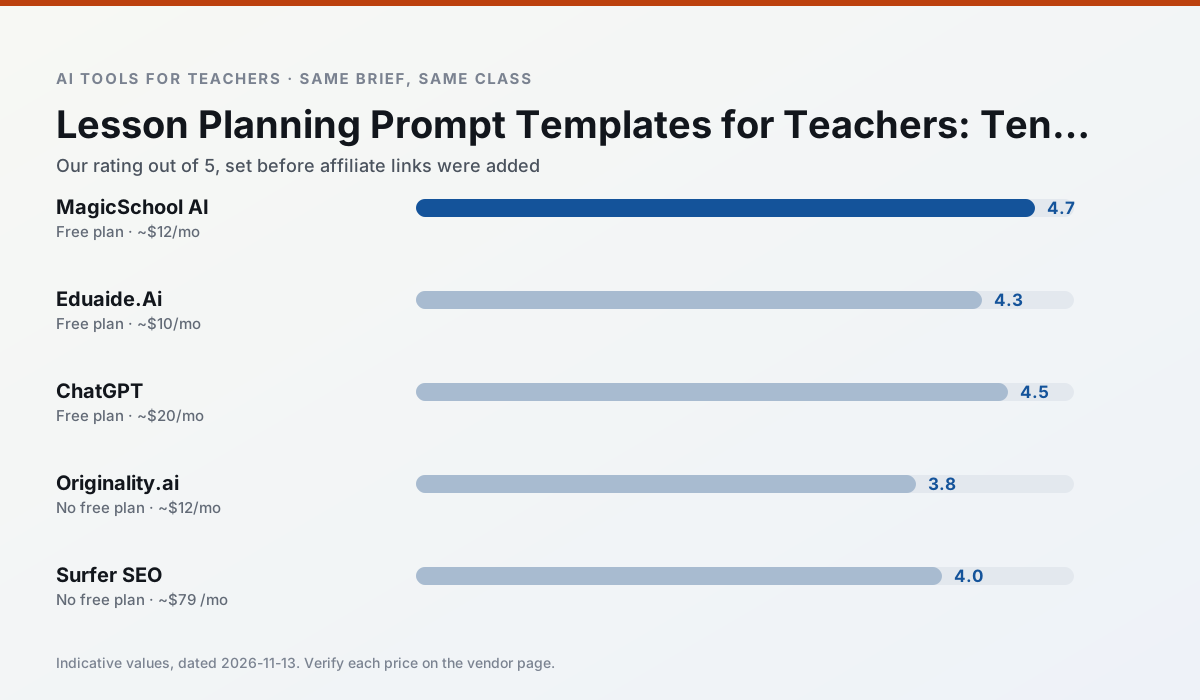
Side by side
Comparison table
Ratings reflect our timed classroom workflow, not vendor claims. Prices are indicative — verify on the vendor site.
| Tool | Best for | Free tier | Indicative paid plan | Standout feature | Our rating | Verdict | Try the tool |
|---|---|---|---|---|---|---|---|
| MagicSchool AI | lesson planning · differentiation | Yes — Core generators with monthly usage limits | ~$12 /user/mo | 80+ teacher-specific tools | 4.7 / 5 | Top pick | Try free |
| Eduaide.Ai | lesson planning · rubric creation | Yes — Daily generation cap | ~$10 /user/mo | Resource library | 4.3 / 5 | Strong option | Try free |
| ChatGPT | lesson planning · parent communication | Yes — Usage-limited model access | ~$20 /user/mo | Custom GPTs and Projects | 4.5 / 5 | Top pick | Try free |
| Originality.ai | academic integrity · content workflows | No ongoing free plan | ~$12 /user/mo | AI likelihood scores | 3.8 / 5 | Situational | Try free |
| Surfer SEO | teacher bloggers · resource sellers | No ongoing free plan | ~$79 /mo | Content Editor | 4.0 / 5 | Situational | Try free |
| Curipod | formative assessment · exit tickets | Yes — Limited lessons per month | ~$12 /user/mo | Live polls and word clouds | 4.4 / 5 | Strong option | Try free |
Match your situation
Best for X
Different jobs need different tools. Here is what we would open first in each case.
Nothing on MagicSchool AI's free tier is a teaser demo; the limits are documented and a normal week fits inside them.
Eduaide.Ai is the one we would open on a normal planning day because the first output is editable rather than restructurable, and the free plan covers a single teacher's routine.
ChatGPT runs in a browser tab with no extension, no student accounts and no onboarding call, so you can test it in a free period.
Originality.ai is the option IT is least likely to block: single sign-on, admin removal of AI features and an agreement on file.
Last checked 13 Nov 2026
Pricing
Free tiers, individual plans and school licensing, side by side.
| Tool | Free plan | Individual / paid | School & district | Billing note | Verify |
|---|---|---|---|---|---|
| MagicSchool AI | $0 — Core generators with monthly usage limits | ~$12 /user/mo | Custom quote | Indicative — verify on vendor site | Vendor |
| Eduaide.Ai | $0 — Daily generation cap | ~$10 /user/mo | Custom quote | Indicative — verify on vendor site | Vendor |
| ChatGPT | $0 — Usage-limited model access | ~$20 /user/mo | ~$25+ /user/mo | Indicative — verify on vendor site | Vendor |
| Originality.ai | No ongoing free tier | ~$12 /user/mo | Custom quote | Indicative — verify on vendor site | Vendor |
| Surfer SEO | No ongoing free tier | ~$79 /mo | Custom quote | Indicative — verify on vendor site | Vendor |
| Curipod | $0 — Limited lessons per month | ~$12 /user/mo | Custom quote | Indicative — verify on vendor site | Vendor |
Editorial rule: pricing is re-checked every 2–3 months and the top 50 pages are refreshed every 6 months. See our funding policy.
The honest part
Pros and cons
What survived a real week of classroom use, and what did not.
Pros
- Widest purpose-built template library
- Strong free tier for individual teachers
- Fast to learn with almost no prompting skill
Cons
- Outputs still need standards review
- Best features sit behind the paid tier
- District approval can be slow
Pros
- Very low entry price
- Good worksheet and rubric output
- Clean, uncluttered UI
Cons
- Smaller template set than MagicSchool
- Less polished export options
- Limited integrations
Pros
- Most flexible option available
- Huge community of teacher prompt libraries
- Strong multilingual support
Cons
- Requires prompt skills for consistent results
- No built-in standards alignment
- District privacy review usually required
Pros
- Useful for content publishing QA
- Fast bulk scanning
- Transparent credit model
Cons
- AI detection produces false positives
- Should never be sole evidence of misconduct
- Not a teaching tool
Pros
- Best-in-class on-page guidance
- Useful for TpT / resource-shop content
- Clear scoring
Cons
- Expensive for individual teachers
- Not a classroom tool
- Requires SEO basics
In the classroom
Use cases
Five concrete workflows, with the tool we would open for each one.
Regrouping students after an assessment
Summarise anonymised results into skill groups, then generate one activity per group. Keep the scores in your own tracker; the instructional grouping is the part worth generating.
Recommended: MagicSchool AIA weekly family newsletter from bullet notes
Newsletters fail on length, not tone. Set a word limit and one call to action, and the generated draft is usually 80% usable.
Recommended: Eduaide.AiThree reading levels from one source text
Paste a vetted text, ask for supported, core and extension versions, then check the vocabulary list by hand. Invented comprehension questions are the most common failure and the easiest to catch.
Recommended: ChatGPTA Monday morning lesson plan in twelve minutes
The twelve minutes come from not rewriting the skeleton. Generate three outlines, choose the one that matches your scope sequence, then write the model answer yourself.
Recommended: Originality.aiA parent email in two languages
Draft in plain, warm language with no names, translate, then back-translate the important sentences to check meaning. Keep specific incidents out of the prompt and add them yourself.
Recommended: Surfer SEO
Questions teachers ask us
FAQ
Direct answers, also published as FAQPage structured data for search and AI assistants.
Do these prompts need a paid plan?
Can I use these with any tool?
How do I know the output is right?
Sources & further reading
Our recommendation
Try MagicSchool AI free for your next lesson planning task
A large library of teacher-specific AI generators in one dashboard. Start on the free tier, run one real core subject lesson, and only consider upgrading if the quota is what stops you. Disclosure: we may earn a commission (30% recurring) at no extra cost to you.
Some links on this page are affiliate links. We may earn a commission at no extra cost to you. Our rankings are editorial and never pay-to-play. Never enter student PII into a free consumer account.
Keep reading
Related comparisons in this cluster.
Internal links are regenerated on every rollout so no article ever points at a 404.