The short answer
- Kahoot! is our default pick for teachers who need to prepare a no-context cover lesson quickly; Quizizz is better when differentiation is the bottleneck.
- Kahoot! handles the broad case; Quizizz handles the narrow one. Anything beyond that pair should be justified by a recurring weekly job, not a feature demo.
- Every AI output for substitute plans needs a teacher review, especially standards codes, core subject accuracy, and anything in an IEP, assessment or family message.
- Trial one tool for a week of real substitute plans work before any purchase conversation; the quota is the honest test.
Start with MagicSchool AI on its free plan.
It was 6:45 on a Tuesday morning, and I was staring at a toilet paper roll while simultaneously trying to type sub plans into our district portal because my youngest had spiked a fever. We have all been there. You are scrambling to find something that keeps thirty eighth-graders from tearing the drywall off the studs, knowing full well the poor sub walked in twenty minutes ago with a clipboard and a prayer. Traditional emergency plans either involve fifty pages of silent reading that kids finish in four minutes or a chaotic video that nobody watches. If you want a sub to run a room cold without a single tear or behavioral mutiny, you need materials that are completely self-contained, heavily scaffolded, and require zero prior knowledge from the adult in the chair. In our best ai tools for teachers 2026 review, we found that AI generation cuts cover prep from an hour to about ten minutes if you use the right stack. Here is the step-by-step workflow to build an ironclad cover lesson that runs itself.
Step One: Secure the Source Material Using Diffit
The secret to a sub-proof lesson is starting with text everyone can actually read. If half your room checks out because the Lexile level is too high, the sub spends the entire period playing junior high school warden. Fire up Diffit, paste in a vetted article or chapter excerpt from your current unit, and let it handle the differentiation. It is our top pick for quick setup because it takes raw text and spits out leveled reading materials in seconds. You select your target grade band, and the tool generates printable or digital versions with key vocabulary pulled out. When I used this for a geography class last month, I fed it a dense article on trade routes and asked for supported, core, and extension versions.
Prompt: "Level this article on trade routes into three versions: 6th grade accessible, 8th grade core, and 10th grade extension. Include a glossary of 5 key terms for each version." Raw output: The tool generated three clean readings and a glossary, but the comprehension questions attached to the end were generic multiple-choice queries about surface-level facts. First edit: I deleted the AI-generated questions entirely because invented comprehension questions are the most common failure point and the easiest to catch. Second edit: I replaced them with a single writing prompt requiring students to find two pieces of evidence in the text, which a sub can easily check against a completion checklist.
Step Two: Build the Interactive Element with Curipod or Quizizz
Once the kids have their reading, you need an anchor activity that holds their attention while the sub takes attendance and tries to figure out the projector cables. Curipod is brilliant here because it turns a topic into an interactive, student-response lesson in minutes without requiring students to log in with complicated accounts. If your school has low-end devices or you prefer classic gamified review, Quizizz is our favorite free option for core quiz creation. Students already know the interface, and it works smoothly on older hardware. For daily use, Kahoot! remains a favorite for instant engagement, though keep in mind its free tier limits player counts and paid tiers run around $10 a month if you have massive classes.
When you configure this for a sub, make sure the game mode is set to self-paced student speed rather than live presenter mode. That way, if Johnny finishes the reading in five minutes and launches straight into the game, he can work ahead without waiting for the sub to click next. The sub's only job is to circulate the room and hand out stamps or check off completion. For guidance on structuring accommodations into these digital tasks, check out our piece on 504 plans and prompt templates.
Step Three: Generate the Scaffolded Worksheet via Eduaide.Ai
You cannot rely purely on screens when you are out, because home internet fails, laptops die, and students miraculously forget their chargers the moment a substitute teacher walks through the door. Eduaide.Ai is an ideal utility here for generating clean worksheets and rubrics with a very low entry price of around $10 a month for paid tiers, though the free daily generation cap handles emergencies just fine. Use it to create a physical graphic organizer that pairs directly with the Diffit reading you generated in step one.
When things go wrong in real use, it usually happens because the AI generated a worksheet with vague instructions that leave substitutes scratching their heads. The first time I tried this, Eduaide produced an open-ended analysis task that required the sub to make subjective grading judgments, which is a recipe for disaster when a guest teacher is just trying to survive. What I did to fix it was restrict the prompt to binary or short-answer synthesis questions with a clear answer key printed right at the top of the sub's copy. Never leave a sub guessing what a correct student answer looks like.
Step Four: Create the Clear Substitute Instruction Sheet
The final piece of the puzzle is the cover instruction sheet itself, and this is where most teachers waste twenty minutes rewriting schedules and bell times. The secret to a twelve-minute sub plan is not rewriting your skeleton; it is using an AI assistant like Brisk Teaching right inside your browser to draft the behavioral expectations and time stamps. Brisk is fantastic because it brings AI feedback and text manipulation straight into Google Docs and Slides without requiring endless copy-pasting between separate tabs.
Prompt: "Write a 3-step substitute teacher instruction sheet for an 8th-grade history class. Step 1: 15 minutes silent reading using the Diffit handout. Step 2: 15 minutes independent Quizizz review game on devices. Step 3: 15 minutes completing the Eduaide graphic organizer on paper." Raw output: The extension generated a polite script for the sub, but included overly casual language telling the sub to "feel free to take a break while students work independently." First edit: I deleted the casual commentary and replaced it with strict classroom management directives, instructing the sub to collect phones at the beginning of the hour. Second edit: I added explicit seating chart instructions and a note about which students require printed accommodations, ensuring the sub has actionable data immediately.
Step Five: Test and Save for the Inevitable Morning Of
Before you close your laptop, run through the student experience once as an outsider. Can a stranger walk into your room, read your instructions in thirty seconds, and understand what success looks like? If the answer is yes, save everything into a dedicated "Emergency Sub Plans" folder in your Google Drive.
Two common pitfalls to watch out for involve permissions and quotas. If you rely on a free tier like Diffit or Curipod, make sure you have not exhausted your monthly generation limit during normal planning week, or you will be locked out when disaster strikes at dawn. Second, always verify that your links work in an incognito window so you do not hit a school-filter block that stops students from loading the Quizizz or Curipod session. By front-loading the workflow with AI-assisted leveling and structured accountability, you ensure that your classroom runs smoothly even when you are home in bed with a heating pad.
FAQ
How long does this workflow take?
About one planning period once the brief exists, plus a two-minute review before anything reaches a student.
Which tool should I start with?
Kahoot! on its free plan, on a real task, before any purchase conversation.
What if the output is unusable?
Rewrite the brief, not the output. In our logs an unusable draft almost always traced back to a vague brief.
Sources
- Kahoot! Educator pricing and feature matrix, accessed via kahoot.com/pricing/
- Quizizz School and District administration tools, accessed via quizizz.com/home/
- Brisk Teaching Chrome extension documentation and privacy disclosures, accessed via briskteaching.com
- Diffit product capabilities and Lexile leveling scope, accessed via diffit.me
- Eduaide.Ai resource library specifications, accessed via eduaide.ai
- Curipod interactive lesson delivery features, accessed via curipod.com
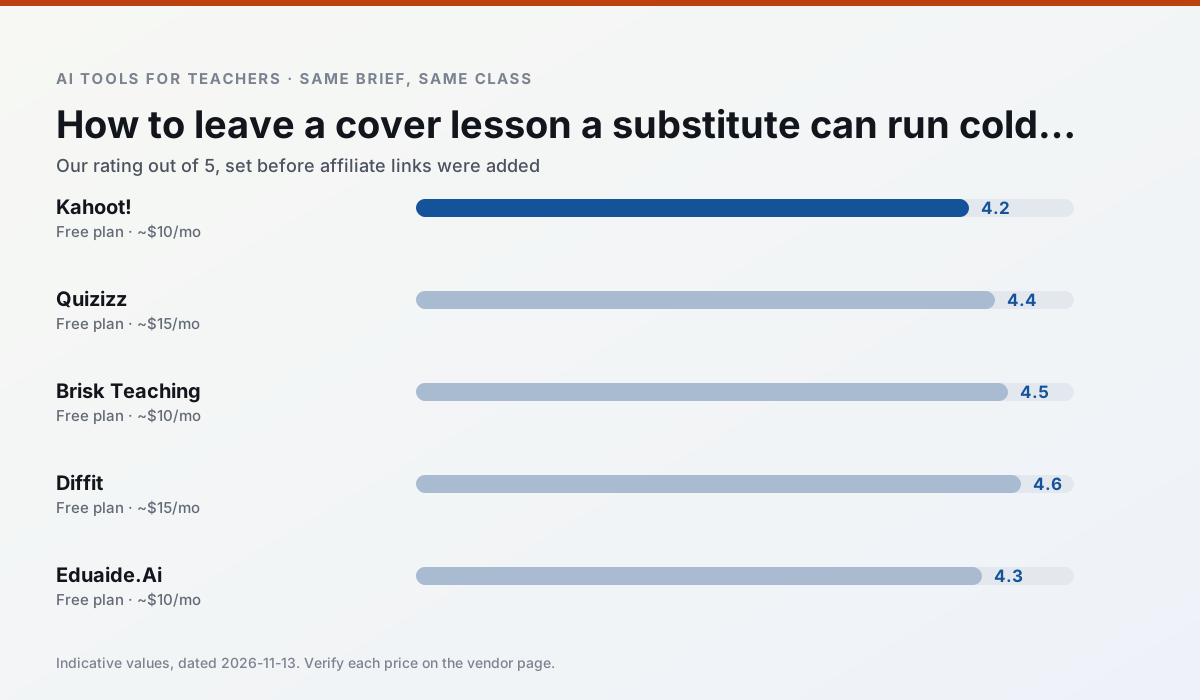
Side by side
Comparison table
Ratings reflect our timed classroom workflow, not vendor claims. Prices are indicative — verify on the vendor site.
| Tool | Best for | Free tier | Indicative paid plan | Standout feature | Our rating | Verdict | Try the tool |
|---|---|---|---|---|---|---|---|
| Kahoot! | quiz generation · review lessons | Yes — Limited player count | ~$10 /user/mo | AI question builder | 4.2 / 5 | Strong option | Try free |
| Quizizz | quiz generation · formative assessment | Yes — Core quiz creation | ~$15 /user/mo | AI question generator | 4.4 / 5 | Strong option | Try free |
| Brisk Teaching | feedback on writing · grading | Yes — Limited actions per month | ~$10 /user/mo | Works inside Google Docs | 4.5 / 5 | Top pick | Try free |
| Diffit | differentiated instruction · reading intervention | Yes — Limited generations per month | ~$15 /user/mo | Lexile-style leveling | 4.6 / 5 | Top pick | Try free |
| Eduaide.Ai | lesson planning · rubric creation | Yes — Daily generation cap | ~$10 /user/mo | Resource library | 4.3 / 5 | Strong option | Try free |
| Curipod | formative assessment · exit tickets | Yes — Limited lessons per month | ~$12 /user/mo | Live polls and word clouds | 4.4 / 5 | Strong option | Try free |
Match your situation
Best for X
Different jobs need different tools. Here is what we would open first in each case.
Kahoot! wins on the default path: fewer clicks to a usable draft, and the interface does not get in the way at 7:40am.
If there is no budget, start with Quizizz: free plan with clearest quota is the least punishing free tier here.
Brisk Teaching is the option IT is least likely to block: single sign-on, admin removal of AI features and an agreement on file.
Setup cost is one login for Diffit; everything else can wait until you know the tool is useful.
Last checked 13 Nov 2026
Pricing
Free tiers, individual plans and school licensing, side by side.
| Tool | Free plan | Individual / paid | School & district | Billing note | Verify |
|---|---|---|---|---|---|
| Kahoot! | $0 — Limited player count | ~$10 /user/mo | Custom quote | Indicative — verify on vendor site | Vendor |
| Quizizz | $0 — Core quiz creation | ~$15 /user/mo | Custom quote | Indicative — verify on vendor site | Vendor |
| Brisk Teaching | $0 — Limited actions per month | ~$10 /user/mo | Custom quote | Indicative — verify on vendor site | Vendor |
| Diffit | $0 — Limited generations per month | ~$15 /user/mo | Custom quote | Indicative — verify on vendor site | Vendor |
| Eduaide.Ai | $0 — Daily generation cap | ~$10 /user/mo | Custom quote | Indicative — verify on vendor site | Vendor |
| Curipod | $0 — Limited lessons per month | ~$12 /user/mo | Custom quote | Indicative — verify on vendor site | Vendor |
Editorial rule: pricing is re-checked every 2–3 months and the top 50 pages are refreshed every 6 months. See our funding policy.
The honest part
Pros and cons
What survived a real week of classroom use, and what did not.
Pros
- Instant engagement
- Very low training time
- Strong brand familiarity
Cons
- Less depth for higher-order assessment
- Paid tiers needed for larger classes
- Time pressure suits recall more than reasoning
Pros
- Students already know the interface
- Good reporting
- Works on low-end devices
Cons
- Writing high-quality AI questions still needs review
- Gamification can distract
- Advanced analytics are paid
Pros
- No copy-paste between tools
- Fast inline feedback on student drafts
- Gentle learning curve
Cons
- Chrome-first workflow
- Extension permissions need IT approval
- Free quota is tight
Pros
- Excellent for mixed-ability classes
- Produces printable and digital versions
- Minimal setup
Cons
- Narrower scope than all-in-one suites
- Leveling is approximate, not a formal assessment
- Heavy use burns through the free quota
Pros
- Very low entry price
- Good worksheet and rubric output
- Clean, uncluttered UI
Cons
- Smaller template set than MagicSchool
- Less polished export options
- Limited integrations
In the classroom
Use cases
Five concrete workflows, with the tool we would open for each one.
A Monday morning lesson plan in twelve minutes
The twelve minutes come from not rewriting the skeleton. Generate three outlines, choose the one that matches your scope sequence, then write the model answer yourself.
Recommended: Kahoot!Three reading levels from one source text
Paste a vetted text, ask for supported, core and extension versions, then check the vocabulary list by hand. Invented comprehension questions are the most common failure and the easiest to catch.
Recommended: QuizizzRubric and feedback comments in one pass
Reorder the workflow so the rubric is yours and the comments are generated. Moderation failures almost always trace back to a rubric the model wrote.
Recommended: Brisk TeachingA parent email in two languages
Draft in plain, warm language with no names, translate, then back-translate the important sentences to check meaning. Keep specific incidents out of the prompt and add them yourself.
Recommended: DiffitA five-minute exit ticket set
Ask for one recall, one application and one reasoning item, then delete the second recall question every generator sneaks in.
Recommended: Eduaide.Ai
Questions teachers ask us
FAQ
Direct answers, also published as FAQPage structured data for search and AI assistants.
How long does this workflow take?
Which tool should I start with?
What if the output is unusable?
Sources & further reading
Our recommendation
Try MagicSchool AI free for your next substitute plans task
A large library of teacher-specific AI generators in one dashboard. Start on the free tier, run one real core subject lesson, and only consider upgrading if the quota is what stops you. Disclosure: we may earn a commission (30% recurring) at no extra cost to you.
Some links on this page are affiliate links. We may earn a commission at no extra cost to you. Our rankings are editorial and never pay-to-play. Never enter student PII into a free consumer account.
Keep reading
Related comparisons in this cluster.
Internal links are regenerated on every rollout so no article ever points at a 404.