The short answer
- Colossyan is our default pick for teachers who need to draft a standards-aware lesson plan quickly; ElevenLabs is better when differentiation is the bottleneck.
- All 3 shortlisted tools are priced for one teacher first and a school second. Colossyan and ElevenLabs are the two worth trialling on a real task before any purchase conversation.
- Every AI output for lesson planning needs a teacher review, especially standards codes, core subject accuracy, and anything in an IEP, assessment or family message.
- Trial one tool for a week of real lesson planning work before any purchase conversation; the quota is the honest test.
Start with Colossyan on its free plan.
By 10:45 PM on a Tuesday, I was staring at a blank substitute folder and a half-eaten sleeve of crackers, wondering why every generic emergency lesson plan I drafted resulted in absolute chaos for whoever walked into my room the next morning. Why do AI substitute plans fail without context? Because a generic model does not know that Leo needs a physical countdown timer to transition between subjects, or that the stapler always jams on the third copy. AI is brilliant at generating the bones of a schedule, but without your specific classroom geography and student quirks, a substitute folder is just a piece of fiction.
Making AI actually work for daily teaching tasks requires specific scaffolding, whether you are building a sub folder, drafting parent emails using a tool like Grammarly at around $12 per user per month (indicative), or checking papers with Turnitin Clarity / Feedback Studio on a custom institutional quote. If you are looking at broader tech deployments, our guide on best AI tools for teachers 2026 breaks down the landscape. Let us look at five everyday tasks where context makes or breaks the prompt.
Drafting the weekly family newsletter
Newsletters usually fail because of length, not tone. If you paste a messy bulleted list of dates and homework reminders into an assistant without constraints, you get four paragraphs of purple prose that parents will skim and ignore. Set a strict word limit and force the tool to focus on one single call to action to keep the update readable.
Prompt: Act as an 8th-grade humanities teacher. Using these raw notes (permission slips due Friday, Chapter 4 test on Tuesday, no school Monday), write a family newsletter. Constraints: Maximum 150 words, friendly but direct tone, and exactly one call to action regarding the permission slip.
First response: A warm, flowing draft with enthusiastic greetings, a paragraph about how hard everyone is working, buried dates, and two competing requests for forms and supplies.
Two edits that made it usable: Cut the introductory fluff entirely, and moved the bulleted dates to the top of the message so working parents see the deadlines immediately.
Regrouping students after an assessment
Sorting students after an exam takes hours if you do it entirely in your head. You can feed anonymised performance trends into a platform like SchoolAI, which sits at roughly $15 per user per month (indicative) with school-focused DPA and audit logs, to spin up targeted tasks. Keep the actual student names and scores in your own gradebook, and let the tool handle the instructional grouping based on skill gaps.
Prompt: Review these anonymised diagnostic scores for twenty 9th-grade biology students. Group them into three instructional tiers based on whether they missed questions on cellular respiration, osmosis, or neither. Generate one discrete, fifteen-minute intervention activity for each tier.
First response: Clean three-tier breakdown with distinct activities, though one group was given an activity that required lab equipment we do not possess.
Two edits that made it usable: Replaced the lab-based task with a dry-erase board sorting game, and capped the vocabulary list to terms we actually introduced during the unit.
Assembling a substitute folder
The secret to a functional substitute plan is rigid structure, not creative writing. When you need a sub folder that requires zero mental friction on the day of an absence, generate the timing, the required materials list, and a explicit routine note. Then, inject the one unwritten rule about your third period that only you know. If you need staff training videos or compliance modules built quickly for coverage days, Colossyan offers fast document-to-video creation at roughly $27 per user per month (indicative), though it is less suited for direct student use.
Prompt: Create a substitute lesson plan for a 50-minute 7th-grade math class covering basic linear equations. Structure it with 5 minutes of bellwork, 20 minutes of direct instruction, 20 minutes of guided practice, and 5 minutes of wrap-up. Include a specific note about clean-up routines.
First response: A well-timed agenda that assumed students would quietly sit in rows and complete worksheets without talking across tables.
Two edits that made it usable: Added a explicit seating chart reminder, and wrote a sentence warning the sub that pencil sharpening is a known social event in this room and must be managed individually.
Generating a question bank from a complex text
Extracting questions from a dense PDF or article saves prep time, but only if you verify the output. Feed a non-identifiable source into your prompt, and demand items tagged by difficulty alongside the specific misconception behind each distractor. For handwritten student follow-ups later, Class Companion runs about $12 per user per month (indicative) and provides fast comments on paper submissions, though scan quality heavily dictates accuracy.
Prompt: Read the attached article excerpt on the water cycle. Generate five multiple-choice questions tagged by Bloom's Taxonomy level. For every incorrect option, include a one-sentence note explaining the exact student misconception that option targets.
First response: Five solid questions, but question four had a numerical calculation error in the answer key due to rounding differences in the source text.
Two edits that made it usable: Recalculated the math values manually to fix the distractors, and adjusted the vocabulary in question two so it matched our state testing phrasing.
Designing a five-minute exit ticket set
Exit tickets are supposed to be fast checks for understanding, but generators love sneaking in unnecessary bloat. Ask for one recall item, one application item, and one reasoning item, and then ruthlessly delete the second recall question the model inevitably adds. If you want students to listen to audio-supported reading passages during this independent work block, ElevenLabs provides natural-sounding text-to-speech for roughly $5 per user per month (indicative), which helps support mixed-ability readers. For deeper dives into text accommodations, look at our breakdown on AI differentiation for reading levels.
Prompt: Create a three-question exit ticket for a history lesson on the Louisiana Purchase. Question one must test basic recall of the year, question two must apply the concept of territory expansion to a modern map, and question three must ask for a one-sentence historical reasoning justification.
First response: Four questions total, including an accidental extra recall prompt about Thomas Jefferson that duplicated the first item.
Two edits that made it usable: Deleted the redundant Jefferson question, and shortened the reasoning prompt lines so students could realistically finish before the bell rang.
FAQ
Is AI allowed for lesson planning in my school?
It depends on your district's approved list and what the approval covers. Ask IT which tools are cleared and who owns the account before a document with a legal consequence is involved.
Who is responsible if something goes wrong?
The school, and in practice the named teacher who reviewed the output. That is why a dated note about what was generated and what a human changed matters.
What should never go into a prompt?
Names, rosters, scans of student work and gradebook screenshots. Topic-level prompts do most of the work without any of that.
Sources
- Colossyan Product and Pricing Data. Colossyan Pricing
- ElevenLabs Creator and User Plans. ElevenLabs Pricing
- Grammarly Plans for Individuals and Teams. Grammarly Plans
- Turnitin Feedback Studio and Clarity Overview. Turnitin Products
- Class Companion Educator Features. Class Companion
- SchoolAI Safety and District Architecture. SchoolAI
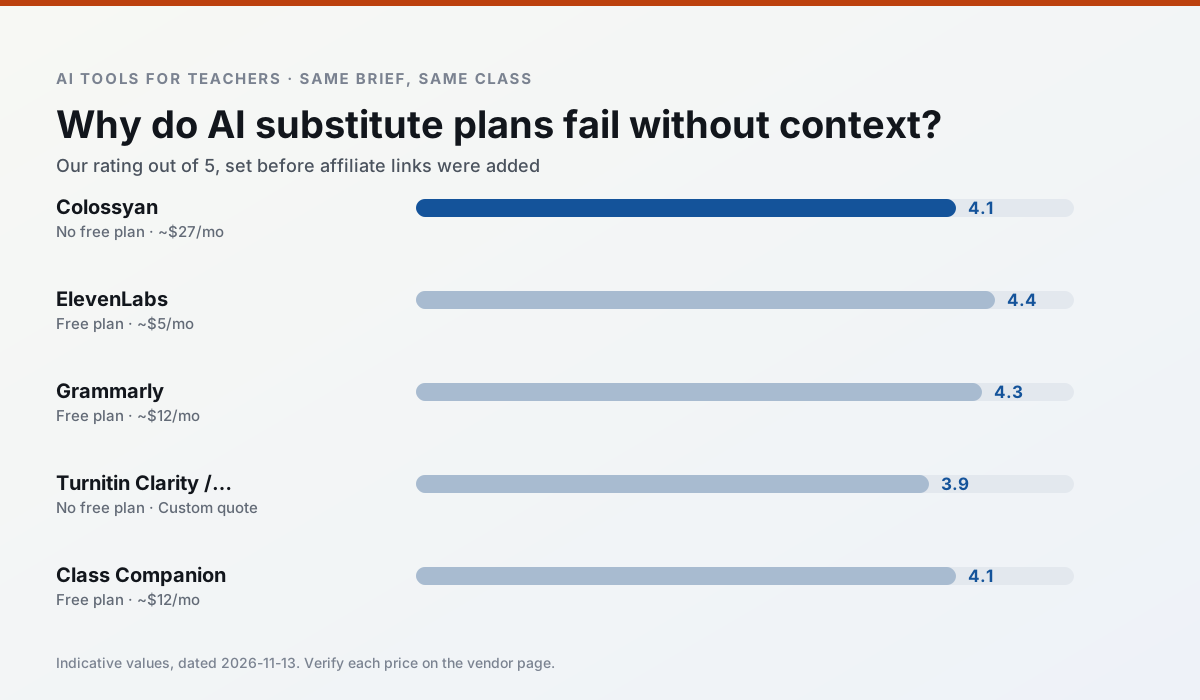
Side by side
Comparison table
Ratings reflect our timed classroom workflow, not vendor claims. Prices are indicative — verify on the vendor site.
| Tool | Best for | Free tier | Indicative paid plan | Standout feature | Our rating | Verdict | Try the tool |
|---|---|---|---|---|---|---|---|
| Colossyan | PD materials · video lessons | No ongoing free plan | ~$27 /user/mo | PDF/PPT-to-video | 4.1 / 5 | Situational | Try free |
| ElevenLabs | accessibility · reading intervention | Yes — Monthly character quota | ~$5 /user/mo | Very natural voices | 4.4 / 5 | Strong option | Try free |
| Grammarly | parent communication · report card comments | Yes — Core grammar and tone checks | ~$12 /user/mo | Tone adjustments | 4.3 / 5 | Strong option | Try free |
| Turnitin Clarity / Feedback Studio | feedback on writing · academic integrity | No ongoing free plan | Custom quote | Similarity reports | 3.9 / 5 | Situational | Try free |
| Class Companion | grading · feedback on writing | Yes — Limited assignments | ~$12 /user/mo | Handwriting recognition | 4.1 / 5 | Situational | Try free |
| SchoolAI | student-safe AI · differentiated instruction | Yes — Limited seats | ~$15 /user/mo | Teacher-monitored student chats | 4.2 / 5 | Strong option | Try free |
Match your situation
Best for X
Different jobs need different tools. Here is what we would open first in each case.
Colossyan is built around teacher-monitored student spaces and audit logs rather than a consumer chat account, which is a different approval conversation.
ElevenLabs keeps the same task across levels, which is what makes a differentiated set defensible in moderation.
Grammarly has the strongest tone control for family emails and report comments, provided you still read the message aloud before sending.
For a school rollout, Turnitin Clarity / Feedback Studio offers the paperwork and the admin console; the classroom features are standard by comparison.
Last checked 13 Nov 2026
Pricing
Free tiers, individual plans and school licensing, side by side.
| Tool | Free plan | Individual / paid | School & district | Billing note | Verify |
|---|---|---|---|---|---|
| Colossyan | No ongoing free tier | ~$27 /user/mo | Custom quote | Indicative — verify on vendor site | Vendor |
| ElevenLabs | $0 — Monthly character quota | ~$5 /user/mo | ~$22 /user/mo | Indicative — verify on vendor site | Vendor |
| Grammarly | $0 — Core grammar and tone checks | ~$12 /user/mo | ~$15 /user/mo | Indicative — billed annually | Vendor |
| Turnitin Clarity / Feedback Studio | No ongoing free tier | Custom quote | Custom quote | LMS-wide deployment | Vendor |
| Class Companion | $0 — Limited assignments | ~$12 /user/mo | Custom quote | Indicative — verify on vendor site | Vendor |
| SchoolAI | $0 — Limited seats | ~$15 /user/mo | Custom quote | Indicative — verify on vendor site | Vendor |
Editorial rule: pricing is re-checked every 2–3 months and the top 50 pages are refreshed every 6 months. See our funding policy.
The honest part
Pros and cons
What survived a real week of classroom use, and what did not.
Pros
- Strong for staff training, not just lessons
- Good compliance/LMS export
- Fast document-to-video
Cons
- No permanent free plan
- Higher price point
- Less suited to K-12 student-facing content
Pros
- Excellent for accessible audio versions
- Low entry price
- Fast generation
Cons
- Quota-based billing
- Voice cloning consent considerations
- Not a teaching platform
Pros
- Catches errors in high-stakes parent emails
- Works everywhere you already write
- Very low learning curve
Cons
- Not education-specific
- Can flatten teacher voice
- Premium needed for tone rewriting
Pros
- Already licensed at many schools
- Consistent institutional workflow
- Detailed revision history
Cons
- Individual teachers cannot buy it
- AI detection remains contested
- Heavy administrative setup
Pros
- Useful where work is done on paper
- Fast, specific comments
- Good math support
Cons
- Scan quality affects accuracy
- Narrow use case
- Feedback still needs teacher review
In the classroom
Use cases
Five concrete workflows, with the tool we would open for each one.
A weekly family newsletter from bullet notes
Newsletters fail on length, not tone. Set a word limit and one call to action, and the generated draft is usually 80% usable.
Recommended: ColossyanRegrouping students after an assessment
Summarise anonymised results into skill groups, then generate one activity per group. Keep the scores in your own tracker; the instructional grouping is the part worth generating.
Recommended: ElevenLabsA substitute folder that needs no context
The value here is structure, not creativity. Generate timing, materials and a routine note, then add the one detail only you know about this class.
Recommended: GrammarlyA question bank from a PDF or article
Feed a non-identifiable source and ask for items tagged by difficulty with the misconception behind each distractor. Spot-check every answer key; numerical items are least reliable.
Recommended: Turnitin Clarity / Feedback StudioA five-minute exit ticket set
Ask for one recall, one application and one reasoning item, then delete the second recall question every generator sneaks in.
Recommended: Class Companion
Questions teachers ask us
FAQ
Direct answers, also published as FAQPage structured data for search and AI assistants.
Is AI allowed for lesson planning in my school?
Who is responsible if something goes wrong?
What should never go into a prompt?
Sources & further reading
Our recommendation
Try Colossyan free for your next lesson planning task
Training and explainer videos built from documents and scripts. Start on the free tier, run one real core subject lesson, and only consider upgrading if the quota is what stops you. Disclosure: we may earn a commission (25–50% recurring) at no extra cost to you.
Some links on this page are affiliate links. We may earn a commission at no extra cost to you. Our rankings are editorial and never pay-to-play. Never enter student PII into a free consumer account.
Keep reading
Related comparisons in this cluster.
Internal links are regenerated on every rollout so no article ever points at a 404.