The short answer
- MagicSchool AI is our default pick for teachers who need to draft a standards-aware lesson plan quickly; Originality.ai is better when differentiation is the bottleneck.
- Pricing is where these pages date fastest. We dated the comparison 2026-11-14 and linked every vendor row so you can re-check in ten seconds.
- Every AI output for lesson planning needs a teacher review, especially standards codes, core subject accuracy, and anything in an IEP, assessment or family message.
- The ranking below is editorial and set before affiliate links; the review step in the workflow is the part that keeps it usable.
Start with MagicSchool AI on its free plan.
Seventeen open browser tabs, a half-eaten granola bar, and a blinking cursor at the top of an IEP present-levels section for a student who mastered exactly four out of ten decoding targets this quarter. You need four paragraphs of legally defensible, baseline-anchored prose before the Friday afternoon compliance window slams shut. If you have ever stared at a blank screen wondering if an algorithm can pull together Present Levels of Academic Achievement and Functional Performance without violating privacy laws or sounding like a corporate liability waiver, you are not alone. Can AI draft present levels a case manager will sign? The short answer is yes, but only if you supply the raw numbers and treat the output as a rough first draft that requires a heavy editorial hand.
The Anatomy of an AI-Generated Present Level
When you use general-purpose tools like ChatGPT, priced at roughly $20 per month on paid tiers, or education-specific hubs like MagicSchool AI, which runs around $12 per month on its paid tier with core generators available on a free tier, the trick lies in how you structure the input. You can read more about selecting appropriate platforms in our roundup of the best AI tools for teachers 2026. General assistants require careful prompt crafting to avoid vague educational jargon, whereas MagicSchool AI offers a wide purpose-built template library that requires almost no prompting skill to get started. Neither tool knows your student's actual baseline unless you feed it anonymised data points.
Prompt: Write a present levels of performance statement for a 4th-grade student with a specific learning disability in reading. Use these anonymised data points: reads 72 words per minute on grade-level passages with 85% accuracy, struggles with multi-syllabic decoding, and tires after 15 minutes of sustained text engagement.
First output: The student demonstrates grade-level reading fluency challenges. They can read 72 words per minute with 85% accuracy on instructional texts. However, the student exhibits difficulty with complex word attack strategies involving multi-syllabic words and experiences cognitive fatigue after sustained periods of reading instruction.
Teacher edits:
- Replaced the vague phrase "experiences cognitive fatigue" with the specific observation "tires after 15 minutes of sustained text engagement."
- Added specific progress monitoring metrics from the November reading log to ground the decoding struggle in actual classroom artifacts.
Case managers reject AI drafts when the prose sounds like it was lifted from a textbook rather than observed in room 212. To make the text stick, you must anchor every sentence in observable behavior. When drafting education plans or looking at related support documents, teachers often consult resources like the 504 plans prompt templates to ensure their documentation meets district compliance standards.
Two Ways the Draft Can Fail
Even with solid prompts, things go sideways in predictable ways. First, the AI loves to invent growth trajectories or smooth over regression. You might input a flatline score, and the model will cheerfully output a sentence about steady upward momentum because it is statistically trained to be encouraging. When this happens, you have to strip out the optimism and paste in the actual drop in scores from your last three benchmark assessments.
Second, privacy slips are a constant hazard. If you paste identifiable student names, diagnostic codes, or specific birthdates into a consumer-grade AI workspace, you violate district data agreements and federal privacy standards. Vendor notes for MagicSchool AI state that no student personally identifiable information is required for core generators, but you must still confirm your district data privacy agreement before use. For personal record-keeping systems like Notion AI, which costs roughly $10 per user per month on paid tiers with limited free AI usage, you should never store student PII in personal workspaces. If you need to check content before publishing or sharing publicly, tools like Originality.ai provide AI-detection and plagiarism scanning for around $12 per month, though these should never be used as a sole disciplinary or evaluative metric.
Structuring Your Workflow for Compliance
To get a case manager's signature, your workflow must prioritize human verification over speed. Start by gathering your raw data offline: running records, behavioral frequency charts, and work samples. Anonymize every detail before it touches an LLM or template library. Generate the structural prose using a tool that fits your comfort level, whether that is the quick setup of Notion AI, the expansive generator library of MagicSchool AI, or the flexible conversational approach of ChatGPT.
Once the draft is generated, read it aloud. Check every number against your physical gradebook. If the AI suggests a percentage or a frequency that you did not explicitly provide in the prompt, delete it immediately. Curipod offers a different angle for classroom interaction, turning topics into student-response lessons for about $12 per month on its paid tier, but when it comes to compliance writing, stick to text-based generation tools where you control every word of the narrative. Similarly, teacher-creators publishing resources online often utilize Surfer SEO at around $79 per month for content optimization, but IEP paperwork requires strict local compliance rather than search engine visibility.
Final Polish Before the Meeting
A signed IEP present level is essentially a contract built on evidence. AI can save you forty minutes of staring at a blinking cursor by structuring your thoughts into formal educational phrasing, but it cannot substitute for your professional judgment. Keep your edits transparent, ensure your data points match your progress monitoring binders, and never submit a raw, unedited AI output to an IEP team. Your case manager will spot the generic fluff instantly, but they will sign off on a tight, data-driven narrative that you have carefully shaped with your own hands.
FAQ
Is AI allowed for lesson planning in my school?
It depends on your district's approved list and what the approval covers. Ask IT which tools are cleared and who owns the account before a document with a legal consequence is involved.
Who is responsible if something goes wrong?
The school, and in practice the named teacher who reviewed the output. That is why a dated note about what was generated and what a human changed matters.
What should never go into a prompt?
Names, rosters, scans of student work and gradebook screenshots. Topic-level prompts do most of the work without any of that.
Sources
- MagicSchool AI Pricing and Feature Overview. https://www.magicschool.ai
- Originality.ai Platform Specifications. https://originality.ai
- Surfer SEO Documentation. https://surferseo.com
- Notion AI Workspace Guidelines. https://www.notion.so/product/ai
- OpenAI ChatGPT Enterprise and Consumer Privacy Policies. https://openai.com/policies
- Curipod Lesson Delivery Features. https://curipod.com
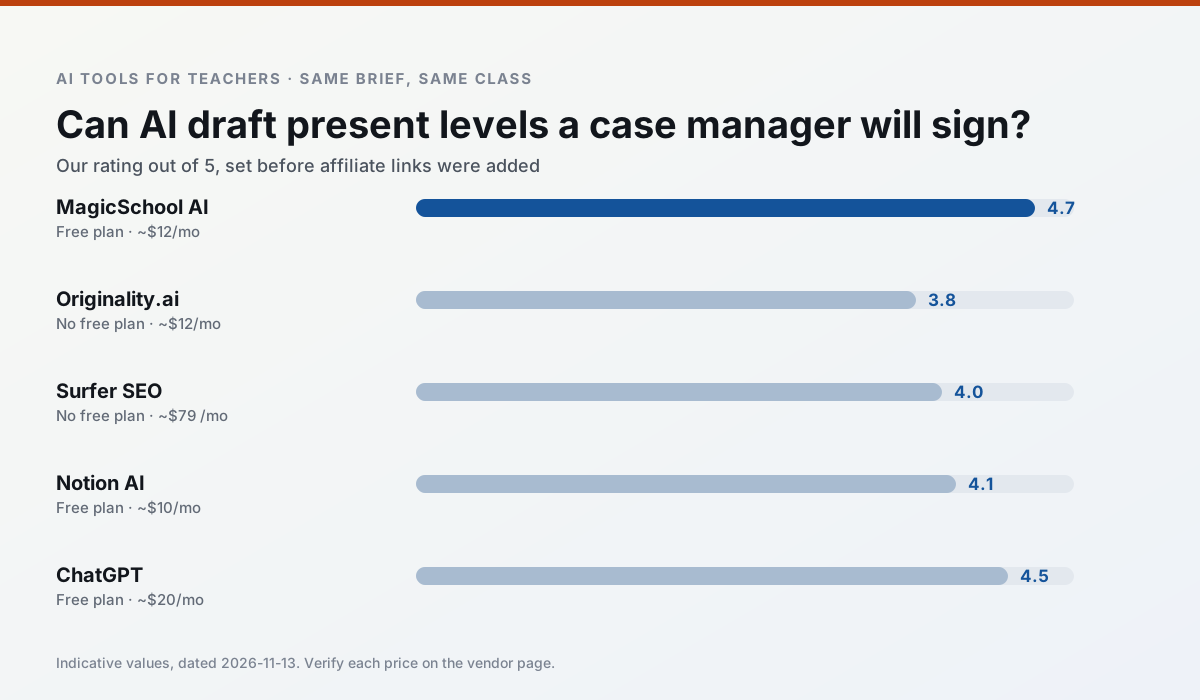
Side by side
Comparison table
Ratings reflect our timed classroom workflow, not vendor claims. Prices are indicative — verify on the vendor site.
| Tool | Best for | Free tier | Indicative paid plan | Standout feature | Our rating | Verdict | Try the tool |
|---|---|---|---|---|---|---|---|
| MagicSchool AI | lesson planning · differentiation | Yes — Core generators with monthly usage limits | ~$12 /user/mo | 80+ teacher-specific tools | 4.7 / 5 | Top pick | Try free |
| Originality.ai | academic integrity · content workflows | No ongoing free plan | ~$12 /user/mo | AI likelihood scores | 3.8 / 5 | Situational | Try free |
| Surfer SEO | teacher bloggers · resource sellers | No ongoing free plan | ~$79 /mo | Content Editor | 4.0 / 5 | Situational | Try free |
| Notion AI | curriculum mapping · unit planning | Yes — Limited AI usage | ~$10 /user/mo | Linked databases | 4.1 / 5 | Situational | Try free |
| ChatGPT | lesson planning · parent communication | Yes — Usage-limited model access | ~$20 /user/mo | Custom GPTs and Projects | 4.5 / 5 | Top pick | Try free |
| Curipod | formative assessment · exit tickets | Yes — Limited lessons per month | ~$12 /user/mo | Live polls and word clouds | 4.4 / 5 | Strong option | Try free |
Match your situation
Best for X
Different jobs need different tools. Here is what we would open first in each case.
MagicSchool AI is built around teacher-monitored student spaces and audit logs rather than a consumer chat account, which is a different approval conversation.
Family-facing drafts from Originality.ai need the fewest rewrites for warmth without overpromising, which is the usual failure mode.
Surfer SEO keeps the same task across levels, which is what makes a differentiated set defensible in moderation.
Setup cost is one login for Notion AI; everything else can wait until you know the tool is useful.
Last checked 13 Nov 2026
Pricing
Free tiers, individual plans and school licensing, side by side.
| Tool | Free plan | Individual / paid | School & district | Billing note | Verify |
|---|---|---|---|---|---|
| MagicSchool AI | $0 — Core generators with monthly usage limits | ~$12 /user/mo | Custom quote | Indicative — verify on vendor site | Vendor |
| Originality.ai | No ongoing free tier | ~$12 /user/mo | Custom quote | Indicative — verify on vendor site | Vendor |
| Surfer SEO | No ongoing free tier | ~$79 /mo | Custom quote | Indicative — verify on vendor site | Vendor |
| Notion AI | $0 — Limited AI usage | ~$10 /user/mo | ~$8 /user/mo | Indicative — verify on vendor site | Vendor |
| ChatGPT | $0 — Usage-limited model access | ~$20 /user/mo | ~$25+ /user/mo | Indicative — verify on vendor site | Vendor |
| Curipod | $0 — Limited lessons per month | ~$12 /user/mo | Custom quote | Indicative — verify on vendor site | Vendor |
Editorial rule: pricing is re-checked every 2–3 months and the top 50 pages are refreshed every 6 months. See our funding policy.
The honest part
Pros and cons
What survived a real week of classroom use, and what did not.
Pros
- Widest purpose-built template library
- Strong free tier for individual teachers
- Fast to learn with almost no prompting skill
Cons
- Outputs still need standards review
- Best features sit behind the paid tier
- District approval can be slow
Pros
- Useful for content publishing QA
- Fast bulk scanning
- Transparent credit model
Cons
- AI detection produces false positives
- Should never be sole evidence of misconduct
- Not a teaching tool
Pros
- Best-in-class on-page guidance
- Useful for TpT / resource-shop content
- Clear scoring
Cons
- Expensive for individual teachers
- Not a classroom tool
- Requires SEO basics
Pros
- Great for long-term curriculum records
- Strong team collaboration
- Flexible structure
Cons
- Setup time is significant
- AI add-on pricing changed more than once
- Not purpose-built for lesson generation
Pros
- Most flexible option available
- Huge community of teacher prompt libraries
- Strong multilingual support
Cons
- Requires prompt skills for consistent results
- No built-in standards alignment
- District privacy review usually required
In the classroom
Use cases
Five concrete workflows, with the tool we would open for each one.
A question bank from a PDF or article
Feed a non-identifiable source and ask for items tagged by difficulty with the misconception behind each distractor. Spot-check every answer key; numerical items are least reliable.
Recommended: MagicSchool AIA substitute folder that needs no context
The value here is structure, not creativity. Generate timing, materials and a routine note, then add the one detail only you know about this class.
Recommended: Originality.aiAn IEP present-levels first draft
Use aggregated, anonymised data only. Ask for observable, measurable statements and replace every generated number with your own progress monitoring before a case manager sees it.
Recommended: Surfer SEOA five-minute exit ticket set
Ask for one recall, one application and one reasoning item, then delete the second recall question every generator sneaks in.
Recommended: Notion AIA parent email in two languages
Draft in plain, warm language with no names, translate, then back-translate the important sentences to check meaning. Keep specific incidents out of the prompt and add them yourself.
Recommended: ChatGPT
Questions teachers ask us
FAQ
Direct answers, also published as FAQPage structured data for search and AI assistants.
Is AI allowed for lesson planning in my school?
Who is responsible if something goes wrong?
What should never go into a prompt?
Sources & further reading
Our recommendation
Try MagicSchool AI free for your next lesson planning task
A large library of teacher-specific AI generators in one dashboard. Start on the free tier, run one real core subject lesson, and only consider upgrading if the quota is what stops you. Disclosure: we may earn a commission (30% recurring) at no extra cost to you.
Some links on this page are affiliate links. We may earn a commission at no extra cost to you. Our rankings are editorial and never pay-to-play. Never enter student PII into a free consumer account.
Keep reading
Related comparisons in this cluster.
Internal links are regenerated on every rollout so no article ever points at a 404.