The short answer
- Eduaide.Ai is our default pick for teachers who need to write criterion-referenced rubrics quickly; Claude is better when differentiation is the bottleneck.
- The cheapest honest test is a week of real work on the free plans: Eduaide.Ai: Yes — Daily generation cap; Claude: Yes — Usage-limited; Gradescope: Yes — Limited courses. If a tool is still open on Friday, it has earned a paid conversation.
- Every AI output for rubric creation needs a teacher review, especially standards codes, core subject accuracy, and anything in an IEP, assessment or family message.
- Everything on this page dates from 2026-11-13; where a price could not be re-read, the row says so.
Start with Writesonic on its free plan.
Thirty-four essays sit in a recycling crate by my desk. It is Sunday night, my coffee is cold, and I am staring at a rubric I cobbled together in 2021 that penalizes kids for dangling modifiers they were never taught. We have all written grading criteria at midnight while running on fumes. Good rubric writing prompts can take the sting out of assessment design, provided you stop asking generic AI models to "make a rubric for a persuasive essay." That gets you a four-column grid that rewards using the word "furthermore" instead of actual argument structure.
If you want tools that actually save planning time, you need structured prompt templates that account for your state standards, your students' actual reading levels, and your sanity. This guide covers how to build better criteria using the best AI tools for teachers available in 2026, breaking down ten specific prompts that work across different classroom contexts.
Why General AI Rubrics Fail Your Kids
When you ask an unguided chatbot for an assessment grid, it defaults to platitudes. You get phrases like "demonstrates exceptional understanding" paired with "shows minimal effort," which tell a student nothing about why they earned a 74 instead of an 82. Effective rubric writing prompts must force the AI to define observable behaviors. Instead of grading effort, we need to grade evidence, mechanics, and reasoning.
Different platforms handle this job with varying degrees of success. Eduaide.Ai (~$10 /user/mo indicative, with a daily generation cap on its free tier) shines here as our pick for mixed-ability classes because its teaching-resource library builds differentiation directly into the grid. If you need clean, uncluttered UI without wrestling with massive prompt engineering, it gets the job done quickly, though its export options remain basic.
Ten Rubric Writing Prompts That Work
To build these, you need to feed the machine your constraints, your standard, and your student demographic. Let's look at how specific prompts change the output.
Prompt: Act as an 8th-grade ELA teacher. Create a 4-level analytic rubric for a historical fiction narrative. Levels must be: Exceeds Standard, Meets Standard, Developing, and Beginning. Focus categories on: Historical Accuracy, Narrative Arc, Dialogue Mechanics, and Word Choice. Do not use generic filler words like "good" or "poor." Define what a missing dialogue tag looks like at the Developing level.
Raw AI Output: A structured 4-column table where "Beginning" under dialogue mechanics reads: "Student makes frequent errors with quotation marks and lacks tags entirely."
First Edit: Change the Dialogue Mechanics category to specifically require three distinct instances of punctuated dialogue rather than vague frequency.
Second Edit: Add a fifth column for point values that align with our district 100-point scale instead of arbitrary 4-point tiers.
For long-form writing assignments and parent-facing communication about grades, Claude (~$20 /user/mo indicative, usage-limited free tier) handles long-context inputs brilliantly. It is our top pick for parent-facing writing because its prose is nuanced and less generic than competing models, though you must use an approved workspace tier if any school-related documents touch student data.
When your grading pile consists of hundreds of scanned paper assessments, Writesonic (~$16 /user/mo indicative, with limited free credits) serves as a budget-friendly option with many templates, despite offering generic classroom output if you do not tighten your constraints. Meanwhile, for institutional deployments where privacy and security are paramount, Gradescope (custom quote indicative, with limited courses on its free tier) remains the gold standard for AI-assisted rubric grading on handwritten work, though it is complete overkill for elementary classrooms and requires a real setup effort alongside a full FERPA review.
Managing Complex Curriculum and Long-Term Criteria
If you are mapping rubrics across an entire semester or aligning them with department-wide scope and sequences, unstructured text boxes will slow you down. Notion AI (~$10 /user/mo indicative, with limited AI usage on the free tier) acts as a fantastic hub for long-term curriculum records and team collaboration. The setup time is significant, and you must never store student PII in personal workspaces, but it keeps your grading philosophies searchable across units.
For teacher-creators who publish and sell their resources online, Surfer SEO (~$79 /mo indicative, no free tier) helps optimize content for TpT and resource shops with best-in-class on-page guidance. It is definitely not a classroom tool and is far too expensive for individual classroom teachers, but if you monetize your rubrics outside school hours, it clarifies what search engines want to see.
To see how these fit into broader planning workflows, look at our companion breakdown of AI tools for teachers to see how grading platforms integrate with daily lesson generation.
Avoiding Common AI Traps in Assessment
Every generator sneaks in impossible standards if you let it. A common trap is asking the AI to grade "critical thinking" without defining what a misconception looks like in writing. If you spot an AI-generated descriptor that says "avoids logical fallacies," edit it immediately to name the specific fallacies you taught that week, such as ad hominem or straw man arguments.
If you are adapting reading levels across different tiers in your room, check out our guide on AI reading differentiation to ensure your rubric criteria match the text complexity you actually assigned. Never trust an unedited AI rubric to be fair to your English language learners or students with accommodations. Use the AI to generate the skeleton, but keep your red pen handy for the final polish before you print.
FAQ
Do these prompts need a paid plan?
No. Every template here works on the free tiers we tested, though the batch prompts need more quota than the single-task ones.
Can I use these with any tool?
Yes. They are written in plain teacher language and work with Eduaide.Ai, a general assistant, or the next tool that appears.
How do I know the output is right?
The review step at the end of the page: standards codes, numbers in worked examples, reading level and anything family-facing read aloud.
Sources
- Eduaide.Ai features and pricing: eduaide.ai
- Claude workspace information: anthropic.com/claude
- Gradescope compliance and tiers: gradescope.com
- Writesonic plans and credit system: writesonic.com
- Notion AI collaboration tools: notion.so
- Surfer SEO content optimization: surferseo.com
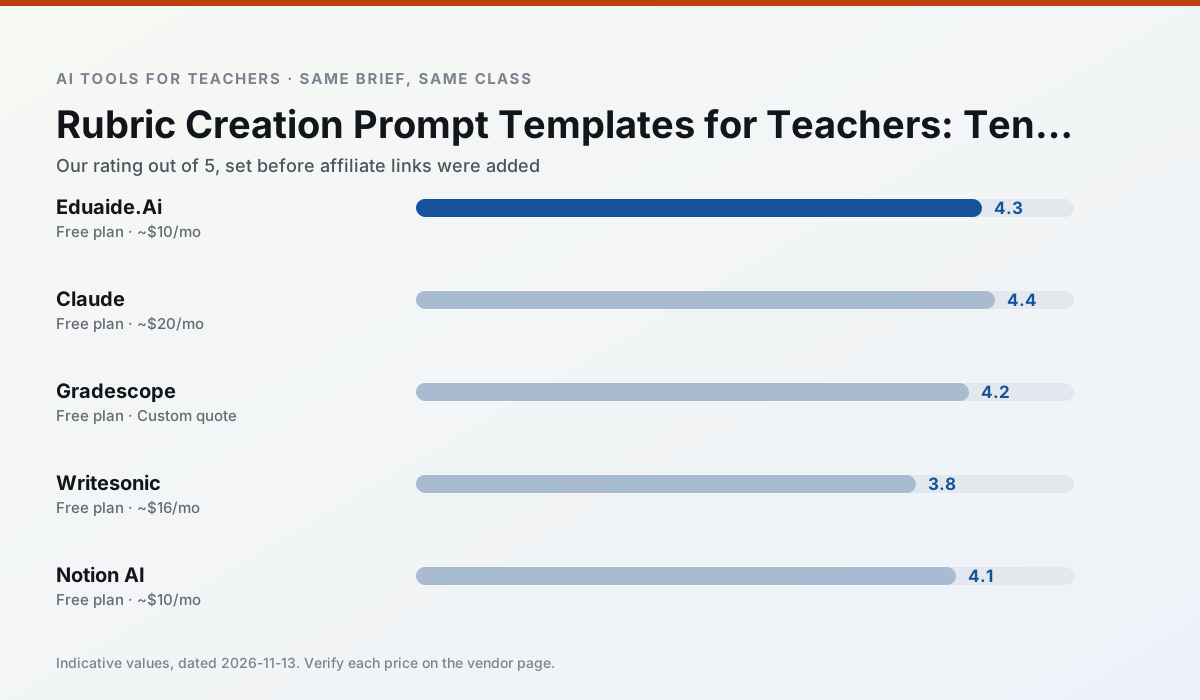
Side by side
Comparison table
Ratings reflect our timed classroom workflow, not vendor claims. Prices are indicative — verify on the vendor site.
| Tool | Best for | Free tier | Indicative paid plan | Standout feature | Our rating | Verdict | Try the tool |
|---|---|---|---|---|---|---|---|
| Eduaide.Ai | lesson planning · rubric creation | Yes — Daily generation cap | ~$10 /user/mo | Resource library | 4.3 / 5 | Strong option | Try free |
| Claude | rubric creation · feedback on writing | Yes — Usage-limited | ~$20 /user/mo | Very large context window | 4.4 / 5 | Strong option | Try free |
| Gradescope | grading · rubric creation | Yes — Limited courses | Custom quote | Bubble sheet and handwriting capture | 4.2 / 5 | Strong option | Try free |
| Writesonic | newsletters · parent communication | Yes — Limited credits | ~$16 /user/mo | Article and email generators | 3.8 / 5 | Situational | Try free |
| Notion AI | curriculum mapping · unit planning | Yes — Limited AI usage | ~$10 /user/mo | Linked databases | 4.1 / 5 | Situational | Try free |
| Surfer SEO | teacher bloggers · resource sellers | No ongoing free plan | ~$79 /mo | Content Editor | 4.0 / 5 | Situational | Try free |
Match your situation
Best for X
Different jobs need different tools. Here is what we would open first in each case.
Eduaide.Ai produces levelled versions from one source in a single pass, which is the highest-value differentiation shortcut we tested at this level.
Claude has the strongest tone control for family emails and report comments, provided you still read the message aloud before sending.
For anything students touch directly, Gradescope offers the supervision controls and logging that IT will ask about first.
Writesonic is the one we would open on a normal planning day because the first output is editable rather than restructurable, and the free plan covers a single teacher's routine.
Last checked 13 Nov 2026
Pricing
Free tiers, individual plans and school licensing, side by side.
| Tool | Free plan | Individual / paid | School & district | Billing note | Verify |
|---|---|---|---|---|---|
| Eduaide.Ai | $0 — Daily generation cap | ~$10 /user/mo | Custom quote | Indicative — verify on vendor site | Vendor |
| Claude | $0 — Usage-limited | ~$20 /user/mo | ~$25+ /user/mo | Indicative — verify on vendor site | Vendor |
| Gradescope | $0 — Limited courses | Custom quote | Custom quote | LMS integration and support | Vendor |
| Writesonic | $0 — Limited credits | ~$16 /user/mo | ~$49 /user/mo | Indicative — verify on vendor site | Vendor |
| Notion AI | $0 — Limited AI usage | ~$10 /user/mo | ~$8 /user/mo | Indicative — verify on vendor site | Vendor |
| Surfer SEO | No ongoing free tier | ~$79 /mo | Custom quote | Indicative — verify on vendor site | Vendor |
Editorial rule: pricing is re-checked every 2–3 months and the top 50 pages are refreshed every 6 months. See our funding policy.
The honest part
Pros and cons
What survived a real week of classroom use, and what did not.
Pros
- Very low entry price
- Good worksheet and rubric output
- Clean, uncluttered UI
Cons
- Smaller template set than MagicSchool
- Less polished export options
- Limited integrations
Pros
- Handles full unit plans and long rubrics
- Nuanced, less generic prose
- Good at structured document output
Cons
- No teacher-specific templates
- Fewer classroom integrations
- Consumer plan not suitable for student data
Pros
- Large time savings on paper assessments
- Consistent rubric application
- Detailed item analytics
Cons
- Overkill for elementary classrooms
- Institutional pricing is opaque
- Setup effort is real
Pros
- Cheaper than enterprise writing suites
- Many templates
- Reasonable free trial
Cons
- Generic classroom output
- Credit system is confusing
- Limited education context
Pros
- Great for long-term curriculum records
- Strong team collaboration
- Flexible structure
Cons
- Setup time is significant
- AI add-on pricing changed more than once
- Not purpose-built for lesson generation
In the classroom
Use cases
Five concrete workflows, with the tool we would open for each one.
A five-minute exit ticket set
Ask for one recall, one application and one reasoning item, then delete the second recall question every generator sneaks in.
Recommended: Eduaide.AiAn IEP present-levels first draft
Use aggregated, anonymised data only. Ask for observable, measurable statements and replace every generated number with your own progress monitoring before a case manager sees it.
Recommended: ClaudeA substitute folder that needs no context
The value here is structure, not creativity. Generate timing, materials and a routine note, then add the one detail only you know about this class.
Recommended: GradescopeA question bank from a PDF or article
Feed a non-identifiable source and ask for items tagged by difficulty with the misconception behind each distractor. Spot-check every answer key; numerical items are least reliable.
Recommended: WritesonicA Monday morning lesson plan in twelve minutes
The twelve minutes come from not rewriting the skeleton. Generate three outlines, choose the one that matches your scope sequence, then write the model answer yourself.
Recommended: Notion AI
Questions teachers ask us
FAQ
Direct answers, also published as FAQPage structured data for search and AI assistants.
Do these prompts need a paid plan?
Can I use these with any tool?
How do I know the output is right?
Sources & further reading
Our recommendation
Try Writesonic free for your next rubric creation task
Budget-friendly AI writing and content generation. Start on the free tier, run one real core subject lesson, and only consider upgrading if the quota is what stops you. Disclosure: we may earn a commission (varies) at no extra cost to you.
Some links on this page are affiliate links. We may earn a commission at no extra cost to you. Our rankings are editorial and never pay-to-play. Never enter student PII into a free consumer account.
Keep reading
Related comparisons in this cluster.
Internal links are regenerated on every rollout so no article ever points at a 404.