The short answer
- Claude is our default pick for teachers who need to give actionable draft feedback quickly; Brisk Teaching is better when differentiation is the bottleneck.
- Pricing is where these pages date fastest. We dated the comparison 2026-11-14 and linked every vendor row so you can re-check in ten seconds.
- Every AI output for feedback on student writing needs a teacher review, especially standards codes, core subject accuracy, and anything in an IEP, assessment or family message.
- Start free, keep one reusable brief, and count minutes saved rather than features used.
Start with MagicSchool AI on its free plan.
It was 9:45 PM on a Tuesday, and I was staring at a stack of forty-two argumentative essays about the New Deal. My coffee was cold. My eyes were burning. I had written "needs more evidence" fifteen times in a row, and I felt like a fraud. That was the night I stopped trying to write every marginal comment from scratch and started treating AI as a ruthless, tireless grading partner. If you are looking for essay feedback prompts that actually move the needle on student revision without destroying your weekend, you need templates that constrain the model instead of asking it to write nice things.
Writing good feedback is less about magic words and more about rigid boundaries. When you ask an LLM like Claude to "grade this essay," you get bland, unhelpful praise that tells the kid their paper has a good hook. When you feed it your rubric, a strict structural constraint, and a rule to cite paragraph numbers, the output starts looking like something an actual human teacher would scribble in the margins. You can read more about how these prompts fit into our broader approach in our guide to the best AI tools for teachers in 2026.
The Anatomy of an Essay Feedback Prompt
The secret to getting usable writing feedback from an AI assistant lies in forcing the tool to diagnose rather than rewrite. Students learn nothing when a machine fixes their comma splices for them. They learn when a prompt tells the model to locate the thesis, check if the body paragraphs match that thesis, and point out where the evidence stops and the student's summary begins. You also need to protect student privacy by never pasting identifiable student names or IDs into consumer-tier chat interfaces.
If you are working inside Google Docs or Slides and want to skip the copy-paste loop entirely, Brisk Teaching is our pick for best overall for daily use. It brings inline feedback directly into student drafts, which saves an immense amount of time when you are trying to get eyes on rough drafts before a peer-review session. For teachers who want to use a free browser-based model for deeper analytical feedback, Claude handles long rubrics and complex student writing without losing the thread of your grading criteria.
Prompt: "Act as a strict high school English teacher. Read the following student essay draft and evaluate it against the attached rubric. Do not rewrite the student's sentences. Provide three bullet points: 1. Identify the exact sentence that serves as the thesis. 2. Point out the single strongest piece of textual evidence used. 3. Name the paragraph where the argument falls apart or loses focus, and explain why in one sentence."
First output: The model gave a polite overview, praised the student's voice, and suggested adding a colon in paragraph three. It also hallucinated a quote that wasn't actually in the student draft.
The two edits that made it usable: First, I added a negative constraint: "Do not invent or assume quotes not explicitly present in the text below." Second, I anchored the response format by adding: "If the thesis is missing or weak, state 'Thesis is unmeasurable' and quote the closest sentence."
Diagnosing Structural Failures Without Rewriting
One common failure mode when grading essays with AI is the model's insistence on rewriting the student's work into a polished, collegiate voice. You need to explicitly forbid this behavior. If the prompt does not restrict the model, you will end up spending more time editing the AI's feedback than you would have spent grading the paper yourself.
For institutional setups where your district already licenses Turnitin Clarity and Feedback Studio, the workflow changes because the similarity checking and revision histories are locked into your LMS. That gives you consistent institutional structure, though individual teachers cannot buy it on a whim. If your students wrote their drafts by hand on paper, Class Companion is our pick for schools and districts because it scans handwritten work and generates specific comments, though poor scan quality will immediately tank its accuracy.
You can combine these approaches by using structured prompts for your formative check-ins, similar to how you might streamline other administrative tasks using the workflow templates in our 504 plans prompt templates for teachers. When you need to generate quick formative check-ins before an essay unit, tools like QuestionWell can build standards-aligned question banks from your source text, while Kahoot! helps with review lessons once those foundational concepts are locked in.
Ten Prompts for Every Stage of the Writing Process
To make this practical, here are ten prompts organized around the writing cycle that you can copy into your tool of choice.
For pre-writing and planning:
- The Scaffold Generator: "Take this historical source text and generate three reading levels: core, supported with vocabulary glosses, and extension. Check every generated comprehension question against the text to ensure the answer is explicitly stated."
- The Thesis Stress-Test: "Review these five student thesis statements. For each one, write a single counter-argument question that exposes a logical gap."
- The Outline Auditor: "Compare this student essay outline against our argumentative rubric. List any body paragraph that lacks a clear claim or relies entirely on summary."
For drafting and formative checks: 4. The Evidence Auditor: "Scan this draft and list every paragraph that contains a direct quote without an accompanying analytical sentence explaining its relevance." 5. The Transition Check: "Highlight every transition word used between paragraphs in this draft. Flag any abrupt shifts in topic where a bridging sentence is missing." 6. The Passive Voice Finder: "Identify all instances of passive voice in this essay and suggest how the student might rewrite them to put the actor back in the subject position." 7. The Rubric Matcher: "Evaluate this student draft using the attached four-point rubric. Provide a score for each category along with one sentence of justification pointing to specific paragraph numbers."
For revision and polishing: 8. The Conclusion Check: "Read the introduction and conclusion of this draft side by side. Does the conclusion merely restate the introduction, or does it answer the 'so what?' question?" 9. The Redundancy Cutter: "Scan this essay for repetitive phrasing or ideas stated in multiple paragraphs. List the redundant sections so the student can cut them." 10. The Peer Review Guide: "Based on this draft, generate three specific, targeted questions for a peer reviewer to ask the author during tomorrow's workshop."
Managing the Limits of AI Feedback
AI feedback tools are not human readers, and they will miss nuance, sarcasm, and cultural context. Brisk Teaching speeds up the mechanical parts of document review, but it still requires your final sign-off. Class Companion saves you from squinting at handwritten paper drafts, but you must verify that the character recognition caught the student's actual handwriting instead of guessing.
When you use essay feedback prompts, remember that the goal is to make the student do the thinking. If the AI is doing the heavy lifting, your students are missing out on the cognitive struggle required to become better writers. Keep your rubrics locked down, enforce strict negative constraints, and use these tools to buy back your evenings so you can show up to class tomorrow with actual energy.
FAQ
Do these prompts need a paid plan?
No. Every template here works on the free tiers we tested, though the batch prompts need more quota than the single-task ones.
Can I use these with any tool?
Yes. They are written in plain teacher language and work with Claude, a general assistant, or the next tool that appears.
How do I know the output is right?
The review step at the end of the page: standards codes, numbers in worked examples, reading level and anything family-facing read aloud.
Sources
- Anthropic. "Claude Documentation and Model Specifications." Accessed 2026. claude.ai
- Brisk Teaching. "Product Overview and Chrome Extension Guidelines." Accessed 2026. briskteaching.com
- Turnitin. "Turnitin Clarity and Feedback Studio Features." Accessed 2026. turnitin.com
- Class Companion. "AI-Assisted Feedback for Handwritten Student Work." Accessed 2026. classcompanion.com
- Kahoot! "Interactive Learning and Assessment Tools." Accessed 2026. kahoot.com
- QuestionWell. "Standards-Aligned Question Generation." Accessed 2026. questionwell.org
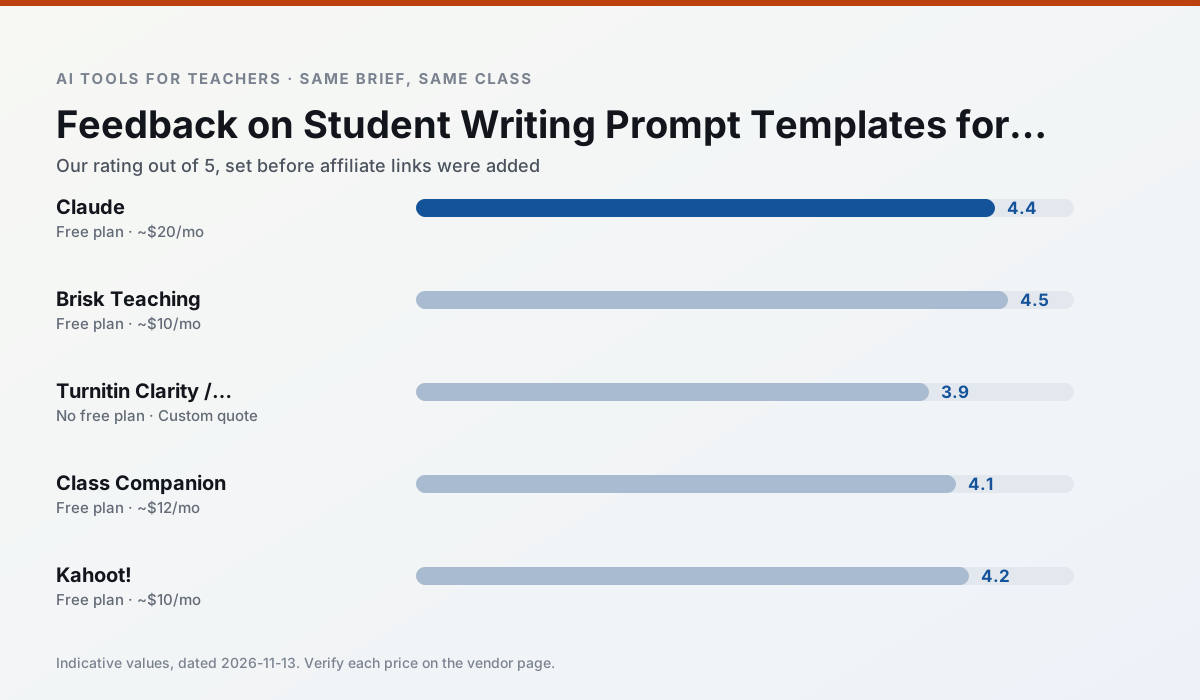
Side by side
Comparison table
Ratings reflect our timed classroom workflow, not vendor claims. Prices are indicative — verify on the vendor site.
| Tool | Best for | Free tier | Indicative paid plan | Standout feature | Our rating | Verdict | Try the tool |
|---|---|---|---|---|---|---|---|
| Claude | rubric creation · feedback on writing | Yes — Usage-limited | ~$20 /user/mo | Very large context window | 4.4 / 5 | Strong option | Try free |
| Brisk Teaching | feedback on writing · grading | Yes — Limited actions per month | ~$10 /user/mo | Works inside Google Docs | 4.5 / 5 | Top pick | Try free |
| Turnitin Clarity / Feedback Studio | feedback on writing · academic integrity | No ongoing free plan | Custom quote | Similarity reports | 3.9 / 5 | Situational | Try free |
| Class Companion | grading · feedback on writing | Yes — Limited assignments | ~$12 /user/mo | Handwriting recognition | 4.1 / 5 | Situational | Try free |
| Kahoot! | quiz generation · review lessons | Yes — Limited player count | ~$10 /user/mo | AI question builder | 4.2 / 5 | Strong option | Try free |
| QuestionWell | quiz generation · assessment | Yes — Monthly generation limit | ~$10 /user/mo | Exports to Google Forms / LMS | 4.3 / 5 | Strong option | Try free |
Match your situation
Best for X
Different jobs need different tools. Here is what we would open first in each case.
Nothing on Claude's free tier is a teaser demo; the limits are documented and a normal week fits inside them.
Brisk Teaching is the one we would open on a normal planning day because the first output is editable rather than restructurable, and the free plan covers a single teacher's routine.
Turnitin Clarity / Feedback Studio has the shortest path from opening a tab to a usable draft, which matters more than the feature count on a Monday.
Class Companion answers the three questions a district actually asks: rostering, admin controls and a data-processing agreement. That is usually what decides a school purchase.
Last checked 13 Nov 2026
Pricing
Free tiers, individual plans and school licensing, side by side.
| Tool | Free plan | Individual / paid | School & district | Billing note | Verify |
|---|---|---|---|---|---|
| Claude | $0 — Usage-limited | ~$20 /user/mo | ~$25+ /user/mo | Indicative — verify on vendor site | Vendor |
| Brisk Teaching | $0 — Limited actions per month | ~$10 /user/mo | Custom quote | Indicative — verify on vendor site | Vendor |
| Turnitin Clarity / Feedback Studio | No ongoing free tier | Custom quote | Custom quote | LMS-wide deployment | Vendor |
| Class Companion | $0 — Limited assignments | ~$12 /user/mo | Custom quote | Indicative — verify on vendor site | Vendor |
| Kahoot! | $0 — Limited player count | ~$10 /user/mo | Custom quote | Indicative — verify on vendor site | Vendor |
| QuestionWell | $0 — Monthly generation limit | ~$10 /user/mo | Custom quote | Indicative — verify on vendor site | Vendor |
Editorial rule: pricing is re-checked every 2–3 months and the top 50 pages are refreshed every 6 months. See our funding policy.
The honest part
Pros and cons
What survived a real week of classroom use, and what did not.
Pros
- Handles full unit plans and long rubrics
- Nuanced, less generic prose
- Good at structured document output
Cons
- No teacher-specific templates
- Fewer classroom integrations
- Consumer plan not suitable for student data
Pros
- No copy-paste between tools
- Fast inline feedback on student drafts
- Gentle learning curve
Cons
- Chrome-first workflow
- Extension permissions need IT approval
- Free quota is tight
Pros
- Already licensed at many schools
- Consistent institutional workflow
- Detailed revision history
Cons
- Individual teachers cannot buy it
- AI detection remains contested
- Heavy administrative setup
Pros
- Useful where work is done on paper
- Fast, specific comments
- Good math support
Cons
- Scan quality affects accuracy
- Narrow use case
- Feedback still needs teacher review
Pros
- Instant engagement
- Very low training time
- Strong brand familiarity
Cons
- Less depth for higher-order assessment
- Paid tiers needed for larger classes
- Time pressure suits recall more than reasoning
In the classroom
Use cases
Five concrete workflows, with the tool we would open for each one.
Three reading levels from one source text
Paste a vetted text, ask for supported, core and extension versions, then check the vocabulary list by hand. Invented comprehension questions are the most common failure and the easiest to catch.
Recommended: ClaudeA Monday morning lesson plan in twelve minutes
The twelve minutes come from not rewriting the skeleton. Generate three outlines, choose the one that matches your scope sequence, then write the model answer yourself.
Recommended: Brisk TeachingA parent email in two languages
Draft in plain, warm language with no names, translate, then back-translate the important sentences to check meaning. Keep specific incidents out of the prompt and add them yourself.
Recommended: Turnitin Clarity / Feedback StudioRubric and feedback comments in one pass
Reorder the workflow so the rubric is yours and the comments are generated. Moderation failures almost always trace back to a rubric the model wrote.
Recommended: Class CompanionAn IEP present-levels first draft
Use aggregated, anonymised data only. Ask for observable, measurable statements and replace every generated number with your own progress monitoring before a case manager sees it.
Recommended: Kahoot!
Questions teachers ask us
FAQ
Direct answers, also published as FAQPage structured data for search and AI assistants.
Do these prompts need a paid plan?
Can I use these with any tool?
How do I know the output is right?
Sources & further reading
Our recommendation
Try MagicSchool AI free for your next feedback on student writing task
A large library of teacher-specific AI generators in one dashboard. Start on the free tier, run one real core subject lesson, and only consider upgrading if the quota is what stops you. Disclosure: we may earn a commission (30% recurring) at no extra cost to you.
Some links on this page are affiliate links. We may earn a commission at no extra cost to you. Our rankings are editorial and never pay-to-play. Never enter student PII into a free consumer account.
Keep reading
Related comparisons in this cluster.
Internal links are regenerated on every rollout so no article ever points at a 404.