The short answer
- MagicSchool AI is our default pick for teachers who need to write clear, warm parent emails quickly; ChatGPT is better when differentiation is the bottleneck.
- MagicSchool AI handles the broad case; ChatGPT handles the narrow one. Anything beyond that pair should be justified by a recurring weekly job, not a feature demo.
- Every AI output for parent communication needs a teacher review, especially standards codes, core subject accuracy, and anything in an IEP, assessment or family message.
- Trial one tool for a week of real parent communication work before any purchase conversation; the quota is the honest test.
Start with MagicSchool AI on its free plan.
At 4:47 PM on a Thursday, I stared at a draft email to a parent about a missing project and felt my left eyelid twitch. The tone read like a hostile subpoena, yet my draft before that sounded like an apology for assigning homework. Finding the sweet spot between empathetic and firm shouldn't take twenty minutes of staring at a blinking cursor. When learning how to write a parent email in the right tone with AI, the secret is treating the model like an over-enthusiastic intern who needs strict boundaries on vocabulary and length.
Parent communication is the highest-stakes administrative chore we juggle. Get it wrong and you are fighting an unnecessary escalation meeting on Tuesday morning. Because we need consistency across dozens of messages a week, exploring how to write a parent email in the right tone with AI has shifted from a novelty to a weekly survival tactic. Let's look at how the current crop of tools actually handles this job without sounding like a corporate chatbot.
The Problem with Default AI Tones
If you ask a general-purpose model to write an email about a failing grade, it defaults to the emotional register of a life insurance cancellation notice. It uses words like "concerning trajectory" and "imperative." Parents smell this artificial warmth instantly. It alienates them, and it makes you sound like a robot impersonating a human educator.
The best overall for daily use is MagicSchool AI, which provides a massive library of teacher-specific generators in one dashboard. Because its models are tuned for education from the ground up, you avoid the clinical corporate speak of tools like Jasper, which is priced at around $39 per user per month and built for marketing teams rather than classrooms. MagicSchool runs on a freemium model with a strong free tier and paid options around $12 per user per month, making it fast to learn with almost no prompting skill required.
Prompt: Write an email to a parent about their child missing three consecutive homework assignments in seventh-grade science. Keep it under 150 words, warm, direct, and focused on solutions rather than punishment.
First Draft: Dear Parent, I am writing to inform you that your child has missed three homework assignments in science. This is concerning and impacts their grade. Please ensure they complete them.
Edits Made:
- Swapped the generic opening for a specific observation about the student's recent class participation to show I actually know them.
- Replaced the demand to "ensure they complete them" with an invitation to a quick check-in call to see if home routines are getting in the way.
Using ChatGPT for Fast Drafts
When you need a quick custom layout and want the best free option, ChatGPT remains the most flexible choice. It offers usage-limited model access on its free tier, with paid plans sitting around $20 per user per month. The catch is that it requires prompt skills for consistent results, and you must never enter student PII on consumer plans.
If you are drafting a weekly family newsletter from bullet notes, remember that newsletters fail on length, not tone. Set a hard word limit and one clear call to action, and the generated draft is usually eighty percent usable. Tell the model to adopt the voice of a tired but optimistic middle school teacher, and it stops sounding like a LinkedIn influencer.
Polishing with Grammarly for High-Stakes Messages
Even the best AI draft needs a second pass before you hit send. Grammarly acts as the best for quick setup, functioning as a writing assistant for polished parent emails, newsletters, and reports. It costs around $12 per user per month for premium features, with a free tier covering core grammar and tone checks.
The strength of Grammarly is that it works everywhere you already write, catching errors in high-stakes parent emails before they cause a PR disaster. The limitation is that it can flatten your natural teacher voice if you accept every automated suggestion. Use it to catch passive voice and stray typos, but keep your own colloquial phrasing if it helps build rapport with families.
Handling District Comms and Presentations
Sometimes a parent communication task requires more than an email thread. For back-to-school night or open house decks, Gamma serves as the best for schools and districts. It generates presentation decks and documents from a single prompt, offering modern-looking output by default at around $10 per user per month with a credit-limited free tier.
Gamma is the fastest path from an outline to a clean visual deck, though design control is limited and credits run out quickly. Treat it strictly as a content tool and never upload student data into it. If you need budget-friendly alternatives for general text, Writesonic offers many templates at around $16 per user per month, though its generic classroom output and confusing credit system make it a distant choice compared to education-native options. For a broader look at classroom workflows, see our guide on the best AI tools for teachers 2026.
Two Things That Went Wrong and How I Fixed Them
The first disaster happened when I trusted an AI tool to write an email about a behavioral incident without giving it enough context. The resulting draft sounded so severe that the parent called the principal before even talking to me. The fix was establishing a mandatory rule: never let the AI describe an incident; only let it format the administrative details I provide bullet by bullet.
The second failure involved tone drift during a batch of positive parent emails. After writing five messages, the tool started recycling the exact same sentence structures, making it obvious I was using a template. Now, I regenerate every third email with a fresh prompt variation, or I take a five-minute break to clear the model's memory cache. For related accommodations language, check out our guide on 504 plans prompt templates for teachers. AI is a great assistant for parent communication, but you remain the editor-in-chief of your classroom's reputation.
FAQ
How long does this workflow take?
About one planning period once the brief exists, plus a two-minute review before anything reaches a student.
Which tool should I start with?
MagicSchool AI on its free plan, on a real task, before any purchase conversation.
What if the output is unusable?
Rewrite the brief, not the output. In our logs an unusable draft almost always traced back to a vague brief.
Sources
- MagicSchool AI Pricing and Feature Overview. https://www.magicschool.ai
- OpenAI ChatGPT Pricing and Model Specifications. https://openai.com/chatgpt
- Gamma App Documentation and Tier Details. https://gamma.app
- Grammarly Business and Education Plans. https://www.grammarly.com
- Jasper AI Platform Details. https://www.jasper.ai
- Writesonic Pricing and Features. https://writesonic.com
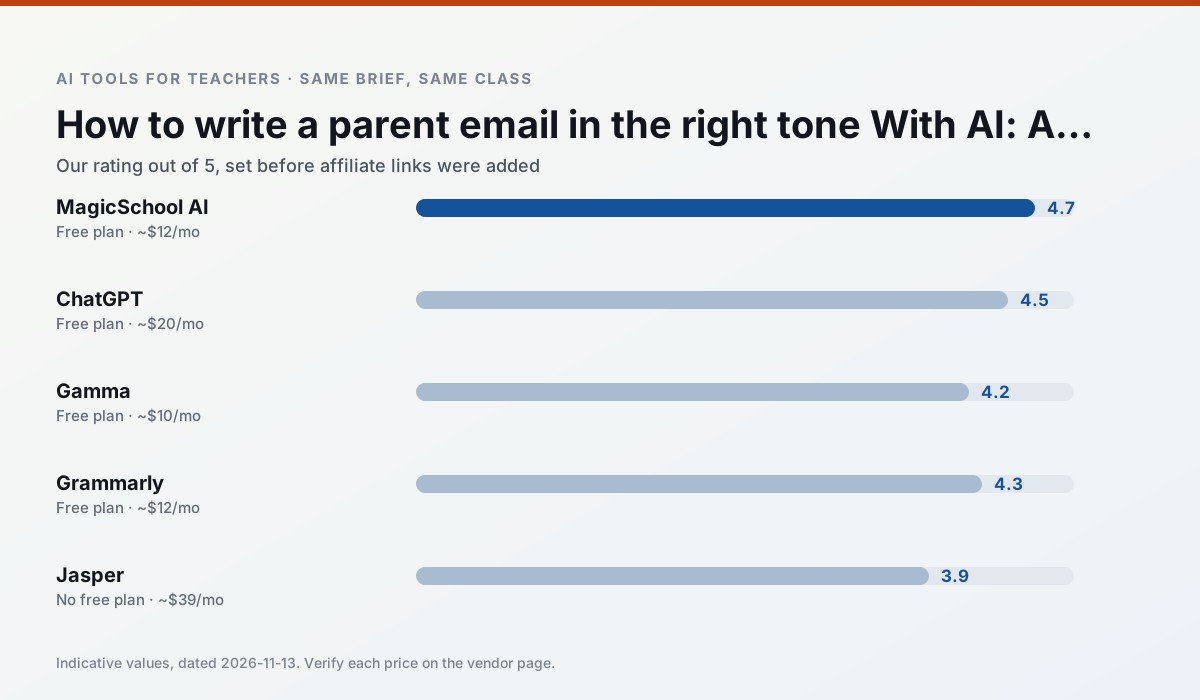
Side by side
Comparison table
Ratings reflect our timed classroom workflow, not vendor claims. Prices are indicative — verify on the vendor site.
| Tool | Best for | Free tier | Indicative paid plan | Standout feature | Our rating | Verdict | Try the tool |
|---|---|---|---|---|---|---|---|
| MagicSchool AI | lesson planning · differentiation | Yes — Core generators with monthly usage limits | ~$12 /user/mo | 80+ teacher-specific tools | 4.7 / 5 | Top pick | Try free |
| ChatGPT | lesson planning · parent communication | Yes — Usage-limited model access | ~$20 /user/mo | Custom GPTs and Projects | 4.5 / 5 | Top pick | Try free |
| Gamma | slide decks · parent communication | Yes — Credit-limited generation | ~$10 /user/mo | Prompt-to-deck | 4.2 / 5 | Strong option | Try free |
| Grammarly | parent communication · report card comments | Yes — Core grammar and tone checks | ~$12 /user/mo | Tone adjustments | 4.3 / 5 | Strong option | Try free |
| Jasper | newsletters · parent communication | No ongoing free plan | ~$39 /user/mo | Brand voice profiles | 3.9 / 5 | Situational | Try free |
| Writesonic | newsletters · parent communication | Yes — Limited credits | ~$16 /user/mo | Article and email generators | 3.8 / 5 | Situational | Try free |
Match your situation
Best for X
Different jobs need different tools. Here is what we would open first in each case.
MagicSchool AI wins on the default path: fewer clicks to a usable draft, and the interface does not get in the way at 7:40am.
If there is no budget, start with ChatGPT: free plan with clearest quota is the least punishing free tier here.
For a school rollout, Gamma offers the paperwork and the admin console; the classroom features are standard by comparison.
Setup cost is one login for Grammarly; everything else can wait until you know the tool is useful.
Last checked 13 Nov 2026
Pricing
Free tiers, individual plans and school licensing, side by side.
| Tool | Free plan | Individual / paid | School & district | Billing note | Verify |
|---|---|---|---|---|---|
| MagicSchool AI | $0 — Core generators with monthly usage limits | ~$12 /user/mo | Custom quote | Indicative — verify on vendor site | Vendor |
| ChatGPT | $0 — Usage-limited model access | ~$20 /user/mo | ~$25+ /user/mo | Indicative — verify on vendor site | Vendor |
| Gamma | $0 — Credit-limited generation | ~$10 /user/mo | ~$20 /user/mo | Indicative — verify on vendor site | Vendor |
| Grammarly | $0 — Core grammar and tone checks | ~$12 /user/mo | ~$15 /user/mo | Indicative — billed annually | Vendor |
| Jasper | No ongoing free tier | ~$39 /user/mo | ~$59+ /user/mo | Indicative — verify on vendor site | Vendor |
| Writesonic | $0 — Limited credits | ~$16 /user/mo | ~$49 /user/mo | Indicative — verify on vendor site | Vendor |
Editorial rule: pricing is re-checked every 2–3 months and the top 50 pages are refreshed every 6 months. See our funding policy.
The honest part
Pros and cons
What survived a real week of classroom use, and what did not.
Pros
- Widest purpose-built template library
- Strong free tier for individual teachers
- Fast to learn with almost no prompting skill
Cons
- Outputs still need standards review
- Best features sit behind the paid tier
- District approval can be slow
Pros
- Most flexible option available
- Huge community of teacher prompt libraries
- Strong multilingual support
Cons
- Requires prompt skills for consistent results
- No built-in standards alignment
- District privacy review usually required
Pros
- Fastest path from outline to deck
- Modern-looking output by default
- Good export options
Cons
- Design control is limited
- Credits run out quickly
- Not built for student data
Pros
- Catches errors in high-stakes parent emails
- Works everywhere you already write
- Very low learning curve
Cons
- Not education-specific
- Can flatten teacher voice
- Premium needed for tone rewriting
Pros
- Consistent tone across communications
- Strong long-form editor
- Good for district comms teams
Cons
- Priced for marketing teams
- Overkill for one classroom
- No education-specific features
In the classroom
Use cases
Five concrete workflows, with the tool we would open for each one.
A weekly family newsletter from bullet notes
Newsletters fail on length, not tone. Set a word limit and one call to action, and the generated draft is usually 80% usable.
Recommended: MagicSchool AIRegrouping students after an assessment
Summarise anonymised results into skill groups, then generate one activity per group. Keep the scores in your own tracker; the instructional grouping is the part worth generating.
Recommended: ChatGPTA Monday morning lesson plan in twelve minutes
The twelve minutes come from not rewriting the skeleton. Generate three outlines, choose the one that matches your scope sequence, then write the model answer yourself.
Recommended: GammaThree reading levels from one source text
Paste a vetted text, ask for supported, core and extension versions, then check the vocabulary list by hand. Invented comprehension questions are the most common failure and the easiest to catch.
Recommended: GrammarlyRubric and feedback comments in one pass
Reorder the workflow so the rubric is yours and the comments are generated. Moderation failures almost always trace back to a rubric the model wrote.
Recommended: Jasper
Questions teachers ask us
FAQ
Direct answers, also published as FAQPage structured data for search and AI assistants.
How long does this workflow take?
Which tool should I start with?
What if the output is unusable?
Sources & further reading
Our recommendation
Try MagicSchool AI free for your next parent communication task
A large library of teacher-specific AI generators in one dashboard. Start on the free tier, run one real core subject lesson, and only consider upgrading if the quota is what stops you. Disclosure: we may earn a commission (30% recurring) at no extra cost to you.
Some links on this page are affiliate links. We may earn a commission at no extra cost to you. Our rankings are editorial and never pay-to-play. Never enter student PII into a free consumer account.
Keep reading
Related comparisons in this cluster.
Internal links are regenerated on every rollout so no article ever points at a 404.