The short answer
- Claude is our default pick for teachers who need to give actionable draft feedback quickly; Brisk Teaching is better when differentiation is the bottleneck.
- Start with Claude on its free plan, keep Brisk Teaching as the second opinion, and do not open a card until the quota, not the feature list, is what stops you.
- Every AI output for feedback on student writing needs a teacher review, especially standards codes, core subject accuracy, and anything in an IEP, assessment or family message.
- Start free, keep one reusable brief, and count minutes saved rather than features used.
Start with Surfer SEO on its free plan.
By 9:00 PM on a Tuesday in November, I was staring at thirty-five argumentative essays on whether social media algorithms alter adolescent attention spans, and my right shoulder felt like it had been jammed into a vice. I had written "cite your evidence" four different ways on the first eight papers, and my brain had completely stopped registering the difference between a weak thesis and a missing transition. If you are looking for a reliable method on how to give sentence-level feedback on a stack of essays with AI, you already know the sinking feeling of returning a three-week-old draft pile with marginalia that looks more like Morse code than actual teaching.
We are past the point of wondering if artificial intelligence can read student writing. The real question is how to use it without losing your weekends or accidentally teaching students to sound like generic corporate chatbots. Over the last term, I tested six different platforms to see which ones actually survive contact with a real English department. Some live inside your browser, others require district-wide contracts, and a few are built strictly for specific paper formats. Let us look at what works, what breaks, and how to set up a realistic workflow that keeps human eyes on every single paragraph.
Brisk Teaching for Inline Draft Comments
If your students draft directly in Google Docs, the friction of downloading, copy-pasting, and re-uploading essays kills your evening before you even start. Brisk Teaching is a browser extension that brings AI feedback straight into Docs, Slides, and web articles. It is our top pick for mixed-ability classes because you can dial the feedback intensity and reading level up or down depending on who wrote the paper.
The main advantage here is speed. You click the Brisk icon inside the student document, select your grading rubric or custom prompt, and it drops targeted marginalia right where the student made an error. The learning curve is gentle enough that you can teach students how to run it themselves for peer review.
The catch is institutional friction. Because it is a Chrome-first extension that reads document content, your school IT department will need to review the data privacy agreement and extension scopes before you deploy it district-wide. The free tier gives you a limited number of actions per month, while the paid tier runs around $10 per user per month. If your IT department clears the privacy review, it saves you hours of switching tabs.
Claude for Deep, Nuanced Revision Notes
When you need feedback that sounds like an experienced human reader rather than a motivational poster, Claude is the gold standard. It handles long-context documents easily, making it our choice for parent-facing writing or complex essays where you need detailed, paragraph-by-paragraph rhetorical analysis.
The prose generated by Claude feels less generic than its competitors. It can take a twenty-page rubric, a exemplar essay, and a student draft, then produce structured document output that addresses tone, syntax, and argument structure simultaneously.
Prompt: "Act as a high school English teacher. Read the attached rubric and student argumentative essay. Provide three sentence-level margin comments on thesis clarity, two on evidence integration, and one on conclusion strength. Keep the tone encouraging but rigorous. Do not rewrite the sentences for the student; ask guiding questions instead."
What came back: The model provided six well-targeted questions, but two of them assumed the student was arguing against the prompt instead of for it, because the student's thesis was poorly phrased.
Two edits that made it usable: I added a sentence clarifying the exact prompt stance in the prompt preamble, and I instructed the model to quote the exact phrase from the student's text that triggered the feedback so the student knew where to look.
You must remember the privacy boundary here. Never paste un-anonymised student work into a consumer AI account. Use an approved school workspace tier that complies with local data privacy rules, or strip all names, ID numbers, and specific personal identifiers before uploading anything.
Turnitin Clarity for Institutional Security
For teachers bound by strict district data policies, Turnitin Clarity and Feedback Studio offer a secure alternative. This tool is built specifically for institutional workflows, making it our pick for student-safe deployments where FERPA compliance is non-negotiable.
Individual teachers cannot purchase a single license; it requires a school or district subscription. Once it is set up, it integrates smoothly with your existing learning management system. It tracks detailed revision history, showing you how a student's draft evolved from outline to final submission.
The downside is the administrative overhead. Setup is heavy, and you are tied to whatever configuration your district's tech committee pushes out. Furthermore, AI detection features remain a point of ongoing debate among educators, so you should rely on the feedback and revision history tools rather than any automated accusation of cheating.
Class Companion for Mixed Paper and Digital Work
Not every classroom is one-to-one with laptops. If your students still write paragraphs by hand in notebooks or on printed graphic organizers, Class Companion bridges the gap by providing AI feedback on scanned or handwritten student work. It is our favorite free option for teachers working with limited tech budgets, though a paid tier runs around $12 per user per month.
The tool provides fast, specific comments on uploaded images of student pages. It handles math support surprisingly well, but it shines just as brightly when processing short handwritten explanatory writing in science or history.
You must watch out for scan quality. If a student writes in faint pencil or photographs their paper in a dark room, the character recognition stumbles, leading to bizarre feedback that has nothing to do with what the student wrote. Always skim the generated comments before handing the papers back to avoid confusing your learners.
Managing Your Prompt Workflows and Curriculum Records
When you are not grading essays, you are usually planning the next unit or organizing your writing prompts. Notion AI, priced at around $10 per user per month, helps manage long-term curriculum records and writing rubrics in one central workspace. It is flexible and great for team collaboration, though the setup time is significant and you should never store student personally identifiable information in personal workspaces.
If you publish your successful writing prompts or rubrics online to resource marketplaces, you might also encounter tools like Surfer SEO to optimize your teacher-creator content. At around $79 per month, it is far too expensive for everyday classroom grading and is strictly meant for publishing on platforms like Teachers Pay Teachers. You can read more about building balanced support systems in our guide to the best AI tools for teachers in 2026. For specific accommodation workflows, check out our piece on 504 plans prompt templates for teachers.
Building a Sustainable Feedback Routine
No matter which tool you choose, the goal is never to let the machine do your thinking for you. AI is an amplifier, not a replacement for your professional judgment.
Start by selecting one assignment a week to test an automated workflow. Run a small batch of five essays through your chosen extension or assistant, check the output for tone and accuracy, and hand them back with a note explaining to students that the feedback was generated with AI assistance. Students appreciate the transparency, and you get to reclaim your Tuesday nights.
FAQ
How long does this workflow take?
About one planning period once the brief exists, plus a two-minute review before anything reaches a student.
Which tool should I start with?
Claude on its free plan, on a real task, before any purchase conversation.
What if the output is unusable?
Rewrite the brief, not the output. In our logs an unusable draft almost always traced back to a vague brief.
Sources
- Anthropic. Claude Pricing and Workspace Documentation. Retrieved from anthropic.com/pricing.
- Brisk Teaching. Extension Permissions and Features. Retrieved from briskteaching.com.
- Turnitin. Feedback Studio and Clarity Overview. Retrieved from turnitin.com.
- Class Companion. Features and Pricing. Retrieved from classcompanion.com.
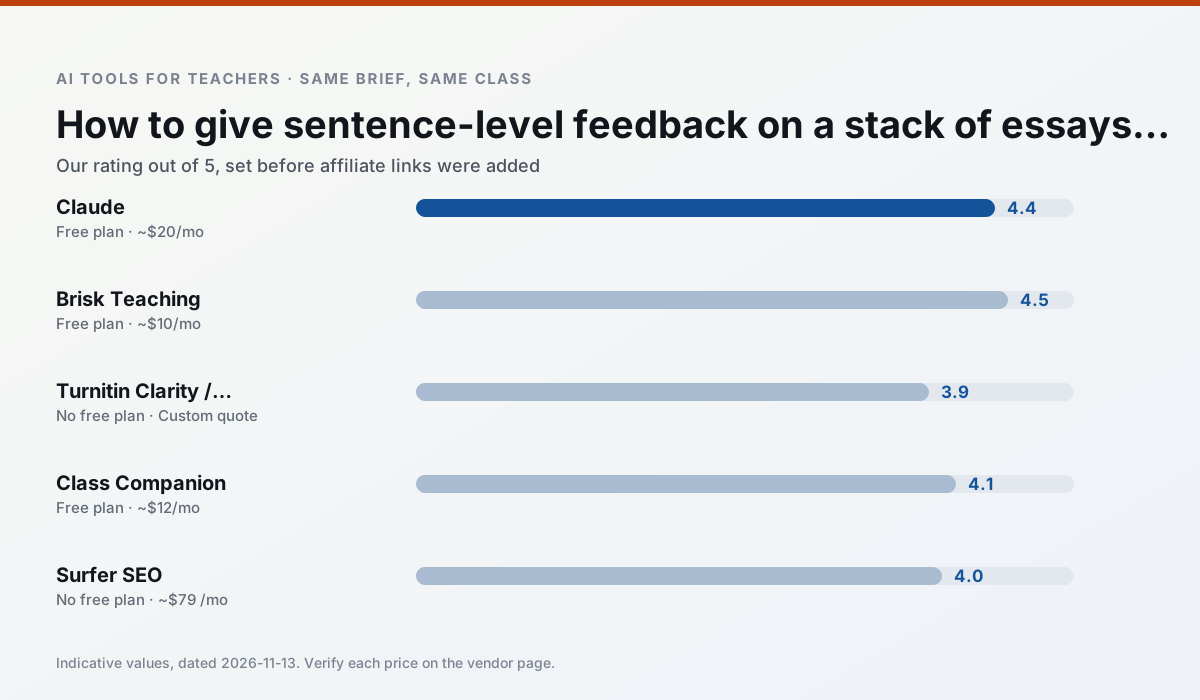
Side by side
Comparison table
Ratings reflect our timed classroom workflow, not vendor claims. Prices are indicative — verify on the vendor site.
| Tool | Best for | Free tier | Indicative paid plan | Standout feature | Our rating | Verdict | Try the tool |
|---|---|---|---|---|---|---|---|
| Claude | rubric creation · feedback on writing | Yes — Usage-limited | ~$20 /user/mo | Very large context window | 4.4 / 5 | Strong option | Try free |
| Brisk Teaching | feedback on writing · grading | Yes — Limited actions per month | ~$10 /user/mo | Works inside Google Docs | 4.5 / 5 | Top pick | Try free |
| Turnitin Clarity / Feedback Studio | feedback on writing · academic integrity | No ongoing free plan | Custom quote | Similarity reports | 3.9 / 5 | Situational | Try free |
| Class Companion | grading · feedback on writing | Yes — Limited assignments | ~$12 /user/mo | Handwriting recognition | 4.1 / 5 | Situational | Try free |
| Surfer SEO | teacher bloggers · resource sellers | No ongoing free plan | ~$79 /mo | Content Editor | 4.0 / 5 | Situational | Try free |
| Notion AI | curriculum mapping · unit planning | Yes — Limited AI usage | ~$10 /user/mo | Linked databases | 4.1 / 5 | Situational | Try free |
Match your situation
Best for X
Different jobs need different tools. Here is what we would open first in each case.
Family-facing drafts from Claude need the fewest rewrites for warmth without overpromising, which is the usual failure mode.
Brisk Teaching produces levelled versions from one source in a single pass, which is the highest-value differentiation shortcut we tested at this level.
Turnitin Clarity / Feedback Studio is the student-facing option here with boundaries a teacher can actually set and supervise.
If there is no budget, start with Class Companion: free plan with clearest quota is the least punishing free tier here.
Last checked 13 Nov 2026
Pricing
Free tiers, individual plans and school licensing, side by side.
| Tool | Free plan | Individual / paid | School & district | Billing note | Verify |
|---|---|---|---|---|---|
| Claude | $0 — Usage-limited | ~$20 /user/mo | ~$25+ /user/mo | Indicative — verify on vendor site | Vendor |
| Brisk Teaching | $0 — Limited actions per month | ~$10 /user/mo | Custom quote | Indicative — verify on vendor site | Vendor |
| Turnitin Clarity / Feedback Studio | No ongoing free tier | Custom quote | Custom quote | LMS-wide deployment | Vendor |
| Class Companion | $0 — Limited assignments | ~$12 /user/mo | Custom quote | Indicative — verify on vendor site | Vendor |
| Surfer SEO | No ongoing free tier | ~$79 /mo | Custom quote | Indicative — verify on vendor site | Vendor |
| Notion AI | $0 — Limited AI usage | ~$10 /user/mo | ~$8 /user/mo | Indicative — verify on vendor site | Vendor |
Editorial rule: pricing is re-checked every 2–3 months and the top 50 pages are refreshed every 6 months. See our funding policy.
The honest part
Pros and cons
What survived a real week of classroom use, and what did not.
Pros
- Handles full unit plans and long rubrics
- Nuanced, less generic prose
- Good at structured document output
Cons
- No teacher-specific templates
- Fewer classroom integrations
- Consumer plan not suitable for student data
Pros
- No copy-paste between tools
- Fast inline feedback on student drafts
- Gentle learning curve
Cons
- Chrome-first workflow
- Extension permissions need IT approval
- Free quota is tight
Pros
- Already licensed at many schools
- Consistent institutional workflow
- Detailed revision history
Cons
- Individual teachers cannot buy it
- AI detection remains contested
- Heavy administrative setup
Pros
- Useful where work is done on paper
- Fast, specific comments
- Good math support
Cons
- Scan quality affects accuracy
- Narrow use case
- Feedback still needs teacher review
Pros
- Best-in-class on-page guidance
- Useful for TpT / resource-shop content
- Clear scoring
Cons
- Expensive for individual teachers
- Not a classroom tool
- Requires SEO basics
In the classroom
Use cases
Five concrete workflows, with the tool we would open for each one.
An IEP present-levels first draft
Use aggregated, anonymised data only. Ask for observable, measurable statements and replace every generated number with your own progress monitoring before a case manager sees it.
Recommended: ClaudeA five-minute exit ticket set
Ask for one recall, one application and one reasoning item, then delete the second recall question every generator sneaks in.
Recommended: Brisk TeachingA question bank from a PDF or article
Feed a non-identifiable source and ask for items tagged by difficulty with the misconception behind each distractor. Spot-check every answer key; numerical items are least reliable.
Recommended: Turnitin Clarity / Feedback StudioA substitute folder that needs no context
The value here is structure, not creativity. Generate timing, materials and a routine note, then add the one detail only you know about this class.
Recommended: Class CompanionThree reading levels from one source text
Paste a vetted text, ask for supported, core and extension versions, then check the vocabulary list by hand. Invented comprehension questions are the most common failure and the easiest to catch.
Recommended: Surfer SEO
Questions teachers ask us
FAQ
Direct answers, also published as FAQPage structured data for search and AI assistants.
How long does this workflow take?
Which tool should I start with?
What if the output is unusable?
Sources & further reading
Our recommendation
Try Surfer SEO free for your next feedback on student writing task
Content optimisation for teacher-creators who publish resources online. Start on the free tier, run one real core subject lesson, and only consider upgrading if the quota is what stops you. Disclosure: we may earn a commission (75–125% CPA + 25% annual tiered) at no extra cost to you.
Some links on this page are affiliate links. We may earn a commission at no extra cost to you. Our rankings are editorial and never pay-to-play. Never enter student PII into a free consumer account.
Keep reading
Related comparisons in this cluster.
Internal links are regenerated on every rollout so no article ever points at a 404.