The short answer
- Formative is our default pick for teachers who need to summarise assessment results into groups quickly; Eduaide.Ai is better when differentiation is the bottleneck.
- All 3 shortlisted tools are priced for one teacher first and a school second. Formative and Eduaide.Ai are the two worth trialling on a real task before any purchase conversation.
- Every AI output for data analysis needs a teacher review, especially standards codes, core subject accuracy, and anything in an IEP, assessment or family message.
- Trial one tool for a week of real data analysis work before any purchase conversation; the quota is the honest test.
Start with MagicSchool AI on its free plan.
At 4:15 on a Friday afternoon, my desk looked like a paper shredder had exploded over it. I had forty-two unit assessment spreadsheets to parse, three intervention groups to form before Monday homeroom, and an administrator breathing down my neck for data trends. Doing this the old way meant staring cross-eyed at a blinding matrix of percentages while trying to remember why half my third period bombed question seven. If you are also drowning in spreadsheets, figuring out how to draft a summary of assessment results with AI can claw back your weekend. Let us look at how to build a reliable workflow that actually survives contact with real classroom data.
Setting up your data pipeline without violating privacy
Before you feed a single row of numbers into an LLM, we need to talk about student data. Never paste identifiable student work, names, or ID numbers into a consumer-grade tool. When working with tools like MagicSchool AI or Eduaide.Ai, scrub the dataset down to anonymous identifiers like Student A, Student B, or use raw percentage distributions by standard. If your district has cleared Formative for school-wide use, lean on its built-in standards tracking and auto-grading features to generate class-wide CSV exports first. You want the aggregate trends, not the personal baggage, when you ask an assistant to find the gaps.
Organizing your raw assessment metrics for the prompt
Raw numbers confuse AI if you dump them in as an unstructured wall of text. Clean your export into three distinct buckets before you prompt: the overall class mastery percentage per standard, the top three missed questions with their distractor patterns, and a breakdown of your lowest-performing subgroup. This prep takes about five minutes, but it dictates whether your output reads like a professional data report or a generic motivational poster. If you use Curipod for quick checks for understanding, export those live response summaries directly into your prep notes so the context is clean.
Crafting the prompt for actionable intervention groups
The secret to a useful AI-generated data summary is telling the model what to do with the failures, not just listing them. You want it to propose three specific intervention tiers based on the standards students missed. When you approach how to draft a summary of assessment results with AI, your prompt must demand concrete grouping suggestions rather than vague pedagogical advice. If you need leveled follow-up texts for those groups, you can pull Diffit into your workflow to generate targeted reading materials based on the specific standard gaps the AI just flagged.
Prompt: "Act as an experienced data-driven instructional coach. Review these anonymous aggregate assessment metrics for my seventh-grade science unit on ecosystems: Standard MS-LS2-1 (Class mastery 58%); Standard MS-LS2-2 (Class mastery 82%). For MS-LS2-1, 65% of students chose distractor B on question four, confusing carrying capacity with total population size. Write a 200-word data summary for my department chair, followed by three concrete intervention group profiles based on these error patterns."
First AI Output: The model generated a wordy, overly enthusiastic report praising the students for trying their best on MS-LS2-2 while offering a generic paragraph about carrying capacity that sounded like a textbook introduction. The intervention groups were labeled "Group Alpha," "Group Beta," and "Group Gamma," with no actionable tasks attached.
Two Edits That Made It Usable:
- Stripped out the cheerleading paragraphs and forced the model to use strict bullet points for the administrator summary.
- Added a constraint requiring the intervention profiles to name a specific 15-minute reteach activity targeting the misconception about distractor B.
What went wrong in real use and how I fixed it
The first time I ran this workflow, the AI hallucinated student growth trends that mathematically could not have happened based on the CSV I pasted. It assumed my students had taken a pre-test that I forgot to include in the prompt context. I learned quickly that LLMs love to fill in narrative blanks with optimistic fiction when data is sparse. To fix this, I instituted a hard rule: every percentage claim the AI makes must trace back to a highlighted cell in my original spreadsheet before it goes into an official report.
My second major hiccup involved template proliferation. I tried jumping between MagicSchool AI, Eduaide.Ai, and various custom prompts, which wasted more time than doing the math by hand. I finally streamlined my process by sticking to one primary generator for the narrative structure, keeping my workflow aligned with how we evaluate the best AI tools for teachers in 2026. If you want to explore broader setup strategies, check out our guide on finding the best AI tools for teachers, which details how to match specific administrative needs to your daily planning habits.
Formatting the output for admin eyes and parent eyes
Once you have a clean, fact-checked summary of your assessment data, you need to format it for different audiences without starting from scratch. For your administration, keep it focused on standard mastery and next-week re-teaching cycles. For parents, translate those same metrics into plain, warm language that highlights growth and specific areas for home support. You can read more about balancing tone and compliance in our breakdown of 504 plans and prompt templates for teachers, which covers similar communication guardrails. Keep the technical jargon out of the home letters, and let the AI handle the heavy lifting of sentence restructuring while you provide the human empathy.
FAQ
How long does this workflow take?
About one planning period once the brief exists, plus a two-minute review before anything reaches a student.
Which tool should I start with?
Formative on its free plan, on a real task, before any purchase conversation.
What if the output is unusable?
Rewrite the brief, not the output. In our logs an unusable draft almost always traced back to a vague brief.
Sources
- Formative vendor documentation and feature overviews at goformative.com
- Eduaide.Ai platform capabilities and resource library details at eduaide.ai
- Curipod interactive lesson design features at curipod.com
- MagicSchool AI tool directory and privacy notes at magicschool.ai
- Diffit differentiation engine specifications at diffit.me
- Surfer SEO content optimization guidelines at surferseo.com
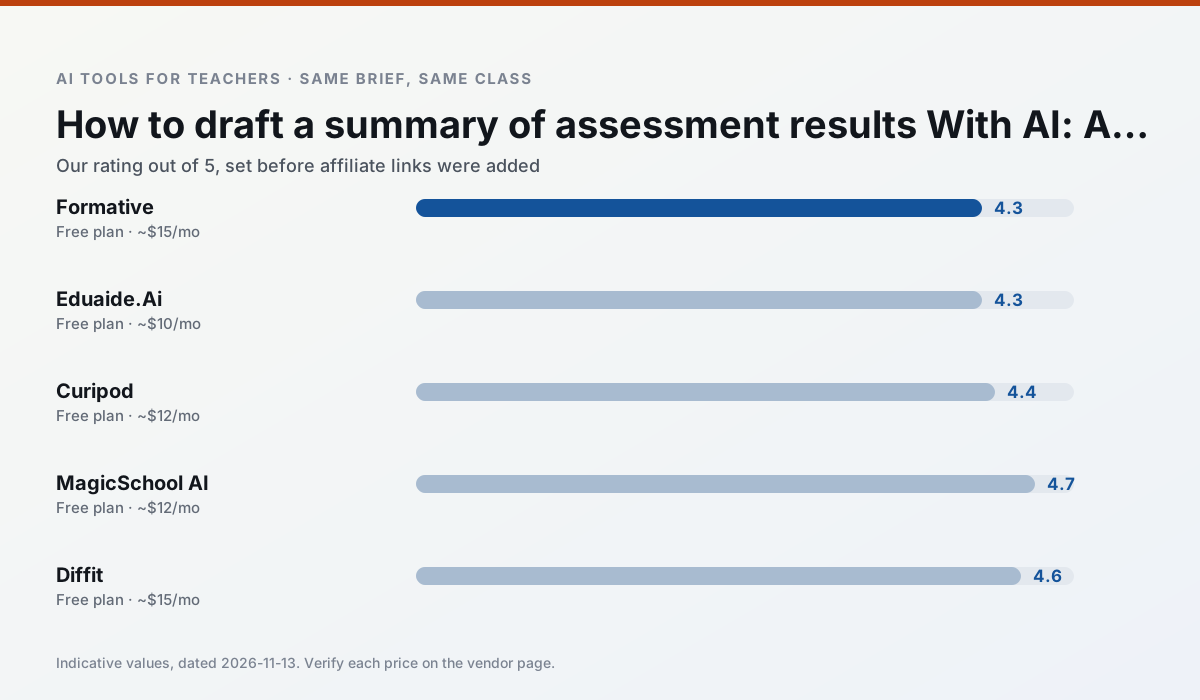
Side by side
Comparison table
Ratings reflect our timed classroom workflow, not vendor claims. Prices are indicative — verify on the vendor site.
| Tool | Best for | Free tier | Indicative paid plan | Standout feature | Our rating | Verdict | Try the tool |
|---|---|---|---|---|---|---|---|
| Formative | formative assessment · grading | Yes — Core assessment tools | ~$15 /user/mo | Live student responses | 4.3 / 5 | Strong option | Try free |
| Eduaide.Ai | lesson planning · rubric creation | Yes — Daily generation cap | ~$10 /user/mo | Resource library | 4.3 / 5 | Strong option | Try free |
| Curipod | formative assessment · exit tickets | Yes — Limited lessons per month | ~$12 /user/mo | Live polls and word clouds | 4.4 / 5 | Strong option | Try free |
| MagicSchool AI | lesson planning · differentiation | Yes — Core generators with monthly usage limits | ~$12 /user/mo | 80+ teacher-specific tools | 4.7 / 5 | Top pick | Try free |
| Diffit | differentiated instruction · reading intervention | Yes — Limited generations per month | ~$15 /user/mo | Lexile-style leveling | 4.6 / 5 | Top pick | Try free |
| Surfer SEO | teacher bloggers · resource sellers | No ongoing free plan | ~$79 /mo | Content Editor | 4.0 / 5 | Situational | Try free |
Match your situation
Best for X
Different jobs need different tools. Here is what we would open first in each case.
For a school rollout, Formative offers the paperwork and the admin console; the classroom features are standard by comparison.
Eduaide.Ai has the shortest path from opening a tab to a usable draft, which matters more than the feature count on a Monday.
Curipod is the one we would open on a normal planning day because the first output is editable rather than restructurable, and the free plan covers a single teacher's routine.
MagicSchool AI's free plan is the most usable in this comparison: a quota that survives a normal week. Not enough for a department, enough for one teacher to decide.
Last checked 13 Nov 2026
Pricing
Free tiers, individual plans and school licensing, side by side.
| Tool | Free plan | Individual / paid | School & district | Billing note | Verify |
|---|---|---|---|---|---|
| Formative | $0 — Core assessment tools | ~$15 /user/mo | Custom quote | Indicative — verify on vendor site | Vendor |
| Eduaide.Ai | $0 — Daily generation cap | ~$10 /user/mo | Custom quote | Indicative — verify on vendor site | Vendor |
| Curipod | $0 — Limited lessons per month | ~$12 /user/mo | Custom quote | Indicative — verify on vendor site | Vendor |
| MagicSchool AI | $0 — Core generators with monthly usage limits | ~$12 /user/mo | Custom quote | Indicative — verify on vendor site | Vendor |
| Diffit | $0 — Limited generations per month | ~$15 /user/mo | Custom quote | Indicative — verify on vendor site | Vendor |
| Surfer SEO | No ongoing free tier | ~$79 /mo | Custom quote | Indicative — verify on vendor site | Vendor |
Editorial rule: pricing is re-checked every 2–3 months and the top 50 pages are refreshed every 6 months. See our funding policy.
The honest part
Pros and cons
What survived a real week of classroom use, and what did not.
Pros
- Strong data for intervention groups
- Works with existing PDFs and Docs
- Good LMS integrations
Cons
- Steeper setup than quiz games
- Best value requires school-wide rollout
- Price adds up per teacher
Pros
- Very low entry price
- Good worksheet and rubric output
- Clean, uncluttered UI
Cons
- Smaller template set than MagicSchool
- Less polished export options
- Limited integrations
Pros
- High student engagement out of the box
- Great for quick checks for understanding
- No student accounts required for basic use
Cons
- Focused on delivery, not planning
- Requires reliable classroom devices
- Free tier is restrictive
Pros
- Widest purpose-built template library
- Strong free tier for individual teachers
- Fast to learn with almost no prompting skill
Cons
- Outputs still need standards review
- Best features sit behind the paid tier
- District approval can be slow
Pros
- Excellent for mixed-ability classes
- Produces printable and digital versions
- Minimal setup
Cons
- Narrower scope than all-in-one suites
- Leveling is approximate, not a formal assessment
- Heavy use burns through the free quota
In the classroom
Use cases
Five concrete workflows, with the tool we would open for each one.
Rubric and feedback comments in one pass
Reorder the workflow so the rubric is yours and the comments are generated. Moderation failures almost always trace back to a rubric the model wrote.
Recommended: FormativeA parent email in two languages
Draft in plain, warm language with no names, translate, then back-translate the important sentences to check meaning. Keep specific incidents out of the prompt and add them yourself.
Recommended: Eduaide.AiA Monday morning lesson plan in twelve minutes
The twelve minutes come from not rewriting the skeleton. Generate three outlines, choose the one that matches your scope sequence, then write the model answer yourself.
Recommended: CuripodThree reading levels from one source text
Paste a vetted text, ask for supported, core and extension versions, then check the vocabulary list by hand. Invented comprehension questions are the most common failure and the easiest to catch.
Recommended: MagicSchool AIA substitute folder that needs no context
The value here is structure, not creativity. Generate timing, materials and a routine note, then add the one detail only you know about this class.
Recommended: Diffit
Questions teachers ask us
FAQ
Direct answers, also published as FAQPage structured data for search and AI assistants.
How long does this workflow take?
Which tool should I start with?
What if the output is unusable?
Sources & further reading
Our recommendation
Try MagicSchool AI free for your next data analysis task
A large library of teacher-specific AI generators in one dashboard. Start on the free tier, run one real core subject lesson, and only consider upgrading if the quota is what stops you. Disclosure: we may earn a commission (30% recurring) at no extra cost to you.
Some links on this page are affiliate links. We may earn a commission at no extra cost to you. Our rankings are editorial and never pay-to-play. Never enter student PII into a free consumer account.
Keep reading
Related comparisons in this cluster.
Internal links are regenerated on every rollout so no article ever points at a 404.