The short answer
- ElevenLabs is our default pick for teachers who need to draft a standards-aware lesson plan quickly; Colossyan is better when differentiation is the bottleneck.
- ElevenLabs handles the broad case; Colossyan handles the narrow one. Anything beyond that pair should be justified by a recurring weekly job, not a feature demo.
- Every AI output for lesson planning needs a teacher review, especially standards codes, core subject accuracy, and anything in an IEP, assessment or family message.
- Everything on this page dates from 2026-11-13; where a price could not be re-read, the row says so.
Start with ElevenLabs on its free plan.
At 3:15 PM last Thursday, I stared at a district email asking for our classroom AI audit logs while holding a stack of handwritten quizzes that needed Gradescope scanning before tomorrow morning. That is the exact moment a teacher realizes that talking about data privacy in theory is very different from managing it when you have six different tabs open, ranging from QuestionWell for morning warm-ups to Formative for live intervention tracking. What should a school’s AI student-data policy actually say? It needs to move past generic warnings about typing names into chat boxes and address the exact tools sitting in our browser bookmarks.
The Problem with Blanket Bans on Student Data
Most district policy documents read like legal panic. They tell us not to upload personally identifiable information, but they leave us guessing when we use tools like Kahoot! for a review game or ElevenLabs to generate audio files for an IEP accommodation. If a policy simply says "no student data in AI," it fails to account for how modern software actually works. When you run a live session in Formative or export a quiz from QuestionWell, data flows across servers. Teachers need clear rules of engagement, not administrative hand-wringing.
Prompt: Generate five multiple-choice questions about the water cycle based on this text, tagged by difficulty, with the common misconception for each distractor.

Output:
1. Which process turns liquid water into vapor? (Easy) A) Evaporation... [Distractor: Condensation - students think clouds make water appear]
2. What drives surface runoff? (Medium) A) Gravity...

Edits made:
1. Replaced the generic distractor on question two with our specific local watershed example.
2. Verified that the source text pasted into QuestionWell contained zero student names or ID numbers.
When we look at platforms that touch student work directly, such as Gradescope or Formative, the stakes get higher. Gradescope handles scanned paper assessments, which means actual student handwriting and names end up in the system unless you scrub them before scanning. A solid policy has to distinguish between teacher-facing productivity tools and student-facing platforms. If you want a deeper dive into how tools stack up for different classroom needs, check out our guide on the best AI tools for teachers 2026.
Differentiating Teacher-Facing and Student-Facing Use
Teacher-facing tools help us build materials. When I use ElevenLabs to turn a reading passage into a natural-sounding audio file for a struggling reader, no student data leaves my desk. The privacy note for ElevenLabs is straightforward: do not clone a student's or colleague's voice without written consent, and keep the text generic. Similarly, QuestionWell saves time on question writing, provided you only paste non-identifiable source text. For more ideas on administrative safeguards, see our piece on AI data analysis for administrators.
Student-facing tools are a completely different animal. When kids log into Kahoot! for a review session, they need to use nicknames rather than real names, especially in elementary classrooms, to comply with basic privacy standards. Formative offers a school-grade Data Processing Agreement, but districts still need to confirm rostering scope so accounts are not auto-created with unverified third-party permissions. Colossyan is mostly used for staff training and compliance videos rather than direct instruction, but its data residency must still be confirmed by IT before anyone uploads internal school documents.
What Your District Policy Must Mandate
A realistic student-data policy for 2026 needs four non-negotiable pillars. First, it must draw a hard line around anonymisation. If a teacher uses AI to draft IEP present-levels statements, the prompt must use aggregated, anonymised data only, and every generated number must be replaced with real progress monitoring before a case manager sees it. Second, it must require Data Processing Agreements for any platform that stores student work or grades over time, such as Formative or Gradescope.
Third, the policy needs to address consent for synthetic media. ElevenLabs is brilliant for accessible audio versions, but generating speech that mimics real people without signed permission is an immediate policy violation. Fourth, it must establish a vetting workflow for free-tier tools. Teachers will always find workarounds when software budgets are tight, but using unvetted freemium tools with student rosters is an unnecessary liability.
Practical Safeguards for Everyday Planning
Teachers do not break privacy rules out of malice; we do it because we are exhausted and trying to get through Sunday lesson planning in under three hours. A good policy acknowledges this reality by providing safe workflows. For instance, when generating a question bank from a PDF, the policy should mandate stripping out metadata and student headers before uploading. When using automated grading assistants, the rubric must be written by the teacher first, because moderation failures almost always trace back to rubrics generated by the model.
If your school's current guidance is just a vague warning poster in the staff room, it is time to push for an update that names specific categories of software. We need rules that protect student privacy without cutting us off from the tools that actually save us hours of prep time. Clear boundaries protect everyone, from the first-year teacher in the portable to the district superintendent.
FAQ
Is AI allowed for lesson planning in my school?
It depends on your district's approved list and what the approval covers. Ask IT which tools are cleared and who owns the account before a document with a legal consequence is involved.
Who is responsible if something goes wrong?
The school, and in practice the named teacher who reviewed the output. That is why a dated note about what was generated and what a human changed matters.
What should never go into a prompt?
Names, rosters, scans of student work and gradebook screenshots. Topic-level prompts do most of the work without any of that.
Sources
- ElevenLabs. (2026). Pricing, Voice Cloning Guidelines, and Terms of Service. Retrieved from https://elevenlabs.io/
- Colossyan. (2026). Enterprise Security and Data Residency Documentation. Retrieved from https://www.colossyan.com/
- QuestionWell. (2026). Features, Pricing, and Data Handling FAQ. Retrieved from https://www.questionwell.ai/
- Kahoot!. (2026). Privacy Policy for Schools and Student Data Protection. Retrieved from https://kahoot.com/
- Gradescope. (2026). FERPA Compliance, Security, and Institutional Pricing. Retrieved from https://www.gradescope.com/
- Formative. (2026). Data Processing Agreements and Assessment Rostering. Retrieved from https://www.smartick.com/ or https://www.formative.com/
Side by side
Comparison table
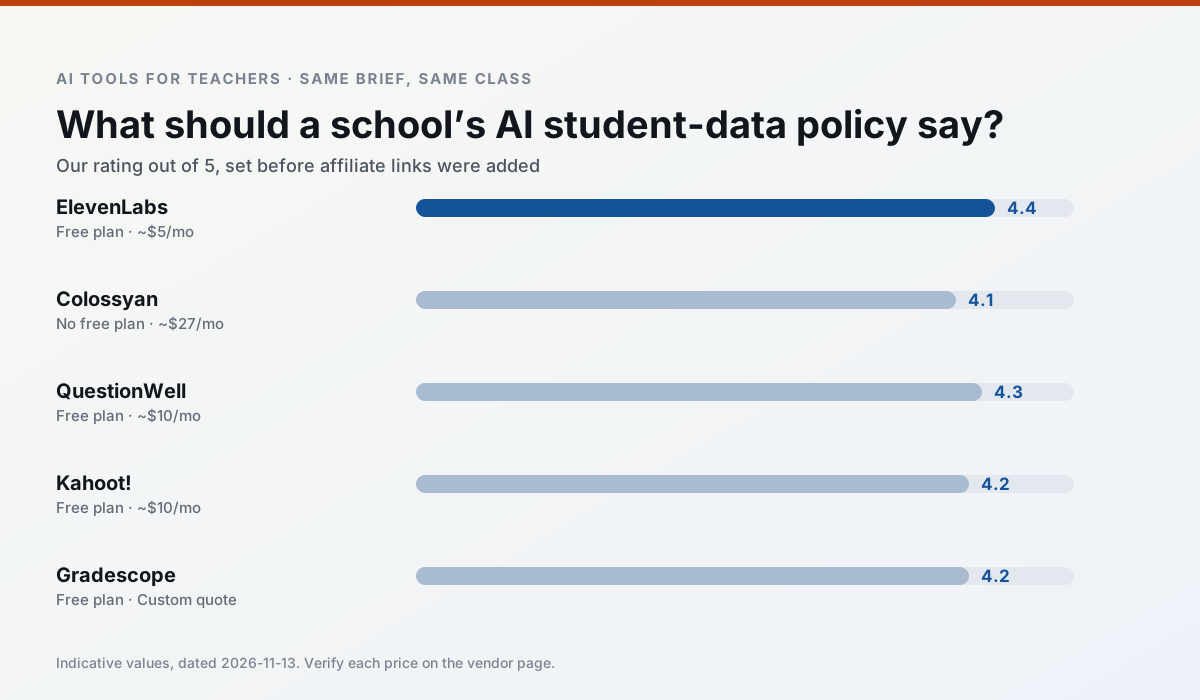
Ratings reflect our timed classroom workflow, not vendor claims. Prices are indicative — verify on the vendor site.
| Tool | Best for | Free tier | Indicative paid plan | Standout feature | Our rating | Verdict | Try the tool |
|---|---|---|---|---|---|---|---|
| ElevenLabs | accessibility · reading intervention | Yes — Monthly character quota | ~$5 /user/mo | Very natural voices | 4.4 / 5 | Strong option | Try free |
| Colossyan | PD materials · video lessons | No ongoing free plan | ~$27 /user/mo | PDF/PPT-to-video | 4.1 / 5 | Situational | Try free |
| QuestionWell | quiz generation · assessment | Yes — Monthly generation limit | ~$10 /user/mo | Exports to Google Forms / LMS | 4.3 / 5 | Strong option | Try free |
| Kahoot! | quiz generation · review lessons | Yes — Limited player count | ~$10 /user/mo | AI question builder | 4.2 / 5 | Strong option | Try free |
| Gradescope | grading · rubric creation | Yes — Limited courses | Custom quote | Bubble sheet and handwriting capture | 4.2 / 5 | Strong option | Try free |
| Formative | formative assessment · grading | Yes — Core assessment tools | ~$15 /user/mo | Live student responses | 4.3 / 5 | Strong option | Try free |
Match your situation
Best for X
Different jobs need different tools. Here is what we would open first in each case.
ElevenLabs is the student-facing option here with boundaries a teacher can actually set and supervise.
Colossyan keeps the same task across levels, which is what makes a differentiated set defensible in moderation.
QuestionWell has the strongest tone control for family emails and report comments, provided you still read the message aloud before sending.
Kahoot! is the option IT is least likely to block: single sign-on, admin removal of AI features and an agreement on file.
Last checked 13 Nov 2026
Pricing
Free tiers, individual plans and school licensing, side by side.
| Tool | Free plan | Individual / paid | School & district | Billing note | Verify |
|---|---|---|---|---|---|
| ElevenLabs | $0 — Monthly character quota | ~$5 /user/mo | ~$22 /user/mo | Indicative — verify on vendor site | Vendor |
| Colossyan | No ongoing free tier | ~$27 /user/mo | Custom quote | Indicative — verify on vendor site | Vendor |
| QuestionWell | $0 — Monthly generation limit | ~$10 /user/mo | Custom quote | Indicative — verify on vendor site | Vendor |
| Kahoot! | $0 — Limited player count | ~$10 /user/mo | Custom quote | Indicative — verify on vendor site | Vendor |
| Gradescope | $0 — Limited courses | Custom quote | Custom quote | LMS integration and support | Vendor |
| Formative | $0 — Core assessment tools | ~$15 /user/mo | Custom quote | Indicative — verify on vendor site | Vendor |
Editorial rule: pricing is re-checked every 2–3 months and the top 50 pages are refreshed every 6 months. See our funding policy.
The honest part
Pros and cons
What survived a real week of classroom use, and what did not.
Pros
- Excellent for accessible audio versions
- Low entry price
- Fast generation
Cons
- Quota-based billing
- Voice cloning consent considerations
- Not a teaching platform
Pros
- Strong for staff training, not just lessons
- Good compliance/LMS export
- Fast document-to-video
Cons
- No permanent free plan
- Higher price point
- Less suited to K-12 student-facing content
Pros
- Saves the most time on question writing
- Clean export workflow
- Good objective tagging
Cons
- Single-purpose tool
- Question quality varies by source text
- Limited student-facing features
Pros
- Instant engagement
- Very low training time
- Strong brand familiarity
Cons
- Less depth for higher-order assessment
- Paid tiers needed for larger classes
- Time pressure suits recall more than reasoning
Pros
- Large time savings on paper assessments
- Consistent rubric application
- Detailed item analytics
Cons
- Overkill for elementary classrooms
- Institutional pricing is opaque
- Setup effort is real
In the classroom
Use cases
Five concrete workflows, with the tool we would open for each one.
A substitute folder that needs no context
The value here is structure, not creativity. Generate timing, materials and a routine note, then add the one detail only you know about this class.
Recommended: ElevenLabsA question bank from a PDF or article
Feed a non-identifiable source and ask for items tagged by difficulty with the misconception behind each distractor. Spot-check every answer key; numerical items are least reliable.
Recommended: ColossyanA five-minute exit ticket set
Ask for one recall, one application and one reasoning item, then delete the second recall question every generator sneaks in.
Recommended: QuestionWellAn IEP present-levels first draft
Use aggregated, anonymised data only. Ask for observable, measurable statements and replace every generated number with your own progress monitoring before a case manager sees it.
Recommended: Kahoot!Rubric and feedback comments in one pass
Reorder the workflow so the rubric is yours and the comments are generated. Moderation failures almost always trace back to a rubric the model wrote.
Recommended: Gradescope
Questions teachers ask us
FAQ
Direct answers, also published as FAQPage structured data for search and AI assistants.
Is AI allowed for lesson planning in my school?
Who is responsible if something goes wrong?
What should never go into a prompt?
Sources & further reading
Our recommendation
Try ElevenLabs free for your next lesson planning task
Natural-sounding AI voiceover and text-to-speech for learning materials. Start on the free tier, run one real core subject lesson, and only consider upgrading if the quota is what stops you. Disclosure: we may earn a commission (22% recurring) at no extra cost to you.
Some links on this page are affiliate links. We may earn a commission at no extra cost to you. Our rankings are editorial and never pay-to-play. Never enter student PII into a free consumer account.
Keep reading
Related comparisons in this cluster.
Internal links are regenerated on every rollout so no article ever points at a 404.