The short answer
- Formative is our default pick for teachers who need to draft a standards-aware lesson plan quickly; Gradescope is better when differentiation is the bottleneck.
- Free-tier reality for this shortlist: Formative: Yes — Core assessment tools; Gradescope: Yes — Limited courses; Kahoot!: Yes — Limited player count. Treat every paid figure as indicative until you have read the vendor page; only the free quota is something you can test yourself this week.
- Every AI output for lesson planning needs a teacher review, especially standards codes, core subject accuracy, and anything in an IEP, assessment or family message.
- Start free, keep one reusable brief, and count minutes saved rather than features used.
Start with Synthesia on its free plan.
It is 10:45 on a Tuesday night. I am staring at an open browser window, trying to write an Individualized Education Program goal for a seventh-grader who struggles with reading comprehension, while three unread parent emails blink from my inbox and tomorrow’s warm-up isn't printed yet. When teachers ask can AI tools write IEP goals a district will approve, they are usually sitting right where I am. The short answer is no, not out of the box. If you copy and paste a generic prompt into an unguided large language model, you will get back goal statements packed with meaningless educational jargon that your district special education coordinator will reject before the ink dries.
District compliance committees look for specific, measurable, achievable, relevant, and time-bound criteria tied to explicit present levels of performance. Generic AI outputs miss the local testing baselines every time. Yet, special education teachers and general educators writing intervention plans are increasingly turning to software suites to handle the heavy lifting of drafting question sets, leveling text passages, and organizing diagnostic data. To understand what actually works in a real school building, we have to look past the hype and test the specific platforms teachers use every day. If you want a broader look at how classrooms are changing this year, read our guide on AI tools for teachers 2026.
The real test of AI-generated content
The biggest mistake teachers make when using AI for instructional planning is trusting the first draft. Whether you are generating quiz items or trying to build support frameworks, the machine needs strict constraints. For instance, when I need to adapt a complex historical article for three different reading levels in my inclusion classroom, I never let the algorithm invent the questions. Instead, I rely on a structured workflow that separates the source material from the assessment layer.
Prompt: "Take this 400-word article on the water cycle and rewrite it into three distinct versions: a supported version at a third-grade readability level with simplified syntax, a core version at a fifth-grade level, and an extension version at a seventh-grade level. Keep all factual details about evaporation and condensation identical across versions."
First output: The model generated the three text levels cleanly, but it also took the liberty of inventing five multiple-choice comprehension questions at the end of each passage without my asking. Two of those questions featured factually incorrect distractors about cloud formation.
Two edits to make it usable:
- Strip out all generated comprehension questions entirely, since invented quiz items are the most common failure point in text-leveling workflows.
- Manually cross-reference the vocabulary list generated for the supported text against our district's mandatory Tier 2 academic vocabulary list to ensure alignment.
Finding the right tools for daily instructional design
When you are balancing IEP documentation, differentiated readings, and formative checks, you need tools that fit naturally into your planning period without adding administrative overhead. For question generation, QuestionWell stands out as the best overall for daily use, helping educators quickly pull standards-aligned item banks from arbitrary source texts while keeping non-identifiable data safe. For live checks during class, Formative offers strong data collection for intervention groups and integrates cleanly with existing PDFs and Docs at about $15 per user per month on its paid tier, making it our top pick for quick setup.
If you are grading stack after stack of paper assessments, Gradescope provides massive time savings through AI-assisted rubric application for scanned and handwritten work, earning our nod as best for schools and districts despite its opaque institutional pricing. For low-stakes review sessions, Kahoot! remains the most popular free option for instant engagement, though its time-pressure format suits recall much better than higher-order reasoning. Meanwhile, video creation platforms like Synthesia and HeyGen bring multilingual voice output and lip-sync translation to instructional content at roughly $29 per user per month, though their cost and privacy considerations—such as avoiding student likenesses without explicit consent—mean they belong in the hands of media specialists or district curriculum teams rather than individual classroom teachers. For more on supporting inclusive workflows, see our piece on AI accommodations for paraprofessionals.
Where automation breaks down in the classroom
Technology fails in predictable ways when applied to complex human environments. Last term, I attempted to use an AI assistant to generate holistic writing rubrics alongside personalized student feedback comments in a single pass. The moderation failure was immediate: because the model wrote both the grading criteria and the student comments simultaneously, the resulting feedback praised students for meeting rubric standards that were mathematically impossible under the criteria the AI had established.
To fix this, I completely reversed the workflow. Now, I write the grading rubric myself using our school district standards, and I only use the AI to draft the individualized feedback comments after I have locked down the grading criteria. Another common trap is feeding student work into unverified platforms. When drafting parent communication or analyzing diagnostic data, you must keep specific names, student IDs, and identifiable incidents completely out of your prompts. If you need to draft a warm, plain-language email in multiple languages, write the core message without names, translate it through the tool, and always back-translate the critical sentences yourself to verify that the tone and meaning remained intact.
Building sustainable systems
The goal of using educational technology is not to hand your professional judgment over to an algorithm. It is to claw back the forty minutes you spend formatting worksheets so you can spend that time sitting next to a student who is struggling to decode a paragraph. Whether you are building an accommodation bank, drafting intervention tracking sheets, or sorting through diagnostic scores, treat every AI output as a rough first draft written by an enthusiastic student who needs heavy teacher editing before it is ready for prime time.
FAQ
Is AI allowed for lesson planning in my school?
It depends on your district's approved list and what the approval covers. Ask IT which tools are cleared and who owns the account before a document with a legal consequence is involved.
Who is responsible if something goes wrong?
The school, and in practice the named teacher who reviewed the output. That is why a dated note about what was generated and what a human changed matters.
What should never go into a prompt?
Names, rosters, scans of student work and gradebook screenshots. Topic-level prompts do most of the work without any of that.
Sources
- Formative pricing and feature data retrieved from newsela.com/products/formative
- Gradescope feature specifications and assessment workflows retrieved from gradescope.com
- Kahoot! tier limits and student engagement tools retrieved from kahoot.com
- QuestionWell objective tagging and export features retrieved from questionwell.org
- Synthesia avatar video capabilities and pricing data retrieved from synthesia.io
- HeyGen translation workflows and credit structures retrieved from heygen.com
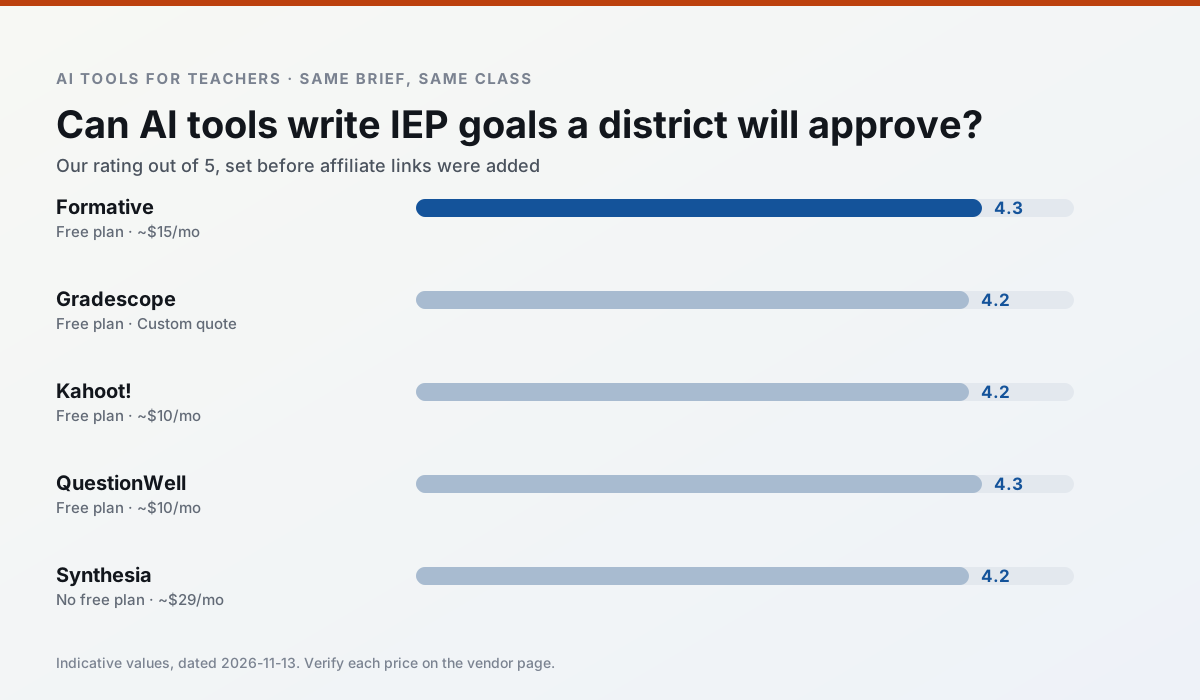
Side by side
Comparison table
Ratings reflect our timed classroom workflow, not vendor claims. Prices are indicative — verify on the vendor site.
| Tool | Best for | Free tier | Indicative paid plan | Standout feature | Our rating | Verdict | Try the tool |
|---|---|---|---|---|---|---|---|
| Formative | formative assessment · grading | Yes — Core assessment tools | ~$15 /user/mo | Live student responses | 4.3 / 5 | Strong option | Try free |
| Gradescope | grading · rubric creation | Yes — Limited courses | Custom quote | Bubble sheet and handwriting capture | 4.2 / 5 | Strong option | Try free |
| Kahoot! | quiz generation · review lessons | Yes — Limited player count | ~$10 /user/mo | AI question builder | 4.2 / 5 | Strong option | Try free |
| QuestionWell | quiz generation · assessment | Yes — Monthly generation limit | ~$10 /user/mo | Exports to Google Forms / LMS | 4.3 / 5 | Strong option | Try free |
| Synthesia | flipped lessons · video lessons | No ongoing free plan | ~$29 /user/mo | 140+ languages | 4.2 / 5 | Strong option | Try free |
| HeyGen | video lessons · translation | Yes — Limited credit plan | ~$29 /user/mo | Video translation | 4.3 / 5 | Strong option | Try free |
Match your situation
Best for X
Different jobs need different tools. Here is what we would open first in each case.
Formative has the shortest path from opening a tab to a usable draft, which matters more than the feature count on a Monday.
Gradescope is the option IT is least likely to block: single sign-on, admin removal of AI features and an agreement on file.
If there is no budget, start with Kahoot!: free plan with clearest quota is the least punishing free tier here.
QuestionWell is the one we would open on a normal planning day because the first output is editable rather than restructurable, and the free plan covers a single teacher's routine.
Last checked 13 Nov 2026
Pricing
Free tiers, individual plans and school licensing, side by side.
| Tool | Free plan | Individual / paid | School & district | Billing note | Verify |
|---|---|---|---|---|---|
| Formative | $0 — Core assessment tools | ~$15 /user/mo | Custom quote | Indicative — verify on vendor site | Vendor |
| Gradescope | $0 — Limited courses | Custom quote | Custom quote | LMS integration and support | Vendor |
| Kahoot! | $0 — Limited player count | ~$10 /user/mo | Custom quote | Indicative — verify on vendor site | Vendor |
| QuestionWell | $0 — Monthly generation limit | ~$10 /user/mo | Custom quote | Indicative — verify on vendor site | Vendor |
| Synthesia | No ongoing free tier | ~$29 /user/mo | Custom quote | Indicative — verify on vendor site | Vendor |
| HeyGen | $0 — Limited credit plan | ~$29 /user/mo | Custom quote | Indicative — verify on vendor site | Vendor |
Editorial rule: pricing is re-checked every 2–3 months and the top 50 pages are refreshed every 6 months. See our funding policy.
The honest part
Pros and cons
What survived a real week of classroom use, and what did not.
Pros
- Strong data for intervention groups
- Works with existing PDFs and Docs
- Good LMS integrations
Cons
- Steeper setup than quiz games
- Best value requires school-wide rollout
- Price adds up per teacher
Pros
- Large time savings on paper assessments
- Consistent rubric application
- Detailed item analytics
Cons
- Overkill for elementary classrooms
- Institutional pricing is opaque
- Setup effort is real
Pros
- Instant engagement
- Very low training time
- Strong brand familiarity
Cons
- Less depth for higher-order assessment
- Paid tiers needed for larger classes
- Time pressure suits recall more than reasoning
Pros
- Saves the most time on question writing
- Clean export workflow
- Good objective tagging
Cons
- Single-purpose tool
- Question quality varies by source text
- Limited student-facing features
Pros
- No camera or editing skills required
- Excellent multilingual voice output
- Easy updates to existing videos
Cons
- Cost is hard to justify for a single teacher
- Avatar video can feel impersonal
- No free ongoing tier
In the classroom
Use cases
Five concrete workflows, with the tool we would open for each one.
A parent email in two languages
Draft in plain, warm language with no names, translate, then back-translate the important sentences to check meaning. Keep specific incidents out of the prompt and add them yourself.
Recommended: FormativeRubric and feedback comments in one pass
Reorder the workflow so the rubric is yours and the comments are generated. Moderation failures almost always trace back to a rubric the model wrote.
Recommended: GradescopeThree reading levels from one source text
Paste a vetted text, ask for supported, core and extension versions, then check the vocabulary list by hand. Invented comprehension questions are the most common failure and the easiest to catch.
Recommended: Kahoot!A Monday morning lesson plan in twelve minutes
The twelve minutes come from not rewriting the skeleton. Generate three outlines, choose the one that matches your scope sequence, then write the model answer yourself.
Recommended: QuestionWellA question bank from a PDF or article
Feed a non-identifiable source and ask for items tagged by difficulty with the misconception behind each distractor. Spot-check every answer key; numerical items are least reliable.
Recommended: Synthesia
Questions teachers ask us
FAQ
Direct answers, also published as FAQPage structured data for search and AI assistants.
Is AI allowed for lesson planning in my school?
Who is responsible if something goes wrong?
What should never go into a prompt?
Sources & further reading
Our recommendation
Try Synthesia free for your next lesson planning task
Turn a script into a presenter-led video with AI avatars. Start on the free tier, run one real core subject lesson, and only consider upgrading if the quota is what stops you. Disclosure: we may earn a commission (25% recurring) at no extra cost to you.
Some links on this page are affiliate links. We may earn a commission at no extra cost to you. Our rankings are editorial and never pay-to-play. Never enter student PII into a free consumer account.
Keep reading
Related comparisons in this cluster.
Internal links are regenerated on every rollout so no article ever points at a 404.