The short answer
- Writesonic is our default pick for teachers who need to draft a standards-aware lesson plan quickly; Brisk Teaching is better when differentiation is the bottleneck.
- Writesonic handles the broad case; Brisk Teaching handles the narrow one. Anything beyond that pair should be justified by a recurring weekly job, not a feature demo.
- Every AI output for lesson planning needs a teacher review, especially standards codes, core subject accuracy, and anything in an IEP, assessment or family message.
- Everything on this page dates from 2026-11-13; where a price could not be re-read, the row says so.
Start with Writesonic on its free plan.
September arrives with thirty-two seventh graders staring at you, six unread emails from department heads, and an instructional coach asking for your differentiated reading tiers by noon. If you are building your stack of the best ai tools for teachers this term, you do not need another thirty-page whitepaper on the future of education. You need a practical sequence to set up your digital desk before the first bell rings, ensuring you do not spend your entire Sunday formatting rubrics.
Setting up your digital tools for the year requires a methodical sequence rather than downloading everything in sight. Last August, I installed twelve different browser extensions and promptly forgot the passwords to half of them by midterms. This guide walks through the exact setup checklist you need, sorting out which platforms handle your daily writing, how to keep your sanity when leveling texts, and what to check before IT blocks your favorite dashboard.
Sorting Your Daily Writing Suite
Every teacher needs a reliable text generator that does not require a degree in prompt engineering. For general drafting, lesson plan skeletons, and bulk content generation, Writesonic sits as our pick for best overall for daily use. At an indicative price of around $16 per user per month with a limited free tier, it acts as a budget-friendly alternative to enterprise writing suites. The catch is that its output can feel generic if you do not feed it your own classroom context, and its credit system takes some getting used to.
Getting a Monday morning lesson plan sorted in twelve minutes comes down to how you handle the skeleton. Do not ask the model to write the whole thing from scratch. Generate three separate outlines, choose the one that matches your scope and sequence, and then write the model answer yourself. Writesonic handles the heavy lifting of formatting standards alignment, but your voice has to anchor the actual delivery. Remember that these tools are not intended for student data, so keep names and identifiers out of your prompts entirely.
Installing Inline Feedback and Review Tools
Moving back and forth between a grading platform and a student document wastes precious minutes during planning periods. Brisk Teaching operates as a browser extension that brings AI feedback directly into Docs, Slides, and articles, making it our best free option for teachers who want to keep their workflow in one window. The free tier offers a limited number of actions per month, while paid tiers run around $10 per user per month.
Prompt: Review this seventh-grade argumentative paragraph against our state rubric for evidence integration. Generate three inline comments focusing on citation placement and warrant strength, keeping the tone encouraging for a student who struggles with transitions.
First output: The model provided a generic wall of text praising the student's effort, followed by three overly academic rewrite suggestions that sounded like a graduate student wrote them.
Edits made: First, I restricted the comment length to a single sentence each. Second, I added a rule requiring the tool to ask a guiding question rather than fixing the citation directly.
The main hurdle with Brisk Teaching is that extension permissions require IT approval, and the Chrome-first workflow means you need to review the scope carefully against district privacy guidelines.
Organizing Resource Libraries and Quick Setup
When you need a wide library of teacher-specific generators without fighting a steep learning curve, MagicSchool AI remains the gold standard for quick setup. It offers the widest purpose-built template library on the market, with a strong free tier and an indicative paid price of around $12 per user per month. It is our top recommendation for teachers who want immediate results with almost no prompting skill.
Prompt: Create a five-minute exit ticket set for our unit on ecosystems, featuring one recall item, one application item, and one reasoning item suitable for diverse readers.
First output: The generator produced four multiple-choice questions, two of which were identical recall checks about biotic factors, completely missing the application prompt.
Edits made: I manually deleted the second recall question the generator snuck in and rewrote the application item to reference our local park field trip from last Tuesday.
Even with the best tools, you still need to review outputs for standards alignment. If you are looking for alternatives with similar pedagogical focus, Eduaide.Ai offers a clean, uncluttered UI and solid worksheet and rubric output for around $10 per user per month with a daily generation cap. Its template set is smaller than MagicSchool, but it gets the job done without clutter.
Differentiating Texts Without Losing Your Weekend
Mixed-ability classrooms demand immediate resource adaptation, and Diffit makes this manageable by leveling any text or video into differentiated reading materials. At an indicative price of around $15 per user per month with a limited free tier, it handles printable and digital versions with minimal setup. It stands out when you need three reading levels from one source text. You paste a vetted article, ask for supported, core, and extension versions, and then check the vocabulary list by hand.
Comprehension questions invented by AI are the most common failure point and the easiest to catch. If you do not vet them, you will end up with questions that ask about details not present in the leveled text. Heavy use burns through the free quota quickly, so save this tool for core anchor texts rather than every minor handout. For a broader look at how these systems fit into your overall classroom management, review our guide on the best ai tools for teachers 2026.
Gamification and District-Wide Assessment
When it comes to student engagement and formative checks that actually report back to your gradebook, Quizizz is our top pick for schools and districts. At around $15 per user per month with robust core quiz creation on the free tier, students usually already know the interface, which cuts down on onboarding time. It works well on low-end devices, making it reliable for cart-based laptop sharing.
High-quality AI question generation still requires careful review because distractor options can sometimes be too obviously incorrect. Advanced analytics sit behind the paid tier, and while COPPA and FERPA documentation is available from the vendor, you must confirm your district's specific compliance stance. When communicating with families about these new assessment methods, you can draft parent emails in two languages by writing them in plain, warm language with no student names, translating them, and then back-translating the important sentences to verify meaning.
Finalizing Your Setup Checklist
Before you officially close your browser tab and call your setup complete, run through this final safety check. Never paste identifiable student work into third-party generators unless your district has an active data processing agreement on file. If you work with support staff, coordinate your setups using resources like ai accommodations for paraprofessionals to ensure everyone is pulling in the same direction.
A clean digital desk means you can focus on teaching rather than troubleshooting permissions on a Monday morning. Pick one tool for writing, one for feedback, and one for differentiation, and leave the rest for later in the term.
FAQ
How long does this workflow take?
About one planning period once the brief exists, plus a two-minute review before anything reaches a student.
Which tool should I start with?
Writesonic on its free plan, on a real task, before any purchase conversation.
What if the output is unusable?
Rewrite the brief, not the output. In our logs an unusable draft almost always traced back to a vague brief.
Sources
- Writesonic Vendor Pricing and Features: Writesonic Pricing
- Brisk Teaching Extension Overview: Brisk Teaching
- Quizizz School and District Features: Quizizz Schools
- MagicSchool AI Platform Specifications: MagicSchool AI
- Diffit Differentiated Learning Tools: Diffit
- Eduaide.Ai Resource Library: Eduaide.Ai
Side by side
Comparison table
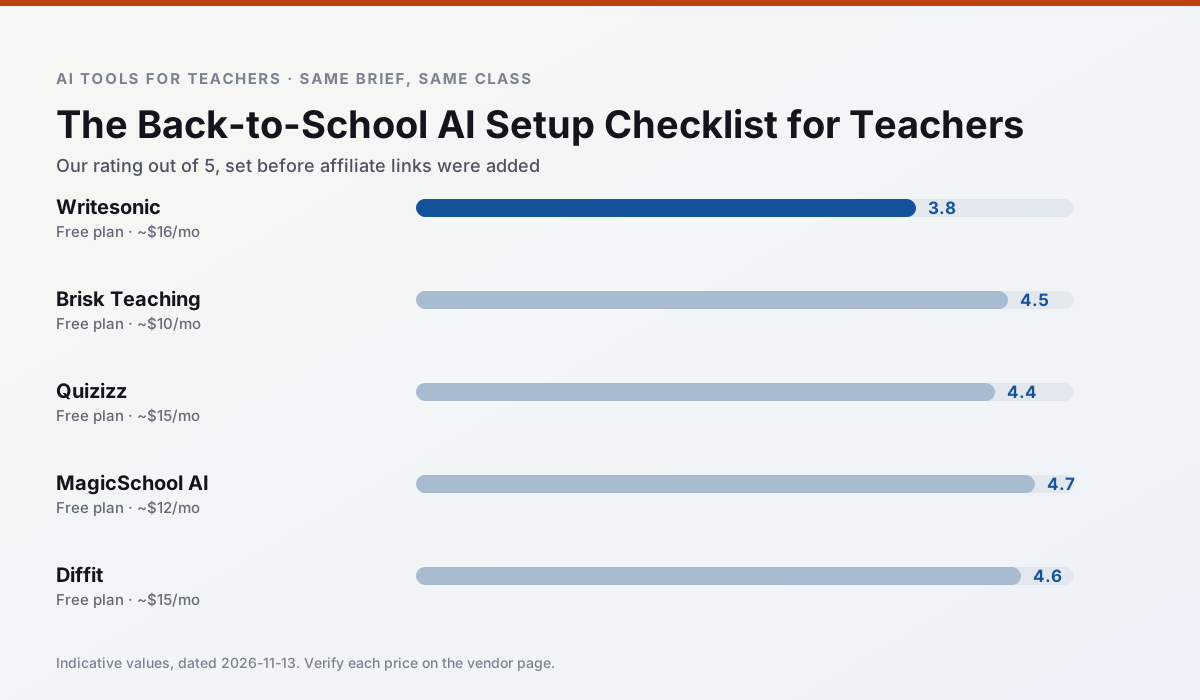
Ratings reflect our timed classroom workflow, not vendor claims. Prices are indicative — verify on the vendor site.
| Tool | Best for | Free tier | Indicative paid plan | Standout feature | Our rating | Verdict | Try the tool |
|---|---|---|---|---|---|---|---|
| Writesonic | newsletters · parent communication | Yes — Limited credits | ~$16 /user/mo | Article and email generators | 3.8 / 5 | Situational | Try free |
| Brisk Teaching | feedback on writing · grading | Yes — Limited actions per month | ~$10 /user/mo | Works inside Google Docs | 4.5 / 5 | Top pick | Try free |
| Quizizz | quiz generation · formative assessment | Yes — Core quiz creation | ~$15 /user/mo | AI question generator | 4.4 / 5 | Strong option | Try free |
| MagicSchool AI | lesson planning · differentiation | Yes — Core generators with monthly usage limits | ~$12 /user/mo | 80+ teacher-specific tools | 4.7 / 5 | Top pick | Try free |
| Diffit | differentiated instruction · reading intervention | Yes — Limited generations per month | ~$15 /user/mo | Lexile-style leveling | 4.6 / 5 | Top pick | Try free |
| Eduaide.Ai | lesson planning · rubric creation | Yes — Daily generation cap | ~$10 /user/mo | Resource library | 4.3 / 5 | Strong option | Try free |
Match your situation
Best for X
Different jobs need different tools. Here is what we would open first in each case.
Writesonic wins on the default path: fewer clicks to a usable draft, and the interface does not get in the way at 7:40am.
Brisk Teaching's free plan is the most usable in this comparison: a quota that survives a normal week. Not enough for a department, enough for one teacher to decide.
Quizizz is the option IT is least likely to block: single sign-on, admin removal of AI features and an agreement on file.
Setup cost is one login for MagicSchool AI; everything else can wait until you know the tool is useful.
Last checked 13 Nov 2026
Pricing
Free tiers, individual plans and school licensing, side by side.
| Tool | Free plan | Individual / paid | School & district | Billing note | Verify |
|---|---|---|---|---|---|
| Writesonic | $0 — Limited credits | ~$16 /user/mo | ~$49 /user/mo | Indicative — verify on vendor site | Vendor |
| Brisk Teaching | $0 — Limited actions per month | ~$10 /user/mo | Custom quote | Indicative — verify on vendor site | Vendor |
| Quizizz | $0 — Core quiz creation | ~$15 /user/mo | Custom quote | Indicative — verify on vendor site | Vendor |
| MagicSchool AI | $0 — Core generators with monthly usage limits | ~$12 /user/mo | Custom quote | Indicative — verify on vendor site | Vendor |
| Diffit | $0 — Limited generations per month | ~$15 /user/mo | Custom quote | Indicative — verify on vendor site | Vendor |
| Eduaide.Ai | $0 — Daily generation cap | ~$10 /user/mo | Custom quote | Indicative — verify on vendor site | Vendor |
Editorial rule: pricing is re-checked every 2–3 months and the top 50 pages are refreshed every 6 months. See our funding policy.
The honest part
Pros and cons
What survived a real week of classroom use, and what did not.
Pros
- Cheaper than enterprise writing suites
- Many templates
- Reasonable free trial
Cons
- Generic classroom output
- Credit system is confusing
- Limited education context
Pros
- No copy-paste between tools
- Fast inline feedback on student drafts
- Gentle learning curve
Cons
- Chrome-first workflow
- Extension permissions need IT approval
- Free quota is tight
Pros
- Students already know the interface
- Good reporting
- Works on low-end devices
Cons
- Writing high-quality AI questions still needs review
- Gamification can distract
- Advanced analytics are paid
Pros
- Widest purpose-built template library
- Strong free tier for individual teachers
- Fast to learn with almost no prompting skill
Cons
- Outputs still need standards review
- Best features sit behind the paid tier
- District approval can be slow
Pros
- Excellent for mixed-ability classes
- Produces printable and digital versions
- Minimal setup
Cons
- Narrower scope than all-in-one suites
- Leveling is approximate, not a formal assessment
- Heavy use burns through the free quota
In the classroom
Use cases
Five concrete workflows, with the tool we would open for each one.
A Monday morning lesson plan in twelve minutes
The twelve minutes come from not rewriting the skeleton. Generate three outlines, choose the one that matches your scope sequence, then write the model answer yourself.
Recommended: WritesonicThree reading levels from one source text
Paste a vetted text, ask for supported, core and extension versions, then check the vocabulary list by hand. Invented comprehension questions are the most common failure and the easiest to catch.
Recommended: Brisk TeachingRubric and feedback comments in one pass
Reorder the workflow so the rubric is yours and the comments are generated. Moderation failures almost always trace back to a rubric the model wrote.
Recommended: QuizizzA parent email in two languages
Draft in plain, warm language with no names, translate, then back-translate the important sentences to check meaning. Keep specific incidents out of the prompt and add them yourself.
Recommended: MagicSchool AIA five-minute exit ticket set
Ask for one recall, one application and one reasoning item, then delete the second recall question every generator sneaks in.
Recommended: Diffit
Questions teachers ask us
FAQ
Direct answers, also published as FAQPage structured data for search and AI assistants.
How long does this workflow take?
Which tool should I start with?
What if the output is unusable?
Sources & further reading
Our recommendation
Try Writesonic free for your next lesson planning task
Budget-friendly AI writing and content generation. Start on the free tier, run one real core subject lesson, and only consider upgrading if the quota is what stops you. Disclosure: we may earn a commission (varies) at no extra cost to you.
Some links on this page are affiliate links. We may earn a commission at no extra cost to you. Our rankings are editorial and never pay-to-play. Never enter student PII into a free consumer account.
Keep reading
Related comparisons in this cluster.
Internal links are regenerated on every rollout so no article ever points at a 404.