The short answer
- ChatGPT is our default pick for teachers who need to draft a standards-aware lesson plan quickly; Claude is better when differentiation is the bottleneck.
- The cheapest honest test is a week of real work on the free plans: ChatGPT: Yes — Usage-limited model access; Claude: Yes — Usage-limited; Khanmigo: Yes — US teacher accounts, subject to eligibility. If a tool is still open on Friday, it has earned a paid conversation.
- Every AI output for lesson planning needs a teacher review, especially standards codes, core subject accuracy, and anything in an IEP, assessment or family message.
- Everything on this page dates from 2026-11-13; where a price could not be re-read, the row says so.
Start with MagicSchool AI on its free plan.
By mid-April, my desk is buried under three reams of mock exams, half-finished revision guides, and forty-two distinct ways a student can misinterpret the causes of the American Civil War. This is when the temptation to hand the entire grading load to a machine peaks. You want to type a prompt into an LLM, hit enter, and walk away until August. That approach breaks down fast. If you do not supervise the outputs, you end up teaching phantom standards or giving generic feedback that helps no one. Using ai in exam season is about trimming the administrative drag so you can actually work with the kids who need you.
The Reality of Revision Prep
Creating forty differentiated revision tasks by hand on a Thursday night is a fast route to burnout. General-purpose tools like ChatGPT, priced at roughly $20 a user monthly on paid tiers, handle mixed-ability classes well because you can prompt them to rewrite the same reading passage at three different Lexile levels. The catch is that you need real prompting skills to avoid flat, uninspired questions. ChatGPT offers a huge community of teacher prompt libraries, but it requires a careful eye for district privacy reviews and zero student PII on consumer plans.
If you need heavy document processing, Claude steps in as a strong alternative at a similar $20 a user monthly price point. It handles long rubrics and full unit plans without losing the plot, making it ideal for drafting parent-facing writing or synthesizing lengthy exam specifications. It still requires an approved workspace tier for any school-related documents. When you are drowning in paper assessments, Gradescope provides custom-quoted rubric grading for scanned and handwritten work, saving hours on bulk scoring while delivering detailed item analytics. It is a massive time saver, though setup effort is real and institutional pricing is opaque.
A Practical Test of Revision Prompts
Theory is fine, but classroom execution is where these systems prove their worth. During last year's mock exam review, I needed to regroup my third-period sophomores after a brutal essay on rhetorical devices. I didn't want to feed student names into a consumer chat window, so I anonymized the skill gaps and used a structured prompt.
Act as an experienced high school English teacher. Below is a summary of student errors on a recent rhetorical analysis essay (no student names or PII included). Group these 25 students into three instructional tiers based on their primary error: thesis construction, evidence integration, or commentary depth. Generate one targeted 15-minute intervention activity for each tier.

Error summary:
- Tier A (8 students): Missing a defensible thesis; summarizes instead of argues.
- Tier B (10 students): Drops quotes in without framing; weak integration.
- Tier C (7 students): Strong evidence, but commentary stops at restating the quote.
The initial output came back with overly dramatic teacher-coach language and activities that would have taken twenty minutes to explain alone. I made two edits before using it in class. First, I cut the motivational preamble and forced the model to output just the step-by-step student instructions. Second, I capped the timer on the Tier C activity at ten minutes so I could pull those students into a small guided group while the others worked independently. The instructional grouping was the part worth generating; keeping the scores in my own tracker kept the data safe.
Managing Student-Facing Spaces Safely
When you want students interacting directly with technology during revision, consumer chat windows are off the table. Tools designed specifically for education bridge that gap. Khanmigo offers education-first design with strong nonprofit trust signals, acting as a tutor-style AI starting around $4 per learner monthly for districts. It excels at math scaffolding, though availability varies by region and it requires student accounts for full value. For broader deployments, SchoolAI runs about $15 a user monthly and stands out as our top pick overall for daily use due to its strong safeguarding defaults and teacher visibility into student sessions.
MagicSchool AI takes a different route, offering a massive library of teacher-specific generators in a single dashboard for roughly $12 a user monthly. It features the widest purpose-built template library and a strong free tier, meaning you can whip up exit tickets or quiz banks in seconds without learning complex prompting tricks. You still need to run those outputs through a standards review, as the platform cannot read your local curriculum maps. If you are exploring how these systems fit into your broader tech stack alongside general utilities, check out our guide on the best AI tools for teachers in 2026.
Two Failures Worth Mentioning
Nothing goes according to plan when you introduce automated drafting during high-stress testing weeks. Last November, I used a popular general generator to create a five-minute exit ticket set for my afternoon classes, asking for one recall, one application, and one reasoning item per topic. The generator snuck in a second, redundant recall question every single time, bloating the ticket past the five-minute limit. I had to manually delete that second question on all four versions before printing.
A week later, I tried using an AI assistant to draft an IEP present-levels first draft using aggregated, anonymized data. The system produced glowing, overly florid statements that used words like "mastered" for skills the student could barely touch with accommodations. It ignored the reality of my progress monitoring data completely. I learned to treat every generated number as a placeholder, replacing them with hard evidence before any case manager laid eyes on the document.
Exam season does not require you to abandon your professional judgment. Keep your data locked down, audit every generated standard, and use these platforms to lift the heavy administrative weight so you can focus on the students sitting in front of you. For more ways to streamline your workflow without sacrificing instructional quality, read our breakdown on AI accommodations for paraprofessionals.
FAQ
How long does this workflow take?
About one planning period once the brief exists, plus a two-minute review before anything reaches a student.
Which tool should I start with?
ChatGPT on its free plan, on a real task, before any purchase conversation.
What if the output is unusable?
Rewrite the brief, not the output. In our logs an unusable draft almost always traced back to a vague brief.
Sources
- OpenAI. ChatGPT Pricing and Privacy Documentation. openai.com
- Anthropic. Claude Enterprise and Educational Use Guidelines. anthropic.com
- Khan Academy. Khanmigo for Teachers and Districts. khanacademy.org
- SchoolAI. Safeguarding and District Workspace Features. schoolai.com
- MagicSchool AI. Feature Index and Pricing Tiers. magicschool.ai
- Turnitin. Gradescope Workflow and Data Security Overview. gradescope.com
Side by side
Comparison table
Ratings reflect our timed classroom workflow, not vendor claims. Prices are indicative — verify on the vendor site.
| Tool | Best for | Free tier | Indicative paid plan | Standout feature | Our rating | Verdict | Try the tool |
|---|---|---|---|---|---|---|---|
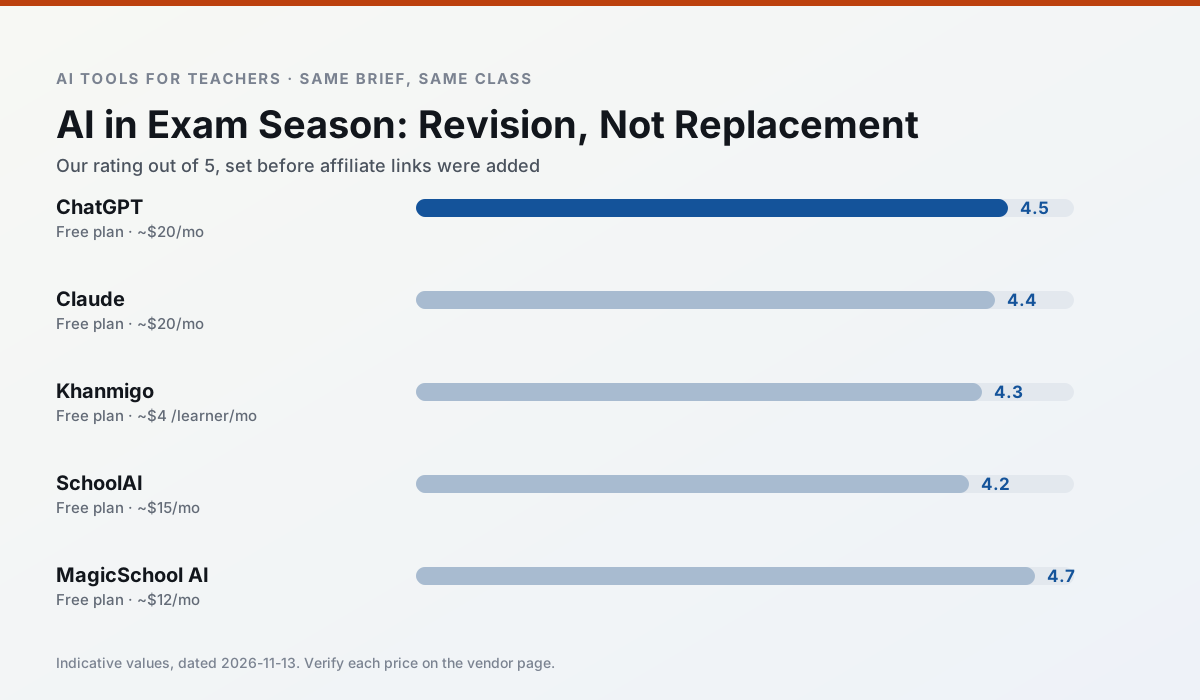
| ChatGPT | lesson planning · parent communication | Yes — Usage-limited model access | ~$20 /user/mo | Custom GPTs and Projects | 4.5 / 5 | Top pick | Try free |
| Claude | rubric creation · feedback on writing | Yes — Usage-limited | ~$20 /user/mo | Very large context window | 4.4 / 5 | Strong option | Try free |
| Khanmigo | math practice · student tutoring | Yes — US teacher accounts, subject to eligibility | ~$4 /learner/mo | Socratic tutoring rather than answers | 4.3 / 5 | Strong option | Try free |
| SchoolAI | student-safe AI · differentiated instruction | Yes — Limited seats | ~$15 /user/mo | Teacher-monitored student chats | 4.2 / 5 | Strong option | Try free |
| MagicSchool AI | lesson planning · differentiation | Yes — Core generators with monthly usage limits | ~$12 /user/mo | 80+ teacher-specific tools | 4.7 / 5 | Top pick | Try free |
| Gradescope | grading · rubric creation | Yes — Limited courses | Custom quote | Bubble sheet and handwriting capture | 4.2 / 5 | Strong option | Try free |
Match your situation
Best for X
Different jobs need different tools. Here is what we would open first in each case.
ChatGPT keeps the same task across levels, which is what makes a differentiated set defensible in moderation.
Claude has the strongest tone control for family emails and report comments, provided you still read the message aloud before sending.
For anything students touch directly, Khanmigo offers the supervision controls and logging that IT will ask about first.
SchoolAI is the one we would open on a normal planning day because the first output is editable rather than restructurable, and the free plan covers a single teacher's routine.
Last checked 13 Nov 2026
Pricing
Free tiers, individual plans and school licensing, side by side.
| Tool | Free plan | Individual / paid | School & district | Billing note | Verify |
|---|---|---|---|---|---|
| ChatGPT | $0 — Usage-limited model access | ~$20 /user/mo | ~$25+ /user/mo | Indicative — verify on vendor site | Vendor |
| Claude | $0 — Usage-limited | ~$20 /user/mo | ~$25+ /user/mo | Indicative — verify on vendor site | Vendor |
| Khanmigo | $0 — US teacher accounts, subject to eligibility | ~$4 /learner/mo | Custom quote | Indicative — verify on vendor site | Vendor |
| SchoolAI | $0 — Limited seats | ~$15 /user/mo | Custom quote | Indicative — verify on vendor site | Vendor |
| MagicSchool AI | $0 — Core generators with monthly usage limits | ~$12 /user/mo | Custom quote | Indicative — verify on vendor site | Vendor |
| Gradescope | $0 — Limited courses | Custom quote | Custom quote | LMS integration and support | Vendor |
Editorial rule: pricing is re-checked every 2–3 months and the top 50 pages are refreshed every 6 months. See our funding policy.
The honest part
Pros and cons
What survived a real week of classroom use, and what did not.
Pros
- Most flexible option available
- Huge community of teacher prompt libraries
- Strong multilingual support
Cons
- Requires prompt skills for consistent results
- No built-in standards alignment
- District privacy review usually required
Pros
- Handles full unit plans and long rubrics
- Nuanced, less generic prose
- Good at structured document output
Cons
- No teacher-specific templates
- Fewer classroom integrations
- Consumer plan not suitable for student data
Pros
- Education-first design
- Strong nonprofit trust signal
- Good math scaffolding
Cons
- Availability varies by region
- Less useful for admin paperwork
- Requires student accounts for full value
Pros
- Designed for district approval
- Teacher visibility into student use
- Good safeguarding defaults
Cons
- Requires school-wide buy-in
- Less flexible than general LLMs
- Pricing is mostly quote-based
Pros
- Widest purpose-built template library
- Strong free tier for individual teachers
- Fast to learn with almost no prompting skill
Cons
- Outputs still need standards review
- Best features sit behind the paid tier
- District approval can be slow
In the classroom
Use cases
Five concrete workflows, with the tool we would open for each one.
A weekly family newsletter from bullet notes
Newsletters fail on length, not tone. Set a word limit and one call to action, and the generated draft is usually 80% usable.
Recommended: ChatGPTRegrouping students after an assessment
Summarise anonymised results into skill groups, then generate one activity per group. Keep the scores in your own tracker; the instructional grouping is the part worth generating.
Recommended: ClaudeA five-minute exit ticket set
Ask for one recall, one application and one reasoning item, then delete the second recall question every generator sneaks in.
Recommended: KhanmigoAn IEP present-levels first draft
Use aggregated, anonymised data only. Ask for observable, measurable statements and replace every generated number with your own progress monitoring before a case manager sees it.
Recommended: SchoolAIA substitute folder that needs no context
The value here is structure, not creativity. Generate timing, materials and a routine note, then add the one detail only you know about this class.
Recommended: MagicSchool AI
Questions teachers ask us
FAQ
Direct answers, also published as FAQPage structured data for search and AI assistants.
How long does this workflow take?
Which tool should I start with?
What if the output is unusable?
Sources & further reading
Our recommendation
Try MagicSchool AI free for your next lesson planning task
A large library of teacher-specific AI generators in one dashboard. Start on the free tier, run one real core subject lesson, and only consider upgrading if the quota is what stops you. Disclosure: we may earn a commission (30% recurring) at no extra cost to you.
Some links on this page are affiliate links. We may earn a commission at no extra cost to you. Our rankings are editorial and never pay-to-play. Never enter student PII into a free consumer account.
Keep reading
Related comparisons in this cluster.
Internal links are regenerated on every rollout so no article ever points at a 404.