The short answer
- Writesonic is our default pick for Primary who need to draft a standards-aware lesson plan quickly; Brisk Teaching is better when differentiation is the bottleneck.
- All 3 shortlisted tools are priced for one teacher first and a school second. Writesonic and Brisk Teaching are the two worth trialling on a real task before any purchase conversation.
- Every AI output for Phonics needs a teacher review, especially standards codes, core subject accuracy, and anything in an IEP, assessment or family message.
- Trial one tool for a week of real Phonics work before any purchase conversation; the quota is the honest test.
Start with Writesonic on its free plan.
By 8:14 on a Tuesday morning, I had already thrown away twenty decodable sentences because the AI generator thought the quick brown fox jumps over the lazy dog counted as a phonics drill for short /o/. If you teach primary, you know the sinking feeling of opening a shiny new app, typing in "make me a short a worksheet," and getting back a vocabulary list that includes words like astronaut and archaeology. Using AI phonics for primary isn't about letting a model run your literacy block. It is about saving your wrists from typing twenty variations of Pat the cat sat on the mat before first period bell rings.
Building Decodable Sentences Without the Lexile Hangover
When you need targeted decodable texts for small groups, generic language models often fail the phonetic constraint test. They drop in sight words your kids haven't seen yet or sneak in open syllables when you are strictly working on closed CVC patterns. Writesonic works well here for bulk generation if you give it strict negative constraints, though its output needs a heavy teacher edit to strip out the corporate tone. You can test workflows across a few platforms, similar to what we cover in our guide on the best AI tools for teachers. The trick is treating the platform as a fast drafting engine rather than a pedagogical expert.
Prompt: Act as a primary literacy specialist. Generate ten decodable sentences focusing strictly on short 'i' and consonant blends. Use only the following sight words: the, is, a, to. Do not use any words with long vowels, vowel teams, or silent e.
First output: The big pig is in the mud. Tim got a pin. Jane likes to skip with the cat. (Failure: "Jane" and "likes" use silent e).
Two edits that made it usable:
- Manually crossed out the sentence with "Jane" and replaced it with "Tim got a fig."
- Added an explicit instruction to the prompt telling the model to check every word against a closed-syllable rule before outputting.
Leveling Shared Reading Texts for Mixed-Ability Tables
Primary classrooms live and die by differentiation. You might have kids reading at a kindergarten level sitting right next to second-grade readers who need more robust vocabulary exposure. Diffit is built specifically for this, letting you take a single source text and spin it out into multiple reading levels with matching vocabulary lists. It ranks as a reliable option for mixed-ability classes because it handles the formatting and Lexile adjustment in seconds. You still have to read through the generated comprehension questions, because models love to sneak in abstract inference questions that require reading comprehension skills your emergent readers simply do not have yet.
Generating Quick Formative Checks and Exit Tickets
At the end of a phonics rotation, you need to know who actually mapped the grapheme to the phoneme and who was just copying their neighbor's slate. Quizizz functions well for this when you want a quick check that students can complete on low-end school devices without a fuss. Students already know the interface from math or science rotations, which cuts down on instructional drag. The platform's AI quiz creation pulls from a massive question bank, but you have to watch out for the duplicate recall questions that automated generators love to sneak in. Delete the fluff, keep the targeted application items, and your formative data suddenly becomes useful for your afternoon intervention groups.
Organizing Lesson Outlines and Scope Sequences
If you are staring at a blank lesson plan template on a Sunday night, MagicSchool AI offers the widest purpose-built template library for teachers without requiring a degree in prompt engineering. Getting a Monday morning lesson plan sorted in twelve minutes comes down to not rewriting the basic skeleton. You generate three distinct outlines, choose the one that matches your district scope and sequence, and then write the model answer yourself. The platform stands out for quick setup, though you must review every output against your state standards. The vendor states that no student PII is required for core generators, but you should always check your district data privacy agreement before uploading anything sensitive.
Managing Accommodations and Parallel Support
Primary literacy also means managing paraprofessionals and interventionists who need rapid-fire materials for kids pulled out for small group work. If you need to align your phonics routines with accommodations for students with IEPs, pairing your lesson generation with targeted support materials keeps everyone on the same page. For a closer look at how support staff can use these systems without breaking privacy rules, read our breakdown on ai accommodations for paraprofessionals. Never paste identifiable student names or reading scores into any open prompt box, no matter how convenient it feels in the moment.
Streamlining Feedback and Worksheets
When you are grading twenty student writing drafts where every single child spelled because as bc, writing individual margin notes burns up your planning period. Brisk Teaching handles this inside Google Docs or Slides without forcing you to copy and paste text back and forth across different browser tabs. Its inline feedback feature offers a gentle learning curve, though you need to make sure your school IT department has cleared the extension permissions first. Keep your rubric strict and let the tool handle the mechanical phrasing, but always write the core grading criteria yourself to avoid moderation drift.
FAQ
Can AI do Phonics at mixed-grade level?
It can produce a first draft and a structure. The level judgement, the standards check and the tone are teacher decisions.
Which tool is best for Phonics?
Writesonic on the evidence in this article, with Brisk Teaching as the second opinion. Neither replaces the review step.
What is the biggest risk?
A confident, plausible output that nobody checked. The five checks below exist for that reason.
Sources
- Writesonic Product Overview and Pricing: Writesonic Pricing
- Brisk Teaching Chrome Extension and Privacy Policy: Brisk Teaching
- Quizizz Schools and Compliance Documentation: Quizizz Schools
- MagicSchool AI Teacher Tools and Privacy FAQ: MagicSchool AI
- Diffit Features and Differentiation Workflow: Diffit
- Eduaide.Ai Resource Library and Generative Limits: Eduaide.Ai
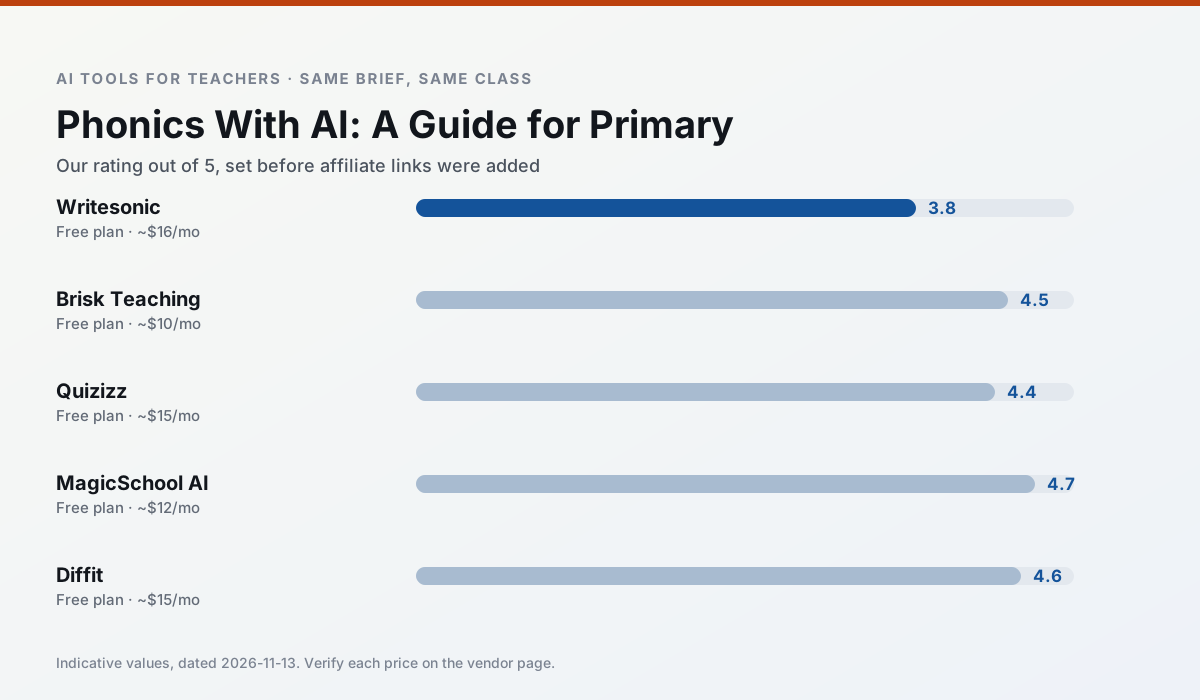
Side by side
Comparison table
Ratings reflect our timed classroom workflow, not vendor claims. Prices are indicative — verify on the vendor site.
| Tool | Best for | Free tier | Indicative paid plan | Standout feature | Our rating | Verdict | Try the tool |
|---|---|---|---|---|---|---|---|
| Writesonic | newsletters · parent communication | Yes — Limited credits | ~$16 /user/mo | Article and email generators | 3.8 / 5 | Situational | Try free |
| Brisk Teaching | feedback on writing · grading | Yes — Limited actions per month | ~$10 /user/mo | Works inside Google Docs | 4.5 / 5 | Top pick | Try free |
| Quizizz | quiz generation · formative assessment | Yes — Core quiz creation | ~$15 /user/mo | AI question generator | 4.4 / 5 | Strong option | Try free |
| MagicSchool AI | lesson planning · differentiation | Yes — Core generators with monthly usage limits | ~$12 /user/mo | 80+ teacher-specific tools | 4.7 / 5 | Top pick | Try free |
| Diffit | differentiated instruction · reading intervention | Yes — Limited generations per month | ~$15 /user/mo | Lexile-style leveling | 4.6 / 5 | Top pick | Try free |
| Eduaide.Ai | lesson planning · rubric creation | Yes — Daily generation cap | ~$10 /user/mo | Resource library | 4.3 / 5 | Strong option | Try free |
Match your situation
Best for X
Different jobs need different tools. Here is what we would open first in each case.
Writesonic wins on the default path: fewer clicks to a usable draft, and the interface does not get in the way at 7:40am.
Nothing on Brisk Teaching's free tier is a teaser demo; the limits are documented and a normal week fits inside them.
For a school rollout, Quizizz offers the paperwork and the admin console; the classroom features are standard by comparison.
Setup cost is one login for MagicSchool AI; everything else can wait until you know the tool is useful.
Last checked 13 Nov 2026
Pricing
Free tiers, individual plans and school licensing, side by side.
| Tool | Free plan | Individual / paid | School & district | Billing note | Verify |
|---|---|---|---|---|---|
| Writesonic | $0 — Limited credits | ~$16 /user/mo | ~$49 /user/mo | Indicative — verify on vendor site | Vendor |
| Brisk Teaching | $0 — Limited actions per month | ~$10 /user/mo | Custom quote | Indicative — verify on vendor site | Vendor |
| Quizizz | $0 — Core quiz creation | ~$15 /user/mo | Custom quote | Indicative — verify on vendor site | Vendor |
| MagicSchool AI | $0 — Core generators with monthly usage limits | ~$12 /user/mo | Custom quote | Indicative — verify on vendor site | Vendor |
| Diffit | $0 — Limited generations per month | ~$15 /user/mo | Custom quote | Indicative — verify on vendor site | Vendor |
| Eduaide.Ai | $0 — Daily generation cap | ~$10 /user/mo | Custom quote | Indicative — verify on vendor site | Vendor |
Editorial rule: pricing is re-checked every 2–3 months and the top 50 pages are refreshed every 6 months. See our funding policy.
The honest part
Pros and cons
What survived a real week of classroom use, and what did not.
Pros
- Cheaper than enterprise writing suites
- Many templates
- Reasonable free trial
Cons
- Generic classroom output
- Credit system is confusing
- Limited education context
Pros
- No copy-paste between tools
- Fast inline feedback on student drafts
- Gentle learning curve
Cons
- Chrome-first workflow
- Extension permissions need IT approval
- Free quota is tight
Pros
- Students already know the interface
- Good reporting
- Works on low-end devices
Cons
- Writing high-quality AI questions still needs review
- Gamification can distract
- Advanced analytics are paid
Pros
- Widest purpose-built template library
- Strong free tier for individual teachers
- Fast to learn with almost no prompting skill
Cons
- Outputs still need standards review
- Best features sit behind the paid tier
- District approval can be slow
Pros
- Excellent for mixed-ability classes
- Produces printable and digital versions
- Minimal setup
Cons
- Narrower scope than all-in-one suites
- Leveling is approximate, not a formal assessment
- Heavy use burns through the free quota
In the classroom
Use cases
Five concrete workflows, with the tool we would open for each one.
A Monday morning lesson plan in twelve minutes
The twelve minutes come from not rewriting the skeleton. Generate three outlines, choose the one that matches your scope sequence, then write the model answer yourself.
Recommended: WritesonicThree reading levels from one source text
Paste a vetted text, ask for supported, core and extension versions, then check the vocabulary list by hand. Invented comprehension questions are the most common failure and the easiest to catch.
Recommended: Brisk TeachingRubric and feedback comments in one pass
Reorder the workflow so the rubric is yours and the comments are generated. Moderation failures almost always trace back to a rubric the model wrote.
Recommended: QuizizzA parent email in two languages
Draft in plain, warm language with no names, translate, then back-translate the important sentences to check meaning. Keep specific incidents out of the prompt and add them yourself.
Recommended: MagicSchool AIA five-minute exit ticket set
Ask for one recall, one application and one reasoning item, then delete the second recall question every generator sneaks in.
Recommended: Diffit
Questions teachers ask us
FAQ
Direct answers, also published as FAQPage structured data for search and AI assistants.
Can AI do Phonics at mixed-grade level?
Which tool is best for Phonics?
What is the biggest risk?
Sources & further reading
Our recommendation
Try Writesonic free for your next Phonics task
Budget-friendly AI writing and content generation. Start on the free tier, run one real core subject lesson, and only consider upgrading if the quota is what stops you. Disclosure: we may earn a commission (varies) at no extra cost to you.
Some links on this page are affiliate links. We may earn a commission at no extra cost to you. Our rankings are editorial and never pay-to-play. Never enter student PII into a free consumer account.
Keep reading
Related comparisons in this cluster.
Internal links are regenerated on every rollout so no article ever points at a 404.