The short answer
- ChatGPT is our default pick for teachers who need to draft a standards-aware lesson plan quickly; Claude is better when differentiation is the bottleneck.
- The cheapest honest test is a week of real work on the free plans: ChatGPT: Yes — Usage-limited model access; Claude: Yes — Usage-limited; Khanmigo: Yes — US teacher accounts, subject to eligibility. If a tool is still open on Friday, it has earned a paid conversation.
- Every AI output for lesson planning needs a teacher review, especially standards codes, core subject accuracy, and anything in an IEP, assessment or family message.
- Everything on this page dates from 2026-11-13; where a price could not be re-read, the row says so.
Start with MagicSchool AI on its free plan.
Last November, I watched a colleague paste thirty lines of a struggling reader's accommodation log, complete with first names and diagnosis codes, straight into a consumer-tier chatbot to draft a progress note. She wanted to save twenty minutes before a 3:30 PM IEP meeting. She saved the time, but she also handed a third-party commercial platform identifiable special education records without district authorization. Most educators do not read the terms of service checkbox during account setup. If you are using general-purpose assistants like ChatGPT or Claude for daily teacher workflows, your default settings are likely training their models on the material you input.
Managing your data footprint does not require an advanced degree in cybersecurity. It requires flipping four specific switches in your account settings before you type another prompt. Whether you use the free tier or pay the approximately $20 per user monthly fee for ChatGPT, consumer models retain chat history by default to improve future iterations. Before you log any lesson plan or draft any parent email, you need to change how OpenAI stores your inputs.
Turning off model training in consumer accounts
The single most important adjustment sits inside your account settings under data controls. You must toggle off "Improve the model for everyone." When this setting remains active, every prompt, every curriculum idea, and every draft you generate becomes raw training data for the underlying models. Teachers handle sensitive administrative data, behavior notes, and proprietary school materials that should never feed public commercial models.
Once you disable model training, you should also clear out your chat history retention or turn off chat history entirely if your workflow allows it. Consumer plans like ChatGPT and Claude are powerful, flexible, and adapt to almost any classroom task, but they lack the built-in safeguards of education-specific platforms. While tools like SchoolAI and Khanmigo are built from the ground up for district approval and student-safe deployments, general-purpose assistants require manual lockdown from the user.
Prompt: Act as a high school English teacher. Write a five-minute exit ticket for a lesson on rhetorical appeals, including one recall item, one application item, and one reasoning item based on a speech excerpt.
What came back: The model provided two recall questions, one application item, two reasoning items, and a multiple-choice section that missed the rhetorical focus entirely.
Two edits that made it usable: I deleted the second recall question and the redundant multiple-choice items that sneaked in, then rewrote the application item to match our specific class novel instead of the generic political speech the AI chose.
Understanding the limits of consumer privacy
Even after you change your settings, consumer plans are not suitable for student personally identifiable information. If you need to draft an IEP present-levels first draft, use aggregated and anonymised data only. Ask for observable, measurable statements, and replace every generated number with your own progress monitoring before a case manager or parent ever lays eyes on it. PII includes student ID numbers, full names, specific medical diagnoses, or disciplinary records tied to an individual.
When our team evaluated the broader landscape in our guide to the best ai tools for teachers 2026, we noticed a sharp divide between general consumer platforms and dedicated education software. Platforms such as MagicSchool AI and Diffit handle differentiated reading materials and template generation with fewer setup hurdles, but they still require teachers to exercise caution with source texts and user data. Never paste identifiable student work into any platform unless your district has an active Data Privacy Agreement in place.
Securing document workflows in Claude and other assistants
Claude is exceptional for document-heavy planning and feedback, handling full unit plans and long rubrics with nuanced prose that avoids the robotic tone of older models. Yet its long-context window makes it dangerously easy to upload entire class rosters or unredacted student writing samples for grading assistance. If you use Claude for lesson planning or parent-facing writing, establish a strict habit of scrubbing names, dates of birth, and local identifiers before uploading any PDF or text file.
A safer workflow involves using purpose-built education dashboards or ensuring you operate within a district-vetted workspace tier. When districts invest in tools like SchoolAI, they secure school-focused Data Privacy Agreements, audit logs, and safeguarding defaults that consumer accounts simply lack. If your school has not purchased an institutional license for an AI platform, you are legally and ethically the data protection officer for your own classroom browser tab.
Establishing a safe daily AI routine
You do not need to abandon AI to keep your classroom data secure. You just need a firewall of good habits. Start every planning session by asking whether the text or scenario you are typing could identify a real child if it leaked. If the answer is yes, anonymize it or switch to a tool designed for institutional use.
Prompt: Create a substitute teacher folder routine for a middle school science class that requires no outside context, including timing, materials, and a routine note for a 45-minute lab cleanup period.
What came back: A standard, highly generic timeline that suggested handing out worksheets and monitoring silent reading for the entire period.
Two edits that made it usable: I inserted the actual bell schedule for our modified Tuesday block, and I added the one detail only I know about this class: table four must be separated before handling glassware.
Two major issues routinely disrupt teacher AI workflows. First, teachers often rely on default consumer accounts without checking if their state or district has already banned specific platforms under student privacy laws. Second, educators frequently trust AI-generated answer keys blindly, especially for numerical items or math scaffolding, which are notoriously unreliable without human verification.
When things go wrong—such as an assistant hallucinating a reading level or formatting output with restricted data—the fix is immediate cessation and a manual override. AI is a drafting engine, not an administrator. Lock down your privacy settings today, keep your student data off consumer servers, and treat every output as a rough first draft that requires your professional judgment to finish.
FAQ
Is AI allowed for lesson planning in my school?
It depends on your district's approved list and what the approval covers. Ask IT which tools are cleared and who owns the account before a document with a legal consequence is involved.
Who is responsible if something goes wrong?
The school, and in practice the named teacher who reviewed the output. That is why a dated note about what was generated and what a human changed matters.
What should never go into a prompt?
Names, rosters, scans of student work and gradebook screenshots. Topic-level prompts do most of the work without any of that.
Sources
- OpenAI. "Privacy and data controls FAQ." openai.com
- Anthropic. "Privacy practices and consumer choices." anthropic.com
- Khan Academy. "Khanmigo for Teachers safety and privacy overview." khanacademy.org
- SchoolAI. "Trust, safety, and district compliance documentation." schoolai.com
- MagicSchool AI. "Data privacy and security commitments for educators." magicschool.ai
- Diffit. "Privacy policy and safe classroom usage guidelines." diffit.me
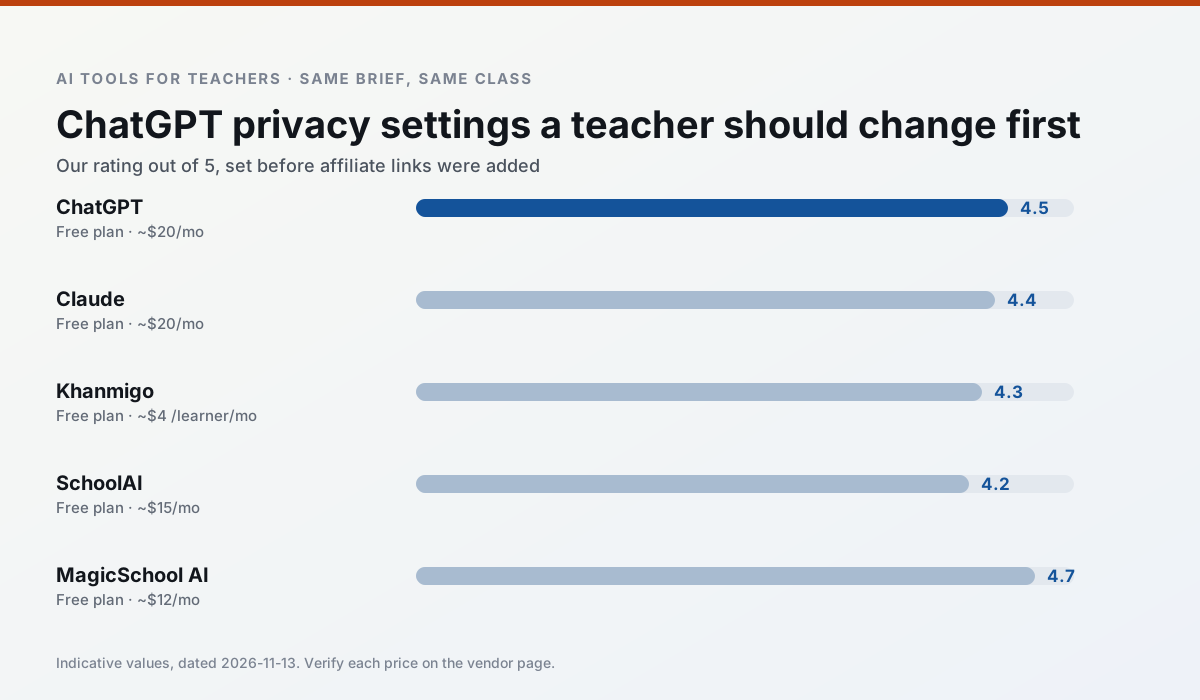
Side by side
Comparison table
Ratings reflect our timed classroom workflow, not vendor claims. Prices are indicative — verify on the vendor site.
| Tool | Best for | Free tier | Indicative paid plan | Standout feature | Our rating | Verdict | Try the tool |
|---|---|---|---|---|---|---|---|
| ChatGPT | lesson planning · parent communication | Yes — Usage-limited model access | ~$20 /user/mo | Custom GPTs and Projects | 4.5 / 5 | Top pick | Try free |
| Claude | rubric creation · feedback on writing | Yes — Usage-limited | ~$20 /user/mo | Very large context window | 4.4 / 5 | Strong option | Try free |
| Khanmigo | math practice · student tutoring | Yes — US teacher accounts, subject to eligibility | ~$4 /learner/mo | Socratic tutoring rather than answers | 4.3 / 5 | Strong option | Try free |
| SchoolAI | student-safe AI · differentiated instruction | Yes — Limited seats | ~$15 /user/mo | Teacher-monitored student chats | 4.2 / 5 | Strong option | Try free |
| MagicSchool AI | lesson planning · differentiation | Yes — Core generators with monthly usage limits | ~$12 /user/mo | 80+ teacher-specific tools | 4.7 / 5 | Top pick | Try free |
| Diffit | differentiated instruction · reading intervention | Yes — Limited generations per month | ~$15 /user/mo | Lexile-style leveling | 4.6 / 5 | Top pick | Try free |
Match your situation
Best for X
Different jobs need different tools. Here is what we would open first in each case.
ChatGPT keeps the same task across levels, which is what makes a differentiated set defensible in moderation.
Claude has the strongest tone control for family emails and report comments, provided you still read the message aloud before sending.
For anything students touch directly, Khanmigo offers the supervision controls and logging that IT will ask about first.
On the daily cycle, SchoolAI saves the most edit time per task; the paid tier mostly buys more runs rather than better ones.
Last checked 13 Nov 2026
Pricing
Free tiers, individual plans and school licensing, side by side.
| Tool | Free plan | Individual / paid | School & district | Billing note | Verify |
|---|---|---|---|---|---|
| ChatGPT | $0 — Usage-limited model access | ~$20 /user/mo | ~$25+ /user/mo | Indicative — verify on vendor site | Vendor |
| Claude | $0 — Usage-limited | ~$20 /user/mo | ~$25+ /user/mo | Indicative — verify on vendor site | Vendor |
| Khanmigo | $0 — US teacher accounts, subject to eligibility | ~$4 /learner/mo | Custom quote | Indicative — verify on vendor site | Vendor |
| SchoolAI | $0 — Limited seats | ~$15 /user/mo | Custom quote | Indicative — verify on vendor site | Vendor |
| MagicSchool AI | $0 — Core generators with monthly usage limits | ~$12 /user/mo | Custom quote | Indicative — verify on vendor site | Vendor |
| Diffit | $0 — Limited generations per month | ~$15 /user/mo | Custom quote | Indicative — verify on vendor site | Vendor |
Editorial rule: pricing is re-checked every 2–3 months and the top 50 pages are refreshed every 6 months. See our funding policy.
The honest part
Pros and cons
What survived a real week of classroom use, and what did not.
Pros
- Most flexible option available
- Huge community of teacher prompt libraries
- Strong multilingual support
Cons
- Requires prompt skills for consistent results
- No built-in standards alignment
- District privacy review usually required
Pros
- Handles full unit plans and long rubrics
- Nuanced, less generic prose
- Good at structured document output
Cons
- No teacher-specific templates
- Fewer classroom integrations
- Consumer plan not suitable for student data
Pros
- Education-first design
- Strong nonprofit trust signal
- Good math scaffolding
Cons
- Availability varies by region
- Less useful for admin paperwork
- Requires student accounts for full value
Pros
- Designed for district approval
- Teacher visibility into student use
- Good safeguarding defaults
Cons
- Requires school-wide buy-in
- Less flexible than general LLMs
- Pricing is mostly quote-based
Pros
- Widest purpose-built template library
- Strong free tier for individual teachers
- Fast to learn with almost no prompting skill
Cons
- Outputs still need standards review
- Best features sit behind the paid tier
- District approval can be slow
In the classroom
Use cases
Five concrete workflows, with the tool we would open for each one.
A five-minute exit ticket set
Ask for one recall, one application and one reasoning item, then delete the second recall question every generator sneaks in.
Recommended: ChatGPTAn IEP present-levels first draft
Use aggregated, anonymised data only. Ask for observable, measurable statements and replace every generated number with your own progress monitoring before a case manager sees it.
Recommended: ClaudeA substitute folder that needs no context
The value here is structure, not creativity. Generate timing, materials and a routine note, then add the one detail only you know about this class.
Recommended: KhanmigoA question bank from a PDF or article
Feed a non-identifiable source and ask for items tagged by difficulty with the misconception behind each distractor. Spot-check every answer key; numerical items are least reliable.
Recommended: SchoolAIA Monday morning lesson plan in twelve minutes
The twelve minutes come from not rewriting the skeleton. Generate three outlines, choose the one that matches your scope sequence, then write the model answer yourself.
Recommended: MagicSchool AI
Questions teachers ask us
FAQ
Direct answers, also published as FAQPage structured data for search and AI assistants.
Is AI allowed for lesson planning in my school?
Who is responsible if something goes wrong?
What should never go into a prompt?
Sources & further reading
Our recommendation
Try MagicSchool AI free for your next lesson planning task
A large library of teacher-specific AI generators in one dashboard. Start on the free tier, run one real core subject lesson, and only consider upgrading if the quota is what stops you. Disclosure: we may earn a commission (30% recurring) at no extra cost to you.
Some links on this page are affiliate links. We may earn a commission at no extra cost to you. Our rankings are editorial and never pay-to-play. Never enter student PII into a free consumer account.
Keep reading
Related comparisons in this cluster.
Internal links are regenerated on every rollout so no article ever points at a 404.