The short answer
- SchoolAI is our default pick for teachers who need to draft a standards-aware lesson plan quickly; Diffit is better when differentiation is the bottleneck.
- SchoolAI handles the broad case; Diffit handles the narrow one. Anything beyond that pair should be justified by a recurring weekly job, not a feature demo.
- Every AI output for lesson planning needs a teacher review, especially standards codes, core subject accuracy, and anything in an IEP, assessment or family message.
- Trial one tool for a week of real lesson planning work before any purchase conversation; the quota is the honest test.
Start with MagicSchool AI on its free plan.
The bell rang three minutes ago, twenty-eight seventh graders are staring at a blank document, and I am trying to figure out why my carefully planned reading passage is entirely too dense for half the room. Every teacher knows this panic. We spend our evenings hunting for tools that promise to save hours, only to find ourselves knee-deep in configuration menus or wrestling with generic chatbots that have never set foot in a real classroom. When looking at the current landscape of AI tools for teachers, the choices narrow down quickly once you try to use them under real time pressure.
If you are trying to decide between a closed, school-safe ecosystem and an instant content generator, the debate usually boils down to SchoolAI vs Diffit. Both platforms sit on many district radar screens, but they solve entirely different classroom headaches. SchoolAI functions as a school-safe AI workspace with teacher-controlled student spaces, costing around $15 per user per month on its paid tier with a limited free option. Diffit is built to level any text or video into differentiated reading materials, also priced around $15 per user per month with a limited generations free tier. We rank SchoolAI as best for schools and districts due to its robust safety guardrails, while Diffit takes the crown for best for quick setup when you need leveled reading materials yesterday.
Putting Both Tools Through the Same Brief
To see how these platforms actually perform, I ran the exact same planning task through both. I needed to take a dry, twenty-page district PDF on local watersheds and turn it into three differentiated reading tiers with corresponding comprehension checks for a mixed-ability geography block.
Prompt: "Take this text on local watersheds. Generate three versions of a reading passage: one on-grade, one two years below grade with vocabulary glossaries, and one enrichment tier. Include five multiple-choice questions for each tier aligned to standard MS-ESS3-3."
The raw output from Diffit was ready to print in under ninety seconds. The lower-tier text successfully dropped the Lexile level and bolded key vocabulary, saving me twenty minutes of manual rewriting. SchoolAI handled the request differently, steering me toward creating a guided student space where kids could chat with an AI assistant about the watershed text rather than just handing me a static, printable worksheet.
To make the Diffit output usable in class, I had to make two specific edits. First, I manually adjusted two questions that tested surface recall rather than the actual standard. Second, I trimmed the glossary definitions because the AI used terminology that was still too academic for my striving readers. For more comparisons on how these tools stack up against other platforms, check out our guide on the best AI tools for teachers 2026.
Where Things Go Wrong in Real Use
No matter which platform you choose, things will inevitably break during a normal school day. With Diffit, my biggest headache involved heavy usage burning through my free quota right in the middle of a curriculum planning sprint, leaving me locked out until the monthly reset or forced to upgrade. The leveling feature is also approximate rather than a formal assessment, meaning you cannot rely on it blindly without checking the readability yourself.
SchoolAI presents a different set of hurdles. Because it is designed for district approval with strong safeguarding defaults, it requires school-wide buy-in to unlock its true potential. If your IT department hasn't pre-approved the student spaces, you are stuck using it as a lone-wolf teacher, which defeats the purpose of its collaborative tracking features. Furthermore, it is less flexible than general LLMs when you just want to draft a quick parent email or brainstorm an open-ended discussion prompt. If you are weighing Diffit against other browser-based helpers, our breakdown on Brisk Teaching vs Diffit covers how extension-based workflows compare to dedicated web apps.
The Rest of the Field: Khanmigo, Brisk, ChatGPT, and Claude
While SchoolAI and Diffit dominate the classroom-specific conversation, four other platforms frequently pop up in teacher staff rooms. Khanmigo, priced at roughly $4 per learner per month with subject-to-eligibility free accounts for US teachers, is our pick as best overall for daily use. It offers an education-first design from a trusted nonprofit, providing exceptional math scaffolding, though its availability varies by region and it requires student accounts for full value.
Brisk Teaching operates as a Chrome extension bringing AI feedback directly into Docs and Slides. It is our best free option, though the free quota is tight and paid tiers run around $10 per user per month. It shines because there is no copy-pasting between tabs, but you need IT approval to install extensions, and it reads document content directly.
On the generalist side, ChatGPT and Claude both sit around $20 per user per month on their paid tiers. ChatGPT remains the most flexible option available with a huge community prompt library, but it requires strong prompt skills and has no built-in standards alignment. Claude handles long-context documents brilliantly, making it ideal for digesting entire unit plans or multi-page rubrics without losing the plot, but neither consumer plan is suitable for entering student PII.
Making Your Final Choice
If your primary goal is safe, monitored student interaction with AI during class time, SchoolAI justifies its district-level implementation. If you spend your Sundays desperately trying to find reading passages that match five different reading levels in a single classroom, Diffit pays for itself in saved time by the end of the first week. Pick the tool that matches your immediate bottleneck, test it on a low-stakes assignment, and keep your finger on the edit button.
FAQ
SchoolAI or Diffit for lesson planning?
SchoolAI for breadth and speed, Diffit when the output goes to a colleague or a family and has to be right first time.
Which is cheaper for one teacher?
Compare the free quotas first, then the individual plans. In most weeks the free plan decides the purchase, not the list price.
Do they produce the same output?
On simple tasks, often yes, and that is a useful result: it points at the cheaper, better-governed option rather than the one with more features.
Sources
- SchoolAI Vendor Overview and Feature Documentation. https://schoolai.com/
- Diffit Product Pricing and Features. https://diffit.me/
- Khanmigo for Teachers Information Page. https://www.khanacademy.org/khanmigo
- Brisk Teaching Extension Specs and Privacy Details. https://www.briskteaching.com/
- OpenAI ChatGPT Pricing and Workspace Models. https://openai.com/
- Anthropic Claude Product Plans and Context Windows. https://claude.ai/
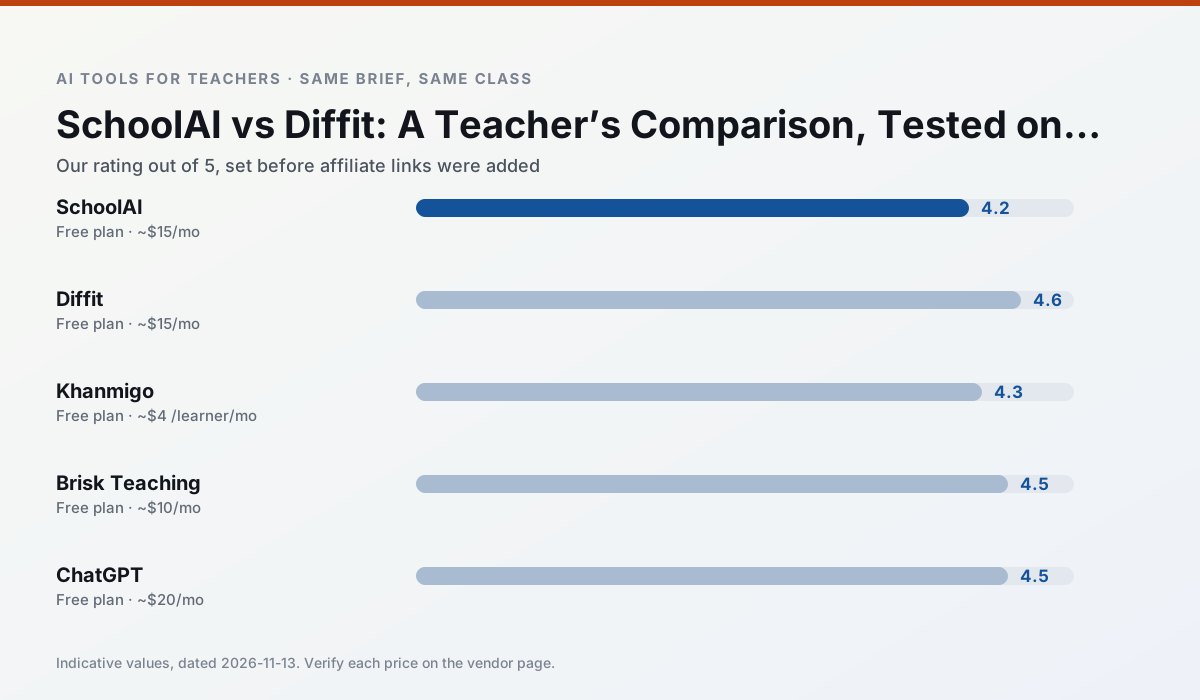
Side by side
Comparison table
Ratings reflect our timed classroom workflow, not vendor claims. Prices are indicative — verify on the vendor site.
| Tool | Best for | Free tier | Indicative paid plan | Standout feature | Our rating | Verdict | Try the tool |
|---|---|---|---|---|---|---|---|
| SchoolAI | student-safe AI · differentiated instruction | Yes — Limited seats | ~$15 /user/mo | Teacher-monitored student chats | 4.2 / 5 | Strong option | Try free |
| Diffit | differentiated instruction · reading intervention | Yes — Limited generations per month | ~$15 /user/mo | Lexile-style leveling | 4.6 / 5 | Top pick | Try free |
| Khanmigo | math practice · student tutoring | Yes — US teacher accounts, subject to eligibility | ~$4 /learner/mo | Socratic tutoring rather than answers | 4.3 / 5 | Strong option | Try free |
| Brisk Teaching | feedback on writing · grading | Yes — Limited actions per month | ~$10 /user/mo | Works inside Google Docs | 4.5 / 5 | Top pick | Try free |
| ChatGPT | lesson planning · parent communication | Yes — Usage-limited model access | ~$20 /user/mo | Custom GPTs and Projects | 4.5 / 5 | Top pick | Try free |
| Claude | rubric creation · feedback on writing | Yes — Usage-limited | ~$20 /user/mo | Very large context window | 4.4 / 5 | Strong option | Try free |
Match your situation
Best for X
Different jobs need different tools. Here is what we would open first in each case.
For a school rollout, SchoolAI offers the paperwork and the admin console; the classroom features are standard by comparison.
Setup cost is one login for Diffit; everything else can wait until you know the tool is useful.
Khanmigo wins on the default path: fewer clicks to a usable draft, and the interface does not get in the way at 7:40am.
If there is no budget, start with Brisk Teaching: free plan with clearest quota is the least punishing free tier here.
Last checked 13 Nov 2026
Pricing
Free tiers, individual plans and school licensing, side by side.
| Tool | Free plan | Individual / paid | School & district | Billing note | Verify |
|---|---|---|---|---|---|
| SchoolAI | $0 — Limited seats | ~$15 /user/mo | Custom quote | Indicative — verify on vendor site | Vendor |
| Diffit | $0 — Limited generations per month | ~$15 /user/mo | Custom quote | Indicative — verify on vendor site | Vendor |
| Khanmigo | $0 — US teacher accounts, subject to eligibility | ~$4 /learner/mo | Custom quote | Indicative — verify on vendor site | Vendor |
| Brisk Teaching | $0 — Limited actions per month | ~$10 /user/mo | Custom quote | Indicative — verify on vendor site | Vendor |
| ChatGPT | $0 — Usage-limited model access | ~$20 /user/mo | ~$25+ /user/mo | Indicative — verify on vendor site | Vendor |
| Claude | $0 — Usage-limited | ~$20 /user/mo | ~$25+ /user/mo | Indicative — verify on vendor site | Vendor |
Editorial rule: pricing is re-checked every 2–3 months and the top 50 pages are refreshed every 6 months. See our funding policy.
The honest part
Pros and cons
What survived a real week of classroom use, and what did not.
Pros
- Designed for district approval
- Teacher visibility into student use
- Good safeguarding defaults
Cons
- Requires school-wide buy-in
- Less flexible than general LLMs
- Pricing is mostly quote-based
Pros
- Excellent for mixed-ability classes
- Produces printable and digital versions
- Minimal setup
Cons
- Narrower scope than all-in-one suites
- Leveling is approximate, not a formal assessment
- Heavy use burns through the free quota
Pros
- Education-first design
- Strong nonprofit trust signal
- Good math scaffolding
Cons
- Availability varies by region
- Less useful for admin paperwork
- Requires student accounts for full value
Pros
- No copy-paste between tools
- Fast inline feedback on student drafts
- Gentle learning curve
Cons
- Chrome-first workflow
- Extension permissions need IT approval
- Free quota is tight
Pros
- Most flexible option available
- Huge community of teacher prompt libraries
- Strong multilingual support
Cons
- Requires prompt skills for consistent results
- No built-in standards alignment
- District privacy review usually required
In the classroom
Use cases
Five concrete workflows, with the tool we would open for each one.
A weekly family newsletter from bullet notes
Newsletters fail on length, not tone. Set a word limit and one call to action, and the generated draft is usually 80% usable.
Recommended: SchoolAIRegrouping students after an assessment
Summarise anonymised results into skill groups, then generate one activity per group. Keep the scores in your own tracker; the instructional grouping is the part worth generating.
Recommended: DiffitRubric and feedback comments in one pass
Reorder the workflow so the rubric is yours and the comments are generated. Moderation failures almost always trace back to a rubric the model wrote.
Recommended: KhanmigoA parent email in two languages
Draft in plain, warm language with no names, translate, then back-translate the important sentences to check meaning. Keep specific incidents out of the prompt and add them yourself.
Recommended: Brisk TeachingA Monday morning lesson plan in twelve minutes
The twelve minutes come from not rewriting the skeleton. Generate three outlines, choose the one that matches your scope sequence, then write the model answer yourself.
Recommended: ChatGPT
Questions teachers ask us
FAQ
Direct answers, also published as FAQPage structured data for search and AI assistants.
SchoolAI or Diffit for lesson planning?
Which is cheaper for one teacher?
Do they produce the same output?
Sources & further reading
Our recommendation
Try MagicSchool AI free for your next lesson planning task
A large library of teacher-specific AI generators in one dashboard. Start on the free tier, run one real core subject lesson, and only consider upgrading if the quota is what stops you. Disclosure: we may earn a commission (30% recurring) at no extra cost to you.
Some links on this page are affiliate links. We may earn a commission at no extra cost to you. Our rankings are editorial and never pay-to-play. Never enter student PII into a free consumer account.
Keep reading
Related comparisons in this cluster.
Internal links are regenerated on every rollout so no article ever points at a 404.