The short answer
- Turnitin Clarity / Feedback Studio is our default pick for teachers who need to draft a standards-aware lesson plan quickly; Gradescope is better when differentiation is the bottleneck.
- Free-tier reality for this shortlist: Turnitin Clarity / Feedback Studio: No ongoing free plan; Gradescope: Yes — Limited courses; Formative: Yes — Core assessment tools. Treat every paid figure as indicative until you have read the vendor page; only the free quota is something you can test yourself this week.
- Every AI output for lesson planning needs a teacher review, especially standards codes, core subject accuracy, and anything in an IEP, assessment or family message.
- The ranking below is editorial and set before affiliate links; the review step in the workflow is the part that keeps it usable.
Start with MagicSchool AI on its free plan.
It is three minutes past midnight on a Wednesday in November 2026. I am staring at a flagged paragraph in a sophomore research paper. Turnitin’s AI detector has painted a tidy orange band across three sentences about the New Deal, giving it an eighty-two percent probability of machine generation. The student is a quiet kid who sat at the back row of my room for three weeks drafting those exact sentences by hand in a spiral notebook, crossing out words, chewing on her pen, and asking me if "infrastructure" was spelled right.
I don't have proof she wrote it, and the software doesn't have proof she didn't. Yet here I am, sitting at a kitchen table that smells like cold coffee, trying to decide whether to ruin a relationship over a proprietary percentage score. We need to talk about Turnitin and why most classroom teachers should step away from its detection features.
Why the Detection Flag is a Trap
Turnitin is a legacy institution in high school and college writing departments. Many campuses already license it, making it part of the default institutional workflow for plagiarism checks and revision history tracking. When districts bundle it into their software packages, administrators often assume the AI detection toggle is an objective referee. It is not. The system scans text for predictability and bursts of uniformity, which frequently flags non-native English writers, neurodivergent students who rely on structured phrasing, and anyone who writes with clean, straightforward syntax.
Individual teachers cannot purchase Turnitin directly; it requires institutional procurement, meaning you are usually stuck with whatever detection thresholds your district's IT department left turned on by default. If you rely on those orange and blue percentage bars to police your students, you spend your planning periods playing detective instead of teaching revision. For a broader look at how these engines misfire, read our guide on AI detector false positives for teachers. We need tools that build better writers, not tools that breed courtroom battles over algorithmic guesses.
Shifting From Policing to Practice
When we look at the broader landscape of AI tools designed for grading and feedback in 2026, the contrast is stark. The best platforms help us manage the crushing weight of formative assessment rather than acting as digital probation officers. If you want to see how these options stack up against other classroom software, browse our comprehensive roundup of the best AI tools for teachers in 2026.
Using technology to catch cheaters drains the joy out of English and history classrooms. Instead, we should use AI to generate differentiated texts, build quick check-ins, and draft formative feedback that saves our evenings. The real value of educational technology lies in scaffolding instruction for living, breathing kids who make mistakes and learn from them.
The Daily Workhorse: QuestionWell
Prompt: Generate five multiple-choice questions and two short-response prompts based on this excerpt about the causes of the American Civil War, targeted at a ninth-grade reading level. Focus on economic differences between North and South, and tag each question to a historical reasoning skill.
First output: The model provided five basic recall questions and two vague writing prompts. Two of the distractors in the multiple-choice section were identical in meaning, and the reasoning skill tags were misaligned with state standards.
Two edits made: I swapped out the two overlapping distractors for plausible misconceptions about tariffs, and I manually rewrote the short-response prompts to require textual evidence rather than general opinion.
QuestionWell stands out as our top pick for daily use because it respects the teacher's expertise. You bring the vetted source text or the learning objective, and the tool builds standards-aligned question banks that you can export straight to your LMS. It is a single-purpose tool, which is precisely why it works. It does not try to grade essays or judge student integrity. It simply removes the thirty minutes of blank-page anxiety you feel when drafting an exit ticket at the end of a brutal Tuesday.
Automated Rubrics and Assessment Engines
Grading paper assessments remains one of the heaviest administrative burdens in secondary education. Gradescope takes our top spot for schools and districts tackling large-scale paper or scanned exams.
+-------------------------------------------------------+
|                 Assessment Workflow                   |
|                                                       |
|  Scanned / Handwritten Work -> AI Rubric Clustering   |
|                                         |             |
|                                         v             |
|  Detailed Item Analytics <--- Consistent Application  |
+-------------------------------------------------------+
By grouping similar student answers together, Gradescope lets you grade fifty variations of the same calculus mistake in one batch rather than hunting for the rubric on every individual page. The setup effort is real, and the institutional pricing is opaque, but the time savings on paper assessments are unmatched once your department commits to the workflow.
For live digital checks, Formative serves as our best free option. It handles core assessment tools without charging a dime, allowing you to track standards mastery in real time across existing PDFs and Google Docs. The paid tier sits around $15 per user per month if you want advanced analytics, but the free version alone gives you enough data to pull small groups for intervention the very next morning.
Gamified Review and Engagement
When classrooms need a burst of energy before a unit exam, traditional flashcards often fall flat. Platforms like Kahoot! and Quizizz bridge that gap with live game interfaces that students already recognize. Kahoot! costs roughly $10 per user per month on paid plans, while Quizizz runs closer to $15 per user per month for advanced analytics and larger player caps.
Both tools now feature AI-assisted question generation, letting you paste a reading passage and instantly spin up a competitive review game. The catch is that time-pressure mechanics lean heavily toward quick recall rather than deep reasoning. Furthermore, you must always review the generated questions by hand to catch weird phrasing or incorrect answer keys before putting them in front of kids.
Managing the Workflow Without Losing Your Mind
Using these platforms effectively requires strict boundaries. When you use AI to draft parent emails or generate reading levels, keep student names and sensitive incidents out of the prompt entirely. If you are grouping students after an assessment, let the tool summarize anonymised skill gaps to generate targeted station activities, but keep the actual gradebook scores in your own private tracker.
Two things went wrong during my first month testing these workflows. First, I trusted an AI-generated reading comprehension quiz without reading the questions, resulting in a test where three different choices had the exact same correct answer. Second, I let a model draft a sensitive email home in a second language without back-translating it first, which accidentally made my tone sound accusatory instead of collaborative. Now, I write the core message myself, use the software strictly for translation or formatting, and read every single word before hitting send.
Turnitin has its place in checking similarity percentages for academic research citations at the collegiate level, but its AI detector does more harm than good in standard K-12 classrooms. Protect your students, protect your planning time, and keep your focus on instruction.
FAQ
Is Turnitin Clarity / Feedback Studio worth paying for at mixed-grade level?
Only if lesson planning is a weekly job for you. At one use a month the free plan is enough; at weekly use the paid tier buys back more time than it costs, provided you keep the review step.
What does Turnitin Clarity / Feedback Studio get wrong most often?
Invented standards codes and assumed resources, in that order. Both survive a quick read, which is why the review checklist in this article starts with those two.
Can Turnitin Clarity / Feedback Studio replace a planning period?
It replaces the blank page, not the planning. Our edit time ranged from eleven minutes for an outline to most of an evening for a full differentiated set.
Is Turnitin Clarity / Feedback Studio safe to use with student data?
Not on a personal account. Use topic-level prompts, keep work samples out, and check what your district has approved before a student's work reaches any tool.
Sources
- Turnitin. "Turnitin Feedback Studio and Clarity Product Documentation." Vendor Specifications, 2026.
- Gradescope. "AI-Assisted Rubric Grading and Workflow Documentation." Institutional Guide, 2026.
- Formative. "Core Assessment Features and Pricing Tiers." Product Overview, 2026.
- QuestionWell. "Standards-Aligned Question Generation Workflow." User Guide, 2026.
- Kahoot! and Quizizz. "AI Question Generation and Gamified Learning Features." Platform Specs, 2026.
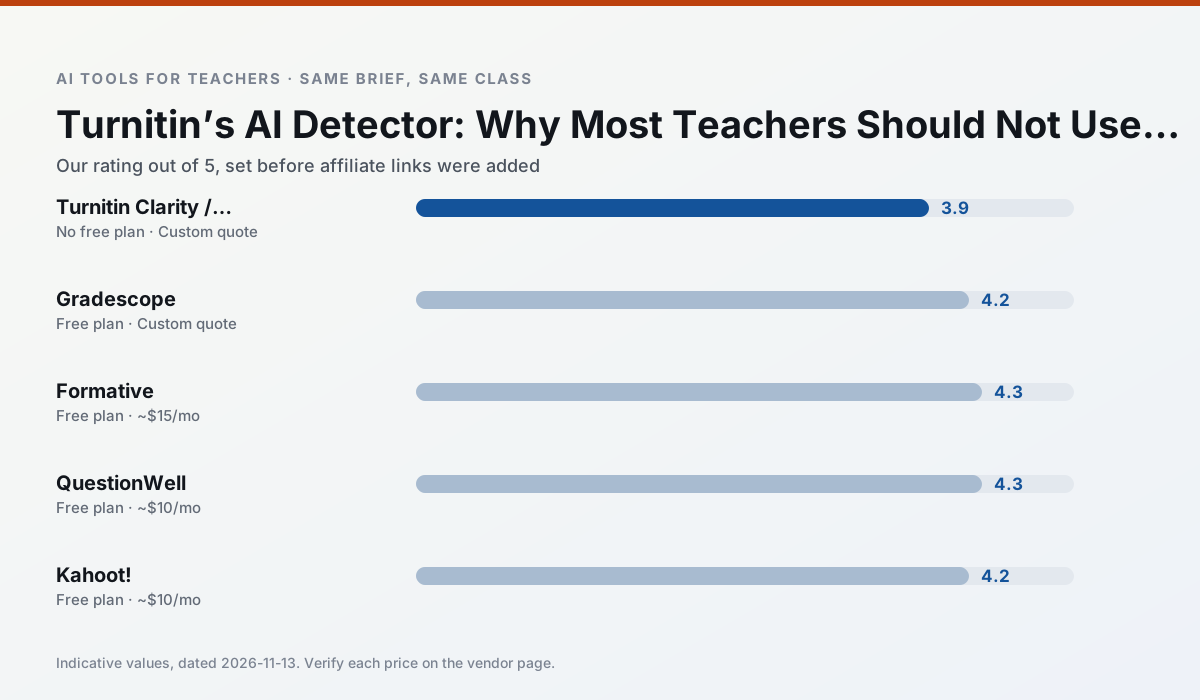
Side by side
Comparison table
Ratings reflect our timed classroom workflow, not vendor claims. Prices are indicative — verify on the vendor site.
| Tool | Best for | Free tier | Indicative paid plan | Standout feature | Our rating | Verdict | Try the tool |
|---|---|---|---|---|---|---|---|
| Turnitin Clarity / Feedback Studio | feedback on writing · academic integrity | No ongoing free plan | Custom quote | Similarity reports | 3.9 / 5 | Situational | Try free |
| Gradescope | grading · rubric creation | Yes — Limited courses | Custom quote | Bubble sheet and handwriting capture | 4.2 / 5 | Strong option | Try free |
| Formative | formative assessment · grading | Yes — Core assessment tools | ~$15 /user/mo | Live student responses | 4.3 / 5 | Strong option | Try free |
| QuestionWell | quiz generation · assessment | Yes — Monthly generation limit | ~$10 /user/mo | Exports to Google Forms / LMS | 4.3 / 5 | Strong option | Try free |
| Kahoot! | quiz generation · review lessons | Yes — Limited player count | ~$10 /user/mo | AI question builder | 4.2 / 5 | Strong option | Try free |
| Quizizz | quiz generation · formative assessment | Yes — Core quiz creation | ~$15 /user/mo | AI question generator | 4.4 / 5 | Strong option | Try free |
Match your situation
Best for X
Different jobs need different tools. Here is what we would open first in each case.
Turnitin Clarity / Feedback Studio has the shortest path from opening a tab to a usable draft, which matters more than the feature count on a Monday.
For a school rollout, Gradescope offers the paperwork and the admin console; the classroom features are standard by comparison.
Nothing on Formative's free tier is a teaser demo; the limits are documented and a normal week fits inside them.
QuestionWell wins on the default path: fewer clicks to a usable draft, and the interface does not get in the way at 7:40am.
Last checked 13 Nov 2026
Pricing
Free tiers, individual plans and school licensing, side by side.
| Tool | Free plan | Individual / paid | School & district | Billing note | Verify |
|---|---|---|---|---|---|
| Turnitin Clarity / Feedback Studio | No ongoing free tier | Custom quote | Custom quote | LMS-wide deployment | Vendor |
| Gradescope | $0 — Limited courses | Custom quote | Custom quote | LMS integration and support | Vendor |
| Formative | $0 — Core assessment tools | ~$15 /user/mo | Custom quote | Indicative — verify on vendor site | Vendor |
| QuestionWell | $0 — Monthly generation limit | ~$10 /user/mo | Custom quote | Indicative — verify on vendor site | Vendor |
| Kahoot! | $0 — Limited player count | ~$10 /user/mo | Custom quote | Indicative — verify on vendor site | Vendor |
| Quizizz | $0 — Core quiz creation | ~$15 /user/mo | Custom quote | Indicative — verify on vendor site | Vendor |
Editorial rule: pricing is re-checked every 2–3 months and the top 50 pages are refreshed every 6 months. See our funding policy.
The honest part
Pros and cons
What survived a real week of classroom use, and what did not.
Pros
- Already licensed at many schools
- Consistent institutional workflow
- Detailed revision history
Cons
- Individual teachers cannot buy it
- AI detection remains contested
- Heavy administrative setup
Pros
- Large time savings on paper assessments
- Consistent rubric application
- Detailed item analytics
Cons
- Overkill for elementary classrooms
- Institutional pricing is opaque
- Setup effort is real
Pros
- Strong data for intervention groups
- Works with existing PDFs and Docs
- Good LMS integrations
Cons
- Steeper setup than quiz games
- Best value requires school-wide rollout
- Price adds up per teacher
Pros
- Saves the most time on question writing
- Clean export workflow
- Good objective tagging
Cons
- Single-purpose tool
- Question quality varies by source text
- Limited student-facing features
Pros
- Instant engagement
- Very low training time
- Strong brand familiarity
Cons
- Less depth for higher-order assessment
- Paid tiers needed for larger classes
- Time pressure suits recall more than reasoning
In the classroom
Use cases
Five concrete workflows, with the tool we would open for each one.
Regrouping students after an assessment
Summarise anonymised results into skill groups, then generate one activity per group. Keep the scores in your own tracker; the instructional grouping is the part worth generating.
Recommended: Turnitin Clarity / Feedback StudioA weekly family newsletter from bullet notes
Newsletters fail on length, not tone. Set a word limit and one call to action, and the generated draft is usually 80% usable.
Recommended: GradescopeA parent email in two languages
Draft in plain, warm language with no names, translate, then back-translate the important sentences to check meaning. Keep specific incidents out of the prompt and add them yourself.
Recommended: FormativeRubric and feedback comments in one pass
Reorder the workflow so the rubric is yours and the comments are generated. Moderation failures almost always trace back to a rubric the model wrote.
Recommended: QuestionWellThree reading levels from one source text
Paste a vetted text, ask for supported, core and extension versions, then check the vocabulary list by hand. Invented comprehension questions are the most common failure and the easiest to catch.
Recommended: Kahoot!
Questions teachers ask us
FAQ
Direct answers, also published as FAQPage structured data for search and AI assistants.
Is Turnitin Clarity / Feedback Studio worth paying for at mixed-grade level?
What does Turnitin Clarity / Feedback Studio get wrong most often?
Can Turnitin Clarity / Feedback Studio replace a planning period?
Is Turnitin Clarity / Feedback Studio safe to use with student data?
Sources & further reading
Our recommendation
Try MagicSchool AI free for your next lesson planning task
A large library of teacher-specific AI generators in one dashboard. Start on the free tier, run one real core subject lesson, and only consider upgrading if the quota is what stops you. Disclosure: we may earn a commission (30% recurring) at no extra cost to you.
Some links on this page are affiliate links. We may earn a commission at no extra cost to you. Our rankings are editorial and never pay-to-play. Never enter student PII into a free consumer account.
Keep reading
Related comparisons in this cluster.
Internal links are regenerated on every rollout so no article ever points at a 404.