The short answer
- Curipod is our default pick for teachers who need to draft a standards-aware lesson plan quickly; Colossyan is better when differentiation is the bottleneck.
- Curipod handles the broad case; Colossyan handles the narrow one. Anything beyond that pair should be justified by a recurring weekly job, not a feature demo.
- Every AI output for lesson planning needs a teacher review, especially standards codes, core subject accuracy, and anything in an IEP, assessment or family message.
- Everything on this page dates from 2026-11-13; where a price could not be re-read, the row says so.
Start with Colossyan on its free plan.
At 8:14 on a Tuesday morning, I typed a single sentence about the water cycle into Curipod, clicked generate, and watched a four-slide interactive presentation stitch itself together in about forty seconds. By 8:18, my seventh-graders were logged in without creating accounts, tapping arrows on their Chromebooks to show how precipitation works. Engagement was near one hundred percent. Then Timmy typed a profanity into the anonymous word cloud, and it floated across the smartboard in seventy-point font. That is the reality of using presentation generation tools in a middle school classroom: you get blinding speed on the front end and immediate panic control on the back end.
If you are trying to cut down your prep time without losing your mind, you are likely looking for a stack that balances live student interaction with backend planning help. We look at dozens of platforms on this site, and you can see our broader baseline in our guide to the best ai tools for teachers 2026. This review focuses specifically on six tools that promise to save you hours of planning, grading, and content creation, ranging from interactive lesson builders to avatar video generators.
Curipod for Rapid Lesson Building
Curipod is designed to turn a topic into an interactive, student-response lesson in minutes. It is the best for quick setup when you need a starter activity or an exit ticket right before the bell rings. You type in your topic, pick your grade level, and the tool builds slides with polls, word clouds, drawings, and open-ended questions.
The free tier gives you a limited number of lessons per month, while paid plans run around $12 per user per month. The biggest strength here is out-of-the-box student engagement. Kids who normally slouch in the back will participate when their answer shows up anonymously on the board. No student accounts are required for basic use, which bypasses weeks of IT ticket requests.
The limit is that Curipod is focused entirely on delivery, not comprehensive unit planning. It also requires reliable classroom devices for every student. Anonymous student responses are the default setting, which keeps participation high, but you need to toggle moderation filters on if your students test boundaries.
Prompt: Create a 5-slide interactive lesson on the causes of the American Revolution for 8th grade, including one poll, one open-ended question, and one drawing slide.
First pass: The generated slides appeared in forty seconds, but the poll asked a leading question with obvious answers, and the drawing prompt asked students to sketch a complex battle scene they had not yet studied.
Two edits:
- Changed the poll prompt to ask about tax fairness rather than a multiple-choice history trivia question.
- Replaced the drawing slide with a reflection prompt asking students to pick a side in the Stamp Act debate.
Colossyan and Daily Workflow Management
While Curipod handles live student interaction, Colossyan attacks the other side of your workload: training and explainer videos built from documents and scripts. It is our pick as best overall for daily use when you need to produce asynchronous content for students or staff.
There is no permanent free plan, and pricing sits around $27 per user per month. It shines for staff training, professional development, and compliance modules that you can easily export to your school's LMS. You paste in a document, choose a presenter, and get a clean video.
The catch is that it is less suited to K-12 student-facing content on a daily basis, and the higher price point requires district or department budget approval. If you want to dive deeper into how automated evaluation intersects with these workflows, take a look at our breakdown on navigating ai grading bias check to ensure your output stays fair.
HeyGen and Canva for Special Projects
HeyGen is built for AI avatar video and video translation for instructional content, coming in at roughly $29 per user per month with a limited credit plan. It offers best-in-class lip-sync translation, which makes it remarkably useful for reaching multilingual families in their home languages. The credit-based pricing can be confusing, and voice cloning raises obvious consent questions, but its translation capability is unmatched.
Canva for Education sits at the other end of the spectrum as the best for student-safe deployments. It is effectively free for verified educators, with paid tiers around $13 per user per month if you need enterprise-level features. You get a massive template library and built-in AI writing and image tools that require no design skills.
Two things went wrong when I first rolled Canva out for a student project. First, the account verification process took nearly two weeks at the district level, leaving my early-adopter enthusiasm hanging. Second, students spent forty minutes picking fonts and background gradients instead of writing their paragraphs. I fixed this by pre-selecting a strict template with locked styling, forcing them to focus on the text content before touching any visual elements.
Khanmigo and Synthesia for Scaffolding
Khanmigo brings a tutor-style AI approach from a nonprofit education platform, offering strong math scaffolding and teacher support tools for around $4 per learner per month, with free accounts available for US teachers subject to eligibility. It is education-first and trustworthy, though availability varies by region and it requires student accounts to unlock its full value.
Synthesia rounds out the video tools, turning scripts into presenter-led videos for roughly $29 per user per month with no ongoing free tier. It is fantastic if you need to update existing staff videos without re-recording audio in a quiet room, but the avatar style can feel impersonal for daily classroom teaching.
Managing these tools means keeping your workflow tight. When writing a weekly family newsletter, avoid letting the AI ramble. Set a strict word limit and one clear call to action, and the generated draft is usually eighty percent usable. When building rubrics, always write your own rubric first and let the AI generate the feedback comments afterward to avoid moderation failures. AI tools are accelerators, not substitutes for professional judgment. Use them to clear the administrative brush so you can spend your energy on the students sitting right in front of you.
FAQ
Is Curipod worth paying for at mixed-grade level?
Only if lesson planning is a weekly job for you. At one use a month the free plan is enough; at weekly use the paid tier buys back more time than it costs, provided you keep the review step.
What does Curipod get wrong most often?
Invented standards codes and assumed resources, in that order. Both survive a quick read, which is why the review checklist in this article starts with those two.
Can Curipod replace a planning period?
It replaces the blank page, not the planning. Our edit time ranged from eleven minutes for an outline to most of an evening for a full differentiated set.
Is Curipod safe to use with student data?
Not on a personal account. Use topic-level prompts, keep work samples out, and check what your district has approved before a student's work reaches any tool.
Sources
- Curipod Pricing and Features Overview, curipod.com
- Colossyan Enterprise Training Documentation, colossyan.com
- HeyGen Video Translation Specs, heygen.com
- Canva for Education Terms and Verification, canva.com/education
- Khanmigo Teacher Support Guide, khanacademy.org/khanmigo
- Synthesia AI Avatar Platform Specs, synthesia.io
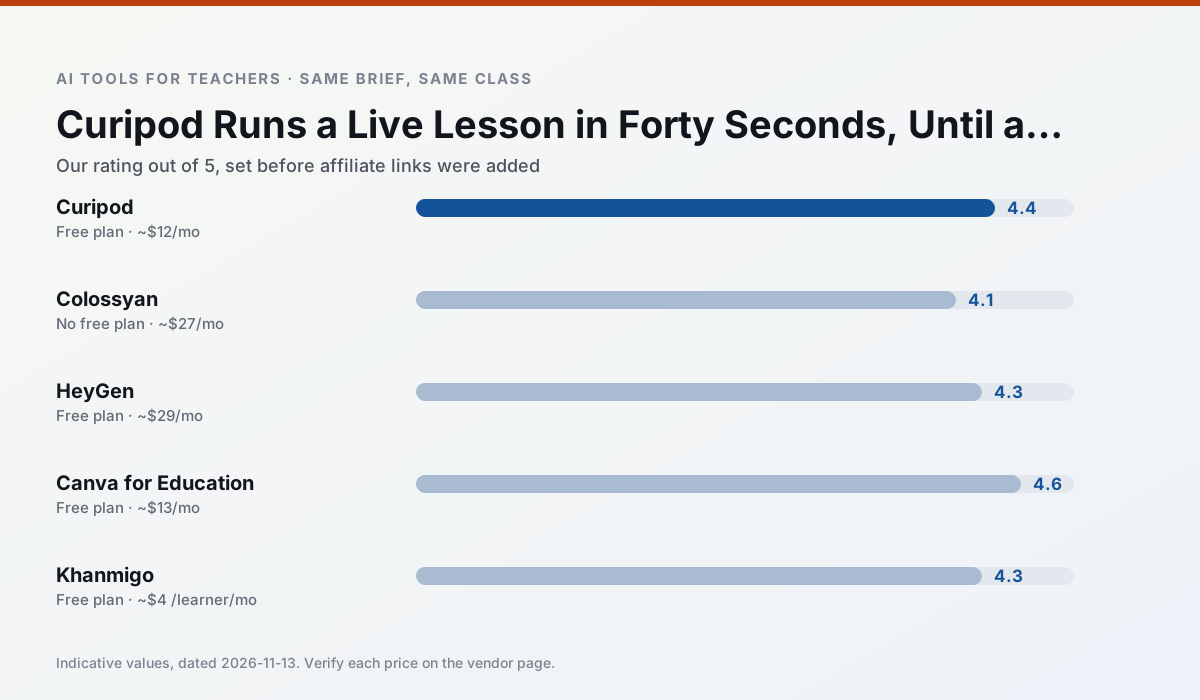
Side by side
Comparison table
Ratings reflect our timed classroom workflow, not vendor claims. Prices are indicative — verify on the vendor site.
| Tool | Best for | Free tier | Indicative paid plan | Standout feature | Our rating | Verdict | Try the tool |
|---|---|---|---|---|---|---|---|
| Curipod | formative assessment · exit tickets | Yes — Limited lessons per month | ~$12 /user/mo | Live polls and word clouds | 4.4 / 5 | Strong option | Try free |
| Colossyan | PD materials · video lessons | No ongoing free plan | ~$27 /user/mo | PDF/PPT-to-video | 4.1 / 5 | Situational | Try free |
| HeyGen | video lessons · translation | Yes — Limited credit plan | ~$29 /user/mo | Video translation | 4.3 / 5 | Strong option | Try free |
| Canva for Education | slide decks · worksheets | Yes — Verification required | ~$13 /user/mo | Thousands of education templates | 4.6 / 5 | Top pick | Try free |
| Khanmigo | math practice · student tutoring | Yes — US teacher accounts, subject to eligibility | ~$4 /learner/mo | Socratic tutoring rather than answers | 4.3 / 5 | Strong option | Try free |
| Synthesia | flipped lessons · video lessons | No ongoing free plan | ~$29 /user/mo | 140+ languages | 4.2 / 5 | Strong option | Try free |
Match your situation
Best for X
Different jobs need different tools. Here is what we would open first in each case.
Curipod has the shortest path from opening a tab to a usable draft, which matters more than the feature count on a Monday.
Colossyan is the one we would open on a normal planning day because the first output is editable rather than restructurable, and the free plan covers a single teacher's routine.
HeyGen's free plan is the most usable in this comparison: a quota that survives a normal week. Not enough for a department, enough for one teacher to decide.
For anything students touch directly, Canva for Education offers the supervision controls and logging that IT will ask about first.
Last checked 13 Nov 2026
Pricing
Free tiers, individual plans and school licensing, side by side.
| Tool | Free plan | Individual / paid | School & district | Billing note | Verify |
|---|---|---|---|---|---|
| Curipod | $0 — Limited lessons per month | ~$12 /user/mo | Custom quote | Indicative — verify on vendor site | Vendor |
| Colossyan | No ongoing free tier | ~$27 /user/mo | Custom quote | Indicative — verify on vendor site | Vendor |
| HeyGen | $0 — Limited credit plan | ~$29 /user/mo | Custom quote | Indicative — verify on vendor site | Vendor |
| Canva for Education | $0 — Verification required | ~$13 /user/mo | Custom quote | Indicative — verify on vendor site | Vendor |
| Khanmigo | $0 — US teacher accounts, subject to eligibility | ~$4 /learner/mo | Custom quote | Indicative — verify on vendor site | Vendor |
| Synthesia | No ongoing free tier | ~$29 /user/mo | Custom quote | Indicative — verify on vendor site | Vendor |
Editorial rule: pricing is re-checked every 2–3 months and the top 50 pages are refreshed every 6 months. See our funding policy.
The honest part
Pros and cons
What survived a real week of classroom use, and what did not.
Pros
- High student engagement out of the box
- Great for quick checks for understanding
- No student accounts required for basic use
Cons
- Focused on delivery, not planning
- Requires reliable classroom devices
- Free tier is restrictive
Pros
- Strong for staff training, not just lessons
- Good compliance/LMS export
- Fast document-to-video
Cons
- No permanent free plan
- Higher price point
- Less suited to K-12 student-facing content
Pros
- Best-in-class lip-sync translation
- Useful for multilingual families
- Generous trial credits
Cons
- Credit-based pricing is confusing
- Voice cloning raises consent questions
- Overkill for everyday lessons
Pros
- Effectively free for verified teachers
- Huge template library
- No design skills needed
Cons
- AI features are capped
- Easy to produce cluttered slides
- Account verification can be slow
Pros
- Education-first design
- Strong nonprofit trust signal
- Good math scaffolding
Cons
- Availability varies by region
- Less useful for admin paperwork
- Requires student accounts for full value
In the classroom
Use cases
Five concrete workflows, with the tool we would open for each one.
A weekly family newsletter from bullet notes
Newsletters fail on length, not tone. Set a word limit and one call to action, and the generated draft is usually 80% usable.
Recommended: CuripodRegrouping students after an assessment
Summarise anonymised results into skill groups, then generate one activity per group. Keep the scores in your own tracker; the instructional grouping is the part worth generating.
Recommended: ColossyanRubric and feedback comments in one pass
Reorder the workflow so the rubric is yours and the comments are generated. Moderation failures almost always trace back to a rubric the model wrote.
Recommended: HeyGenA parent email in two languages
Draft in plain, warm language with no names, translate, then back-translate the important sentences to check meaning. Keep specific incidents out of the prompt and add them yourself.
Recommended: Canva for EducationA Monday morning lesson plan in twelve minutes
The twelve minutes come from not rewriting the skeleton. Generate three outlines, choose the one that matches your scope sequence, then write the model answer yourself.
Recommended: Khanmigo
Questions teachers ask us
FAQ
Direct answers, also published as FAQPage structured data for search and AI assistants.
Is Curipod worth paying for at mixed-grade level?
What does Curipod get wrong most often?
Can Curipod replace a planning period?
Is Curipod safe to use with student data?
Sources & further reading
Our recommendation
Try Colossyan free for your next lesson planning task
Training and explainer videos built from documents and scripts. Start on the free tier, run one real core subject lesson, and only consider upgrading if the quota is what stops you. Disclosure: we may earn a commission (25–50% recurring) at no extra cost to you.
Some links on this page are affiliate links. We may earn a commission at no extra cost to you. Our rankings are editorial and never pay-to-play. Never enter student PII into a free consumer account.
Keep reading
Related comparisons in this cluster.
Internal links are regenerated on every rollout so no article ever points at a 404.