The short answer
- Curipod is our default pick for teachers who need to draft a standards-aware lesson plan quickly; Quizizz is better when differentiation is the bottleneck.
- Start with Curipod on its free plan, keep Quizizz as the second opinion, and do not open a card until the quota, not the feature list, is what stops you.
- Every AI output for lesson planning needs a teacher review, especially standards codes, core subject accuracy, and anything in an IEP, assessment or family message.
- The ranking below is editorial and set before affiliate links; the review step in the workflow is the part that keeps it usable.
Start with MagicSchool AI on its free plan.
By 9:47 AM on a Tuesday, my eighth-period civics class usually looks like a room full of zombies staring through their Chromebooks. I needed a way to check if they actually understood federalism without handing out another dead-tree worksheet they would inevitably fold into paper airplanes. That was when I fired up Curipod to see if it could drag them back into the land of the living. This curipod review breaks down how the tool holds up when you use it with real kids who have short attention spans and spotty internet.
What Curipod Does Best in a Live Room
Curipod turns a standard topic into an interactive slide deck in a couple of minutes. You type in a prompt, select your grade level, and the system generates a full presentation complete with polls, word clouds, open-ended questions, and drawing slides. Students join via a link on their devices without needing to create an account, which saves ten minutes of password reset agony.
The primary strength of the platform is immediate student engagement. When a kid who hasn't opened their notebook all week suddenly sees their drawing of the checks-and-balances system projected on the front board, they sit up. It fits well into our broader collection of strategies, which you can explore in our roundup of the best AI tools for teachers. Because responses are anonymous by default, quieter students participate without the fear of getting laughed at across the room.
Prompt: "Create a 5-slide interactive lesson on checks and balances for 8th-grade civics, including one poll, one drawing slide, and one open-ended reflection."
Result: The generator spat out a clean slide deck with a relevant poll about executive orders, a drawing task for the three branches, and a final reflection on the veto power.
Edits: I had to rewrite the poll question because the original options were too obvious, and I added a specific local government example to the drawing prompt so the kids actually connected it to our city council unit.
Where the Free Tier Falls Short
If you try to run this tool on the free tier, you will hit a wall fast. The free plan limits you to a handful of lessons per month, which means you cannot rely on it for daily warm-ups unless you are constantly deleting old material. The platform focuses heavily on delivery rather than long-term lesson planning or grading workflows. If your school has unreliable Wi-Fi or old student devices that choke on graphics, the live polling feature will stall out mid-class and leave you standing awkwardly at the front of the room.
Comparing Curipod to Other Live Response Tools
When you look at the broader landscape of interactive tech, Curipod sits alongside several heavy hitters that teachers already know. Quizizz remains a staple for mixed-ability classes because students are familiar with the interface, and it functions smoothly on low-end hardware. Kahoot! brings unmatched speed and brand recognition, making it the best option for student-safe deployments when you use nicknames instead of real names. Formative stands out as the best free option if you need deep standards tracking and auto-grading on existing PDFs rather than quick flash polls.
If you need help with parent-facing writing, Curipod actually handles professional summaries quite well compared to quiz-first platforms. Meanwhile, for heavy-duty document analysis, teachers often drop down to a general assistant like Claude for unit plans or turn to Khanmigo for targeted math scaffolding.
Two Real Classroom Failures and Fixes
The first major issue happened when I tried to use an AI-generated set of questions straight from a PDF reading. The generator hallucinated two incorrect answer keys on a history timeline, which I only caught because I read through the questions while the kids were logging in. I had to quickly override the correct answers on the fly and project my own corrected version on the whiteboard.
The second failure involved the drawing slides. Seventh graders being seventh graders, the anonymity of the drawing tool immediately resulted in inappropriate sketches being beamed to the projector. I had to pause the lesson, toggle off the drawing feature, and switch the slide type to a text-only response format. Lesson learned: never trust an anonymous canvas with middle schoolers on a Friday afternoon.
Privacy and Data Realities
You have to be careful with student data whenever live response tools are involved. Curipod keeps student responses anonymous by default, which is great for participation, but you still need to verify your district compliance with IT before rolling it out widely. If you are dealing with sensitive paperwork like an IEP present-levels first draft, avoid using classroom polling tools entirely and stick to secure, approved channels. For grading bias concerns, our guide on AI grading bias check offers a deeper look at how to audit what these systems produce before it goes into a gradebook.
FAQ
Is Curipod worth paying for at mixed-grade level?
Only if lesson planning is a weekly job for you. At one use a month the free plan is enough; at weekly use the paid tier buys back more time than it costs, provided you keep the review step.
What does Curipod get wrong most often?
Invented standards codes and assumed resources, in that order. Both survive a quick read, which is why the review checklist in this article starts with those two.
Can Curipod replace a planning period?
It replaces the blank page, not the planning. Our edit time ranged from eleven minutes for an outline to most of an evening for a full differentiated set.
Is Curipod safe to use with student data?
Not on a personal account. Use topic-level prompts, keep work samples out, and check what your district has approved before a student's work reaches any tool.
Sources
- Curipod Vendor Site: curipod.com
- Quizizz Platform Overview: quizizz.com
- Kahoot! Educator Features: kahoot.com
- Formative Assessment Tools: smartformative.com
- Anthropic Claude Documentation: anthropic.com
- Khanmigo Education Resources: khanacademy.org/khanmigo
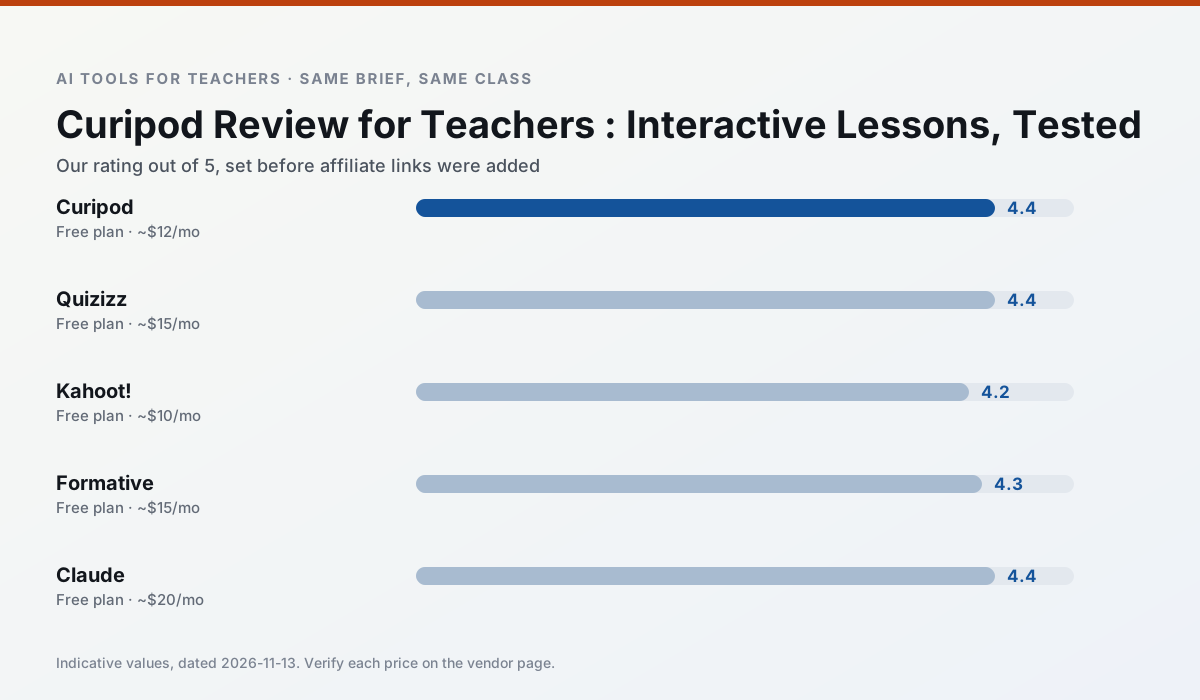
Side by side
Comparison table
Ratings reflect our timed classroom workflow, not vendor claims. Prices are indicative — verify on the vendor site.
| Tool | Best for | Free tier | Indicative paid plan | Standout feature | Our rating | Verdict | Try the tool |
|---|---|---|---|---|---|---|---|
| Curipod | formative assessment · exit tickets | Yes — Limited lessons per month | ~$12 /user/mo | Live polls and word clouds | 4.4 / 5 | Strong option | Try free |
| Quizizz | quiz generation · formative assessment | Yes — Core quiz creation | ~$15 /user/mo | AI question generator | 4.4 / 5 | Strong option | Try free |
| Kahoot! | quiz generation · review lessons | Yes — Limited player count | ~$10 /user/mo | AI question builder | 4.2 / 5 | Strong option | Try free |
| Formative | formative assessment · grading | Yes — Core assessment tools | ~$15 /user/mo | Live student responses | 4.3 / 5 | Strong option | Try free |
| Claude | rubric creation · feedback on writing | Yes — Usage-limited | ~$20 /user/mo | Very large context window | 4.4 / 5 | Strong option | Try free |
| Khanmigo | math practice · student tutoring | Yes — US teacher accounts, subject to eligibility | ~$4 /learner/mo | Socratic tutoring rather than answers | 4.3 / 5 | Strong option | Try free |
Match your situation
Best for X
Different jobs need different tools. Here is what we would open first in each case.
Curipod is the steadiest of this set at plain, respectful language; names and specific incidents still belong in your draft, not the prompt.
For three reading groups and one text, Quizizz needs the least manual relabelling of vocabulary and questions.
For anything students touch directly, Kahoot! offers the supervision controls and logging that IT will ask about first.
Nothing on Formative's free tier is a teaser demo; the limits are documented and a normal week fits inside them.
Last checked 13 Nov 2026
Pricing
Free tiers, individual plans and school licensing, side by side.
| Tool | Free plan | Individual / paid | School & district | Billing note | Verify |
|---|---|---|---|---|---|
| Curipod | $0 — Limited lessons per month | ~$12 /user/mo | Custom quote | Indicative — verify on vendor site | Vendor |
| Quizizz | $0 — Core quiz creation | ~$15 /user/mo | Custom quote | Indicative — verify on vendor site | Vendor |
| Kahoot! | $0 — Limited player count | ~$10 /user/mo | Custom quote | Indicative — verify on vendor site | Vendor |
| Formative | $0 — Core assessment tools | ~$15 /user/mo | Custom quote | Indicative — verify on vendor site | Vendor |
| Claude | $0 — Usage-limited | ~$20 /user/mo | ~$25+ /user/mo | Indicative — verify on vendor site | Vendor |
| Khanmigo | $0 — US teacher accounts, subject to eligibility | ~$4 /learner/mo | Custom quote | Indicative — verify on vendor site | Vendor |
Editorial rule: pricing is re-checked every 2–3 months and the top 50 pages are refreshed every 6 months. See our funding policy.
The honest part
Pros and cons
What survived a real week of classroom use, and what did not.
Pros
- High student engagement out of the box
- Great for quick checks for understanding
- No student accounts required for basic use
Cons
- Focused on delivery, not planning
- Requires reliable classroom devices
- Free tier is restrictive
Pros
- Students already know the interface
- Good reporting
- Works on low-end devices
Cons
- Writing high-quality AI questions still needs review
- Gamification can distract
- Advanced analytics are paid
Pros
- Instant engagement
- Very low training time
- Strong brand familiarity
Cons
- Less depth for higher-order assessment
- Paid tiers needed for larger classes
- Time pressure suits recall more than reasoning
Pros
- Strong data for intervention groups
- Works with existing PDFs and Docs
- Good LMS integrations
Cons
- Steeper setup than quiz games
- Best value requires school-wide rollout
- Price adds up per teacher
Pros
- Handles full unit plans and long rubrics
- Nuanced, less generic prose
- Good at structured document output
Cons
- No teacher-specific templates
- Fewer classroom integrations
- Consumer plan not suitable for student data
In the classroom
Use cases
Five concrete workflows, with the tool we would open for each one.
An IEP present-levels first draft
Use aggregated, anonymised data only. Ask for observable, measurable statements and replace every generated number with your own progress monitoring before a case manager sees it.
Recommended: CuripodA five-minute exit ticket set
Ask for one recall, one application and one reasoning item, then delete the second recall question every generator sneaks in.
Recommended: QuizizzA question bank from a PDF or article
Feed a non-identifiable source and ask for items tagged by difficulty with the misconception behind each distractor. Spot-check every answer key; numerical items are least reliable.
Recommended: Kahoot!A substitute folder that needs no context
The value here is structure, not creativity. Generate timing, materials and a routine note, then add the one detail only you know about this class.
Recommended: FormativeThree reading levels from one source text
Paste a vetted text, ask for supported, core and extension versions, then check the vocabulary list by hand. Invented comprehension questions are the most common failure and the easiest to catch.
Recommended: Claude
Questions teachers ask us
FAQ
Direct answers, also published as FAQPage structured data for search and AI assistants.
Is Curipod worth paying for at mixed-grade level?
What does Curipod get wrong most often?
Can Curipod replace a planning period?
Is Curipod safe to use with student data?
Sources & further reading
Our recommendation
Try MagicSchool AI free for your next lesson planning task
A large library of teacher-specific AI generators in one dashboard. Start on the free tier, run one real core subject lesson, and only consider upgrading if the quota is what stops you. Disclosure: we may earn a commission (30% recurring) at no extra cost to you.
Some links on this page are affiliate links. We may earn a commission at no extra cost to you. Our rankings are editorial and never pay-to-play. Never enter student PII into a free consumer account.
Keep reading
Related comparisons in this cluster.
Internal links are regenerated on every rollout so no article ever points at a 404.