The short answer
- Brisk Teaching is our default pick for teachers who need to draft a standards-aware lesson plan quickly; HeyGen is better when differentiation is the bottleneck.
- Pricing is where these pages date fastest. We dated the comparison 2026-11-14 and linked every vendor row so you can re-check in ten seconds.
- Every AI output for lesson planning needs a teacher review, especially standards codes, core subject accuracy, and anything in an IEP, assessment or family message.
- Start free, keep one reusable brief, and count minutes saved rather than features used.
Start with HeyGen on its free plan.
At 4:15 on a Tuesday afternoon, my desk looked like a paper recycling bin exploded. I had thirty-two argumentative paragraphs about the American Revolution sitting in Google Docs, cold coffee in a mug, and a planning period that vanished into a five-minute impromptu parent phone call. That is the exact moment I installed Brisk Teaching. Most classroom AI tools ask you to pull your hair out by copying text from a student document, pasting it into a chat window, wrestling with the prompt, and then pasting the result back into your grading sheet.
Brisk Teaching sidesteps that entire dance by living directly inside your browser as an extension. It works where you already work, sitting quietly inside Google Docs, Slides, and web articles. You click its icon right on the student's draft page, and the feedback rolls out line by line without ever making you change tabs. If you want a broader look at how these platforms stack up, check out our guide on the best AI tools for teachers 2026. Still, that convenience comes with quirks you need to know before you hand your workflow over to it.
The Reality of In-Document Feedback
The main draw here is speed. When you highlight a student's paragraph in Google Docs, Brisk lets you drop targeted marginal comments, rewrite suggestions, or formative assessments directly into the side panel. It does not grade the paper for you in some black-box algorithmic swoop, which is actually a relief. Instead, it acts as an aggressive teaching assistant that points out missing evidence or weak thesis statements while you scroll.
The free tier gives you a limited number of actions per month, and trust me, you will burn through that quota by Wednesday of the first week. Once you hit the wall, you are looking at the paid tier at roughly $10 per user per month. It feels steep for a browser extension until you realize how many hours of wrist strain it saves you during midterm season.
We also have to talk about the administrative hurdle. Because this extension reads document content right inside your browser window, your school IT department will need to approve the permissions scope before it installs on district machines. Do not try to sneak this past your tech coordinator. The data privacy agreement is critical here since the tool processes student writing live on the page.
When Brisk Fails and How to Fix It
Working with Brisk on a daily basis revealed two specific failure points that catch teachers off guard. First, the extension occasionally chokes on heavily formatted student documents that include weird tables, embedded images, or strange font styling, spitting out an error message that forces you to refresh the tab. When this happened, I simply stripped the formatting or had the student submit a clean text doc.
Second, the auto-generated feedback can occasionally sound a bit too robotic or overly harsh for an eighth-grader who is trying their best. You cannot blindly accept every suggestion it makes. You have to read the comment before clicking insert, treating the AI output as a rough draft of your teacher voice rather than the final word.
Other Tools Worth Noting in the Ecosystem
While Brisk handles your daily document workflow, other platforms fill very different gaps in a teacher's schedule. If you are producing instructional videos for flipped classrooms or multilingual families, HeyGen comes in at roughly $29 per user per month and offers the best lip-sync translation on the market. Its generous trial credits let you test it out, but remember that voice and likeness cloning require documented consent from anyone appearing on camera.
For staff training modules and compliance videos rather than direct student instruction, Colossyan is a solid pick at about $27 per user per month. It turns documents into video explainers quickly, though it lacks a permanent free plan and is definitely overkill for everyday lessons. On the design side, Canva for Education remains the reigning champion for quick slide decks and worksheets. It is effectively free for verified teachers, though the AI generation features are capped, and the account verification process can sometimes drag its feet.
If you need a presentation deck built from a single prompt before the first bell rings, Gamma runs around $10 per user per month and gets you from a raw outline to a modern slide deck faster than anything else. Just remember that it is purely a content creation tool. Do not upload student work into it. Finally, Khanmigo brings tutor-style AI from a trusted nonprofit education platform, priced at about $4 per learner per month, though free options exist for eligible US teachers. It is purpose-built for schools, especially for scaffolding difficult math concepts, though it requires student accounts to get full value.
The Prompt That Actually Works
Testing these tools across a term means learning which prompts waste your time and which ones save your sanity. When you need to generate three different reading levels from a single source text, the prompt matters immensely.
Prompt: Take this vetted article on photosynthesis and rewrite it into three distinct versions: supported (Lexile 600), core (Lexile 800), and extension (Lexile 1100). Keep the core vocabulary identical across all three versions, but adjust sentence complexity and paragraph length. Do not invent any historical facts.What came back: The AI produced three neatly separated versions of the text with accurate Lexile approximations and consistent vocabulary. However, it also generated three sets of multiple-choice comprehension questions at the bottom, two of which contained factually incorrect answer keys.
The two edits that made it usable:
- Deleted the auto-generated comprehension questions entirely, as invented questions are the most common failure point and the easiest to catch by hand.
- Added a glossary box at the top of the supported text for three difficult terms that the AI had missed in its initial pass.
AI tools should remove friction, not create administrative overhead. Read more about related grading concerns in our piece on AI grading bias check. Brisk Teaching works best when you view it as a fast typer rather than a mind reader. Keep your hand on the wheel, check the output before it reaches the student, and protect your planning periods like your sanity depends on them, because it usually does.
FAQ
Is Brisk Teaching worth paying for at mixed-grade level?
Only if lesson planning is a weekly job for you. At one use a month the free plan is enough; at weekly use the paid tier buys back more time than it costs, provided you keep the review step.
What does Brisk Teaching get wrong most often?
Invented standards codes and assumed resources, in that order. Both survive a quick read, which is why the review checklist in this article starts with those two.
Can Brisk Teaching replace a planning period?
It replaces the blank page, not the planning. Our edit time ranged from eleven minutes for an outline to most of an evening for a full differentiated set.
Is Brisk Teaching safe to use with student data?
Not on a personal account. Use topic-level prompts, keep work samples out, and check what your district has approved before a student's work reaches any tool.
Sources
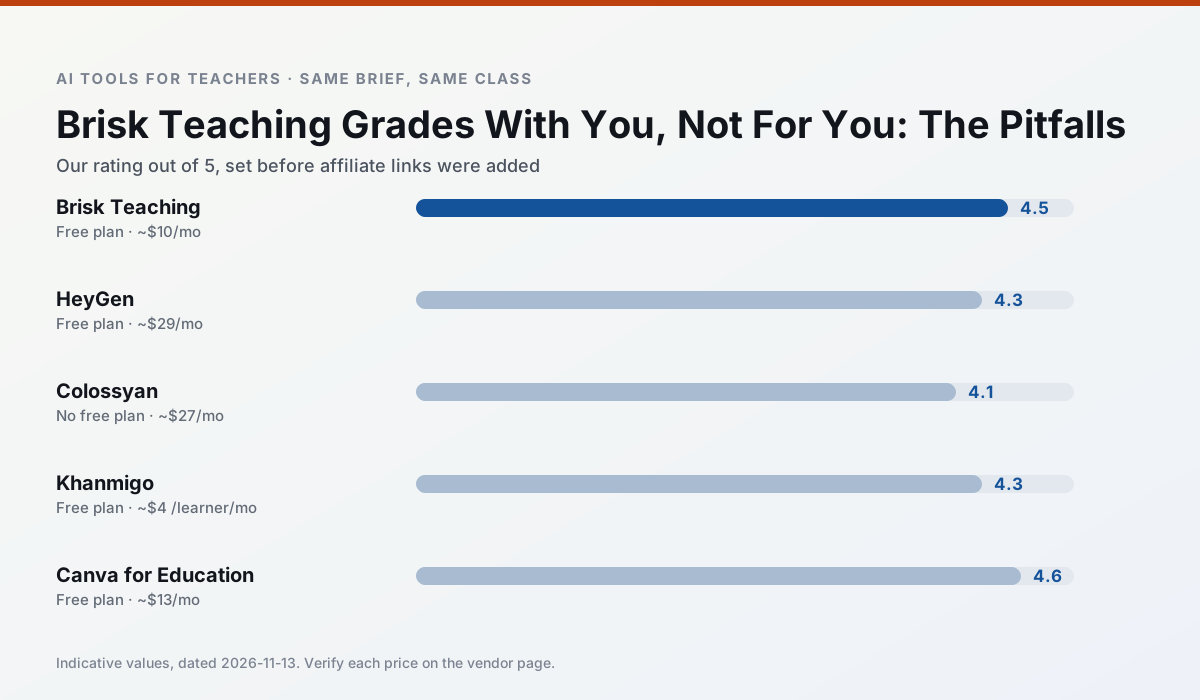
Side by side
Comparison table
Ratings reflect our timed classroom workflow, not vendor claims. Prices are indicative — verify on the vendor site.
| Tool | Best for | Free tier | Indicative paid plan | Standout feature | Our rating | Verdict | Try the tool |
|---|---|---|---|---|---|---|---|
| Brisk Teaching | feedback on writing · grading | Yes — Limited actions per month | ~$10 /user/mo | Works inside Google Docs | 4.5 / 5 | Top pick | Try free |
| HeyGen | video lessons · translation | Yes — Limited credit plan | ~$29 /user/mo | Video translation | 4.3 / 5 | Strong option | Try free |
| Colossyan | PD materials · video lessons | No ongoing free plan | ~$27 /user/mo | PDF/PPT-to-video | 4.1 / 5 | Situational | Try free |
| Khanmigo | math practice · student tutoring | Yes — US teacher accounts, subject to eligibility | ~$4 /learner/mo | Socratic tutoring rather than answers | 4.3 / 5 | Strong option | Try free |
| Canva for Education | slide decks · worksheets | Yes — Verification required | ~$13 /user/mo | Thousands of education templates | 4.6 / 5 | Top pick | Try free |
| Gamma | slide decks · parent communication | Yes — Credit-limited generation | ~$10 /user/mo | Prompt-to-deck | 4.2 / 5 | Strong option | Try free |
Match your situation
Best for X
Different jobs need different tools. Here is what we would open first in each case.
Nothing on Brisk Teaching's free tier is a teaser demo; the limits are documented and a normal week fits inside them.
HeyGen is the one we would open on a normal planning day because the first output is editable rather than restructurable, and the free plan covers a single teacher's routine.
Colossyan has the shortest path from opening a tab to a usable draft, which matters more than the feature count on a Monday.
Khanmigo is the option IT is least likely to block: single sign-on, admin removal of AI features and an agreement on file.
Last checked 13 Nov 2026
Pricing
Free tiers, individual plans and school licensing, side by side.
| Tool | Free plan | Individual / paid | School & district | Billing note | Verify |
|---|---|---|---|---|---|
| Brisk Teaching | $0 — Limited actions per month | ~$10 /user/mo | Custom quote | Indicative — verify on vendor site | Vendor |
| HeyGen | $0 — Limited credit plan | ~$29 /user/mo | Custom quote | Indicative — verify on vendor site | Vendor |
| Colossyan | No ongoing free tier | ~$27 /user/mo | Custom quote | Indicative — verify on vendor site | Vendor |
| Khanmigo | $0 — US teacher accounts, subject to eligibility | ~$4 /learner/mo | Custom quote | Indicative — verify on vendor site | Vendor |
| Canva for Education | $0 — Verification required | ~$13 /user/mo | Custom quote | Indicative — verify on vendor site | Vendor |
| Gamma | $0 — Credit-limited generation | ~$10 /user/mo | ~$20 /user/mo | Indicative — verify on vendor site | Vendor |
Editorial rule: pricing is re-checked every 2–3 months and the top 50 pages are refreshed every 6 months. See our funding policy.
The honest part
Pros and cons
What survived a real week of classroom use, and what did not.
Pros
- No copy-paste between tools
- Fast inline feedback on student drafts
- Gentle learning curve
Cons
- Chrome-first workflow
- Extension permissions need IT approval
- Free quota is tight
Pros
- Best-in-class lip-sync translation
- Useful for multilingual families
- Generous trial credits
Cons
- Credit-based pricing is confusing
- Voice cloning raises consent questions
- Overkill for everyday lessons
Pros
- Strong for staff training, not just lessons
- Good compliance/LMS export
- Fast document-to-video
Cons
- No permanent free plan
- Higher price point
- Less suited to K-12 student-facing content
Pros
- Education-first design
- Strong nonprofit trust signal
- Good math scaffolding
Cons
- Availability varies by region
- Less useful for admin paperwork
- Requires student accounts for full value
Pros
- Effectively free for verified teachers
- Huge template library
- No design skills needed
Cons
- AI features are capped
- Easy to produce cluttered slides
- Account verification can be slow
In the classroom
Use cases
Five concrete workflows, with the tool we would open for each one.
Regrouping students after an assessment
Summarise anonymised results into skill groups, then generate one activity per group. Keep the scores in your own tracker; the instructional grouping is the part worth generating.
Recommended: Brisk TeachingA weekly family newsletter from bullet notes
Newsletters fail on length, not tone. Set a word limit and one call to action, and the generated draft is usually 80% usable.
Recommended: HeyGenThree reading levels from one source text
Paste a vetted text, ask for supported, core and extension versions, then check the vocabulary list by hand. Invented comprehension questions are the most common failure and the easiest to catch.
Recommended: ColossyanA Monday morning lesson plan in twelve minutes
The twelve minutes come from not rewriting the skeleton. Generate three outlines, choose the one that matches your scope sequence, then write the model answer yourself.
Recommended: KhanmigoA parent email in two languages
Draft in plain, warm language with no names, translate, then back-translate the important sentences to check meaning. Keep specific incidents out of the prompt and add them yourself.
Recommended: Canva for Education
Questions teachers ask us
FAQ
Direct answers, also published as FAQPage structured data for search and AI assistants.
Is Brisk Teaching worth paying for at mixed-grade level?
What does Brisk Teaching get wrong most often?
Can Brisk Teaching replace a planning period?
Is Brisk Teaching safe to use with student data?
Sources & further reading
Our recommendation
Try HeyGen free for your next lesson planning task
AI avatar video and video translation for instructional content. Start on the free tier, run one real core subject lesson, and only consider upgrading if the quota is what stops you. Disclosure: we may earn a commission (35% recurring) at no extra cost to you.
Some links on this page are affiliate links. We may earn a commission at no extra cost to you. Our rankings are editorial and never pay-to-play. Never enter student PII into a free consumer account.
Keep reading
Related comparisons in this cluster.
Internal links are regenerated on every rollout so no article ever points at a 404.