The short answer
- QuestionWell is our default pick for teachers who need to draft a standards-aware lesson plan quickly; Formative is better when differentiation is the bottleneck.
- The cheapest honest test is a week of real work on the free plans: QuestionWell: Yes — Monthly generation limit; Formative: Yes — Core assessment tools; Gradescope: Yes — Limited courses. If a tool is still open on Friday, it has earned a paid conversation.
- Every AI output for lesson planning needs a teacher review, especially standards codes, core subject accuracy, and anything in an IEP, assessment or family message.
- Everything on this page dates from 2026-11-13; where a price could not be re-read, the row says so.
Start with MagicSchool AI on its free plan.
By 9:00 PM on a Tuesday, writing eight multiple-choice questions about the branches of government feels less like pedagogy and more like a cruel cognitive endurance test. That was my breaking point with test creation. I had thirty-two essays to grade, twenty-eight parent emails sitting in my inbox, and a department head asking for our next unit assessment by morning. I pasted an article about federalism into QuestionWell, clicked generate, and had a standards-aligned question bank in roughly thirty seconds. It saved me hours of staring at a blinking cursor.
If you are looking for the tools that actually earn their keep in the best AI tools for teachers 2026 stack, QuestionWell sits at the top for daily lesson prep. But it is not a complete ecosystem. Like any single-purpose utility, it does a few things brilliantly and leaves you to figure out the rest. We have tested how these platforms hold up under real classroom conditions, from quick quiz generators to heavy institutional grading software like Turnitin Clarity / Feedback Studio.
What QuestionWell Does and Where It Stops
QuestionWell does one job: it takes source text or learning objectives and turns them into clean, standards-aligned question banks. The interface is refreshingly bare. You drop in an article excerpt, pick your grade level, tag a standard, and hit go. The export workflow is smooth, pushing directly into your LMS or Formative.
The primary strength is sheer speed. It saves more time on raw question writing than any other tool on the market. The objective tagging is generally solid, which keeps your quizzes tethered to actual curriculum goals rather than random trivia.
Prompt pasted into QuestionWell:
"Generate 5 multiple-choice questions about the checks and balances system in the US government, aligned to high school civics standards. Focus on executive vetoes and judicial review."

What came back:
Three decent comprehension questions, one confusing trick question about state courts, and a multiple-choice option where all four answers were variations of 'Congress makes laws.'

Two edits that made it usable:
1. Deleted the trick question about state courts entirely since it missed the objective.
2. Rewrote the distractor choices for the judicial review question so students weren't guessing based on sentence length.
The limits become clear once you push the tool outside its lane. It is a single-purpose application. If you want student-facing interactive delivery, you have to export elsewhere. Furthermore, question quality varies wildly depending on the source text you feed it. If your source is poorly written or overly dense, the generated questions inherit that mud. As with all things AI, never paste identifiable student work into these boxes; stick to non-identifiable public text or your own notes.
Managing Assessment and Live Data with Formative
Once you have your questions, you need to see what students actually understood. Formative stands out as the best free option in this lineup for live checks. While the paid tier runs about $15 per user per month (indicative), the core assessment tools are robust enough to run daily instruction without a district-wide purchase.
You can upload existing PDFs or Docs, layer questions on top of them, and watch student responses roll in real time. The data visualization helps you quickly build intervention groups based on who missed specific learning targets. Setup takes longer than a casual quiz game, and the real value unlocks if your whole school adopts it, but it bridges the gap between static QuestionWell outputs and actionable student data. Just remember to check your rostering scope and make sure your district has a proper data privacy agreement in place before syncing class lists.
Heavy Duty Grading with Gradescope and Turnitin
When you move past multiple-choice quizzes into complex paper assessments or institutional writing programs, the utility shifts entirely. Gradescope is the gold standard for schools and districts dealing with piles of scanned or handwritten math and science tests. It uses AI-assisted rubric grouping to let you grade one page of a student submission at a time across an entire cohort, applying consistent rubric deductions.
The time savings on paper assessments are massive, and the item analytics reveal exact misconceptions across your periods. However, it is complete overkill for elementary classrooms. Institutional pricing is opaque, setup effort is real, and because it handles student work directly, you need a full FERPA and DPA review before rolling it out.
For writing and plagiarism checks, Turnitin Clarity / Feedback Studio remains the best choice for quick setup because it is likely already licensed at your high school or middle school. Individual teachers cannot buy it independently, and AI detection remains a contested landscape with known false positives, as discussed in our breakdown of AI detector false positives for teachers. Still, for institutional revision history and consistent feedback workflows, it handles the heavy administrative lifting.
Interactive Delivery and Inline Writing Support
If you need to turn static content into an engaging whole-class experience without forcing kids to create new logins, Curipod is worth a look. It builds interactive student-response lessons in minutes for about $12 a user per month (indicative), featuring polls, drawings, and open-ended checks for understanding. It focuses entirely on delivery rather than long-term planning, and the free tier is quite tight, but student engagement spikes immediately because responses are anonymous by default.
For writing support directly inside student drafts, Brisk Teaching operates as a browser extension that brings AI feedback right into Google Docs and Slides for roughly $10 a user per month (indicative). There is no copy-pasting between separate tabs. You can generate inline comments, scaffold text into different reading levels, or check for bias in minutes.
Two things frequently go wrong when teachers lean too heavily on these writing and generation assistants. First, if you use Brisk or QuestionWell to rewrite a text into three different reading levels, the auto-generated comprehension questions attached to those levels are often logically flawed and require manual pruning. Second, if you let an AI write your grading rubrics from scratch, your moderation consistency will drift because the model's internal logic rarely matches your departmental grading norms. Always write your own rubric first, then let the AI generate comments against it.
QuestionWell remains my go-to for spinning up a quiz on a short turnaround, provided I check the questions before printing. Pair it with a solid live tracker or an inline writing assistant, and you have an AI stack that actually saves your evenings.
FAQ
Is QuestionWell worth paying for at mixed-grade level?
Only if lesson planning is a weekly job for you. At one use a month the free plan is enough; at weekly use the paid tier buys back more time than it costs, provided you keep the review step.
What does QuestionWell get wrong most often?
Invented standards codes and assumed resources, in that order. Both survive a quick read, which is why the review checklist in this article starts with those two.
Can QuestionWell replace a planning period?
It replaces the blank page, not the planning. Our edit time ranged from eleven minutes for an outline to most of an evening for a full differentiated set.
Is QuestionWell safe to use with student data?
Not on a personal account. Use topic-level prompts, keep work samples out, and check what your district has approved before a student's work reaches any tool.
Sources
- QuestionWell: Feature overview, pricing (~$10 /user/mo indicative), and generation guidelines. questionwell.ai
- Formative: Assessment tools, auto-grading features, and tier structure (~$15 /user/mo indicative). smartico.com/formative
- Gradescope: AI-assisted rubric grading, scanned assessment workflows, and institutional data policies. gradescope.com
- Turnitin Clarity / Feedback Studio: Institutional writing feedback, similarity checking, and DPA frameworks. turnitin.com
- Curipod: Interactive lesson generation, pricing (~$12 /user/mo indicative), and student privacy defaults. curipod.com
- Brisk Teaching: Chrome extension workflows, inline document feedback, and pricing (~$10 /user/mo indicative). briskteaching.com
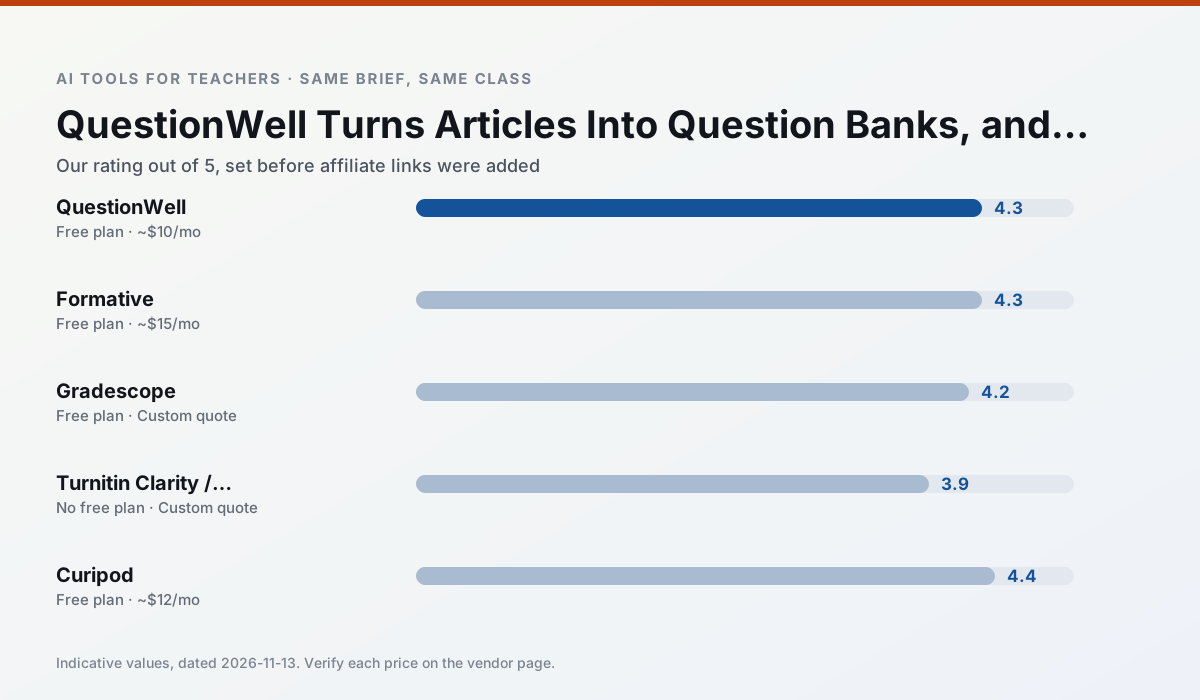
Side by side
Comparison table
Ratings reflect our timed classroom workflow, not vendor claims. Prices are indicative — verify on the vendor site.
| Tool | Best for | Free tier | Indicative paid plan | Standout feature | Our rating | Verdict | Try the tool |
|---|---|---|---|---|---|---|---|
| QuestionWell | quiz generation · assessment | Yes — Monthly generation limit | ~$10 /user/mo | Exports to Google Forms / LMS | 4.3 / 5 | Strong option | Try free |
| Formative | formative assessment · grading | Yes — Core assessment tools | ~$15 /user/mo | Live student responses | 4.3 / 5 | Strong option | Try free |
| Gradescope | grading · rubric creation | Yes — Limited courses | Custom quote | Bubble sheet and handwriting capture | 4.2 / 5 | Strong option | Try free |
| Turnitin Clarity / Feedback Studio | feedback on writing · academic integrity | No ongoing free plan | Custom quote | Similarity reports | 3.9 / 5 | Situational | Try free |
| Curipod | formative assessment · exit tickets | Yes — Limited lessons per month | ~$12 /user/mo | Live polls and word clouds | 4.4 / 5 | Strong option | Try free |
| Brisk Teaching | feedback on writing · grading | Yes — Limited actions per month | ~$10 /user/mo | Works inside Google Docs | 4.5 / 5 | Top pick | Try free |
Match your situation
Best for X
Different jobs need different tools. Here is what we would open first in each case.
QuestionWell wins on the default path: fewer clicks to a usable draft, and the interface does not get in the way at 7:40am.
Formative's free plan is the most usable in this comparison: a quota that survives a normal week. Not enough for a department, enough for one teacher to decide.
Gradescope is the option IT is least likely to block: single sign-on, admin removal of AI features and an agreement on file.
Turnitin Clarity / Feedback Studio has the shortest path from opening a tab to a usable draft, which matters more than the feature count on a Monday.
Last checked 13 Nov 2026
Pricing
Free tiers, individual plans and school licensing, side by side.
| Tool | Free plan | Individual / paid | School & district | Billing note | Verify |
|---|---|---|---|---|---|
| QuestionWell | $0 — Monthly generation limit | ~$10 /user/mo | Custom quote | Indicative — verify on vendor site | Vendor |
| Formative | $0 — Core assessment tools | ~$15 /user/mo | Custom quote | Indicative — verify on vendor site | Vendor |
| Gradescope | $0 — Limited courses | Custom quote | Custom quote | LMS integration and support | Vendor |
| Turnitin Clarity / Feedback Studio | No ongoing free tier | Custom quote | Custom quote | LMS-wide deployment | Vendor |
| Curipod | $0 — Limited lessons per month | ~$12 /user/mo | Custom quote | Indicative — verify on vendor site | Vendor |
| Brisk Teaching | $0 — Limited actions per month | ~$10 /user/mo | Custom quote | Indicative — verify on vendor site | Vendor |
Editorial rule: pricing is re-checked every 2–3 months and the top 50 pages are refreshed every 6 months. See our funding policy.
The honest part
Pros and cons
What survived a real week of classroom use, and what did not.
Pros
- Saves the most time on question writing
- Clean export workflow
- Good objective tagging
Cons
- Single-purpose tool
- Question quality varies by source text
- Limited student-facing features
Pros
- Strong data for intervention groups
- Works with existing PDFs and Docs
- Good LMS integrations
Cons
- Steeper setup than quiz games
- Best value requires school-wide rollout
- Price adds up per teacher
Pros
- Large time savings on paper assessments
- Consistent rubric application
- Detailed item analytics
Cons
- Overkill for elementary classrooms
- Institutional pricing is opaque
- Setup effort is real
Pros
- Already licensed at many schools
- Consistent institutional workflow
- Detailed revision history
Cons
- Individual teachers cannot buy it
- AI detection remains contested
- Heavy administrative setup
Pros
- High student engagement out of the box
- Great for quick checks for understanding
- No student accounts required for basic use
Cons
- Focused on delivery, not planning
- Requires reliable classroom devices
- Free tier is restrictive
In the classroom
Use cases
Five concrete workflows, with the tool we would open for each one.
A weekly family newsletter from bullet notes
Newsletters fail on length, not tone. Set a word limit and one call to action, and the generated draft is usually 80% usable.
Recommended: QuestionWellRegrouping students after an assessment
Summarise anonymised results into skill groups, then generate one activity per group. Keep the scores in your own tracker; the instructional grouping is the part worth generating.
Recommended: FormativeA Monday morning lesson plan in twelve minutes
The twelve minutes come from not rewriting the skeleton. Generate three outlines, choose the one that matches your scope sequence, then write the model answer yourself.
Recommended: GradescopeThree reading levels from one source text
Paste a vetted text, ask for supported, core and extension versions, then check the vocabulary list by hand. Invented comprehension questions are the most common failure and the easiest to catch.
Recommended: Turnitin Clarity / Feedback StudioRubric and feedback comments in one pass
Reorder the workflow so the rubric is yours and the comments are generated. Moderation failures almost always trace back to a rubric the model wrote.
Recommended: Curipod
Questions teachers ask us
FAQ
Direct answers, also published as FAQPage structured data for search and AI assistants.
Is QuestionWell worth paying for at mixed-grade level?
What does QuestionWell get wrong most often?
Can QuestionWell replace a planning period?
Is QuestionWell safe to use with student data?
Sources & further reading
Our recommendation
Try MagicSchool AI free for your next lesson planning task
A large library of teacher-specific AI generators in one dashboard. Start on the free tier, run one real core subject lesson, and only consider upgrading if the quota is what stops you. Disclosure: we may earn a commission (30% recurring) at no extra cost to you.
Some links on this page are affiliate links. We may earn a commission at no extra cost to you. Our rankings are editorial and never pay-to-play. Never enter student PII into a free consumer account.
Keep reading
Related comparisons in this cluster.
Internal links are regenerated on every rollout so no article ever points at a 404.