The short answer
- Kahoot! is our default pick for teachers who need to draft a standards-aware lesson plan quickly; Fliki is better when differentiation is the bottleneck.
- All 3 shortlisted tools are priced for one teacher first and a school second. Kahoot! and Fliki are the two worth trialling on a real task before any purchase conversation.
- Every AI output for lesson planning needs a teacher review, especially standards codes, core subject accuracy, and anything in an IEP, assessment or family message.
- Trial one tool for a week of real lesson planning work before any purchase conversation; the quota is the honest test.
Start with Fliki on its free plan.
At 2:45 PM on a Tuesday, thirty seventh-graders were bouncing off the radiators while waiting for a review session on cellular respiration. I did not have the energy to write twenty multiple-choice questions from scratch. I pasted a chunk of our textbook chapter into Kahoot and crossed my fingers. Three minutes later, the screen lit up with glowing shapes and frantic tapping sounds. The room went dead silent except for the frantic clicking of trackpads. That is the pull of the platform. You get instant engagement with almost zero training time.
If you are trying to figure out which tech is actually worth your planning period, you might want to cross-reference our master guide on the best ai tools for teachers-2026 to see how quiz generators stack up against grading assistants and lesson planners. Kahoot! remains the absolute best for schools and districts because kids already know the interface and buy into the game loop immediately. But the free tier limits your player count, and the paid tiers run about $10 per user per month if you want to unlock larger rooms and advanced question types.
The AI Question Generator in Practice
The generator relies on quick text input to spit out a game board. It saves you from writing distractors by hand, which is usually the most draining part of making a quiz. You drop in your notes, select your question count, and let the model parse the core concepts. The problem is that the speed of the game format pushes everything toward simple recall. If you want kids to evaluate, synthesize, or trace an argument, you will spend more time editing the AI output than you would have spent writing it yourself.
Prompt:
Generate a 10-question Kahoot quiz on cell organelles for 7th grade science, focusing on mitochondria, chloroplasts, and ribosomes. Include two distractor options for each question that target common misconceptions.

First-pass output:
Ten multiple-choice questions about organelle definitions. The distractors were too obviously wrong ("The mitochondria is a tiny green truck") and three questions were exact duplicates.

Two edits that made it usable:
1. Replaced the silly distractors with common student errors, like confusing cellular respiration with photosynthesis.
2. Rewrote two definition prompts into scenario-based questions to force actual reasoning within the time limit.
When you use the AI generation feature, privacy is mostly about how you run the room. For younger students, make them use nicknames rather than their real names on the public leaderboard. It stops the social anxiety of seeing your score broadcast at the bottom of the front projector.
Where the Quiz Generator Falls Short
Two things went wrong during my first full week testing the AI question builder. First, the model generated three questions about plant vacuoles that relied on outdated middle school phrasing, which confused my coteacher who was pulling small groups in the back. I had to pause the game live and skip those slides. Second, the time pressure of the default 20-second timer heavily favors kids who process text fast, rather than kids who actually understand the biology.
To fix the pacing issue, I started doubling the timer on every third question and turning off the point streak bonus. That adjustment shifted the room from a frantic clicking contest into an actual formative check. If you notice grading discrepancies or want to dig deeper into how automated scoring affects your gradebook, take a look at our breakdown on navigating an ai grading tool without losing your mind.
Exploring Voice and Audio Add-Ons
Sometimes you need to move beyond static quizzes and turn text into spoken explanations for station work or absent students. Fliki provides text-to-video with stock media and AI voiceover at about $21 per user per month on paid plans, making it the best for quick setup when you need a visual explainer without starring in a video yourself. The free tier gives you watermarked, limited minutes. It is a content tool only, so keep student personally identifiable information completely out of the prompts.
If you just need clean audio without the video fluff, Murf AI runs around $19 per user per month and stands as our best overall for daily use due to its pristine voice quality and easy slide integration. ElevenLabs is another voice option at about $5 per user per month, giving you a cheap way to generate accessible audio versions of reading passages, provided you never clone a student's or colleague's voice without written consent. Meanwhile, OpusClip takes long lecture recordings and chops them into short captioned clips for about $15 per user per month, serving as the best free-tier-limited option for turning a recorded class into snack-sized review bites.
Publishing Teacher Resources Online
If you write curriculum for teachers-pay-teachers or your own resource shop, you might bump into Surfer SEO. At around $79 per month with no free tier, it provides heavy-duty content optimization for web publishing. It is strictly a creator tool rather than a classroom tool, meaning it helps you rank your teacher-author blog posts so other educators can find your materials. It requires basic SEO knowledge and has zero student data implications because you never use it with learners.
Kahoot remains the heavy hitter in actual classrooms because of its brand familiarity and sheer motivational pull. Just remember that AI-generated questions need a human pass to check for depth. Do not let the tech dictate your rigor.
FAQ
Is Kahoot! worth paying for at mixed-grade level?
Only if lesson planning is a weekly job for you. At one use a month the free plan is enough; at weekly use the paid tier buys back more time than it costs, provided you keep the review step.
What does Kahoot! get wrong most often?
Invented standards codes and assumed resources, in that order. Both survive a quick read, which is why the review checklist in this article starts with those two.
Can Kahoot! replace a planning period?
It replaces the blank page, not the planning. Our edit time ranged from eleven minutes for an outline to most of an evening for a full differentiated set.
Is Kahoot! safe to use with student data?
Not on a personal account. Use topic-level prompts, keep work samples out, and check what your district has approved before a student's work reaches any tool.
Sources
Side by side
Comparison table
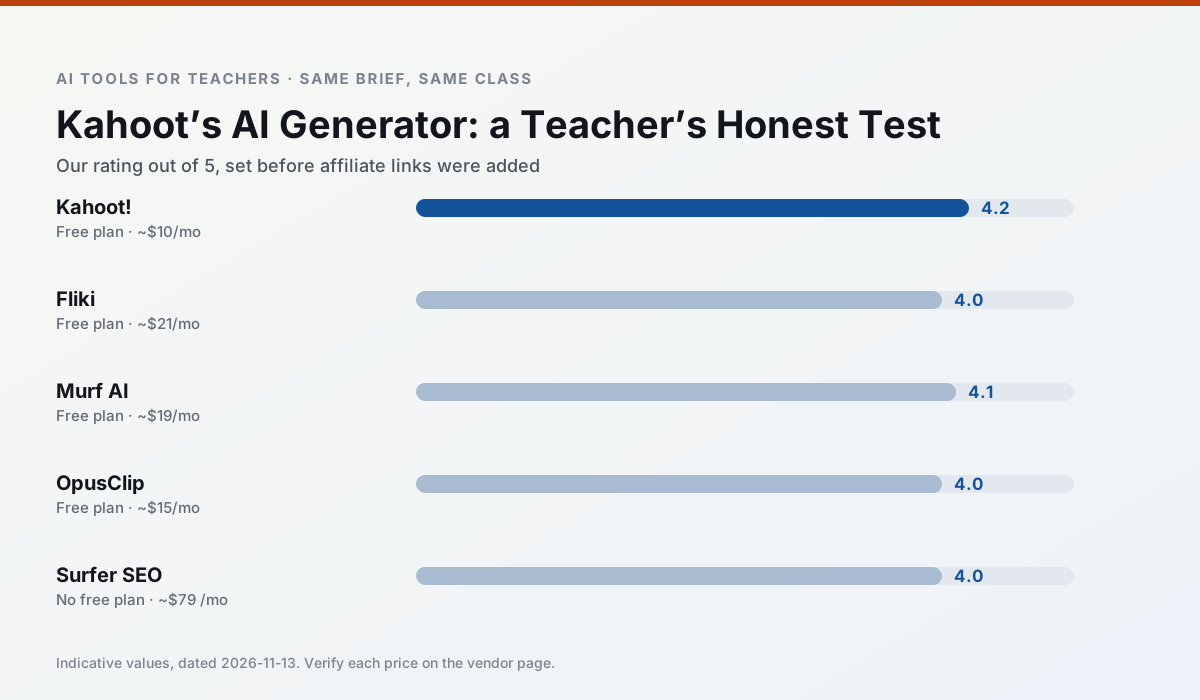
Ratings reflect our timed classroom workflow, not vendor claims. Prices are indicative — verify on the vendor site.
| Tool | Best for | Free tier | Indicative paid plan | Standout feature | Our rating | Verdict | Try the tool |
|---|---|---|---|---|---|---|---|
| Kahoot! | quiz generation · review lessons | Yes — Limited player count | ~$10 /user/mo | AI question builder | 4.2 / 5 | Strong option | Try free |
| Fliki | video lessons · audio lessons | Yes — Watermarked, limited minutes | ~$21 /user/mo | Blog/text to video | 4.0 / 5 | Situational | Try free |
| Murf AI | audio lessons · accessibility | Yes — Trial-only output | ~$19 /user/mo | Voice fine-tuning | 4.1 / 5 | Situational | Try free |
| OpusClip | PD materials · flipped lessons | Yes — Limited monthly clips | ~$15 /user/mo | Auto captions | 4.0 / 5 | Situational | Try free |
| Surfer SEO | teacher bloggers · resource sellers | No ongoing free plan | ~$79 /mo | Content Editor | 4.0 / 5 | Situational | Try free |
| ElevenLabs | accessibility · reading intervention | Yes — Monthly character quota | ~$5 /user/mo | Very natural voices | 4.4 / 5 | Strong option | Try free |
Match your situation
Best for X
Different jobs need different tools. Here is what we would open first in each case.
Kahoot! answers the three questions a district actually asks: rostering, admin controls and a data-processing agreement. That is usually what decides a school purchase.
Fliki runs in a browser tab with no extension, no student accounts and no onboarding call, so you can test it in a free period.
Murf AI wins on the default path: fewer clicks to a usable draft, and the interface does not get in the way at 7:40am.
OpusClip's free plan is the most usable in this comparison: a quota that survives a normal week. Not enough for a department, enough for one teacher to decide.
Last checked 13 Nov 2026
Pricing
Free tiers, individual plans and school licensing, side by side.
| Tool | Free plan | Individual / paid | School & district | Billing note | Verify |
|---|---|---|---|---|---|
| Kahoot! | $0 — Limited player count | ~$10 /user/mo | Custom quote | Indicative — verify on vendor site | Vendor |
| Fliki | $0 — Watermarked, limited minutes | ~$21 /user/mo | ~$66 /user/mo | Indicative — verify on vendor site | Vendor |
| Murf AI | $0 — Trial-only output | ~$19 /user/mo | ~$39 /user/mo | Indicative — verify on vendor site | Vendor |
| OpusClip | $0 — Limited monthly clips | ~$15 /user/mo | ~$29 /user/mo | Indicative — verify on vendor site | Vendor |
| Surfer SEO | No ongoing free tier | ~$79 /mo | Custom quote | Indicative — verify on vendor site | Vendor |
| ElevenLabs | $0 — Monthly character quota | ~$5 /user/mo | ~$22 /user/mo | Indicative — verify on vendor site | Vendor |
Editorial rule: pricing is re-checked every 2–3 months and the top 50 pages are refreshed every 6 months. See our funding policy.
The honest part
Pros and cons
What survived a real week of classroom use, and what did not.
Pros
- Instant engagement
- Very low training time
- Strong brand familiarity
Cons
- Less depth for higher-order assessment
- Paid tiers needed for larger classes
- Time pressure suits recall more than reasoning
Pros
- No avatar needed
- Good for explainer visuals
- Simple editor
Cons
- Minute-based limits
- Output can look generic
- Price jumps between tiers
Pros
- Very clean audio
- Good pacing controls
- Easy slide integration
Cons
- Commercial licensing rules matter
- Free tier is not usable long-term
- Single-purpose
Pros
- Turns a recorded lesson into review clips
- Excellent captions
- Fast
Cons
- Optimised for social formats
- Not a lesson design tool
- Free plan is restrictive
Pros
- Best-in-class on-page guidance
- Useful for TpT / resource-shop content
- Clear scoring
Cons
- Expensive for individual teachers
- Not a classroom tool
- Requires SEO basics
In the classroom
Use cases
Five concrete workflows, with the tool we would open for each one.
Rubric and feedback comments in one pass
Reorder the workflow so the rubric is yours and the comments are generated. Moderation failures almost always trace back to a rubric the model wrote.
Recommended: Kahoot!A parent email in two languages
Draft in plain, warm language with no names, translate, then back-translate the important sentences to check meaning. Keep specific incidents out of the prompt and add them yourself.
Recommended: FlikiA Monday morning lesson plan in twelve minutes
The twelve minutes come from not rewriting the skeleton. Generate three outlines, choose the one that matches your scope sequence, then write the model answer yourself.
Recommended: Murf AIThree reading levels from one source text
Paste a vetted text, ask for supported, core and extension versions, then check the vocabulary list by hand. Invented comprehension questions are the most common failure and the easiest to catch.
Recommended: OpusClipA substitute folder that needs no context
The value here is structure, not creativity. Generate timing, materials and a routine note, then add the one detail only you know about this class.
Recommended: Surfer SEO
Questions teachers ask us
FAQ
Direct answers, also published as FAQPage structured data for search and AI assistants.
Is Kahoot! worth paying for at mixed-grade level?
What does Kahoot! get wrong most often?
Can Kahoot! replace a planning period?
Is Kahoot! safe to use with student data?
Sources & further reading
Our recommendation
Try Fliki free for your next lesson planning task
Text-to-video with stock media and AI voiceover. Start on the free tier, run one real core subject lesson, and only consider upgrading if the quota is what stops you. Disclosure: we may earn a commission (varies) at no extra cost to you.
Some links on this page are affiliate links. We may earn a commission at no extra cost to you. Our rankings are editorial and never pay-to-play. Never enter student PII into a free consumer account.
Keep reading
Related comparisons in this cluster.
Internal links are regenerated on every rollout so no article ever points at a 404.