The short answer
- Canva for Education is our default pick for teachers who need to draft a standards-aware lesson plan quickly; Khanmigo is better when differentiation is the bottleneck.
- The cheapest honest test is a week of real work on the free plans: Canva for Education: Yes — Verification required; Khanmigo: Yes — US teacher accounts, subject to eligibility; Synthesia: No ongoing free plan. If a tool is still open on Friday, it has earned a paid conversation.
- Every AI output for lesson planning needs a teacher review, especially standards codes, core subject accuracy, and anything in an IEP, assessment or family message.
- Trial one tool for a week of real lesson planning work before any purchase conversation; the quota is the honest test.
Start with Synthesia on its free plan.
Last Tuesday at 4:15 PM, I looked at a stack of twenty-four persuasive essays and felt that familiar, heavy dread. I dropped three of them into an AI grading assistant to test a shortcut, and the machine handed back identical 84s with pristine, encouraging paragraphs attached. The only problem? One essay had a completely incoherent thesis statement in the second paragraph, and another had accidentally copied half a Wikipedia page verbatim. The AI missed both, blinded by clean transitional phrases and polite sentence structures. That is when you realize AI grading bias is not just about demographic unfairness; it is about a machine's desperate desire to reward surface-level compliance while missing the actual thinking.
If you are trying to cut down your marking pile without losing your mind, you need a system of checks. You cannot simply drag and drop student files into a generic chat window and trust the percentage that pops out at the bottom. Whether you are using a dedicated grading assistant or pulling together resources through platforms like Eduaide.Ai or Khanmigo, you need an active defense strategy. AI tools are built to predict the next polite word, not to weigh the messy reality of adolescent cognitive development. Here are the four checks you must run before you return a single AI-scored assignment to a student.
Check One: Never let the AI write the rubric
The single biggest failure point in automated scoring traces back to the grading criteria itself. If you ask an AI tool to grade an essay and it has to invent the rubric on the fly, you are asking for trouble. The model will drift toward vague metrics like "clarity of thought" or "engaging tone," which usually means it rewards students who sound like corporate press releases. Reorder your workflow so the rubric belongs to you entirely. Build it in a design space like Canva for Education or pull a clean template, but lock down the point values and specific expectations before the machine ever reads a student submission. When the rubric is fixed and human-made, the AI has a rigid fence to stay inside rather than inventing its own standards of excellence.
Prompt: Grade this 300-word paragraph using the attached four-point rubric for historical accuracy and source citation. Do not rewrite the rubric.
First response: The student wrote a solid piece with a warm tone, demonstrating good vocabulary. Score: 3/4.
Edit one: Strip out fluff words like "warm tone" and force the prompt to cite the exact line numbers from the student text that match the rubric points.
Edit two: Add a negative constraint: "If no primary source is named in the text, cap the citation score at zero regardless of overall writing quality."
Check Two: Protect student privacy and anonymize every submission
It is entirely too easy to copy and paste a student essay complete with their full name, period number, and personal anecdotes into a browser tool. When you use content generators like Gamma for presentations or specialized platforms like Diffit for leveling text, you have to treat student work like a classified document. Strip out names, ID numbers, and specific local identifiers before any text goes into a model. Keep in mind that tools handle data differently, and while education-focused platforms have specific privacy terms, general content tools are not built to hold student records safely. If a tool requires student accounts for full value, verify your district's data protection agreements before you roll it out to a whole class.
Check Three: Hunt for the hidden hallucination in comprehension checks
When you use AI to differentiate readings or generate quick quizzes, you invite quiet errors into your materials. For instance, if you take a complex article and run it through Diffit to create three distinct reading levels for a mixed-ability class, the reading Lexile levels might look great on paper. However, the automatically generated comprehension questions often drift away from the core text. Invented questions that reference facts not present in the source passage are a common failure mode. You have to read the output backwards, checking every single question against the source text before you print or assign it. The same rule applies if you are drafting a quick sub folder or building a Monday morning lesson plan in twelve minutes; the time savings come from the structural skeleton, never from the unedited details.
Check Four: Separate mechanical compliance from actual comprehension
AI models love grammar, punctuation, and structural paragraphs. They hate nuance, genuine voice, and risky arguments that do not quite land. If you rely on an automated score without reading the work yourself, you will consistently punish the idiosyncratic writer who took a creative risk while rewarding the student who mastered the art of sounding smart while saying nothing. Use the tool to flag mechanical issues or pull out recurring errors, but reserve the final score for your own eyes. If you want to explore more about how automated evaluation fails, read our breakdown on the realities of using an AI grading tool, and pair it with insights from our guide on navigating AI detector false positives.
We also have to be realistic about production costs and feature limits across different platforms. While a platform like Canva for Education offers robust templates for verified teachers, its AI features remain capped unless you look at paid upgrades. Similarly, premium video tools like Synthesia can turn a script into a presenter-led avatar, but the subscription cost is difficult to justify for a single classroom teacher without school-wide funding. Keep your expectations grounded. Treat these applications as fast assistants for heavy lifting like drafting parent emails in two languages or formatting worksheets, not as autonomous arbiters of student potential.
FAQ
Is AI allowed for lesson planning in my school?
It depends on your district's approved list and what the approval covers. Ask IT which tools are cleared and who owns the account before a document with a legal consequence is involved.
Who is responsible if something goes wrong?
The school, and in practice the named teacher who reviewed the output. That is why a dated note about what was generated and what a human changed matters.
What should never go into a prompt?
Names, rosters, scans of student work and gradebook screenshots. Topic-level prompts do most of the work without any of that.
Sources
- Canva Education Plans and Verification Guidelines, Canva (2026)
- Khanmigo Teacher Tools and District Pricing, Khan Academy (2026)
- Synthesia Pricing and Avatar Features, Synthesia io (2026)
- Gamma App Pricing and Generation Limits, Gamma App (2026)
- Eduaide.Ai Resource Library and Features, Eduaide Inc. (2026)
- Diffit for Teachers Differentiated Learning, Diffit (2026)
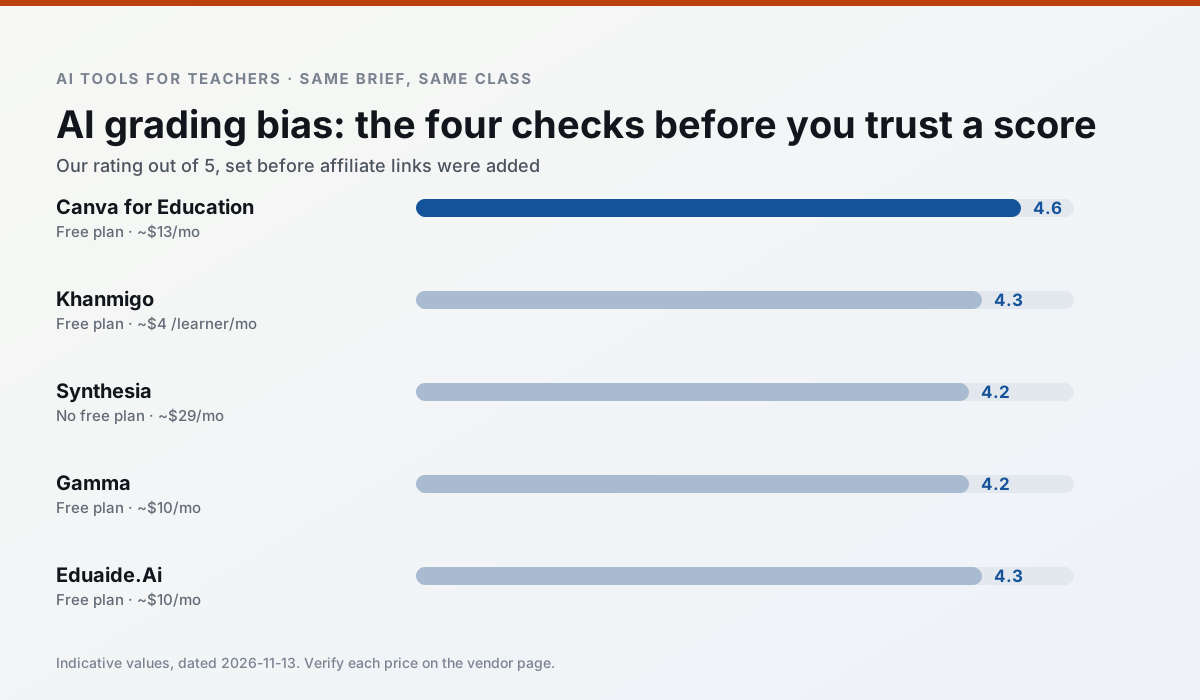
Side by side
Comparison table
Ratings reflect our timed classroom workflow, not vendor claims. Prices are indicative — verify on the vendor site.
| Tool | Best for | Free tier | Indicative paid plan | Standout feature | Our rating | Verdict | Try the tool |
|---|---|---|---|---|---|---|---|
| Canva for Education | slide decks · worksheets | Yes — Verification required | ~$13 /user/mo | Thousands of education templates | 4.6 / 5 | Top pick | Try free |
| Khanmigo | math practice · student tutoring | Yes — US teacher accounts, subject to eligibility | ~$4 /learner/mo | Socratic tutoring rather than answers | 4.3 / 5 | Strong option | Try free |
| Synthesia | flipped lessons · video lessons | No ongoing free plan | ~$29 /user/mo | 140+ languages | 4.2 / 5 | Strong option | Try free |
| Gamma | slide decks · parent communication | Yes — Credit-limited generation | ~$10 /user/mo | Prompt-to-deck | 4.2 / 5 | Strong option | Try free |
| Eduaide.Ai | lesson planning · rubric creation | Yes — Daily generation cap | ~$10 /user/mo | Resource library | 4.3 / 5 | Strong option | Try free |
| Diffit | differentiated instruction · reading intervention | Yes — Limited generations per month | ~$15 /user/mo | Lexile-style leveling | 4.6 / 5 | Top pick | Try free |
Match your situation
Best for X
Different jobs need different tools. Here is what we would open first in each case.
For a school rollout, Canva for Education offers the paperwork and the admin console; the classroom features are standard by comparison.
Khanmigo has the shortest path from opening a tab to a usable draft, which matters more than the feature count on a Monday.
Synthesia wins on the default path: fewer clicks to a usable draft, and the interface does not get in the way at 7:40am.
Nothing on Gamma's free tier is a teaser demo; the limits are documented and a normal week fits inside them.
Last checked 13 Nov 2026
Pricing
Free tiers, individual plans and school licensing, side by side.
| Tool | Free plan | Individual / paid | School & district | Billing note | Verify |
|---|---|---|---|---|---|
| Canva for Education | $0 — Verification required | ~$13 /user/mo | Custom quote | Indicative — verify on vendor site | Vendor |
| Khanmigo | $0 — US teacher accounts, subject to eligibility | ~$4 /learner/mo | Custom quote | Indicative — verify on vendor site | Vendor |
| Synthesia | No ongoing free tier | ~$29 /user/mo | Custom quote | Indicative — verify on vendor site | Vendor |
| Gamma | $0 — Credit-limited generation | ~$10 /user/mo | ~$20 /user/mo | Indicative — verify on vendor site | Vendor |
| Eduaide.Ai | $0 — Daily generation cap | ~$10 /user/mo | Custom quote | Indicative — verify on vendor site | Vendor |
| Diffit | $0 — Limited generations per month | ~$15 /user/mo | Custom quote | Indicative — verify on vendor site | Vendor |
Editorial rule: pricing is re-checked every 2–3 months and the top 50 pages are refreshed every 6 months. See our funding policy.
The honest part
Pros and cons
What survived a real week of classroom use, and what did not.
Pros
- Effectively free for verified teachers
- Huge template library
- No design skills needed
Cons
- AI features are capped
- Easy to produce cluttered slides
- Account verification can be slow
Pros
- Education-first design
- Strong nonprofit trust signal
- Good math scaffolding
Cons
- Availability varies by region
- Less useful for admin paperwork
- Requires student accounts for full value
Pros
- No camera or editing skills required
- Excellent multilingual voice output
- Easy updates to existing videos
Cons
- Cost is hard to justify for a single teacher
- Avatar video can feel impersonal
- No free ongoing tier
Pros
- Fastest path from outline to deck
- Modern-looking output by default
- Good export options
Cons
- Design control is limited
- Credits run out quickly
- Not built for student data
Pros
- Very low entry price
- Good worksheet and rubric output
- Clean, uncluttered UI
Cons
- Smaller template set than MagicSchool
- Less polished export options
- Limited integrations
In the classroom
Use cases
Five concrete workflows, with the tool we would open for each one.
Rubric and feedback comments in one pass
Reorder the workflow so the rubric is yours and the comments are generated. Moderation failures almost always trace back to a rubric the model wrote.
Recommended: Canva for EducationA parent email in two languages
Draft in plain, warm language with no names, translate, then back-translate the important sentences to check meaning. Keep specific incidents out of the prompt and add them yourself.
Recommended: KhanmigoA Monday morning lesson plan in twelve minutes
The twelve minutes come from not rewriting the skeleton. Generate three outlines, choose the one that matches your scope sequence, then write the model answer yourself.
Recommended: SynthesiaThree reading levels from one source text
Paste a vetted text, ask for supported, core and extension versions, then check the vocabulary list by hand. Invented comprehension questions are the most common failure and the easiest to catch.
Recommended: GammaA substitute folder that needs no context
The value here is structure, not creativity. Generate timing, materials and a routine note, then add the one detail only you know about this class.
Recommended: Eduaide.Ai
Questions teachers ask us
FAQ
Direct answers, also published as FAQPage structured data for search and AI assistants.
Is AI allowed for lesson planning in my school?
Who is responsible if something goes wrong?
What should never go into a prompt?
Sources & further reading
Our recommendation
Try Synthesia free for your next lesson planning task
Turn a script into a presenter-led video with AI avatars. Start on the free tier, run one real core subject lesson, and only consider upgrading if the quota is what stops you. Disclosure: we may earn a commission (25% recurring) at no extra cost to you.
Some links on this page are affiliate links. We may earn a commission at no extra cost to you. Our rankings are editorial and never pay-to-play. Never enter student PII into a free consumer account.
Keep reading
Related comparisons in this cluster.
Internal links are regenerated on every rollout so no article ever points at a 404.