The short answer
- Claude is our default pick for teachers who need to draft a standards-aware lesson plan quickly; ChatGPT is better when differentiation is the bottleneck.
- All 3 shortlisted tools are priced for one teacher first and a school second. Claude and ChatGPT are the two worth trialling on a real task before any purchase conversation.
- Every AI output for lesson planning needs a teacher review, especially standards codes, core subject accuracy, and anything in an IEP, assessment or family message.
- Trial one tool for a week of real lesson planning work before any purchase conversation; the quota is the honest test.
Start with Notion AI on its free plan.
It was a Tuesday afternoon when I got the email. A parent forwarded a screenshot from an online AI detector claiming their daughter's essay on the New Deal had a 98% probability of being machine-generated. The student sat at my desk crying because she had spent three hours writing that paper by hand in her notebook. She had the drafts, the crossed-out paragraphs, and the ink stains on her fingers to prove it. Yet, the black-box probability score carried more weight in that moment than her actual process. If you want to understand why AI detectors flag real student writing, you have to look past the marketing claims and understand what these tools are actually doing.
Why detectors flag honest work
Most commercial detectors do not test for AI. Instead, they measure two linguistic properties: perplexity, which is how predictable a word choice is, and burstiness, which is how much sentence length and structure vary. Good writers, especially high schoolers who have internalized academic prose, write with high predictability and low burstiness. They use standard transitions, clear topic sentences, and steady pacing. That uniformity reads to an algorithmic checker as machine-generated. When students write carefully, they often trigger the false positives that cause so much grief in our classrooms. If you rely on these tools, you are essentially penalizing students for writing clearly.
The limits of detection tools
Educational leaders are slowly realizing that no detector is reliable enough to form the basis of an academic integrity violation. Even OpenAI shut down its own classifier due to a miserably low rate of accuracy. When we look at the broader ecosystem of AI tools we use for planning—such as running lesson outlines through Claude or generating leveled texts with Diffit—we see that language models generate text using statistical probabilities. Detectors try to reverse-engineer those probabilities, but they stumble constantly. They fail on formulaic student writing, English language learners who use standard templates, and neurodivergent students who rely on structured phrasing to organize their thoughts.
Prompt: Act as an instructional coach. Write a parent-facing explanation of why AI detectors are unreliable, focusing on perplexity and burstiness in plain English.
First output: AI detectors use perplexity and burstiness metrics to determine if text is generated by a large language model. Perplexity measures word predictability, while burstiness measures sentence variation. Because good student writers produce consistent, predictable sentences, detectors often misclassify their work as artificial intelligence.
Edit 1 (Teacher tone): Cut the jargon. Parents do not want a lecture on computational linguistics; they want to know why their kid got flagged.
Edit 2 (Actionable pivot): Add a direct offer to look at the student's revision history in Google Docs to prove authorship through process rather than product.
Moving from policing to process
Instead of trying to catch students with flawed software, we have to shift our classrooms toward verifiable writing processes. When students write essays, I now require them to maintain a running drafting document or use version-controlled platforms where I can see the keystrokes unfold over days. If a student drops a fully formed, pristine essay into the submission bin without any intermediate drafts, that warrants a conversation. It is not about running the text through a checker; it is about asking the student to talk through their argument. If they wrote it, they can explain it.
When false positives happen
When a detector flags a student's work, the burden of proof should never fall entirely on the child. My standard protocol involves three steps. First, I look at the revision history to see the drafting timeline. Second, I ask the student to explain a specific transition or paragraph in their own voice during a quick check-in. Third, if doubts remain, I have them write a short paragraph on the spot about their thesis. When we use reliable general-purpose assistants like ChatGPT for brainstorming or organize our long-term curriculum records in Notion AI, we keep our focus on productivity. We should bring that same pragmatic mindset to student assessment instead of panicking over unreliable software.
Finding better ways to support writing
If we want to reduce the temptation for students to take shortcuts with large language models, we need to design assignments that cannot be easily solved by a single prompt. That means assigning local history connections, in-class reflections, or multi-stage projects where the intermediate steps carry more grade weight than the final product. Tools like Eduaide.Ai and SchoolAI can help teachers generate targeted scaffolding, but the final output must always reflect the student's actual voice. When we focus our energy on formative feedback and transparent drafting habits, the obsession with detectors naturally fades away. For a deeper look at how automated systems affect our classrooms, explore our guide on AI grading bias check and our broader overview of the best AI tools for teachers 2026.
FAQ
Is AI allowed for lesson planning in my school?
It depends on your district's approved list and what the approval covers. Ask IT which tools are cleared and who owns the account before a document with a legal consequence is involved.
Who is responsible if something goes wrong?
The school, and in practice the named teacher who reviewed the output. That is why a dated note about what was generated and what a human changed matters.
What should never go into a prompt?
Names, rosters, scans of student work and gradebook screenshots. Topic-level prompts do most of the work without any of that.
Sources
- OpenAI. "OpenAI's stance on AI detectors and classifier accuracy." Company research notes and updates.
- National Council of Teachers of English (NCTE). "Statement on Artificial Intelligence and Writing Instruction."
- EdTech Evidence Exchange. "Evaluating classroom software claims and validity." Research reports, 2025-2026.
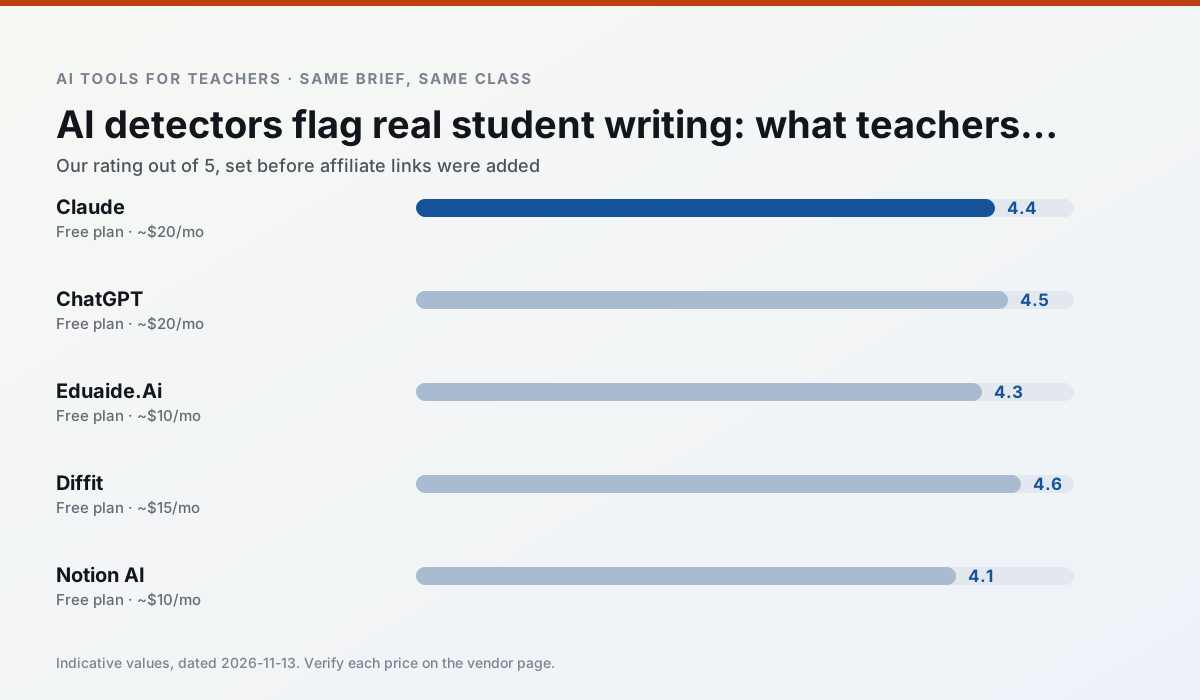
Side by side
Comparison table
Ratings reflect our timed classroom workflow, not vendor claims. Prices are indicative — verify on the vendor site.
| Tool | Best for | Free tier | Indicative paid plan | Standout feature | Our rating | Verdict | Try the tool |
|---|---|---|---|---|---|---|---|
| Claude | rubric creation · feedback on writing | Yes — Usage-limited | ~$20 /user/mo | Very large context window | 4.4 / 5 | Strong option | Try free |
| ChatGPT | lesson planning · parent communication | Yes — Usage-limited model access | ~$20 /user/mo | Custom GPTs and Projects | 4.5 / 5 | Top pick | Try free |
| Eduaide.Ai | lesson planning · rubric creation | Yes — Daily generation cap | ~$10 /user/mo | Resource library | 4.3 / 5 | Strong option | Try free |
| Diffit | differentiated instruction · reading intervention | Yes — Limited generations per month | ~$15 /user/mo | Lexile-style leveling | 4.6 / 5 | Top pick | Try free |
| Notion AI | curriculum mapping · unit planning | Yes — Limited AI usage | ~$10 /user/mo | Linked databases | 4.1 / 5 | Situational | Try free |
| SchoolAI | student-safe AI · differentiated instruction | Yes — Limited seats | ~$15 /user/mo | Teacher-monitored student chats | 4.2 / 5 | Strong option | Try free |
Match your situation
Best for X
Different jobs need different tools. Here is what we would open first in each case.
Claude is the one we would open on a normal planning day because the first output is editable rather than restructurable, and the free plan covers a single teacher's routine.
Nothing on ChatGPT's free tier is a teaser demo; the limits are documented and a normal week fits inside them.
For a school rollout, Eduaide.Ai offers the paperwork and the admin console; the classroom features are standard by comparison.
Setup cost is one login for Diffit; everything else can wait until you know the tool is useful.
Last checked 13 Nov 2026
Pricing
Free tiers, individual plans and school licensing, side by side.
| Tool | Free plan | Individual / paid | School & district | Billing note | Verify |
|---|---|---|---|---|---|
| Claude | $0 — Usage-limited | ~$20 /user/mo | ~$25+ /user/mo | Indicative — verify on vendor site | Vendor |
| ChatGPT | $0 — Usage-limited model access | ~$20 /user/mo | ~$25+ /user/mo | Indicative — verify on vendor site | Vendor |
| Eduaide.Ai | $0 — Daily generation cap | ~$10 /user/mo | Custom quote | Indicative — verify on vendor site | Vendor |
| Diffit | $0 — Limited generations per month | ~$15 /user/mo | Custom quote | Indicative — verify on vendor site | Vendor |
| Notion AI | $0 — Limited AI usage | ~$10 /user/mo | ~$8 /user/mo | Indicative — verify on vendor site | Vendor |
| SchoolAI | $0 — Limited seats | ~$15 /user/mo | Custom quote | Indicative — verify on vendor site | Vendor |
Editorial rule: pricing is re-checked every 2–3 months and the top 50 pages are refreshed every 6 months. See our funding policy.
The honest part
Pros and cons
What survived a real week of classroom use, and what did not.
Pros
- Handles full unit plans and long rubrics
- Nuanced, less generic prose
- Good at structured document output
Cons
- No teacher-specific templates
- Fewer classroom integrations
- Consumer plan not suitable for student data
Pros
- Most flexible option available
- Huge community of teacher prompt libraries
- Strong multilingual support
Cons
- Requires prompt skills for consistent results
- No built-in standards alignment
- District privacy review usually required
Pros
- Very low entry price
- Good worksheet and rubric output
- Clean, uncluttered UI
Cons
- Smaller template set than MagicSchool
- Less polished export options
- Limited integrations
Pros
- Excellent for mixed-ability classes
- Produces printable and digital versions
- Minimal setup
Cons
- Narrower scope than all-in-one suites
- Leveling is approximate, not a formal assessment
- Heavy use burns through the free quota
Pros
- Great for long-term curriculum records
- Strong team collaboration
- Flexible structure
Cons
- Setup time is significant
- AI add-on pricing changed more than once
- Not purpose-built for lesson generation
In the classroom
Use cases
Five concrete workflows, with the tool we would open for each one.
A weekly family newsletter from bullet notes
Newsletters fail on length, not tone. Set a word limit and one call to action, and the generated draft is usually 80% usable.
Recommended: ClaudeRegrouping students after an assessment
Summarise anonymised results into skill groups, then generate one activity per group. Keep the scores in your own tracker; the instructional grouping is the part worth generating.
Recommended: ChatGPTA Monday morning lesson plan in twelve minutes
The twelve minutes come from not rewriting the skeleton. Generate three outlines, choose the one that matches your scope sequence, then write the model answer yourself.
Recommended: Eduaide.AiThree reading levels from one source text
Paste a vetted text, ask for supported, core and extension versions, then check the vocabulary list by hand. Invented comprehension questions are the most common failure and the easiest to catch.
Recommended: DiffitRubric and feedback comments in one pass
Reorder the workflow so the rubric is yours and the comments are generated. Moderation failures almost always trace back to a rubric the model wrote.
Recommended: Notion AI
Questions teachers ask us
FAQ
Direct answers, also published as FAQPage structured data for search and AI assistants.
Is AI allowed for lesson planning in my school?
Who is responsible if something goes wrong?
What should never go into a prompt?
Sources & further reading
Our recommendation
Try Notion AI free for your next lesson planning task
AI-assisted notes, databases and curriculum planning in one workspace. Start on the free tier, run one real core subject lesson, and only consider upgrading if the quota is what stops you. Disclosure: we may earn a commission (varies) at no extra cost to you.
Some links on this page are affiliate links. We may earn a commission at no extra cost to you. Our rankings are editorial and never pay-to-play. Never enter student PII into a free consumer account.
Keep reading
Related comparisons in this cluster.
Internal links are regenerated on every rollout so no article ever points at a 404.