The short answer
- Formative is our default pick for teachers who need to draft a standards-aware lesson plan quickly; MagicSchool AI is better when differentiation is the bottleneck.
- Pricing is where these pages date fastest. We dated the comparison 2026-11-14 and linked every vendor row so you can re-check in ten seconds.
- Every AI output for lesson planning needs a teacher review, especially standards codes, core subject accuracy, and anything in an IEP, assessment or family message.
- Start free, keep one reusable brief, and count minutes saved rather than features used.
Start with MagicSchool AI on its free plan.
Last October, I watched twenty-two ninth-graders stare at a blank graph while I tried to figure out who understood slope-intercept form and who was just copying the kid next to them. Traditional quizzes leave a massive blind spot between the time kids hand them in and the afternoon you finally grade them. By then, the teachable moment is gone. If you are looking at tools in the Grading & Feedback cluster, you have probably wondered if live monitoring software actually changes instruction or just adds another tab to keep open.
Formative costs about $15 per user monthly on paid tiers, though the core assessment tools are free, and it occupies a specific place in my workflow. It lets you upload existing PDFs and documents, slap questions on top of them, and watch student answers populate your screen in real time. If you want to dive deeper into how software is shifting classroom routines, check out our roundup of the best AI tools for teachers. The main draw here is student-safe deployment, backed by solid district-grade data privacy agreements that make IT departments breathe easier.
Setting Up Your First Live Session Without Losing Your Mind
The learning curve on Formative is steeper than a basic quiz game like Kahoot! or Quizizz. You cannot just type a topic and hit generate. You have to build or upload the worksheet, map out the answer keys, and decide how you want to display the live dashboard. When I first ran a live session, I made the mistake of projecting the real-time student responses to the whole class. Halfway through the period, my struggling students panicked when they saw their empty boxes glowing red on the board while the fast finishers cleared the page.
To fix this, I learned to toggle on the anonymous view before projecting anything to the room. It turns out that seeing trends without names attached keeps the anxiety down while still letting me call out common misconceptions. The real power of the platform shows up when you are regrouping students after an assessment.
Prompt: Summarise these anonymised quiz responses into three skill groups based on error types, and generate one targeted practice activity for each group.
First output: A generic list of remedial math tasks that ignored the specific phrasing of my questions and suggested group work that took forty minutes.
Edits made: I added a constraint specifying a ten-minute time limit per station and pasted the exact rubric text into the prompt box.
Where Other Platforms Fit the Feedback Loop
Formative is not the only option when you are drowning in student work. If you need quick setup for review days, Kahoot! remains unmatched at roughly $10 per user monthly, even if its time-pressure mechanics favor rapid recall over deep reasoning. Kids already know the interface, and you can build a game in five minutes. Just remember to use nicknames for younger students to keep data privacy clean. For a broader library of teacher generators, MagicSchool AI sits around $12 per user monthly and handles everything from parent newsletters to IEP drafts, though you still need to review the output for tone and accuracy.
Class Companion costs about $12 per user monthly and shines in mixed-ability classes where students do their work on paper. It handles handwritten and scanned student work, giving specific comments on math and science problems. Brisk Teaching operates as a browser extension for about $10 per user monthly, letting you drop inline feedback directly into Google Docs and slides without copying and pasting text across ten different browser tabs. If you are worried about the broader implications of automated scoring, take a look at our guide on AI grading bias check.
Two Classroom Failures Worth Mentioning
No software works right out of the box every single day. During a mid-unit check last term, I tried to pull a quick question bank from a complex PDF using an AI generator, and the system completely mangled the math word problems. The numbers made sense individually, but the distractors had duplicate correct answers, which turned my formative check into a logic puzzle for me instead of them. I had to pause the lesson and write two questions on the whiteboard manually while the kids waited.
The second issue happened when I relied too heavily on Brisk Teaching's extension permissions during a network stutter. The extension stalled right in the middle of a live writing block, freezing three student drafts because the browser lost connection to the server. I reverted to standard version history in Google Docs and told the class to save offline copies. The lesson here is simple: always have a paper backup ready when your digital workflow depends on steady Wi-Fi and school district firewalls.
Moving Past the Hype
Live feedback tools only work if you actually change your teaching mid-period based on what the screen tells you. If you are just using an expensive digital worksheet to collect the exact same data you used to get from paper, the monthly subscription price is not worth your department's budget. Formative earns its spot because it integrates smoothly with existing learning management systems and handles student privacy better than most flashier alternatives. Start with the free tier, test it on one class period, and make sure your IT lead has cleared the roster setup before you commit your whole team to a school-wide rollout.
FAQ
Is Formative worth paying for at mixed-grade level?
Only if lesson planning is a weekly job for you. At one use a month the free plan is enough; at weekly use the paid tier buys back more time than it costs, provided you keep the review step.
What does Formative get wrong most often?
Invented standards codes and assumed resources, in that order. Both survive a quick read, which is why the review checklist in this article starts with those two.
Can Formative replace a planning period?
It replaces the blank page, not the planning. Our edit time ranged from eleven minutes for an outline to most of an evening for a full differentiated set.
Is Formative safe to use with student data?
Not on a personal account. Use topic-level prompts, keep work samples out, and check what your district has approved before a student's work reaches any tool.
Sources
- Formative Vendor Pricing and Features Page (Newsela)
- MagicSchool AI Educator Tools Overview
- Class Companion Platform Specifications
- Kahoot! Educator Plans and Pricing
- Quizizz Features and District Privacy Documentation
- Brisk Teaching Extension Permissions and Privacy Policy
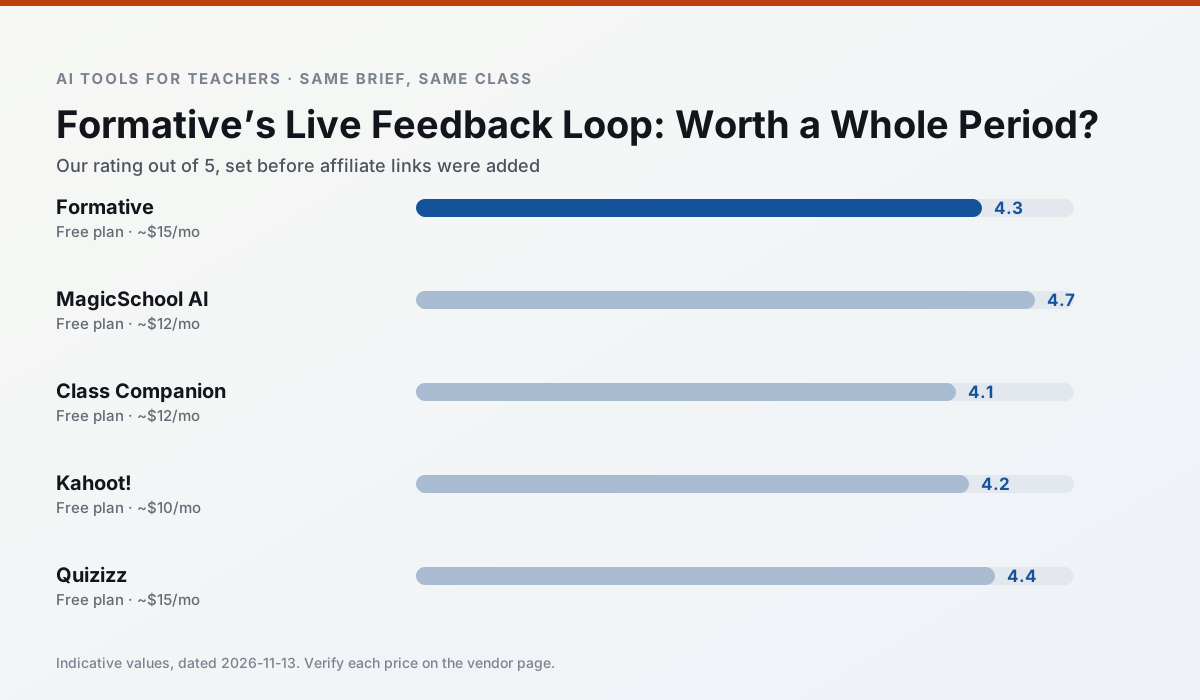
Side by side
Comparison table
Ratings reflect our timed classroom workflow, not vendor claims. Prices are indicative — verify on the vendor site.
| Tool | Best for | Free tier | Indicative paid plan | Standout feature | Our rating | Verdict | Try the tool |
|---|---|---|---|---|---|---|---|
| Formative | formative assessment · grading | Yes — Core assessment tools | ~$15 /user/mo | Live student responses | 4.3 / 5 | Strong option | Try free |
| MagicSchool AI | lesson planning · differentiation | Yes — Core generators with monthly usage limits | ~$12 /user/mo | 80+ teacher-specific tools | 4.7 / 5 | Top pick | Try free |
| Class Companion | grading · feedback on writing | Yes — Limited assignments | ~$12 /user/mo | Handwriting recognition | 4.1 / 5 | Situational | Try free |
| Kahoot! | quiz generation · review lessons | Yes — Limited player count | ~$10 /user/mo | AI question builder | 4.2 / 5 | Strong option | Try free |
| Quizizz | quiz generation · formative assessment | Yes — Core quiz creation | ~$15 /user/mo | AI question generator | 4.4 / 5 | Strong option | Try free |
| Brisk Teaching | feedback on writing · grading | Yes — Limited actions per month | ~$10 /user/mo | Works inside Google Docs | 4.5 / 5 | Top pick | Try free |
Match your situation
Best for X
Different jobs need different tools. Here is what we would open first in each case.
Formative is the student-facing option here with boundaries a teacher can actually set and supervise.
Family-facing drafts from MagicSchool AI need the fewest rewrites for warmth without overpromising, which is the usual failure mode.
Class Companion keeps the same task across levels, which is what makes a differentiated set defensible in moderation.
Setup cost is one login for Kahoot!; everything else can wait until you know the tool is useful.
Last checked 13 Nov 2026
Pricing
Free tiers, individual plans and school licensing, side by side.
| Tool | Free plan | Individual / paid | School & district | Billing note | Verify |
|---|---|---|---|---|---|
| Formative | $0 — Core assessment tools | ~$15 /user/mo | Custom quote | Indicative — verify on vendor site | Vendor |
| MagicSchool AI | $0 — Core generators with monthly usage limits | ~$12 /user/mo | Custom quote | Indicative — verify on vendor site | Vendor |
| Class Companion | $0 — Limited assignments | ~$12 /user/mo | Custom quote | Indicative — verify on vendor site | Vendor |
| Kahoot! | $0 — Limited player count | ~$10 /user/mo | Custom quote | Indicative — verify on vendor site | Vendor |
| Quizizz | $0 — Core quiz creation | ~$15 /user/mo | Custom quote | Indicative — verify on vendor site | Vendor |
| Brisk Teaching | $0 — Limited actions per month | ~$10 /user/mo | Custom quote | Indicative — verify on vendor site | Vendor |
Editorial rule: pricing is re-checked every 2–3 months and the top 50 pages are refreshed every 6 months. See our funding policy.
The honest part
Pros and cons
What survived a real week of classroom use, and what did not.
Pros
- Strong data for intervention groups
- Works with existing PDFs and Docs
- Good LMS integrations
Cons
- Steeper setup than quiz games
- Best value requires school-wide rollout
- Price adds up per teacher
Pros
- Widest purpose-built template library
- Strong free tier for individual teachers
- Fast to learn with almost no prompting skill
Cons
- Outputs still need standards review
- Best features sit behind the paid tier
- District approval can be slow
Pros
- Useful where work is done on paper
- Fast, specific comments
- Good math support
Cons
- Scan quality affects accuracy
- Narrow use case
- Feedback still needs teacher review
Pros
- Instant engagement
- Very low training time
- Strong brand familiarity
Cons
- Less depth for higher-order assessment
- Paid tiers needed for larger classes
- Time pressure suits recall more than reasoning
Pros
- Students already know the interface
- Good reporting
- Works on low-end devices
Cons
- Writing high-quality AI questions still needs review
- Gamification can distract
- Advanced analytics are paid
In the classroom
Use cases
Five concrete workflows, with the tool we would open for each one.
Regrouping students after an assessment
Summarise anonymised results into skill groups, then generate one activity per group. Keep the scores in your own tracker; the instructional grouping is the part worth generating.
Recommended: FormativeA weekly family newsletter from bullet notes
Newsletters fail on length, not tone. Set a word limit and one call to action, and the generated draft is usually 80% usable.
Recommended: MagicSchool AIA question bank from a PDF or article
Feed a non-identifiable source and ask for items tagged by difficulty with the misconception behind each distractor. Spot-check every answer key; numerical items are least reliable.
Recommended: Class CompanionA substitute folder that needs no context
The value here is structure, not creativity. Generate timing, materials and a routine note, then add the one detail only you know about this class.
Recommended: Kahoot!An IEP present-levels first draft
Use aggregated, anonymised data only. Ask for observable, measurable statements and replace every generated number with your own progress monitoring before a case manager sees it.
Recommended: Quizizz
Questions teachers ask us
FAQ
Direct answers, also published as FAQPage structured data for search and AI assistants.
Is Formative worth paying for at mixed-grade level?
What does Formative get wrong most often?
Can Formative replace a planning period?
Is Formative safe to use with student data?
Sources & further reading
Our recommendation
Try MagicSchool AI free for your next lesson planning task
A large library of teacher-specific AI generators in one dashboard. Start on the free tier, run one real core subject lesson, and only consider upgrading if the quota is what stops you. Disclosure: we may earn a commission (30% recurring) at no extra cost to you.
Some links on this page are affiliate links. We may earn a commission at no extra cost to you. Our rankings are editorial and never pay-to-play. Never enter student PII into a free consumer account.
Keep reading
Related comparisons in this cluster.
Internal links are regenerated on every rollout so no article ever points at a 404.