The short answer
- Class Companion is our default pick for teachers who need to draft a standards-aware lesson plan quickly; Writesonic is better when differentiation is the bottleneck.
- Free-tier reality for this shortlist: Class Companion: Yes — Limited assignments; Writesonic: Yes — Limited credits; SchoolAI: Yes — Limited seats. Treat every paid figure as indicative until you have read the vendor page; only the free quota is something you can test yourself this week.
- Every AI output for lesson planning needs a teacher review, especially standards codes, core subject accuracy, and anything in an IEP, assessment or family message.
- Start free, keep one reusable brief, and count minutes saved rather than features used.
Start with Writesonic on its free plan.
It was a stack of forty-two handwritten stoichiometry worksheets at 5:00 PM on a Thursday, and I wanted to throw them in the recycling bin. That is the moment most of us start looking for digital shortcuts that can read actual paper. Class Companion promises to handle that exact bottleneck by giving AI-driven feedback on handwritten and scanned student work, bridging the stubborn gap between traditional pen-and-paper classrooms and modern tech tools. If you are trying to make sense of the broader landscape, you might want to look at our guide on finding the best AI tools for teachers 2026 for a wider view of what is currently worth your planning period.
The Reality of Scanning Student Work
Let us talk about what happens when you feed handwritten student scratchpad math into an image parser. Class Companion delivers fast, specific comments and boasts genuinely useful math support, which can save hours when your handwriting recognition threshold is met. But the physical reality of the classroom gets in the way immediately. Scan quality affects accuracy entirely. If a student writes in faint pencil or smudges their work with the side of their hand, the system stumbles, and you end up grading the scanner instead of the math.
Prompt: "Review this batch of 25 handwritten algebra quizzes. Flag any sign errors in step two and write a one-sentence conceptual hint for each incorrect answer."
First response: Returned accurate flags for clean handwriting, but hallucinated feedback for a smudge on student 14's paper, telling them their fractions were wrong when they had written integers.
First edit: Toggled the strictness slider down and manually cropped the blurry scans before uploading.
Second edit: Added a rule to the prompt telling the AI to ask the teacher for clarification rather than guessing when a character is illegible.
Final usable output: Clean, actionable feedback notes ready to be printed or pasted back onto the paper margins.
Beyond the scanner quirks, you still have to review every piece of feedback before it goes back to a kid. Student work is uploaded directly to the platform, meaning a Data Processing Agreement is required from your district before you can legally use it.
Grading and Feedback Alternatives
When you look outside of handwritten paper workflows, other platforms handle different classroom choke points. SchoolAI positions itself as a school-safe AI workspace with teacher-controlled student spaces, making it our pick for mixed-ability classes because of its strong safeguarding defaults and district-level approval frameworks. It requires school-wide buy-in, though, so you cannot just spin it up on a whim during your planning period.
For organizing your own curriculum and long-term planning, Notion AI offers flexible structures for notes and databases at an indicative price of about $10 per user per month. It is great for quick setup, which is why it holds that spot in our workflow, but the setup time itself is significant and it is not purpose-built for generating instant lesson plans.
Communication is another constant time sink, particularly when you need to translate raw bullet points into a weekly family newsletter without spending an hour agonizing over tone. Writesonic serves as a budget-friendly option for content generation at around $16 per user per month. While it tends to produce generic classroom output and has a confusing credit system, it works well if you set a strict word limit and a single call to action so the draft comes out concise. If your writing needs are more focused on high-stakes parent emails or polished staff reports, Grammarly handles basic tone and grammar checks at about $12 per user per month with virtually no learning curve, though you must disable text collection on school devices to protect privacy.
Bringing Audio Into the Loop
Sometimes text on a screen or paper is simply not enough for every learner in the room. ElevenLabs provides natural-sounding text-to-speech generation at an indicative price of $5 per user per month, making it easy to create audio versions of reading materials for accessibility. The catch is that it runs on a monthly character quota, and you must never clone a student or colleague's voice without explicit written consent.
When you are trying to group students after a mid-unit check, you can feed anonymized results into an AI tracker to generate distinct skill-group activities, saving you the mental math of sorting them by hand. You can also build a robust question bank from an untagged PDF or article by asking for items categorized by difficulty, making sure to spot-check every answer key since numerical items are notoriously unreliable. If you are facing an unexpected absence, generating a sub folder structure gives you a solid timing and routine framework to which you can add the one specific detail only you know about your students. For more on how grading algorithms handle student nuance, check out our piece on AI grading bias check.
Managing the Workflow Burden
No matter which tool you adopt, none of them run on autopilot. Class Companion is fantastic if your school lives and breathes paper, but you will still spend prep time vetting its output and dealing with crumpled pages that refuse to scan cleanly. Keep your data private, watch out for hidden district blocks, and always keep final grading authority in human hands.
FAQ
Is Class Companion worth paying for at mixed-grade level?
Only if lesson planning is a weekly job for you. At one use a month the free plan is enough; at weekly use the paid tier buys back more time than it costs, provided you keep the review step.
What does Class Companion get wrong most often?
Invented standards codes and assumed resources, in that order. Both survive a quick read, which is why the review checklist in this article starts with those two.
Can Class Companion replace a planning period?
It replaces the blank page, not the planning. Our edit time ranged from eleven minutes for an outline to most of an evening for a full differentiated set.
Is Class Companion safe to use with student data?
Not on a personal account. Use topic-level prompts, keep work samples out, and check what your district has approved before a student's work reaches any tool.
Sources
- Class Companion Vendor Pricing and Features. https://classcompanion.com/
- Writesonic Plans and Limits Overview. https://writesonic.com/
- SchoolAI Safety and Deployment Documentation. https://schoolai.com/
- Notion AI Workspace Guidelines. https://notion.so/product/ai
- Grammarly Privacy and Education FAQ. https://grammarly.com/
- ElevenLabs Audio Generation Quotas. https://elevenlabs.io/
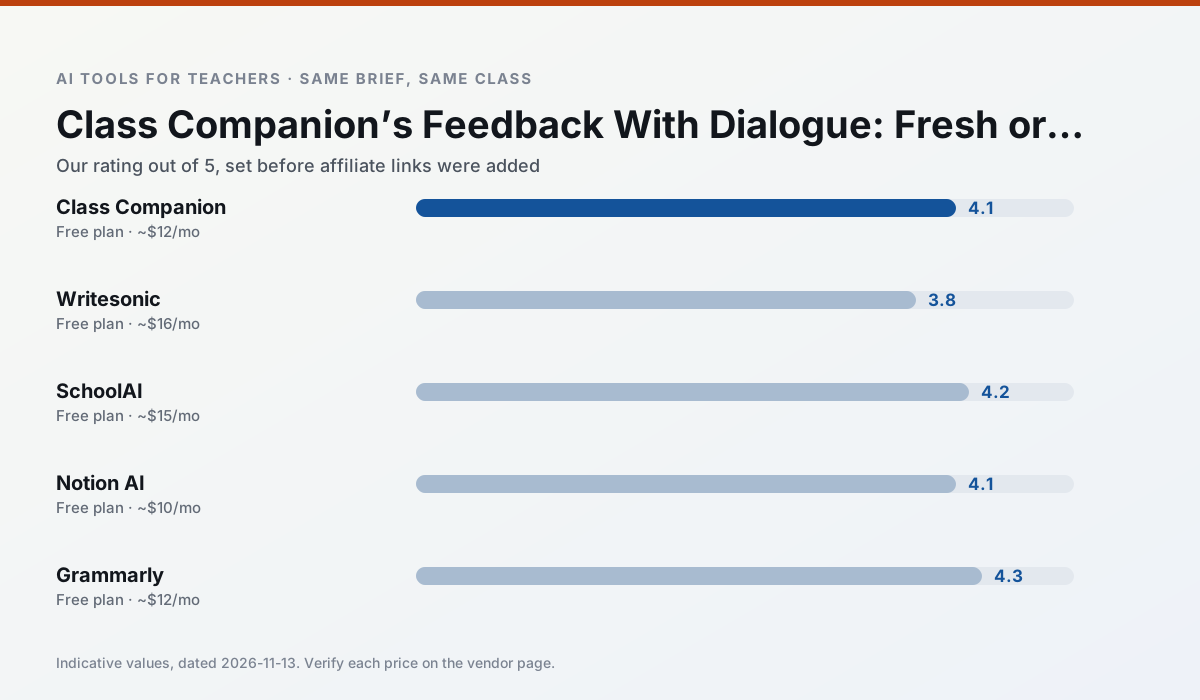
Side by side
Comparison table
Ratings reflect our timed classroom workflow, not vendor claims. Prices are indicative — verify on the vendor site.
| Tool | Best for | Free tier | Indicative paid plan | Standout feature | Our rating | Verdict | Try the tool |
|---|---|---|---|---|---|---|---|
| Class Companion | grading · feedback on writing | Yes — Limited assignments | ~$12 /user/mo | Handwriting recognition | 4.1 / 5 | Situational | Try free |
| Writesonic | newsletters · parent communication | Yes — Limited credits | ~$16 /user/mo | Article and email generators | 3.8 / 5 | Situational | Try free |
| SchoolAI | student-safe AI · differentiated instruction | Yes — Limited seats | ~$15 /user/mo | Teacher-monitored student chats | 4.2 / 5 | Strong option | Try free |
| Notion AI | curriculum mapping · unit planning | Yes — Limited AI usage | ~$10 /user/mo | Linked databases | 4.1 / 5 | Situational | Try free |
| Grammarly | parent communication · report card comments | Yes — Core grammar and tone checks | ~$12 /user/mo | Tone adjustments | 4.3 / 5 | Strong option | Try free |
| ElevenLabs | accessibility · reading intervention | Yes — Monthly character quota | ~$5 /user/mo | Very natural voices | 4.4 / 5 | Strong option | Try free |
Match your situation
Best for X
Different jobs need different tools. Here is what we would open first in each case.
Class Companion is the student-facing option here with boundaries a teacher can actually set and supervise.
Writesonic has the strongest tone control for family emails and report comments, provided you still read the message aloud before sending.
SchoolAI keeps the same task across levels, which is what makes a differentiated set defensible in moderation.
Notion AI has the shortest path from opening a tab to a usable draft, which matters more than the feature count on a Monday.
Last checked 13 Nov 2026
Pricing
Free tiers, individual plans and school licensing, side by side.
| Tool | Free plan | Individual / paid | School & district | Billing note | Verify |
|---|---|---|---|---|---|
| Class Companion | $0 — Limited assignments | ~$12 /user/mo | Custom quote | Indicative — verify on vendor site | Vendor |
| Writesonic | $0 — Limited credits | ~$16 /user/mo | ~$49 /user/mo | Indicative — verify on vendor site | Vendor |
| SchoolAI | $0 — Limited seats | ~$15 /user/mo | Custom quote | Indicative — verify on vendor site | Vendor |
| Notion AI | $0 — Limited AI usage | ~$10 /user/mo | ~$8 /user/mo | Indicative — verify on vendor site | Vendor |
| Grammarly | $0 — Core grammar and tone checks | ~$12 /user/mo | ~$15 /user/mo | Indicative — billed annually | Vendor |
| ElevenLabs | $0 — Monthly character quota | ~$5 /user/mo | ~$22 /user/mo | Indicative — verify on vendor site | Vendor |
Editorial rule: pricing is re-checked every 2–3 months and the top 50 pages are refreshed every 6 months. See our funding policy.
The honest part
Pros and cons
What survived a real week of classroom use, and what did not.
Pros
- Useful where work is done on paper
- Fast, specific comments
- Good math support
Cons
- Scan quality affects accuracy
- Narrow use case
- Feedback still needs teacher review
Pros
- Cheaper than enterprise writing suites
- Many templates
- Reasonable free trial
Cons
- Generic classroom output
- Credit system is confusing
- Limited education context
Pros
- Designed for district approval
- Teacher visibility into student use
- Good safeguarding defaults
Cons
- Requires school-wide buy-in
- Less flexible than general LLMs
- Pricing is mostly quote-based
Pros
- Great for long-term curriculum records
- Strong team collaboration
- Flexible structure
Cons
- Setup time is significant
- AI add-on pricing changed more than once
- Not purpose-built for lesson generation
Pros
- Catches errors in high-stakes parent emails
- Works everywhere you already write
- Very low learning curve
Cons
- Not education-specific
- Can flatten teacher voice
- Premium needed for tone rewriting
In the classroom
Use cases
Five concrete workflows, with the tool we would open for each one.
Regrouping students after an assessment
Summarise anonymised results into skill groups, then generate one activity per group. Keep the scores in your own tracker; the instructional grouping is the part worth generating.
Recommended: Class CompanionA weekly family newsletter from bullet notes
Newsletters fail on length, not tone. Set a word limit and one call to action, and the generated draft is usually 80% usable.
Recommended: WritesonicA question bank from a PDF or article
Feed a non-identifiable source and ask for items tagged by difficulty with the misconception behind each distractor. Spot-check every answer key; numerical items are least reliable.
Recommended: SchoolAIA substitute folder that needs no context
The value here is structure, not creativity. Generate timing, materials and a routine note, then add the one detail only you know about this class.
Recommended: Notion AIAn IEP present-levels first draft
Use aggregated, anonymised data only. Ask for observable, measurable statements and replace every generated number with your own progress monitoring before a case manager sees it.
Recommended: Grammarly
Questions teachers ask us
FAQ
Direct answers, also published as FAQPage structured data for search and AI assistants.
Is Class Companion worth paying for at mixed-grade level?
What does Class Companion get wrong most often?
Can Class Companion replace a planning period?
Is Class Companion safe to use with student data?
Sources & further reading
Our recommendation
Try Writesonic free for your next lesson planning task
Budget-friendly AI writing and content generation. Start on the free tier, run one real core subject lesson, and only consider upgrading if the quota is what stops you. Disclosure: we may earn a commission (varies) at no extra cost to you.
Some links on this page are affiliate links. We may earn a commission at no extra cost to you. Our rankings are editorial and never pay-to-play. Never enter student PII into a free consumer account.
Keep reading
Related comparisons in this cluster.
Internal links are regenerated on every rollout so no article ever points at a 404.