The short answer
- Grammarly is our default pick for teachers who need to draft a standards-aware lesson plan quickly; QuestionWell is better when differentiation is the bottleneck.
- Grammarly handles the broad case; QuestionWell handles the narrow one. Anything beyond that pair should be justified by a recurring weekly job, not a feature demo.
- Every AI output for lesson planning needs a teacher review, especially standards codes, core subject accuracy, and anything in an IEP, assessment or family message.
- Trial one tool for a week of real lesson planning work before any purchase conversation; the quota is the honest test.
Start with Grammarly on its free plan.
At 9:43 on a Thursday night, I was staring at an email to a parent who was furious about a missing lab grade. My cursor blinked. I had written four paragraphs that sounded defensive, deleted them, and written two paragraphs that sounded like a cold robot. That is when I opened Grammarly, pasted my frustrated draft, and watched it strip out every shred of human warmth while successfully fixing my comma splices. It is a brilliant editor for high-stakes messages, but it has a habit of making teachers sound like corporate liability lawyers. If you are trying to build trust with a family, that polished corporate sheen can backfire faster than a misspelled word.
Parent communication is the hardest part of the job that nobody prepares you for in teacher prep programs. When you are balancing newsletters, IEP updates, and difficult behavior emails, you need tools that keep you sounding like yourself without the midnight burnout. We have tested a wide range of writing assistants and classroom software to see what actually survives a 180-day school year. If you are looking for broader context, check our guide on the best AI tools for teachers in 2026.
The Parent Email Trap and Grammarly
Grammarly is the best tool for mixed-ability classes and fast writing polish, priced at roughly $12 per month for the paid tier with a functional free version for basic grammar and tone checks. It catches errors before they hit an administrator or a family inbox, and it works wherever you type, from district email clients to browser-based report cards. The catch is that the free tier stops short of full tone rewriting, and the paid version can flatten your natural teacher voice into a bland corporate memo.
When you use it for family outreach, you have to watch out for the one line it always gets wrong: the opening pleasantry. Grammarly loves to turn a warm, direct greeting into an overly formal declaration of intent. You need to disable text collection on school devices if your district requires strict DPA compliance, and you must review every single sentence for tone before you hit send.
Prompt: Write an email to a parent explaining that their child missed three homework assignments this week, keeping the tone supportive and firm without sounding punitive.
First response: "Dear Parent, this notification serves to inform you regarding your student's recent academic non-compliance concerning designated homework deliverables."
Edit one: Shifted the greeting to use the student's name and replaced "academic non-compliance" with "we missed a few homework targets."
Edit two: Deleted the AI-generated closing paragraph about policy adherence and replaced it with a direct invitation to check the online portal together after soccer practice.
Generating Newsletters Without the Bulk
Newsletters fail on length, not tone. Parents do not read three pages of classroom updates when they are checking their phones in the parking lot. This is where QuestionWell shines, taking our top spot for parent-facing writing at roughly $10 per month. While it is primarily designed to generate standards-aligned question banks from any text or objective, teachers have repurposed its clean export workflow to structure concise weekly family updates from rough bullet notes.
The strategy is simple. Set a strict word limit and demand one single call to action in your prompt. The generated draft usually lands at about 80 percent usability. You must only paste non-identifiable source text into the tool to protect student privacy, and you should always double-check that the generated standards tags match your actual state frameworks.
Quick Checks and Student Safety with Kahoot!
After you finish writing your updates, you often need to check what students actually learned during the week. Kahoot! remains the best choice for student-safe deployments, priced at around $10 per month for paid tiers, with a free option that limits player counts. It delivers instant engagement and has an exceptionally low training time because students already know the interface by heart.
The limitation is depth. The time pressure of a live game suits quick recall much better than higher-order reasoning. For younger students, always use nicknames rather than real names to keep data collection minimal and safe.
Daily Video Review and OpusClip
When you want to turn a recorded lesson into bite-sized review clips for absent students or homework support, OpusClip is the best overall for daily use at roughly $15 per month. It takes long recordings, generates remarkably accurate captions, and chops them into vertical formats at high speed.
The free plan is restrictive, and the tool is optimised for social formats rather than traditional lesson design. You must never upload classroom recordings containing identifiable students unless you have explicit, district-approved media releases on file. For guidance on getting those permissions cleared correctly, read our piece on the AI parent consent letter.
Formative Assessment with Quizizz
Quizizz is another heavy hitter for daily checks, costing around $15 per month for advanced features with a reliable free tier for core quiz creation. Students are familiar with the gamified interface, and it functions smoothly on low-end district chromebooks that choke on heavier software.
Writing high-quality questions with its AI assistant still requires careful teacher review, as distractors can sometimes be too obvious or confusing. Gamification can occasionally distract easily excitable classes, and advanced analytics are locked behind the paid tier. Ensure your deployment aligns with your local COPPA and FERPA documentation before assigning quizzes district-wide.
Publishing Resources Online with Surfer SEO
If you build and publish resources online for other educators, Surfer SEO offers best-in-class on-page guidance for resource shops and teacher-creator blogs at roughly $79 per month with no free tier. It provides clear scoring and structured content outlines based on search data.
It is expensive for individual teachers, requires a basic understanding of SEO principles, and is not a classroom tool in any practical sense. Because it deals exclusively with web content and marketing keywords, it is never used with student data, meaning you do not have to worry about educational privacy compliance.
FAQ
Is Grammarly worth paying for at mixed-grade level?
Only if lesson planning is a weekly job for you. At one use a month the free plan is enough; at weekly use the paid tier buys back more time than it costs, provided you keep the review step.
What does Grammarly get wrong most often?
Invented standards codes and assumed resources, in that order. Both survive a quick read, which is why the review checklist in this article starts with those two.
Can Grammarly replace a planning period?
It replaces the blank page, not the planning. Our edit time ranged from eleven minutes for an outline to most of an evening for a full differentiated set.
Is Grammarly safe to use with student data?
Not on a personal account. Use topic-level prompts, keep work samples out, and check what your district has approved before a student's work reaches any tool.
Sources
- Grammarly Vendor Pricing and Feature Overview (grammarly.com)
- QuestionWell Documentation and Educational Standards Tagging (questionwell.com)
- Kahoot! Educator Plans and Safety Guidelines (kahoot.com)
- OpusClip Video Repurposing and Captioning Specifications (opus.pro)
- Quizizz Educator Features and Privacy Compliance (quizizz.com)
- Surfer SEO Content Optimisation Guidelines (surferseo.com)
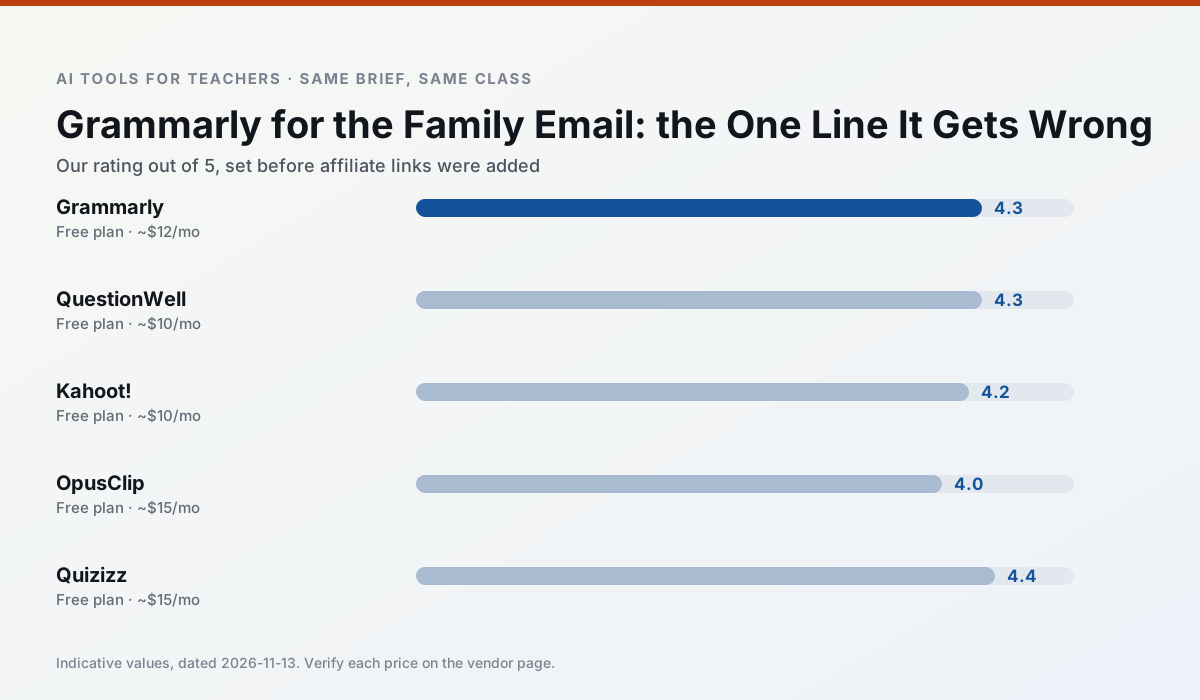
Side by side
Comparison table
Ratings reflect our timed classroom workflow, not vendor claims. Prices are indicative — verify on the vendor site.
| Tool | Best for | Free tier | Indicative paid plan | Standout feature | Our rating | Verdict | Try the tool |
|---|---|---|---|---|---|---|---|
| Grammarly | parent communication · report card comments | Yes — Core grammar and tone checks | ~$12 /user/mo | Tone adjustments | 4.3 / 5 | Strong option | Try free |
| QuestionWell | quiz generation · assessment | Yes — Monthly generation limit | ~$10 /user/mo | Exports to Google Forms / LMS | 4.3 / 5 | Strong option | Try free |
| Kahoot! | quiz generation · review lessons | Yes — Limited player count | ~$10 /user/mo | AI question builder | 4.2 / 5 | Strong option | Try free |
| OpusClip | PD materials · flipped lessons | Yes — Limited monthly clips | ~$15 /user/mo | Auto captions | 4.0 / 5 | Situational | Try free |
| Quizizz | quiz generation · formative assessment | Yes — Core quiz creation | ~$15 /user/mo | AI question generator | 4.4 / 5 | Strong option | Try free |
| Surfer SEO | teacher bloggers · resource sellers | No ongoing free plan | ~$79 /mo | Content Editor | 4.0 / 5 | Situational | Try free |
Match your situation
Best for X
Different jobs need different tools. Here is what we would open first in each case.
For three reading groups and one text, Grammarly needs the least manual relabelling of vocabulary and questions.
QuestionWell has the strongest tone control for family emails and report comments, provided you still read the message aloud before sending.
Kahoot! is built around teacher-monitored student spaces and audit logs rather than a consumer chat account, which is a different approval conversation.
On the daily cycle, OpusClip saves the most edit time per task; the paid tier mostly buys more runs rather than better ones.
Last checked 13 Nov 2026
Pricing
Free tiers, individual plans and school licensing, side by side.
| Tool | Free plan | Individual / paid | School & district | Billing note | Verify |
|---|---|---|---|---|---|
| Grammarly | $0 — Core grammar and tone checks | ~$12 /user/mo | ~$15 /user/mo | Indicative — billed annually | Vendor |
| QuestionWell | $0 — Monthly generation limit | ~$10 /user/mo | Custom quote | Indicative — verify on vendor site | Vendor |
| Kahoot! | $0 — Limited player count | ~$10 /user/mo | Custom quote | Indicative — verify on vendor site | Vendor |
| OpusClip | $0 — Limited monthly clips | ~$15 /user/mo | ~$29 /user/mo | Indicative — verify on vendor site | Vendor |
| Quizizz | $0 — Core quiz creation | ~$15 /user/mo | Custom quote | Indicative — verify on vendor site | Vendor |
| Surfer SEO | No ongoing free tier | ~$79 /mo | Custom quote | Indicative — verify on vendor site | Vendor |
Editorial rule: pricing is re-checked every 2–3 months and the top 50 pages are refreshed every 6 months. See our funding policy.
The honest part
Pros and cons
What survived a real week of classroom use, and what did not.
Pros
- Catches errors in high-stakes parent emails
- Works everywhere you already write
- Very low learning curve
Cons
- Not education-specific
- Can flatten teacher voice
- Premium needed for tone rewriting
Pros
- Saves the most time on question writing
- Clean export workflow
- Good objective tagging
Cons
- Single-purpose tool
- Question quality varies by source text
- Limited student-facing features
Pros
- Instant engagement
- Very low training time
- Strong brand familiarity
Cons
- Less depth for higher-order assessment
- Paid tiers needed for larger classes
- Time pressure suits recall more than reasoning
Pros
- Turns a recorded lesson into review clips
- Excellent captions
- Fast
Cons
- Optimised for social formats
- Not a lesson design tool
- Free plan is restrictive
Pros
- Students already know the interface
- Good reporting
- Works on low-end devices
Cons
- Writing high-quality AI questions still needs review
- Gamification can distract
- Advanced analytics are paid
In the classroom
Use cases
Five concrete workflows, with the tool we would open for each one.
A weekly family newsletter from bullet notes
Newsletters fail on length, not tone. Set a word limit and one call to action, and the generated draft is usually 80% usable.
Recommended: GrammarlyRegrouping students after an assessment
Summarise anonymised results into skill groups, then generate one activity per group. Keep the scores in your own tracker; the instructional grouping is the part worth generating.
Recommended: QuestionWellA five-minute exit ticket set
Ask for one recall, one application and one reasoning item, then delete the second recall question every generator sneaks in.
Recommended: Kahoot!An IEP present-levels first draft
Use aggregated, anonymised data only. Ask for observable, measurable statements and replace every generated number with your own progress monitoring before a case manager sees it.
Recommended: OpusClipA substitute folder that needs no context
The value here is structure, not creativity. Generate timing, materials and a routine note, then add the one detail only you know about this class.
Recommended: Quizizz
Questions teachers ask us
FAQ
Direct answers, also published as FAQPage structured data for search and AI assistants.
Is Grammarly worth paying for at mixed-grade level?
What does Grammarly get wrong most often?
Can Grammarly replace a planning period?
Is Grammarly safe to use with student data?
Sources & further reading
Our recommendation
Try Grammarly free for your next lesson planning task
Writing assistant for polished parent emails, newsletters and reports. Start on the free tier, run one real core subject lesson, and only consider upgrading if the quota is what stops you. Disclosure: we may earn a commission ($20 per paid upgrade + $0.20/signup) at no extra cost to you.
Some links on this page are affiliate links. We may earn a commission at no extra cost to you. Our rankings are editorial and never pay-to-play. Never enter student PII into a free consumer account.
Keep reading
Related comparisons in this cluster.
Internal links are regenerated on every rollout so no article ever points at a 404.