The short answer
- Brisk Teaching is our default pick for teachers who need to draft a standards-aware lesson plan quickly; Quizizz is better when differentiation is the bottleneck.
- Pricing is where these pages date fastest. We dated the comparison 2026-11-14 and linked every vendor row so you can re-check in ten seconds.
- Every AI output for Weekly updates needs a teacher review, especially standards codes, core subject accuracy, and anything in an IEP, assessment or family message.
- Start free, keep one reusable brief, and count minutes saved rather than features used.
Start with MagicSchool AI on its free plan.
It was Sunday night at 9:15, and my kitchen table was buried under a pile of permission slips, half-graded quizzes, and a blank Word document for my weekly parent update. I had forty-eight families waiting for an explanation of why our algebra scores dipped on Friday, what unit was coming next, and why the field trip form was due on Tuesday. Writing that newsletter from scratch used to take forty minutes of staring at a blinking cursor while trying to sound professional instead of exhausted. When I started using AI to draft my weekly updates with AI, that prep time dropped to about ten minutes. You still have to read what comes out of the machine, but you stop staring at white space.
Why Newsletters Fail and How AI Fixes Them
Parent newsletters usually fail because teachers try to write a novel. Families do not have time to read four paragraphs about our pedagogical philosophy regarding fractions. They want to know three things: what their child is learning, what is due, and whether there is an event coming up. When I feed my raw bullet points into Brisk Teaching, which is my top pick for parent-facing writing, I force it to keep things short and punchy. Brisk works directly inside my browser and reads what I highlight or type without forcing me to bounce between ten different tabs. The free tier has a tight quota of limited actions per month, and the paid version runs around $10 a month if you need more room. Because it is a Chrome extension, your IT department will need to approve it, but the lack of a copy-paste shuffle saves my sanity on Sunday nights.
Prompt: Write a 150-word weekly family update for seventh-grade math. Tone: warm, direct, concise. Bullet points only for upcoming dates. Include one call to action about signing the permission slip by Tuesday.
Draft returned: Hello families! We had a huge week in math as we wrapped up our unit on proportional relationships. Students showed great resilience on Friday's check-in. Next week, we begin solving multi-step equations. Please check your student's binder for graded work. Upcoming dates: Tuesday is the field trip permission slip deadline. Friday is a half-day. Action needed: Please sign and return the yellow permission slip by Tuesday morning so we can finalize bus counts.
Edits made: I cut the generic opener about resilience and swapped in a specific mention of our common student pitfall with cross-multiplication, then tightened the date bullets so they stood out on a phone screen.
Sifting Through Assessment Data for Families
Parents also want to know how their children are grouping and growing, which means I often need to summarize classroom data without overwhelming them. When I want to pair parent updates with actual classroom data or generate follow-up tasks, I lean on tools that handle assessment smoothly. If I need a quick review game where students already know the drill, I pull up Quizizz. It runs smoothly on low-end devices and has great reporting, though the gamification can sometimes distract kids who treat it like a pure video game rather than a review. For quick, high-energy recall at the start of a class, Kahoot! gets instant engagement with very low training time, though you have to watch out for the paid tiers if you have massive classes. Both tools cost around $10 to $15 a month for their paid features, but their free tiers get the job done for basic reviews.
Turning Raw Notes Into Clean Formats
The biggest trap with AI writing tools is letting them invent facts. If my bullet points say three kids missed the quiz because of the volleyball tournament, I do not need the AI to write a three-paragraph essay on athletic eligibility. I need it to state the facts cleanly and move on. When I use QuestionWell to generate standards-aligned question banks from a PDF or article, I run into a similar issue. It is a fantastic single-purpose tool that saves hours of question writing, but you must spot-check every single answer key because AI generators love to sneak in redundant recall questions or weird distractors. QuestionWell has a free monthly generation limit, with a paid tier around $10 a month, and it is my favorite free option for pulling quick practice sets out of messy source texts. Always paste non-identifiable source text to keep student data secure.
Prompt: Create three assessment questions based on this non-identifiable reading passage about ecosystems: one recall, one application, and one reasoning item. Include the common misconception for each distractor.
Draft returned: 1. Recall: What is a producer? (Distractors: consumer, decomposer, sun). 2. Application: If rabbits decrease, what happens to foxes? (Distractors: they grow wings, they starve, they hibernate). 3. Reasoning: Why do energy pyramids narrow at the top? (Distractors: heat loss, fewer animals exist, plants weigh less).
Edits made: I deleted the second recall question the generator snuck in, and I rewrote the third distractor to target our actual class misconception about biomass instead of just letting the AI guess.
Two Things That Went Wrong in Real Use
My first major mistake happened when I trusted a grading assistant tool without a second look. I was testing Gradescope to handle a stack of paper quizzes, and I assumed the AI rubric grouping would sort every weirdly written fraction correctly. It did not. It lumped a bunch of half-credit answers into the zero-credit pile because a student wrote their slash backwards. I had to spend twenty minutes manually re-categorizing submissions before I trusted the item analytics. The lesson is that AI grading tools save time on paper assessments and apply rubrics consistently, but they still need a human eye to scan the edge cases. Institutional pricing for Gradescope is opaque and it requires a full FERPA and DPA review because it handles real student work, so make sure your district is on board before scanning class sets.
My second misstep involved Formative when I tried to set up a complex multi-standard tracker without checking our district rostering scope. I imported a quiz expecting all thirty kids to pop into intervention groups automatically, but half my roster was missing because the sync hadn't run yet. I had to manually assign groups on the fly while my students stared at loading screens. Formative is brilliant for live formative assessment, auto-grading, and building intervention groups from existing PDFs, but the setup effort is real, and the best features require a school-wide rollout. If you want a broader look at how these platforms fit into your daily routine, read our guide on the best AI tools for teachers, or check out how we handle AI parent consent letters when rolling out these platforms to families.
Keeping the Human Element in the Loop
AI tools for weekly updates with AI are assistants, not replacements for professional judgment. When I send home my Friday summary, families can tell if I spent two minutes reviewing the output or if I just copy-pasted a robot-generated cheer session. Keep your word limits strict, focus on the actual academic milestones your students hit, and always verify your dates. If you want to explore more workflows for managing home-school connections, our piece on AI translation privacy for families covers how to safely share these updates across language barriers without leaking student identifiers. Sunday night planning is never going to be effortless, but cutting newsletter writing down to ten minutes leaves me just enough energy to actually enjoy my weekend.
FAQ
Can AI do Weekly updates at mixed-grade level?
It can produce a first draft and a structure. The level judgement, the standards check and the tone are teacher decisions.
Which tool is best for Weekly updates?
Brisk Teaching on the evidence in this article, with Quizizz as the second opinion. Neither replaces the review step.
What is the biggest risk?
A confident, plausible output that nobody checked. The five checks below exist for that reason.
Sources
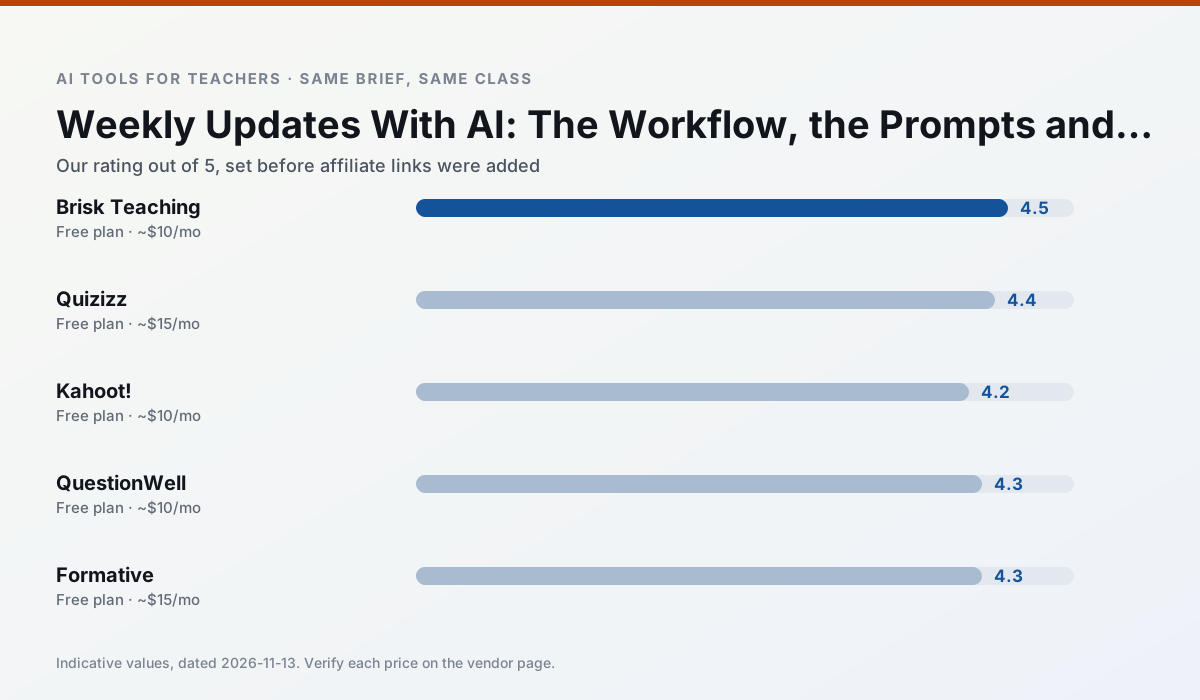
Side by side
Comparison table
Ratings reflect our timed classroom workflow, not vendor claims. Prices are indicative — verify on the vendor site.
| Tool | Best for | Free tier | Indicative paid plan | Standout feature | Our rating | Verdict | Try the tool |
|---|---|---|---|---|---|---|---|
| Brisk Teaching | feedback on writing · grading | Yes — Limited actions per month | ~$10 /user/mo | Works inside Google Docs | 4.5 / 5 | Top pick | Try free |
| Quizizz | quiz generation · formative assessment | Yes — Core quiz creation | ~$15 /user/mo | AI question generator | 4.4 / 5 | Strong option | Try free |
| Kahoot! | quiz generation · review lessons | Yes — Limited player count | ~$10 /user/mo | AI question builder | 4.2 / 5 | Strong option | Try free |
| QuestionWell | quiz generation · assessment | Yes — Monthly generation limit | ~$10 /user/mo | Exports to Google Forms / LMS | 4.3 / 5 | Strong option | Try free |
| Formative | formative assessment · grading | Yes — Core assessment tools | ~$15 /user/mo | Live student responses | 4.3 / 5 | Strong option | Try free |
| Gradescope | grading · rubric creation | Yes — Limited courses | Custom quote | Bubble sheet and handwriting capture | 4.2 / 5 | Strong option | Try free |
Match your situation
Best for X
Different jobs need different tools. Here is what we would open first in each case.
Brisk Teaching is the steadiest of this set at plain, respectful language; names and specific incidents still belong in your draft, not the prompt.
For three reading groups and one text, Quizizz needs the least manual relabelling of vocabulary and questions.
For anything students touch directly, Kahoot! offers the supervision controls and logging that IT will ask about first.
QuestionWell's free plan is the most usable in this comparison: a quota that survives a normal week. Not enough for a department, enough for one teacher to decide.
Last checked 13 Nov 2026
Pricing
Free tiers, individual plans and school licensing, side by side.
| Tool | Free plan | Individual / paid | School & district | Billing note | Verify |
|---|---|---|---|---|---|
| Brisk Teaching | $0 — Limited actions per month | ~$10 /user/mo | Custom quote | Indicative — verify on vendor site | Vendor |
| Quizizz | $0 — Core quiz creation | ~$15 /user/mo | Custom quote | Indicative — verify on vendor site | Vendor |
| Kahoot! | $0 — Limited player count | ~$10 /user/mo | Custom quote | Indicative — verify on vendor site | Vendor |
| QuestionWell | $0 — Monthly generation limit | ~$10 /user/mo | Custom quote | Indicative — verify on vendor site | Vendor |
| Formative | $0 — Core assessment tools | ~$15 /user/mo | Custom quote | Indicative — verify on vendor site | Vendor |
| Gradescope | $0 — Limited courses | Custom quote | Custom quote | LMS integration and support | Vendor |
Editorial rule: pricing is re-checked every 2–3 months and the top 50 pages are refreshed every 6 months. See our funding policy.
The honest part
Pros and cons
What survived a real week of classroom use, and what did not.
Pros
- No copy-paste between tools
- Fast inline feedback on student drafts
- Gentle learning curve
Cons
- Chrome-first workflow
- Extension permissions need IT approval
- Free quota is tight
Pros
- Students already know the interface
- Good reporting
- Works on low-end devices
Cons
- Writing high-quality AI questions still needs review
- Gamification can distract
- Advanced analytics are paid
Pros
- Instant engagement
- Very low training time
- Strong brand familiarity
Cons
- Less depth for higher-order assessment
- Paid tiers needed for larger classes
- Time pressure suits recall more than reasoning
Pros
- Saves the most time on question writing
- Clean export workflow
- Good objective tagging
Cons
- Single-purpose tool
- Question quality varies by source text
- Limited student-facing features
Pros
- Strong data for intervention groups
- Works with existing PDFs and Docs
- Good LMS integrations
Cons
- Steeper setup than quiz games
- Best value requires school-wide rollout
- Price adds up per teacher
In the classroom
Use cases
Five concrete workflows, with the tool we would open for each one.
Regrouping students after an assessment
Summarise anonymised results into skill groups, then generate one activity per group. Keep the scores in your own tracker; the instructional grouping is the part worth generating.
Recommended: Brisk TeachingA weekly family newsletter from bullet notes
Newsletters fail on length, not tone. Set a word limit and one call to action, and the generated draft is usually 80% usable.
Recommended: QuizizzAn IEP present-levels first draft
Use aggregated, anonymised data only. Ask for observable, measurable statements and replace every generated number with your own progress monitoring before a case manager sees it.
Recommended: Kahoot!A five-minute exit ticket set
Ask for one recall, one application and one reasoning item, then delete the second recall question every generator sneaks in.
Recommended: QuestionWellA question bank from a PDF or article
Feed a non-identifiable source and ask for items tagged by difficulty with the misconception behind each distractor. Spot-check every answer key; numerical items are least reliable.
Recommended: Formative
Questions teachers ask us
FAQ
Direct answers, also published as FAQPage structured data for search and AI assistants.
Can AI do Weekly updates at mixed-grade level?
Which tool is best for Weekly updates?
What is the biggest risk?
Sources & further reading
Our recommendation
Try MagicSchool AI free for your next Weekly updates task
A large library of teacher-specific AI generators in one dashboard. Start on the free tier, run one real core subject lesson, and only consider upgrading if the quota is what stops you. Disclosure: we may earn a commission (30% recurring) at no extra cost to you.
Some links on this page are affiliate links. We may earn a commission at no extra cost to you. Our rankings are editorial and never pay-to-play. Never enter student PII into a free consumer account.
Keep reading
Related comparisons in this cluster.
Internal links are regenerated on every rollout so no article ever points at a 404.