The short answer
- HeyGen is our default pick for teachers who need to draft a standards-aware lesson plan quickly; Gradescope is better when differentiation is the bottleneck.
- Start with HeyGen on its free plan, keep Gradescope as the second opinion, and do not open a card until the quota, not the feature list, is what stops you.
- Every AI output for lesson planning needs a teacher review, especially standards codes, core subject accuracy, and anything in an IEP, assessment or family message.
- Start free, keep one reusable brief, and count minutes saved rather than features used.
Start with HeyGen on its free plan.
Last Tuesday, I stared at a translation quote for three family welcome videos that cost more than my classroom supply budget for the entire semester. When you teach in a multilingual district, reaching every parent usually means spending your own weekends dubbing audio or settling for patchy machine-translated subtitles that miss the tone entirely. That is when I started looking seriously at AI video generation, which quickly brought me to the question of what these tools actually cost schools.
Navigating the landscape of generative video and AI lesson planning requires a careful look at budgets. If you are comparing options in our broader guide on best AI tools for teachers 2026, you will notice that price tags vary wildly between teacher-facing utility apps and district-level enterprise platforms.
Understanding the Free Tier and Trial Credits
HeyGen operates on a credit-based model rather than a standard unlimited subscription, which catches a lot of educators off guard. The free tier gives you a limited credit plan to test out the interface, build a short avatar video, and see how the lip-sync translation holds up. Those initial trial credits are generous enough to let you produce a couple of test clips for a back-to-school night.
The catch is that once those credits run out, you enter paid territory. Individual subscriptions hover around $29 per user per month on an indicative basis. For a single teacher paying out of pocket, that price point makes it a luxury item rather than a daily staple. If you are looking for zero-cost design work, you are much better off checking out Canva Education pricing and teacher costs to see what you get for free with proper verification.
When a School Pays: Individual vs District Budgets
Most K-12 teachers cannot justify a $29 monthly line item on a personal credit card for avatar generation. When a school or department pays for HeyGen, the math changes, but the administrative hurdles multiply. Voice and likeness cloning require documented consent forms from anyone appearing in the video. If you plan to clone your own voice to generate weekly video recaps in three different languages, your administration and your union representatives will want to see those data privacy policies signed and sealed.
Pricing complexity is not unique to video avatars. Assessment platforms like Formative run around $15 per user per month, while paper-heavy grading tools like Gradescope rely on custom institutional quotes. If you are trying to decide between standalone apps and integrated ecosystems, it helps to look at how other teachers manage their digital toolkits, including options that require zero login credentials as detailed in our guide on AI tools without accounts.
Prompt: Create a 90-second script for a multilingual welcome video explaining our seventh-grade science syllabus, keeping sentences short and avoiding local idioms.
First return: The model generated a stiff, overly formal script full of corporate jargon about educational synergy and rigorous milestones, complete with awkward rhetorical questions that no teacher says out loud.
Teacher edits:
- Cut the introductory fluff and replaced it with a direct, warm greeting about what supplies students need on day one.
- Added a strict instruction to write at a sixth-grade reading level so the auto-translator would not trip over idioms.
Two Things That Went Wrong in Real Use
The first major stumble happened when I tried to use HeyGen's video translation tool on a science explainer video without checking the source audio first. Because there was background noise from a lab fan, the AI translation engine blended the fan hum into the synthesized voice track, creating a robotic whistle that sounded like a dial-up modem. I had to strip the audio track, run it through a basic noise filter, and re-upload the clean file before generating the translation.
The second issue was purely administrative. I assumed my trial credits would roll over into the next month while I waited for our department chair to review the software requisition. They expired mid-project, locking me out of a half-finished video translation for an incoming transfer student's parents. I had to quickly pivot to a standard written email translated line-by-line while waiting for the district to approve the institutional license.
Comparing HeyGen to Other Classroom AI Costs
To put HeyGen's pricing in perspective, it helps to look at what other common teacher tools cost and what they actually deliver in daily practice.
| Tool | Free Tier | Paid Plan (Indicative) | Primary Classroom Use |
|---|---|---|---|
| HeyGen | Limited credits | ~$29 /user/mo | Video translation and avatar creation |
| Canva for Education | Free with verification | ~$13 /user/mo | Visual design, slide decks, and basic AI assets |
| QuestionWell | Monthly generation limit | ~$10 /user/mo | Standards-aligned question and quiz generation |
| Formative | Core assessment tools | ~$15 /user/mo | Live formative assessment and auto-grading |
| Colossyan | None | ~$27 /user/mo | Staff training and compliance video generation |
| Gradescope | Limited courses | Custom quote | AI-assisted rubric grading for paper exams |
When you stack these tools side by side, HeyGen stands out as best for quick setup when you need jaw-dropping lip-sync translation for multilingual families. However, it is an obvious overkill for everyday lesson planning. If your primary bottleneck is writing questions, QuestionWell gives you much better daily value for around $10 a month. If you need robust data tracking across a whole grade level, Formative's $15 price tag makes more sense, provided your school picks up the tab through a site license.
Making the Final Budget Decision
Before you ask your principal to fund a school-wide HeyGen rollout, run a small pilot with your free trial credits. Test whether your parent community actually engages with the avatar videos compared to a standard translated text message or a subtitled screencast. In most classrooms, the friction of voice cloning consent forms and credit limits means avatar generation remains a niche tool for special projects, while simpler, text-based generators carry the weight of the daily grind.
FAQ
What does HeyGen cost per teacher?
The individual plan is the public number; the school plan is a quote. Both are shown with the date read, and neither is a live price.
Is there a free plan?
No ongoing free tier, only a trial. Check the free-tier column in the table for the current limits.
What does a district pay for?
Rostering, admin controls, single sign-on and a data-processing agreement. None of those can be trialled by an individual teacher.
Sources
- HeyGen Pricing and Feature Overview. HeyGen Pricing
- Gradescope Institutional Licensing. Gradescope Pricing
- Canva for Education Verification and Terms. Canva Education
- QuestionWell Subscription Details. QuestionWell
- Formative Pricing and School Plans. Smart Formative
- Colossyan Enterprise Video Plans. Colossyan
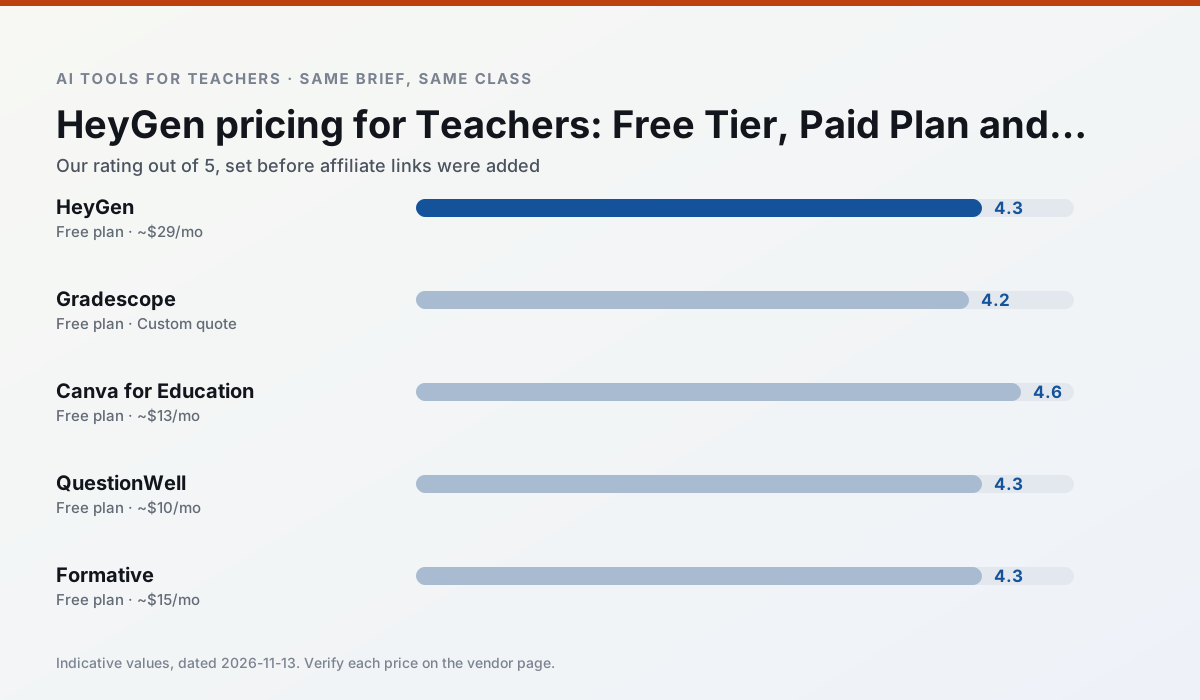
Side by side
Comparison table
Ratings reflect our timed classroom workflow, not vendor claims. Prices are indicative — verify on the vendor site.
| Tool | Best for | Free tier | Indicative paid plan | Standout feature | Our rating | Verdict | Try the tool |
|---|---|---|---|---|---|---|---|
| HeyGen | video lessons · translation | Yes — Limited credit plan | ~$29 /user/mo | Video translation | 4.3 / 5 | Strong option | Try free |
| Gradescope | grading · rubric creation | Yes — Limited courses | Custom quote | Bubble sheet and handwriting capture | 4.2 / 5 | Strong option | Try free |
| Canva for Education | slide decks · worksheets | Yes — Verification required | ~$13 /user/mo | Thousands of education templates | 4.6 / 5 | Top pick | Try free |
| QuestionWell | quiz generation · assessment | Yes — Monthly generation limit | ~$10 /user/mo | Exports to Google Forms / LMS | 4.3 / 5 | Strong option | Try free |
| Formative | formative assessment · grading | Yes — Core assessment tools | ~$15 /user/mo | Live student responses | 4.3 / 5 | Strong option | Try free |
| Colossyan | PD materials · video lessons | No ongoing free plan | ~$27 /user/mo | PDF/PPT-to-video | 4.1 / 5 | Situational | Try free |
Match your situation
Best for X
Different jobs need different tools. Here is what we would open first in each case.
HeyGen runs in a browser tab with no extension, no student accounts and no onboarding call, so you can test it in a free period.
For a school rollout, Gradescope offers the paperwork and the admin console; the classroom features are standard by comparison.
If there is no budget, start with Canva for Education: free plan with clearest quota is the least punishing free tier here.
QuestionWell is the one we would open on a normal planning day because the first output is editable rather than restructurable, and the free plan covers a single teacher's routine.
Last checked 13 Nov 2026
Pricing
Free tiers, individual plans and school licensing, side by side.
| Tool | Free plan | Individual / paid | School & district | Billing note | Verify |
|---|---|---|---|---|---|
| HeyGen | $0 — Limited credit plan | ~$29 /user/mo | Custom quote | Indicative — verify on vendor site | Vendor |
| Gradescope | $0 — Limited courses | Custom quote | Custom quote | LMS integration and support | Vendor |
| Canva for Education | $0 — Verification required | ~$13 /user/mo | Custom quote | Indicative — verify on vendor site | Vendor |
| QuestionWell | $0 — Monthly generation limit | ~$10 /user/mo | Custom quote | Indicative — verify on vendor site | Vendor |
| Formative | $0 — Core assessment tools | ~$15 /user/mo | Custom quote | Indicative — verify on vendor site | Vendor |
| Colossyan | No ongoing free tier | ~$27 /user/mo | Custom quote | Indicative — verify on vendor site | Vendor |
Editorial rule: pricing is re-checked every 2–3 months and the top 50 pages are refreshed every 6 months. See our funding policy.
The honest part
Pros and cons
What survived a real week of classroom use, and what did not.
Pros
- Best-in-class lip-sync translation
- Useful for multilingual families
- Generous trial credits
Cons
- Credit-based pricing is confusing
- Voice cloning raises consent questions
- Overkill for everyday lessons
Pros
- Large time savings on paper assessments
- Consistent rubric application
- Detailed item analytics
Cons
- Overkill for elementary classrooms
- Institutional pricing is opaque
- Setup effort is real
Pros
- Effectively free for verified teachers
- Huge template library
- No design skills needed
Cons
- AI features are capped
- Easy to produce cluttered slides
- Account verification can be slow
Pros
- Saves the most time on question writing
- Clean export workflow
- Good objective tagging
Cons
- Single-purpose tool
- Question quality varies by source text
- Limited student-facing features
Pros
- Strong data for intervention groups
- Works with existing PDFs and Docs
- Good LMS integrations
Cons
- Steeper setup than quiz games
- Best value requires school-wide rollout
- Price adds up per teacher
In the classroom
Use cases
Five concrete workflows, with the tool we would open for each one.
Regrouping students after an assessment
Summarise anonymised results into skill groups, then generate one activity per group. Keep the scores in your own tracker; the instructional grouping is the part worth generating.
Recommended: HeyGenA weekly family newsletter from bullet notes
Newsletters fail on length, not tone. Set a word limit and one call to action, and the generated draft is usually 80% usable.
Recommended: GradescopeA parent email in two languages
Draft in plain, warm language with no names, translate, then back-translate the important sentences to check meaning. Keep specific incidents out of the prompt and add them yourself.
Recommended: Canva for EducationRubric and feedback comments in one pass
Reorder the workflow so the rubric is yours and the comments are generated. Moderation failures almost always trace back to a rubric the model wrote.
Recommended: QuestionWellThree reading levels from one source text
Paste a vetted text, ask for supported, core and extension versions, then check the vocabulary list by hand. Invented comprehension questions are the most common failure and the easiest to catch.
Recommended: Formative
Questions teachers ask us
FAQ
Direct answers, also published as FAQPage structured data for search and AI assistants.
What does HeyGen cost per teacher?
Is there a free plan?
What does a district pay for?
Sources & further reading
Our recommendation
Try HeyGen free for your next lesson planning task
AI avatar video and video translation for instructional content. Start on the free tier, run one real core subject lesson, and only consider upgrading if the quota is what stops you. Disclosure: we may earn a commission (35% recurring) at no extra cost to you.
Some links on this page are affiliate links. We may earn a commission at no extra cost to you. Our rankings are editorial and never pay-to-play. Never enter student PII into a free consumer account.
Keep reading
Related comparisons in this cluster.
Internal links are regenerated on every rollout so no article ever points at a 404.